







Introduction
Measuring team productivity gains after implementing NextlerAI requires a precise, evidence-based approach that goes beyond counting tasks or tracking hours. Operations leaders and IT managers need methodologies that combine quantitative productivity KPIs with qualitative workflow insights, as supported by established research in technology-driven environments. With NextlerAI’s analytics, workflow automation, and permission controls, you can move from anecdotal impressions to clear, actionable metrics aligned with your organization’s goals.
By focusing on capabilities present in NextlerAI Assistant and Publisher—such as operational logs, usage analytics, and role-based permissions—you gain the ability to monitor team performance, validate process improvements, and ensure governance over sensitive data. This article delivers a structured blueprint for setting up meaningful productivity measurement after NextlerAI deployment, mapping each method to specific product features and security controls.
Whether you oversee content teams, manage customer support operations, or coordinate complex workflows, you will learn how to select relevant KPIs, configure analytics modules, address operational risks, and interpret results for continuous improvement. The techniques outlined here synthesize best-practice frameworks with the practical realities of AI workflow analytics—enabling you to capture both the efficiency gains and management safeguards needed for sustained success.
NextlerAI’s implementation also brings the challenge of aligning measurement practices with organizational objectives and compliance requirements. By leveraging customizable dashboards and exportable reports, you can track not only output metrics but also the collaborative dynamics and workflow transitions that drive long-term improvement. This allows for transparent communication of results to stakeholders and the iterative refinement of internal processes. Additionally, integrating NextlerAI analytics with your existing IT infrastructure supports real-time oversight and historical analysis, making it possible to identify trends, validate interventions, and ensure your team’s productivity gains are both measurable and sustainable. The following sections will guide you through each critical aspect of this measurement journey, beginning with identifying the most impactful metrics for your specific context.
Key metrics and takeaways for productivity measurement
Precision in productivity measurement with NextlerAI relies on selecting KPIs that directly correspond to both team output and the efficiency of digital workflows handled by the platform. Metrics such as task completion rates, average response times, and counts of collaborative actions are quantitatively supported by NextlerAI’s operational analytics and usage logging features, ensuring data is sourced from system-generated activity rather than manual reporting. NextlerAI’s enterprise collaboration features illustrate how workflow automation and shared context directly shape the KPIs you should track. Teams looking to combine qualitative insights with structured process analytics should examine editorial calendar automation practices for concrete examples of measurement in collaborative content environments.
NextlerAI’s analytics infrastructure records granular event data for actions performed by users within both NextlerAI Assistant and Publisher. This enables teams to capture workflow-specific metrics—recording when a task is started, handed off, or completed, and associating these events with unique users and time stamps. The availability of these logs allows for segmentation of productivity data by workflow type or by user role, providing diagnostic insight into which processes benefit most from automation or AI augmentation.
Constraints on KPI selection are shaped by the specific NextlerAI modules and features deployed. For example, the monitoring of task cycle time is only possible where workflow automation features are active and logging is enabled. Conversely, collaborative action counts require that document co-editing or workflow handoff tracking is integrated into the selected product tier. Teams must therefore audit their feature set and confirm logging coverage to ensure chosen KPIs are measurable with the available data streams.
Implementation of productivity measurement is further influenced by how analytics permissions are configured. Only authorized roles can access or export sensitive productivity data within NextlerAI. This requirement introduces a diagnostic consideration: if trends or anomalies are noted in KPI dashboards, teams should verify whether underlying log data is complete and whether access scope has restricted visibility into certain workflows.

Edge cases may arise when workflow customizations or integrations with external systems alter the standard event sequence logged by NextlerAI. For instance, if certain tasks are automated outside the platform, corresponding events might not be captured, resulting in an underrepresentation of productivity gains. Diagnosing such discrepancies requires cross-referencing NextlerAI logs with external workflow records to ensure comprehensive coverage.
Comparative measurement, such as analyzing baseline (pre-implementation) versus post-NextlerAI metrics, is only valid when both periods are logged with identical scope and granularity. Any changes in workflow configuration, user assignment, or feature activation between measurement intervals must be documented to avoid misattribution of observed productivity trends. Periodic reviews of system configuration alongside analytics outputs are essential for sustaining measurement accuracy.
Mechanisms that enable KPI mapping and diagnostic depth
NextlerAI’s event logging is designed to capture both micro-level actions and macro-level workflow transitions. For example, the platform can log when a team member opens an assignment, initiates a collaborative session, or marks a task as complete. This event granularity supports the calculation of workflow throughput, average task duration, and frequency of collaborative edits. When configuring analytics, teams can decide whether to aggregate data at the user, team, or project level, and set custom time windows for measurement—enabling granular analysis for specific sprints or reporting cycles.
Role-based dashboards within NextlerAI allow different stakeholders to monitor only the KPIs relevant to their function. For example, a support manager might focus on first-response times and resolution rates, while a content team lead could prioritize content cycle time and versioning events. These dashboards are populated dynamically from the underlying logs, ensuring that displayed metrics accurately reflect current workflow activity and that anomalies or outliers are surfaced without manual intervention.
Strategic decisions for KPI selection must also account for the maturity of workflow automation and user adoption of NextlerAI features. Teams are encouraged to periodically revisit their KPI definitions as they expand feature usage—such as transitioning from manual task assignment to automated routing or introducing real-time collaborative editing. This ensures that productivity measurement remains aligned with evolving digital workflows and that new gains can be attributed to specific feature deployments.
Key takeaways
- KPIs should capture both output (e.g., resolved tickets, published items) and the efficiency gains from workflow optimization (e.g., reduced cycle times, increased collaboration events).
- Measurement is grounded in operational analytics and usage logs, which must be verified for feature coverage and completeness.
- KPI selection must be tailored to both team goals and available NextlerAI product features; unsupported metrics cannot be reliably measured.
- Teams should conduct pre- and post-implementation comparisons using data sets with matching scope, and document any workflow or configuration changes that could affect results.
- Role-based dashboards and permission controls help ensure that KPI analysis is both actionable for stakeholders and protected from unauthorized access.
Risk controls and workflow governance measures
Establishing effective risk controls is fundamental to the credibility, security, and operational value of NextlerAI team productivity measurement. Without rigorous governance, analytics data can be exposed to unauthorized users, and productivity insights may be undermined by unverified changes or incomplete audit trails. This section details the mechanisms available within NextlerAI for maintaining data integrity and controlling access, ensuring that productivity metrics remain actionable and trustworthy. Guidelines for Measuring Productivity of Software Development Teams documents the relevant background and implementation boundaries.
| Risk Control Measure | Description | Implementation in NextlerAI Products | Source |
|---|---|---|---|
| Granular Permissions and Role-Based Access | Restrict access to sensitive analytics and workflow configuration based on user roles. Prevent unauthorized viewing or modification of productivity data. | NextlerAI Assistant supports assignment of access levels (e.g., editor, contributor, admin) to limit which team members can view, edit, or export productivity KPIs and workflow logs. | NextlerAI Assistant for Enterprise: Advanced Team Collaboration Features |
| Comprehensive Logs and Audit Trails | Maintain system-generated records of user actions, workflow modifications, and analytics queries to support transparency and enable retrospective verification. | Both NextlerAI Assistant and Publisher maintain detailed activity logs and analytics event trails, accessible to authorized roles for auditing and compliance checks. | Assistant Contact Capture, Analytics Logs and Unresolved Demand |
| Workflow Boundary Definition | Set explicit limits on who can create, modify, or delete workflow automations and analytics dashboards, reducing risk of metric manipulation. | Workflow automation and analytics configurations are bound to roles and permissions. Only users with assigned authority can alter key metrics or reporting structures. | NextlerAI Assistant for Enterprise: Advanced Team Collaboration Features |
| Regular Control Review and Update | Periodically assess and adjust permissions, workflow boundaries, and audit access as team structures or processes evolve. | Product documentation recommends scheduled role and permission reviews, especially after organizational changes or feature adoption. | Assistant Contact Capture, Analytics Logs and Unresolved Demand |
| Retrospective Measurement Integrity | Enable review of past analytics and workflow event logs to validate reported productivity outcomes and investigate anomalies. | Audit logs and analytics histories are preserved for authorized review, supporting compliance and incident response. | Assistant Contact Capture, Analytics Logs and Unresolved Demand |
NextlerAI’s approach to risk control centers on combining technical safeguards with operational oversight. By enforcing granular permissions, maintaining immutable logs, and setting clear workflow boundaries, teams can ensure that productivity data remains accurate and accessible only to authorized stakeholders. These governance practices directly support reliable AI workflow analytics and team performance measurement, making them essential for any environment where data-driven decision-making is a priority. As organizational needs change, regularly reviewing and updating these controls ensures that measurement integrity and data security keep pace with evolving workflows.
Implementation of these measures in a live environment requires a multifaceted strategy. Administrators should begin by mapping user roles to specific access requirements, ensuring that sensitive analytics and workflow configurations are only available to those whose responsibilities demand them. Permission structures must be granular enough to reflect the diversity of team functions—editors, managers, and contributors each require distinct levels of interaction with productivity data. NextlerAI enables this differentiation natively through its access control features, supporting both operational efficiency and compliance.
Logging and audit trail configuration is not purely a technical exercise—it is a governance decision that underpins measurement reliability. Each action taken within the analytics dashboard or workflow configuration panel is recorded with metadata specifying the user, timestamp, and affected resources. This traceability makes it possible to reconstruct decision history, investigate discrepancies in reported productivity, and demonstrate compliance during internal or external reviews. For distributed teams, such as multi-location editorial operations, audit trails mitigate risks associated with remote collaboration and dispersed authority.
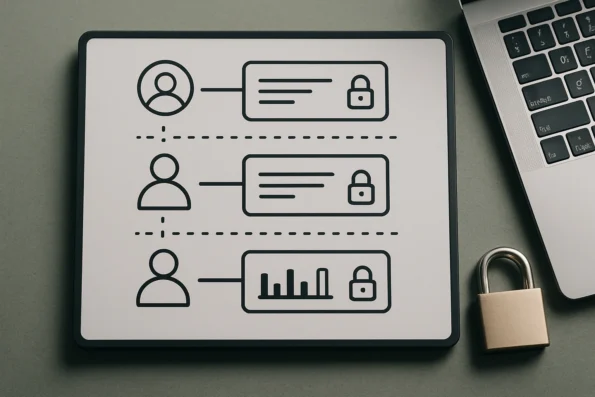
Workflow boundary definition further strengthens governance by preventing unauthorized or accidental changes that could distort productivity measurement. Clearly articulated boundaries, implemented through role-based configuration, ensure that only qualified personnel can adapt workflows or alter measurement logic. This is particularly critical when productivity metrics are tied to organizational performance reviews or regulatory requirements. In NextlerAI, workflow automations and dashboard customizations are explicitly linked to access roles, reducing ambiguity and supporting accountability.
Finally, ongoing governance requires routine reassessment of risk controls as team composition, processes, or regulatory environments change. Scheduled audits of permission structures, regular reviews of audit logs, and updates to workflow boundaries are all essential practices. The combination of these technical and procedural safeguards ensures that productivity data remains accurate, tamper-resistant, and actionable, forming a sound foundation for reliable measurement and informed decision-making. The next section explains the practical steps for configuring analytics within this secure governance framework.
Actionable steps for configuring productivity analytics
To ensure team productivity gains after NextlerAI implementation are tracked with precision and integrity, it is essential to follow a structured configuration process. Each step below aligns with proven measurement frameworks and leverages NextlerAI’s explicit product features, as outlined in official documentation. Learning to Navigate a New Financial Technology: Evidence documents the relevant background and implementation boundaries.
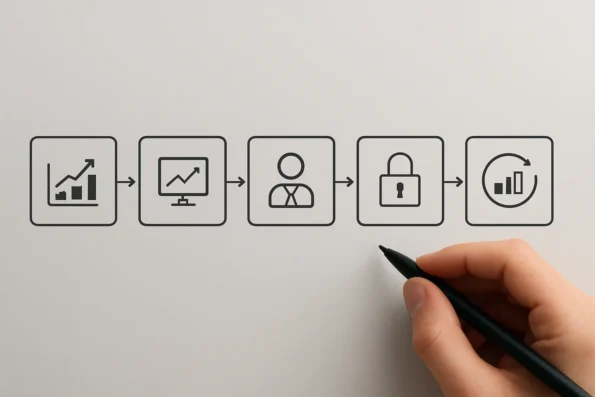
- Define productivity objectives and select KPIs. Begin by clarifying the specific outcomes your team expects from NextlerAI. Identify KPIs that mirror your use case—such as workflow throughput, response accuracy, or collaboration frequency—ensuring each metric is quantifiable through available analytics. Ground your KPI selection in both quantitative and qualitative dimensions to capture a holistic view of productivity, as recommended by peer-reviewed methodologies in technology-driven environments. Consider how each KPI will be measured within NextlerAI’s analytics infrastructure; for instance, workflow throughput can be tied to the number of completed actions logged, while collaboration frequency may correspond to the count of shared tasks or messaging events tracked within the platform.
- Configure analytics and logging features in product settings. Using NextlerAI’s setup interface, activate analytics modules and enable all relevant event and workflow logs. For NextlerAI Assistant and Publisher, confirm that usage tracking and operational dashboards are switched on for each deployed workflow or knowledge base. This configuration supports granular measurement of interactions, task completions, and automated actions, as detailed in the official guides (NextlerAI Assistant documentation). Carefully review the available logging options for each workflow and select those that align with your chosen KPIs, ensuring that both summary and event-level data are captured. Some organizations may require the activation of advanced logging for regulatory compliance or detailed audit trails.
- Assign roles and set permission boundaries for analytics access. Leverage NextlerAI’s role-based access controls to restrict analytics visibility and editing rights. Define which team members can view sensitive productivity data, modify KPIs, or adjust reporting intervals. Assign permissions in accordance with the organizational hierarchy and compliance requirements, thereby minimizing risks associated with unauthorized data exposure or metric tampering. Utilize the platform’s granular settings to assign access at the user, team, or department level; for example, configure so only managers can edit KPIs while analysts have read-only access to dashboards. Document every permission assignment and review these settings periodically to uphold data governance standards.
- Establish baseline measurements prior to wider rollout. Before expanding NextlerAI use across the team, record pre-implementation baseline values for every selected KPI. Use the initial analytics output to document the team’s status quo, which will serve as the reference point for all future comparisons. This ensures your measurement of productivity gains is credible, isolating the effect of NextlerAI from unrelated process changes. To achieve this, collect data over a representative period—such as a typical workweek—ensuring that external factors (like seasonal workflow shifts) are accounted for. Archive these baseline reports securely within your analytics environment for future reference and compliance audits.
- Monitor analytics, review outputs, and iterate controls. Once NextlerAI is fully operational, regularly review dashboard outputs and log data for each measured workflow. Compare current metrics to baseline values to identify trends and areas for improvement. As new insights or anomalies emerge, adjust workflow controls, permission assignments, or KPI definitions to maintain alignment with evolving goals and data integrity standards. Timely iteration is essential to address shifting team structures or changing operational needs. Implement scheduled reviews—such as monthly analytics audits—and use NextlerAI’s export features to create periodic reports for stakeholders. Leverage available filters in dashboards to segment results by team, project, or workflow, enabling targeted performance assessments.
- Integrate analytics with reporting or visualization tools if required. If your team relies on external business intelligence platforms, export NextlerAI analytics data using supported formats as detailed in official resources (Assistant analytics guide). Configure scheduled data exports or API connections where available, ensuring that reporting processes remain consistent and automated. Map exported fields to your reporting templates so that each KPI is tracked accurately across systems. Verify that data transfer processes comply with your organization’s data protection and privacy requirements.
- Document processes and provide training where necessary. Maintain clear documentation of your productivity measurement procedures, from KPI definitions to permission structures and data handling protocols. Develop guidance materials or short training sessions for team members responsible for analytics interpretation or data entry, emphasizing approved workflows and escalation procedures for anomalies. Well-documented and communicated processes help ensure continuity and resilience as personnel or system configurations change.
Completing these steps will position your organization to measure team productivity with accuracy and accountability, while maintaining robust data governance. The following section provides a focused checklist for ongoing monitoring and validation.
Checklist for monitoring and validating productivity data
Maintaining reliable productivity measurement after deploying NextlerAI requires discipline and ongoing oversight. This practical checklist is designed to help operations leaders, team managers, and analysts systematically monitor, validate, and adjust team productivity data in line with evolving workflows and platform configurations. Each item addresses a distinct operational safeguard verified in official NextlerAI documentation and relevant measurement research. For a step-by-step breakdown of how to use role-based access control to protect workflow data and enforce permission boundaries during NextlerAI team productivity measurement, consult the role-based access control guide. Frontiers | Information Theoretic Characterization of Uncertainty Distinguishes documents the relevant background and implementation boundaries.
- Confirm analytics and log activation: Ensure that all relevant analytics features and event logging are enabled within NextlerAI Assistant and Publisher. This includes verifying configuration settings so that usage metrics, workflow actions, and operational logs are being captured for each workflow and content area you intend to monitor. Limiting access to these features according to role-based permissions is crucial for upholding data integrity.
- Review KPI dashboards on a set schedule: Establish a routine for inspecting productivity dashboards. Look for missing data, unexplained anomalies, or gaps in the attribution of workflow events. Use evidence from NextlerAI’s official publisher dashboard documentation to guide dashboard checks, ensuring completeness across task lists, content pipelines, and collaborative actions.
- Validate event and output attribution: Cross-reference workflow events, such as task completions, content approvals, or customer support responses, with user roles and team assignments. This step ensures that productivity data accurately reflects the source of output, preventing misattribution or double counting in team performance measurement. Use operational logs and inventory records as authoritative references.
- Audit permission settings and data access logs: Schedule periodic audits of permission assignments and access logs. Confirm that only authorized team members can view, edit, or export sensitive productivity data. Leverage NextlerAI’s granular permission controls to detect and remediate any accidental overexposure or inappropriate access, protecting both data privacy and measurement reliability.
- Update measurement criteria for workflow or configuration changes: Whenever a workflow is modified, a new team structure is established, or NextlerAI product settings are updated, review and revise your productivity KPIs and measurement criteria. Ensure that analytics are still aligned with operational goals and that all new data flows are being tracked. This proactive step prevents drift in measurement relevance as your organization evolves.
- Establish data completeness checkpoints: At key stages in each reporting cycle, confirm that all required data inputs—such as event timestamps, user actions, and content status changes—are present in analytics exports and dashboard views. Gaps or omissions can lead to misleading productivity interpretations. Use the inventory and system status features in the NextlerAI Publisher dashboard (official guide) as a reference for verifying data coverage.
- Monitor for configuration drift: Regularly compare current analytics and workflow configurations against documented baselines. Unintentional changes to logging scopes, event definitions, or permission structures can cause measurement inconsistencies. Document and address any detected drift promptly to maintain longitudinal data quality.
- Reconcile quantitative and qualitative sources: Where qualitative productivity indicators (such as feedback or peer review notes) are used alongside output metrics, routinely cross-check these sources for alignment. Inconsistencies between logged metrics and user-reported productivity should be investigated to ensure that analytics reflect actual team performance.
- Document all measurement adjustments: Maintain a change log of any modifications to KPI definitions, dashboard settings, permission assignments, or workflow stages that affect productivity measurement. This documentation ensures transparency and supports retrospective analysis if anomalies or disputes arise over reported gains.
- Calibrate access reviews to team changes: Whenever team membership or roles shift, trigger an immediate review of analytics and log access. This minimizes the risk of legacy permissions granting inappropriate access to sensitive measurement data and supports regulatory compliance where applicable.
- Correlate workflow automation changes with analytics: When enabling or disabling workflow automations within NextlerAI, carefully assess how these changes impact the capture and classification of productivity events. Ensure automations are transparently logged and that their effects on team output are reflected accurately in dashboards and reports. If new automated actions are introduced, update measurement documentation and verify that analytics fields and logs include all relevant event types, as detailed in NextlerAI’s platform documentation.
- Implement periodic stakeholder sign-off: Incorporate a schedule for stakeholders—such as department leads or compliance officers—to review and sign off on productivity analytics and measurement practices. This helps validate the integrity of data collection and interpretation processes, fosters cross-functional accountability, and ensures that measurement methodologies remain fit for purpose as organizational needs change.
By applying this checklist, teams can move beyond basic monitoring to implement a robust framework for continuous validation and improvement of productivity metrics. Systematic, documented oversight is integral to preserving measurement credibility as NextlerAI configurations and organizational needs evolve. The next section will address recognized limitations and challenges inherent to productivity analytics in dynamic environments.

Recognized limitations and measurement challenges
Measuring team productivity gains after NextlerAI implementation demands a critical understanding of both the platform’s capabilities and the realities of workplace analytics. Not every improvement brought by workflow automation or knowledge-sharing features will be immediately quantifiable. For instance, enhanced collaboration or reduced onboarding time may be evident in team sentiment or process feedback before these changes translate into measurable KPIs. Capturing such qualitative benefits requires parallel assessment mechanisms—such as structured feedback sessions or targeted surveys—beyond standard analytics dashboards. Teams should also recognize that while NextlerAI’s analytics infrastructure is robust, qualitative outcomes like innovation, employee satisfaction, or process adaptability are best evaluated with complementary human-centered techniques. To better align your analytics with measurable outcomes, review the workflow automation trigger setup details to see how trigger configuration in NextlerAI directly supports accurate tracking and efficiency KPIs.
Data integration and workflow tracking gaps
Comprehensive productivity measurement hinges on the integrity and completeness of integrated data sources. If your NextlerAI deployment is not fully connected to all relevant workflow systems, or if some automated processes are excluded from tracking, observed productivity changes may be partial or misleading. According to established research, incomplete data integration is a frequent cause of missed or distorted productivity insights in technology-driven environments (IEEE). Teams should regularly audit which workflows and user actions are captured in NextlerAI’s analytics, and document any limitations to ensure stakeholders interpret results within the correct context. In practice, this requires reviewing the specific connectors, API integrations, and event tracking rules enabled in your NextlerAI instance, referencing official integration troubleshooting resources (NextlerAI Integration Troubleshooting) for guidance on addressing data source or logging gaps.
Attribution and external factors
Metrics such as task closure rates, response times, or engagement events may shift after implementing NextlerAI, but these changes are not always attributable solely to the platform. Ongoing training, process reengineering, or external market conditions can also influence measured outcomes. Empirical frameworks recommend isolating NextlerAI-related effects through well-defined baselines and control periods, and by supplementing quantitative analysis with operational context. This approach helps avoid overestimating or misattributing the source of productivity gains. In practice, teams should explicitly log change events such as major workflow revisions, training interventions, or external disruptions, and annotate productivity reports to distinguish between changes driven by NextlerAI and those arising from other organizational initiatives. This disciplined attribution process reduces the risk of drawing unsupported conclusions from analytics data.
Balanced scorecards over single KPIs
Over-reliance on a single productivity metric—such as ticket volume resolved or articles published—can create blind spots or encourage counterproductive behaviors. A balanced scorecard approach, which blends multiple KPIs aligned to different aspects of the workflow, is preferable for a robust assessment. This method also helps account for the diverse ways in which NextlerAI Assistant or Publisher might impact various team members or functional areas, from automation efficiency to knowledge base utilization. When designing a balanced scorecard, ensure that both leading indicators (such as process efficiency or collaboration frequency) and lagging indicators (like error rates or customer feedback) are included. This multi-dimensional perspective mitigates risks associated with tunnel vision and supports more sustainable productivity improvements.
Troubleshooting persistent measurement issues
If productivity measurement challenges persist—such as unexplained data gaps, inconsistent reporting, or analytics that do not reflect observed outcomes—consulting official product documentation and troubleshooting resources is essential. These guides provide actionable diagnostics and configuration advice tailored to NextlerAI’s integration architecture (NextlerAI Integration Troubleshooting). Teams should treat unresolved measurement discrepancies as operational risks, escalating to technical support or revisiting system configuration as necessary. Maintain a log of measurement issues, including timestamps, affected workflows, and attempted remedies, to facilitate effective collaboration with support resources. Proactive engagement with product resources helps maintain measurement accuracy as workflows evolve, and ensures that measurement frameworks remain aligned with changes in platform capabilities or business needs. As your team addresses these limitations, the next section offers direct recommendations for overcoming persistent productivity measurement challenges.
FAQ
What are the most effective KPIs for measuring team productivity after NextlerAI deployment?
The most relevant KPIs typically include task completion rates, average resolution times, volume of collaborative actions, and usage metrics for workflow automation features. These KPIs should be mapped directly to the ways your team uses NextlerAI, such as tracking the number of resolved support requests or published articles following workflow triggers. Combining these quantitative measures with periodic qualitative feedback provides a fuller view of productivity changes. Additional granularity can be achieved by segmenting KPIs by role or workflow, enabling teams to distinguish the impact of NextlerAI features across different team functions. This segmentation is supported by the analytics dashboards and usage logs, which can attribute performance metrics to specific users, roles, or workflows. Teams may also choose to analyze metrics over custom time intervals to capture trends and seasonal variations, further strengthening the alignment of KPIs to operational realities.
How do NextlerAI’s analytics tools support ongoing productivity measurement?
NextlerAI Assistant and Publisher offer operational analytics dashboards, event logs, and demand insights that allow teams to monitor activity, attribute outcomes to specific workflows, and identify bottlenecks. These tools enable regular reviews of both individual and team-level performance, supporting continuous improvement by surfacing patterns in usage and efficiency across different roles and permissions. The event-level data collected enables retrospective analysis and auditability, while role-based dashboards facilitate targeted monitoring for team leads and administrators. Integration of analytics outputs with external reporting tools is possible for organizations requiring more advanced or consolidated reporting, and all data collected can be filtered according to permission settings and workflow boundaries to protect sensitive information.
Which risk controls are necessary to ensure reliable measurement and data security?
Reliable measurement requires enforcing granular permissions, role-based access, and immutable audit logging within NextlerAI Assistant. These controls limit data exposure to authorized users, prevent unauthorized edits to analytics or KPIs, and enable retrospective verification of both workflow events and access history. Regular audits and permission reviews further strengthen measurement integrity and compliance. Workflow boundaries can be defined and enforced within the platform, preventing metric manipulation or unauthorized modifications to tracked events. Immutable logs support compliance investigations, and segmented access ensures that only designated roles can view or export sensitive productivity data, reducing exposure to insider threats or accidental disclosures.
What practical steps should teams follow to set up productivity analytics post-implementation?
Teams should start by defining clear productivity goals and relevant KPIs. Next, configure analytics, enable event logging, and assign roles with the appropriate permissions. Capture baseline data prior to rollout for comparison, then regularly monitor analytics outputs. Periodically validate event attribution and update measurement criteria as workflows or NextlerAI configurations change to maintain accuracy. Documentation of analytics set-up and measurement processes is recommended to ensure consistency, support onboarding, and enable efficient troubleshooting. Integration with external business intelligence or reporting platforms can also be configured, provided permissions and data boundaries are maintained as per the organization’s governance requirements.
What limitations or challenges should teams expect in measuring productivity gains?
Several challenges may arise, including incomplete data integration, difficulties quantifying qualitative improvements, and attribution issues caused by external factors unrelated to NextlerAI. Teams must also account for evolving workflows that can affect comparability over time, and avoid focusing on single KPIs at the expense of a balanced assessment. Ongoing validation and stakeholder review help address these limitations. Technical challenges may include integrating analytics across multiple platforms, ensuring event tracking covers all relevant activities, and reconciling data discrepancies between baseline and current measurements. Teams are encouraged to use a balanced scorecard approach, regularly audit integrations, and annotate reports with any changes in workflows or external influences to ensure reliable measurement and proper attribution of productivity gains.
Conclusion
Measuring team productivity after implementing NextlerAI demands a disciplined, evidence-driven approach. Success hinges on maintaining alignment between defined KPIs, actual workflow changes, and the operational controls built into NextlerAI’s analytics features. Effective measurement is not a one-time event but an ongoing process of review, refinement, and accountability. This continuous loop ensures that data remains actionable, securely attributed, and resilient to both internal and external changes affecting output and efficiency.
Beyond simply tracking outcomes, organizations must actively manage the relationship between analytics configuration and evolving team practices. This requires not only technical setup but also a governance framework that adapts as new features or workflow automations are adopted. Decision makers should leverage the granularity of NextlerAI’s permission controls and audit trails to distinguish between genuine productivity gains and superficial metric shifts. Regularly updating KPI definitions in response to new operational realities helps maintain measurement relevance, while ensuring that any changes to workflow boundaries or roles are reflected in both analytics and access management prevents data gaps or attribution errors. Integrating stakeholder feedback into the measurement cycle further enhances the accuracy of reported gains, especially when qualitative improvements supplement the quantitative record.
To move forward, assign a cross-functional review team to oversee the initial measurement cycle. Their mandate should include verifying that analytics capture the full span of relevant team actions, confirming the integrity of permission boundaries, and setting a recurring schedule for assessing baseline shifts. The team’s findings will provide the foundation for both operational improvements and defensible reporting to stakeholders. By deliberately pairing technical configuration with governance, your organization can extract reliable insights on productivity gains and remain agile as workflows evolve.