







Introduction
NextlerAI workflow automation triggers enable content and service teams to streamline repetitive tasks and maintain oversight within WordPress environments. For content managers, editorial leads, and technical team leaders, understanding these triggers is essential for building reliable, efficient automation in publishing and service workflows. This section provides a clear overview of the specific trigger types supported by NextlerAI products, focusing on their direct relevance to real-world editorial and team operations.
With a careful review of verified product documentation, you will gain practical clarity on which workflow automation triggers are available, their operational boundaries, and how to align them with your team’s roles and objectives. This approach ensures that your automation strategy leverages the strengths of NextlerAI—such as status-based and scheduling triggers—without overstepping technical or procedural limits. You will also be equipped to identify situations where explicit human intervention remains required, and where automation can safely handle repetitive decision points.
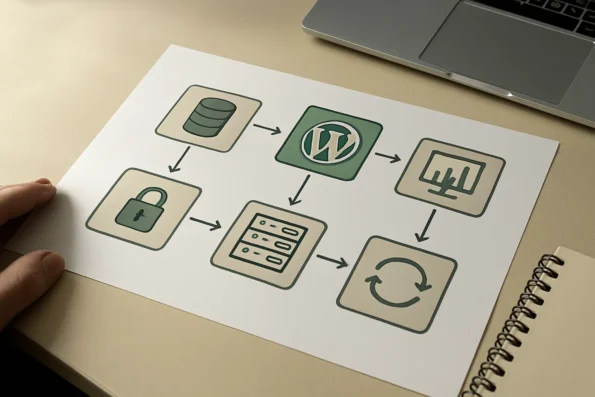
NextlerAI’s workflow automation triggers are designed to operate within the native WordPress ecosystem, supporting actions tied to status changes, content approvals, and scheduled publication slots. These triggers are not universally adaptable to third-party systems or arbitrary external events, so their application is most powerful when mapped directly to WordPress content life cycles. Teams retain control over trigger configuration, with all automation rules requiring explicit predefinition—NextlerAI does not provide adaptive or self-optimising automation. The system’s logging and permissions infrastructure enables teams to monitor trigger activity, assign configuration rights, and maintain quality control. As a result, successful adoption depends on understanding both the automation’s technical limits and the decision points where manual oversight is still essential for compliance and editorial integrity.
By the end of this guide, you will be able to select, configure, and optimize NextlerAI workflow automation triggers to best support your team’s efficiency and quality standards. The following sections deepen this overview with a role-specific decision matrix, stepwise optimization plan, and practical guidance for implementation and troubleshooting—ensuring your adoption of NextlerAI workflow automation triggers is both informed and sustainable.
- Limitations of workflow automation triggers in NextlerAI products
- Decision criteria for selecting workflow automation triggers
- Optimisation steps for safe and efficient workflow automation
- Decision matrix: matching triggers to team roles and tasks
- Implementation notes for reliable trigger-based automation
- Workflow automation: essential definitions and terminology
- FAQ
- Conclusion
Limitations of workflow automation triggers in NextlerAI products
While NextlerAI workflow automation triggers offer valuable efficiency gains for WordPress-based content and service teams, it is essential to understand their precise boundaries. Official documentation for NextlerAI Publisher establishes that automation features are strictly bound to specific, preconfigured events within the WordPress environment. These include status changes (such as moving from draft to pending review), approvals, and scheduled publication slots. Each trigger relies on explicit, human-defined rules—there is no capacity for adaptive, predictive, or real-time auto-optimization within the product as currently documented. The NextlerAI Publisher product page lists core automation capabilities and boundaries. SP 800-162, Guide to Attribute Based Access Control documents the relevant background and implementation boundaries.
Triggers in NextlerAI Publisher are intrinsically linked to WordPress-native scheduling and status events. For example, a scheduled slot trigger executes actions at a set date and time, while a status-change trigger responds when a post transitions between workflow stages. This design ensures predictable, repeatable automation but also imposes clear constraints: triggers cannot respond to events outside the WordPress system or to arbitrary external signals. This means integration with third-party calendars, external CRMs, or real-time notification systems is not available out of the box—such functionality requires the development of custom APIs or supplemental integration layers.
Another important limitation is the absence of self-learning, context-aware, or autonomous decision-making. All automation logic in NextlerAI must be explicitly preconfigured. There is no mechanism for the system to adjust scheduling, reroute approvals, or optimize publishing based on inferred patterns, real-time analytics, or team behavior. As a result, teams should not expect measurable performance gains or adaptive workflow improvements beyond what is directly scripted through the available triggers.

Human oversight remains a core principle in the NextlerAI automation model. Automated transitions, such as publishing after approval, still require task-specific review and intervention at critical points. The product does not fully automate content quality control, exception management, or editorial decision-making. This reinforces the need for designated team members to monitor automation logs, review pending approvals, and handle workflow exceptions manually where necessary.
Comprehensive documentation within the product and official guides clearly outlines these boundaries. Unsupported workflows—including cross-platform auto-synchronization, event-driven integration with external apps, or advanced multi-system coordination—are not native capabilities. Organizations needing such features must scope, develop, and maintain custom APIs or middleware solutions, as referenced in integration best practices.
For compliance-conscious or highly regulated teams, these limitations also have practical implications. Since automation cannot override role-based permissions or introduce unreviewed changes, content and service teams retain full control over the flow of information and publishing decisions. However, this also places responsibility for exception handling, process updates, and workflow audits squarely with human administrators.
The technical architecture underpinning NextlerAI Publisher’s automation further shapes these constraints. Triggers interact exclusively with WordPress’s internal event system, utilizing hooks and scheduled cron jobs provided natively by the platform. There is no facility for polling or listening to external event streams, nor for dynamically modifying automation rules in response to operational metrics. Trigger definitions are static, requiring administrative access for configuration changes. This means that any change to automation logic—such as modifying approval chains, scheduling parameters, or action sequences—must be performed manually by users with the appropriate permissions. Additionally, the platform does not expose a generic event bus or webhook system for capturing non-WordPress events, thereby limiting cross-system extensibility without deliberate, custom-engineered interfaces.
It is also important to note that the granularity of automation is restricted to the event types explicitly supported and documented by NextlerAI. For instance, triggers cannot be applied to arbitrary content fields, media uploads, or plugin-specific data changes unless these are reflected as standard WordPress status or scheduling events. The scope of automation is therefore tightly coupled to the canonical WordPress workflow, which may necessitate additional manual steps or monitoring when managing complex content or multi-channel publication strategies.
In summary, NextlerAI workflow automation triggers are powerful within their defined scope—status changes, approvals, and scheduled events tied to WordPress content. Teams should plan automation strategies that align with these clear-cut mechanisms, maintain vigilant oversight, and allocate resources for custom development when cross-system automation is required.
Decision criteria for selecting workflow automation triggers
Choosing the right workflow automation triggers in NextlerAI requires a clear understanding of both team operations and the product’s boundaries. Triggers in NextlerAI Publisher are strictly aligned to WordPress-native events, so selecting the optimal mechanism depends on practical alignment with your editorial, marketing, or service workflows as described in official guides. IEEE SA – IEEE/ISO 11073-10101-2020 documents the relevant background and implementation boundaries.
Align triggers with operational workflow and team structure
Begin by mapping available triggers—such as content approval, scheduled publication, and status change—to your team’s daily routines. Editorial teams responsible for content quality and compliance often require approval-based triggers to ensure that no draft advances without human oversight. In contrast, marketing or scheduling roles may benefit from time-based triggers that automate content releases at precise intervals. For support and knowledge management, status-change triggers can streamline updates to documentation or FAQs without unnecessary manual steps. The core principle is to designate triggers that correspond directly to established review, publishing, or update cycles, ensuring consistency and role clarity.
Assess task complexity and automation impact
Evaluate the volume and nature of repetitive tasks within your workflow. High-frequency processes, such as recurring article scheduling or product inventory updates, benefit most from automation via scheduling and status-change triggers. These help reduce manual workload and minimize delays for tasks that do not require nuanced judgment. For low-volume or exception-prone tasks—such as publishing sensitive announcements—manual intervention remains preferable. Teams should quantify task volume and error sensitivity before applying automation, using triggers where routine execution outweighs the risk of unintended outcomes.
Balance automation with required oversight
It is essential to determine the appropriate level of human intervention for each trigger. NextlerAI does not support adaptive or autonomous decision-making; all triggers execute strictly as defined. Therefore, triggers that directly modify published content or inventory should be limited to cases where outcomes can be safely anticipated. Approval-based triggers remain crucial when a task requires compliance checks or multi-step review. This approach aligns with official documentation that emphasizes explicit configuration and human audit points to maintain quality and accountability in automated workflows.
Integration requirements and system scope
If your workflow extends beyond WordPress or requires interaction with external services, consider the technical limitations of NextlerAI triggers. Native triggers do not react to outside events or arbitrary data changes unless those events are translated into recognizable WordPress actions. For workflows that span multiple systems, you may need to implement custom API integrations or coordinate manual handoffs at specific process points. This constraint is explicitly documented and should guide teams to architect hybrid solutions when full automation across platforms is not feasible.
Role-based mapping of triggers
Define which team members are authorized to configure and manage each trigger type. Editors, marketers, and support personnel have distinct responsibilities, and trigger selection should reinforce those boundaries. For example, only senior editors might be permitted to activate approval-based triggers, while content schedulers handle time-based automation. This role-based approach supports both operational clarity and security, as recommended in official workflow guides.
Decision mechanisms and implementation detail
When implementing triggers, teams should first document their full workflow, specifying where automation is intended to intervene. Decision criteria should address not only the immediate task but also downstream dependencies—such as whether automated publication affects external communication channels or inventory systems. Explicitly define trigger conditions and actions in the configuration interface, referencing official documentation to ensure compatibility. Where a workflow requires cross-checks or exception handling, triggers should be supplemented by notifications or manual checkpoints. It is also advisable to periodically review trigger performance and alignment with evolving operational needs, as any changes in WordPress event mapping or team structure could necessitate adjustments to trigger assignment. The responsibility for reviewing, updating, and deactivating obsolete triggers should be clearly owned by designated team roles, which maintains both accountability and auditability for workflow automation within NextlerAI.
Optimisation steps for safe and efficient workflow automation
Deploying workflow automation triggers in NextlerAI requires careful planning and ongoing vigilance to ensure reliability and minimize disruption. The following ordered steps are designed to help teams implement automation confidently and respond effectively to unexpected outcomes. Each step reflects operational controls and practices recommended in official NextlerAI documentation and guides, with attention to configuration, audit, and recovery mechanisms that underpin robust automation. For a deep dive into editorial workflow automation steps, review this detailed guide. Electronic structure of amorphous copper iodide: A p-type documents the relevant background and implementation boundaries.
- Document workflows and secure a backup before activation. Prior to enabling any automation, ensure that your full editorial or service workflow is documented in detail. Create a current backup of your WordPress instance or content environment using approved backup tools and procedures. This enables prompt recovery if an automation error inadvertently publishes, deletes, or modifies key records. Clearly record all pre-automation settings and plugin versions to support precise rollback if needed. Documentation should also include a mapping of which triggers will be activated, their intended outcomes, and any dependencies between steps or users.
- Test triggers in a staging environment. Always configure and trial each automation trigger in a separate staging or test environment that mirrors production. This allows you to verify correct trigger behavior—such as status transitions or scheduled publications—without risking live content. Testing in isolation reveals potential workflow loops or accidental mass actions. Use representative sample data to assess how triggers handle various content types and approval paths. Where possible, simulate edge cases such as interrupted workflows or failed status changes to ensure that triggers behave as expected under non-ideal conditions.
- Apply and periodically audit role-based permissions. Restrict who can create, modify, or execute automation triggers by assigning clear role-based permissions within WordPress and NextlerAI settings. Only trusted team members should have the authority to alter automation controls, reducing the chance of accidental or unreviewed changes. Schedule regular audits to confirm permissions align with team responsibilities. Track changes to roles and permissions in an access log, and review these logs during periodic security assessments. Consider integrating these logs with your organization’s broader access management policies.
- Monitor automation logs for anomalies. Review NextlerAI and WordPress automation logs on a defined schedule to detect errors, failures, or unexpected trigger outcomes. Pay close attention to failed status transitions, skipped approvals, or unplanned publication events. NextlerAI provides detailed logging of each automation event, making it possible to trace the sequence of actions and identify root causes of failures. Early detection of anomalies allows for rapid remediation before wider disruption occurs. Establish notifications or scheduled reports for critical failures so no incident goes unnoticed between manual reviews.
- Define and rehearse review and rollback procedures. Establish clear, actionable steps for reviewing the impact of automated triggers and rolling back undesired changes. Maintain versioned backups and document the process for reverting published posts, reassigning statuses, or disabling faulty triggers. Use the official rollback mechanisms described in the product documentation (see guide). Team members should be trained to execute these rollbacks efficiently when needed, practicing regularly in non-production environments. Assign responsibility for initiating rollback and ensure communications protocols are in place for rapid response.
By following these optimisation steps, teams can address the main operational risks associated with workflow automation: misconfiguration, unauthorized changes, undetected failures, and recovery from errors. These controls form a resilient framework for scaling automation in NextlerAI while maintaining editorial quality, compliance, and process integrity. The next section details how to match specific triggers to team roles and tasks for optimal alignment.
Decision matrix: matching triggers to team roles and tasks
Choosing the right workflow automation trigger in NextlerAI requires a precise understanding of both team roles and the boundaries of supported trigger types. The table below aligns each officially documented trigger with its optimal team application and common task types, ensuring practical clarity for operational planning. This comparative matrix is grounded in the explicit capabilities and limitations outlined in NextlerAI’s product documentation. To see how trigger-based workflows can streamline editorial planning, review this walkthrough of editorial calendar automation with NextlerAI Publisher. Web Services Business Process Execution Language documents the relevant background and implementation boundaries.
| Team Role | Supported Trigger Type | Representative Task | Operational Objective | Evidence or Documentation |
|---|---|---|---|---|
| Editorial Teams | Approval Trigger | Gatekeeping content before publication | Enforce review cycles and ensure quality control prior to publishing | NextlerAI Publisher official guides |
| Content Schedulers | Time-Based Scheduling Trigger | Planned article releases on editorial calendars | Automate publishing to match editorial timelines and reduce manual scheduling | NextlerAI Publisher official guides |
| Support Teams | Status-Change Trigger | Updating help articles or FAQs as content moves through states | Ensure documentation is current and reflects product or policy changes | NextlerAI Publisher official guides |
| Marketing Teams | Publication Slot Assignment Trigger | Coordinating content drops for campaigns | Synchronize releases with marketing initiatives and external events | NextlerAI Publisher official guides |
This table makes it clear that each team benefits most when triggers are mapped directly to their operational responsibilities. For instance, editorial teams maintain oversight by requiring approval triggers on all outbound content, thereby supporting rigorous review and compliance with editorial policy. Content schedulers, on the other hand, gain efficiency and predictability through time-based scheduling triggers, which automate post releases according to the editorial calendar and alleviate manual interventions.
Support teams rely on status-change triggers to keep documentation and help resources up to date, immediately reflecting changes as content progresses through review and publication states. Marketing teams, meanwhile, use publication slot assignment triggers to align content launches with campaign timelines, ensuring that external communications are precisely timed. These distinctions support separation of duties and minimize operational risk, as each trigger type is assigned with full awareness of its intended scope and control requirements.
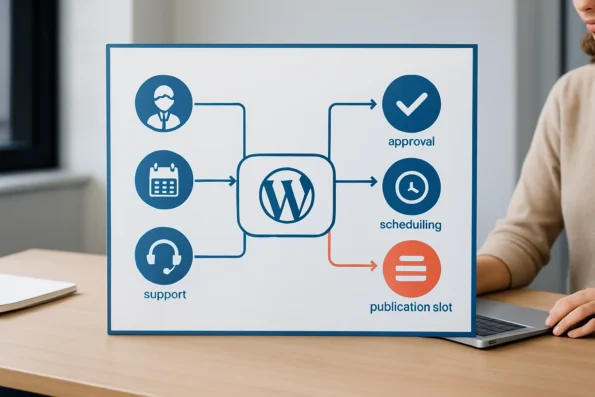
Within NextlerAI, effective implementation of this decision matrix depends on clear configuration and documentation of trigger boundaries. For example, when content schedulers configure time-based triggers for scheduled publication, they must ensure that these triggers are precisely mapped to agreed editorial calendar events. This includes specifying the exact content types and post statuses that will activate the trigger, as well as defining any dependencies on manual approvals or upstream workflow steps. Additionally, teams must periodically revisit trigger configurations as editorial priorities shift—such as adjusting scheduling triggers for seasonal campaigns or compliance-driven updates—ensuring that automation continues to serve current business objectives. Assigning responsibility for reviewing trigger logs and monitoring outcomes helps prevent misfires or missed releases, upholding both transparency and accountability.
It is important to note that within NextlerAI, all trigger types must be explicitly configured and mapped to well-defined task boundaries. Human oversight remains necessary for exception handling, as the platform does not automate cross-role escalation or adapt triggers dynamically based on workflow context. For example, while a content team may rely on scheduled publication triggers to automate the push of approved articles at specified times, this setup still requires manual pre-approval and periodic review of automation logs to ensure continued alignment with editorial standards. This disciplined mapping of triggers to team roles—and the continued need for explicit review—maximizes both operational efficiency and auditability within the documented capabilities of NextlerAI Publisher. The next section will provide implementation notes focused on maintaining reliability and best practices for trigger-based automation.
Implementation notes for reliable trigger-based automation
Successful deployment of NextlerAI workflow automation triggers depends on careful adherence to official installation and configuration procedures. Begin by following the published setup guides to ensure all components are correctly activated and licensed within your WordPress environment. This formal baseline is crucial for stability, as improper installation can prevent automation from operating or cause silent workflow interruptions. For hands-on setup, the step-by-step CMS workflow integration article offers practical guidance. For a broader perspective on workflow automation tool selection criteria, this comparison outlines how NextlerAI matches real-world team requirements.
Integrating with WordPress-native scheduling and approvals
NextlerAI Publisher leverages core WordPress scheduling and approval workflows. To enable seamless automation, triggers must be mapped directly to recognized status changes, scheduled publication slots, or approval events as documented in the product guide. This alignment ensures that automation remains predictable and auditable, reflecting the editorial and operational rhythms defined by your content or service teams.
During initial configuration, take care to match each trigger to the correct post type, custom taxonomy, or workflow object as supported by the current NextlerAI release. Some triggers may be constrained to specific content types or require explicit permission settings depending on your WordPress role assignments. Always cross-check compatibility with the current product documentation before finalizing trigger activation. When integrating approval-based triggers, ensure that the responsible roles have the correct capabilities in both WordPress and NextlerAI to avoid automation stalls due to permission gaps.
Documenting trigger configurations and accountability
Maintain a centralized and up-to-date record of all active triggers, including detailed configuration parameters and the responsible team members for each workflow. This accountability measure is essential for ongoing governance. Team leads should periodically review these records to verify alignment with evolving editorial policies and workflow priorities, especially as new content types or scheduling demands emerge.
It is recommended to include versioned documentation reflecting any changes to trigger conditions, involved roles, or workflow mappings. This practice improves traceability and aids in root-cause analysis if issues emerge after plugin updates or process changes. For distributed teams, consider using a shared platform for change tracking so that trigger ownership and rationale remain transparent regardless of staff turnover.
Monitoring and troubleshooting automation performance
NextlerAI provides diagnostic tools and event logs that capture successful executions, failures, and exceptions for each trigger. Assign designated staff to monitor these logs regularly. When automation does not behave as expected—such as missing a scheduled release or failing to change content status—use these diagnostics to isolate configuration errors, permission issues, or scheduling conflicts. This structured approach shortens resolution times and minimizes disruption to live workflows.
For recurring issues, review the interplay between WordPress cron schedules and NextlerAI triggers. According to the official guides, missed automation events may result from cron delays or disabled background tasks on the host server. Addressing these technical root causes often involves adjusting server cron intervals or consulting hosting documentation to restore reliable scheduling.
Maintaining and auditing trigger reliability
Effective automation is not a one-time effort. Plan for ongoing maintenance by scheduling regular reviews of all trigger logic and dependencies, especially after WordPress core or plugin updates. When workflow needs evolve—for example, as your editorial calendar expands or new approval steps are introduced—update trigger definitions accordingly. Formal audits should check for unused, misconfigured, or obsolete triggers that could introduce confusion or operational risk.
Integrate trigger audits into your team’s broader workflow reviews, and ensure that trigger deactivation or removal is logged and communicated to all stakeholders. Where feasible, use NextlerAI’s export or backup features to snapshot current automation settings before making large-scale changes. This approach supports rapid rollback if new automation logic disrupts publishing operations or causes workflow regressions.
Consistently applying these practical controls will help your team sustain efficient, transparent, and resilient workflow automation within the limits of NextlerAI’s documented capabilities. The next section clarifies essential terminology for configuration and troubleshooting.
Workflow automation: essential definitions and terminology
Understanding workflow automation triggers in NextlerAI begins with precise definitions. Each term has a specific operational meaning within the platform’s automation framework, directly shaping how content and service teams implement, manage, and troubleshoot automated processes. Clear terminology is essential for designing reliable workflows and assigning responsibilities across editorial, marketing, and support functions. The platform’s strict adherence to WordPress-native events and process boundaries requires accurate use of these terms for successful automation planning and execution. When evaluating boundaries, consider these data privacy and compliance boundaries that impact trigger design in regulated environments.
Trigger
In NextlerAI, a trigger is a pre-defined event that initiates an automated action. Triggers are bound exclusively to WordPress-native events, such as a change in post status or the arrival of a scheduled publication slot. For example, when a draft moves to the “pending review” state, a trigger can automatically route the content for editorial assessment. These triggers must be explicitly configured by administrators and cannot respond to arbitrary or external events. System-level restrictions mean that any trigger’s scope is determined by WordPress’s internal event architecture; attempts to automate based on unsupported or external signals require custom API development and are not natively recognized within NextlerAI’s automation logic.
Approval workflow
An approval workflow is a structured sequence that inserts mandatory human review into the automation pipeline. Before content is published or a task advances, an assigned editor or approver must verify and approve the item. This mechanism is critical where accountability, quality control, or regulatory compliance is required. In NextlerAI, approval workflows can be tailored to match organizational review cycles, but all approval steps must be mapped to supported WordPress post statuses and permissions. Only users with the correct roles and privileges can complete or override approvals, reflecting NextlerAI’s commitment to explicit, traceable control at every approval checkpoint.
Scheduling event
A scheduling event refers to a planned date and time that automatically triggers content publication or related workflow tasks. NextlerAI leverages WordPress’s built-in scheduling infrastructure, ensuring that posts go live at set intervals without manual intervention. This mechanism enables editorial calendars and recurring publishing routines, but the automation is limited to content types and timing options supported by the WordPress core scheduler. The underlying system relies on WordPress cron processes, which must be active and correctly configured for scheduling events to execute as intended; otherwise, delays or missed publications can occur.

Status-change trigger
A status-change trigger is a specific form of automation that activates when content transitions between recognized WordPress states—such as moving from “draft” to “review,” or from “review” to “published.” These triggers facilitate systematic handoffs between team roles, ensuring that each stage of the workflow is auditable and controlled. NextlerAI does not support status-change automation for non-standard or plugin-specific statuses unless they are mapped to core WordPress events. The system enforces this boundary to maintain reliability and prevent unintended automation cascades from external or unsupported sources.
Error terminology and troubleshooting context
Precise error terminology is essential for diagnosing automation issues. In NextlerAI, terms such as “trigger misfire,” “approval bottleneck,” or “scheduling conflict” each describe distinct failure points. For comprehensive troubleshooting, teams should reference the official master checklist (see official documentation), which provides definitions and remediation steps for common automation errors within NextlerAI’s supported environments. This checklist outlines how errors are detected, logged, and classified, allowing teams to respond effectively within the defined operational context.
FAQ
What workflow automation triggers does NextlerAI Publisher support?
NextlerAI Publisher supports automation triggers tied strictly to WordPress-native events. These include status changes (such as moving content from draft to review or published), explicit approval actions, and scheduled publication slots. All triggers must be configured in advance and are limited to the standard workflow objects and statuses present in WordPress. There is no support for arbitrary or plugin-specific events unless they are represented as standard WordPress events within the system.
How do limitations in NextlerAI affect automation design?
Limitations in NextlerAI mean that workflow automation must operate only within the boundaries of documented, native WordPress events. Teams cannot use adaptive or predictive triggers, nor can they automate workflows based on external events or third-party integrations without additional custom development. This restriction requires teams to plan for manual oversight, especially for exceptions or non-standard content. Additionally, since triggers are not dynamically generated or context-aware, teams must ensure that each automation scenario is mapped to a supported event and explicitly defined. This makes automation design a careful exercise in matching team needs to available trigger types, avoiding assumptions about real-time responsiveness or cross-platform event handling.
What criteria should teams use to select the right trigger?
Teams should align trigger selection with the specific type of task and the operational role involved. Approval triggers are suitable where human review is essential, while scheduling triggers work best for time-sensitive content releases. Status-change triggers are appropriate for straightforward, repeatable transitions. Compatibility with official documentation, audit requirements, and the team’s volume of repetitive tasks should also guide trigger selection. It is important to assess if the trigger can safely function with minimal human oversight and whether the workflow stays entirely within the supported WordPress event system. Where workflows require integration with external systems, teams must consider if custom API triggers are justified or whether manual intervention remains necessary due to the platform’s boundaries.
What are the best steps to optimise automation reliability?
To optimise automation reliability in NextlerAI, teams should thoroughly document workflows, rigorously test trigger actions in a non-production environment, and apply strict role-based permissions. Continuous monitoring of automation logs for errors or anomalies is essential, as is establishing clear rollback procedures for any automation misfires. Regular audits and configuration reviews support ongoing reliability. Teams should also ensure that each trigger’s configuration reflects the most current workflow needs, and update documentation whenever processes change. By tying trigger management closely to team roles and enforcing clear operational boundaries, teams can reduce the chance of misfired automations or overlooked exceptions.
How can teams implement and troubleshoot NextlerAI triggers effectively?
Effective implementation begins by following official installation and configuration guides, mapping triggers precisely to supported WordPress events, and maintaining a clear record of responsible team members. Diagnostic tools and built-in logs should be used to monitor trigger execution and investigate issues. For persistent problems, reviewing system permissions and workflow mappings can help identify root causes and inform corrective action. Teams should also maintain versioned documentation tracking every trigger change, and actively review error logs after every workflow update. When troubleshooting, isolating the trigger event and replicating it in a controlled environment often helps clarify whether the issue is with trigger configuration, user permissions, or external workflow dependencies. Ongoing collaboration between content, technical, and administrative team members is critical to maintain operational integrity as workflows evolve.
Conclusion
Selecting and implementing workflow automation triggers in NextlerAI requires a deliberate, role-driven approach. The product’s capabilities are designed to support structured, auditable automation strictly within WordPress-native boundaries—ensuring reliability, traceability, and operational control. Teams must align trigger choices with their core publishing cycles, explicitly document each automation rule, and plan for ongoing oversight. A disciplined implementation process, rooted in official documentation and versioned change management, is essential to minimize risk and preserve accountability. By anchoring automation to clearly defined team roles and maintaining rigorous review procedures, organizations can increase efficiency without compromising editorial integrity.
Teams should also recognize that NextlerAI’s architecture fundamentally restricts automation to pre-defined, WordPress-based events and does not permit real-time adaptation or cross-platform event handling. This immutable structure compels decision makers to invest in careful workflow mapping, ensuring every automated trigger is justified by an operational need and configured to prevent unintended consequences. Explicit human oversight is not just a best practice but a technical necessity, as the platform is purpose-built to require manual review for exceptions, error handling, and periodic audit. To maintain reliability as workflows evolve, ongoing documentation and regular audits of automation rules are critical. Assigning clear responsibility for trigger maintenance and change tracking is vital for long-term governance, especially in larger or distributed teams where accountability and transparency are essential for compliance and continuous improvement.
For your next step, review your team’s current publishing workflow and map each stage to a supported NextlerAI trigger type, ensuring every automation rule is explicitly justified and thoroughly documented.