


POWERFUL AI PUBLISHING FOR WORDPRESS — 100% AUTOMATIC
NextlerAI Publisher
Automatic research, content production and publishing—with your approval controlsNextlerAI Publisher is a downloadable WordPress plugin that researches, creates, optimises, schedules and publishes complete articles 100% automatically. It finds valuable content opportunities, plans and creates structured 1,000–10,000-word articles, adds contextual links and section-aware images, checks quality and publishes on your schedule—with optional approval before anything goes live.
- Downloadable plugin ZIP
- Install on your own WordPress website
- Connect your own AI provider
100% automaticRun the complete journey from content opportunity to published WordPress article.Evidence before writingSite inventory, optional search data and verified sources shape the brief.Automation you controlPublish automatically or keep a human review gate.
WORKS WITH YOUR STACK
 WordPress
 Search Console
 OpenAI
 Gemini
 Claude
 Grok
Serper.dev
SEOPress
Grok
Serper.dev
SEOPress
 Yoast SEO
Rank Math
All in One SEO
Polylang
WPML
Yoast SEO
Rank Math
All in One SEO
Polylang
WPML
WordPress
Search Console
OpenAI
Gemini
Claude
Grok
Serper.dev
SEOPress
Yoast SEO
Rank Math
All in One SEO
Polylang
WPML
Selected purchaseWordPress plugin ZIP · Instant download
Buy now ↗✓ Secure checkout · Instant download · 14-day money-back guarantee
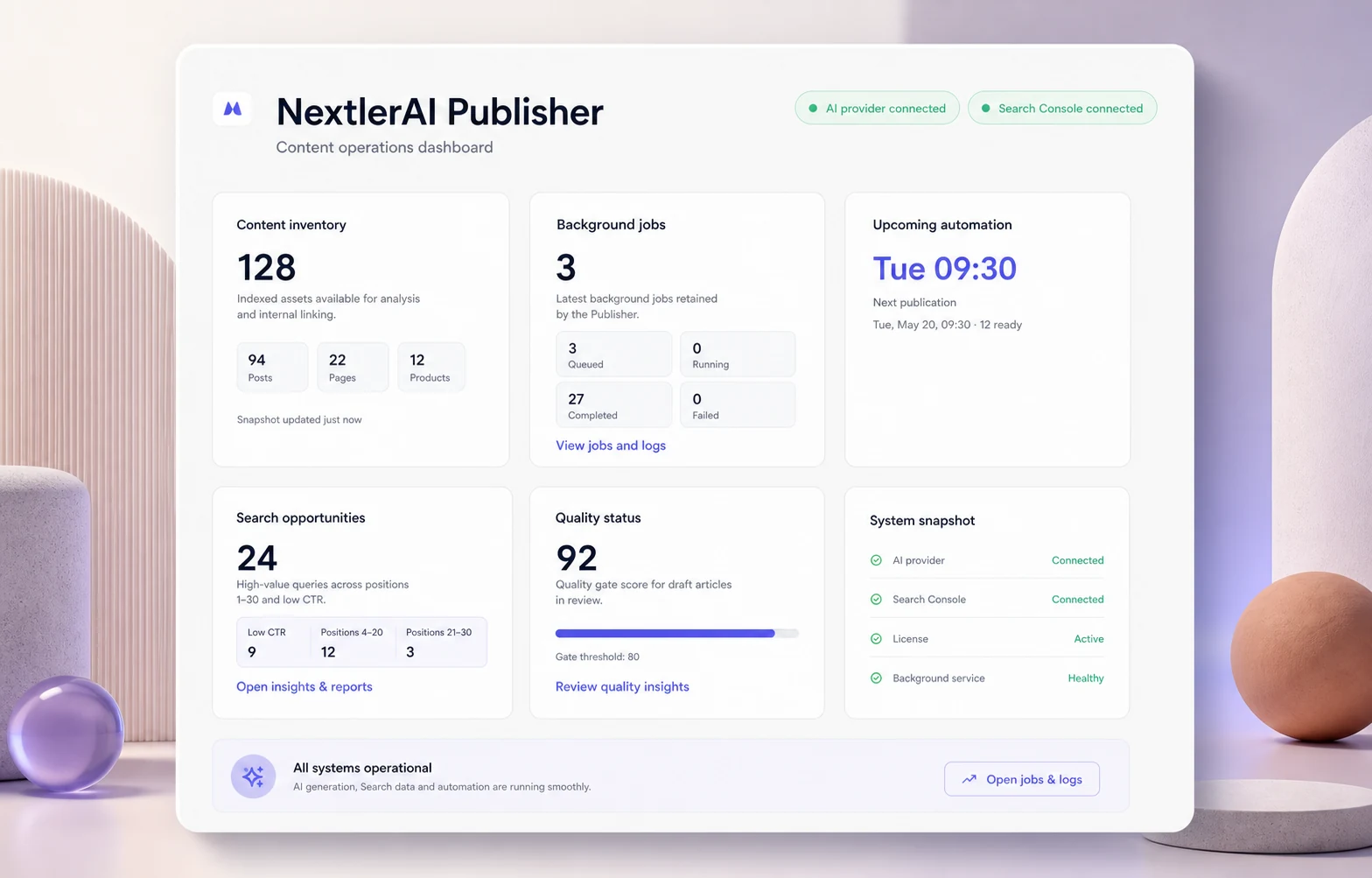
From insight to publication
RESEARCH · CREATE · OPTIMISE · PUBLISHYOUR WORDPRESS. YOUR DATA. YOUR AI KEYS.
WHAT’S INCLUDED WITH YOUR PURCHASE
A complete AI publishing system inside WordPress.
Your purchase gives you the complete installable plugin, the selected website licence and the tools needed to automate publishing from your own WordPress dashboard.
WordPress plugin
Complete WordPress plugin
Download the installation-ready ZIP and install NextlerAI Publisher directly from your WordPress dashboard.
Plugin ZIPWordPress adminSelf-hosted
Automatic publishing workflow
Research, plan, create, optimise, schedule and publish complete WordPress articles 100% automatically.
Complete long-form articles
Create structured 1,000–10,000-word articles with useful sections, tables, lists, FAQs and clean WordPress formatting.
Images, links and SEO
Generate featured and inline images, add contextual links and prepare compatible SEO metadata.
Scheduling and approval control
Save drafts, require review or let quality-approved articles publish automatically on your schedule.
Publishing dashboard and reports
Manage topics, jobs, articles and schedules while reviewing quality scores, warnings and publication history.
Licence, updates and support
Activate the plugin on the number of websites included in your plan and receive the matching update and support period.
Documentation and setup guides
Follow installation, AI provider and publishing workflow guides from the first download to automatic publishing.
InstallationAI setupAutomationSupport
AI CONNECTIONConnect your own OpenAI, Gemini, Claude or Grok account. AI provider and optional Serper usage are billed separately by the services you choose.
THE 100% AUTOMATIC PUBLISHING ROAD
CONNECT YOUR CONTENT AND SEARCH STACKChoose the systems once. Publisher keeps the workflow moving in WordPress.
WordPressSearch ConsoleOpenAIGeminiClaudeYoast SEOFrom search opportunity
to published article.
Publisher connects site intelligence, research, production, quality control and WordPress publishing into one powerful, 100% automatic workflow.
Set the sources and rules
Connect WordPress and a text provider, then choose optional Search Console, Serper, image and SEO integrations. Define language, quality and approval controls.
Find content opportunities worth publishing.
Publisher maps eligible public content, infers clusters and topics, scores opportunities and checks high overlap before generation.
Create complete articles with links, sources, images and metadata.
It creates the brief, varied section plan, 1,000–10,000-word article, contextual links, verified sources, section-aware images and SEO metadata.
Approve—or run automatically
Keep drafts or pending review, or let quality-ready native WordPress posts fill the schedule automatically through resilient background jobs.
BUSINESS VALUEConsistent publishing · less manual production · evidence-led topics · a content system that keeps moving
SEE WHAT PUBLISHER ACTUALLY CONNECTS
Your sources, evidence and rules.
Visible before generation.
Publisher is not a hidden prompt chain. You can see which providers are active, which research sources are available and how voice, links, media, quality and SEO metadata are governed.
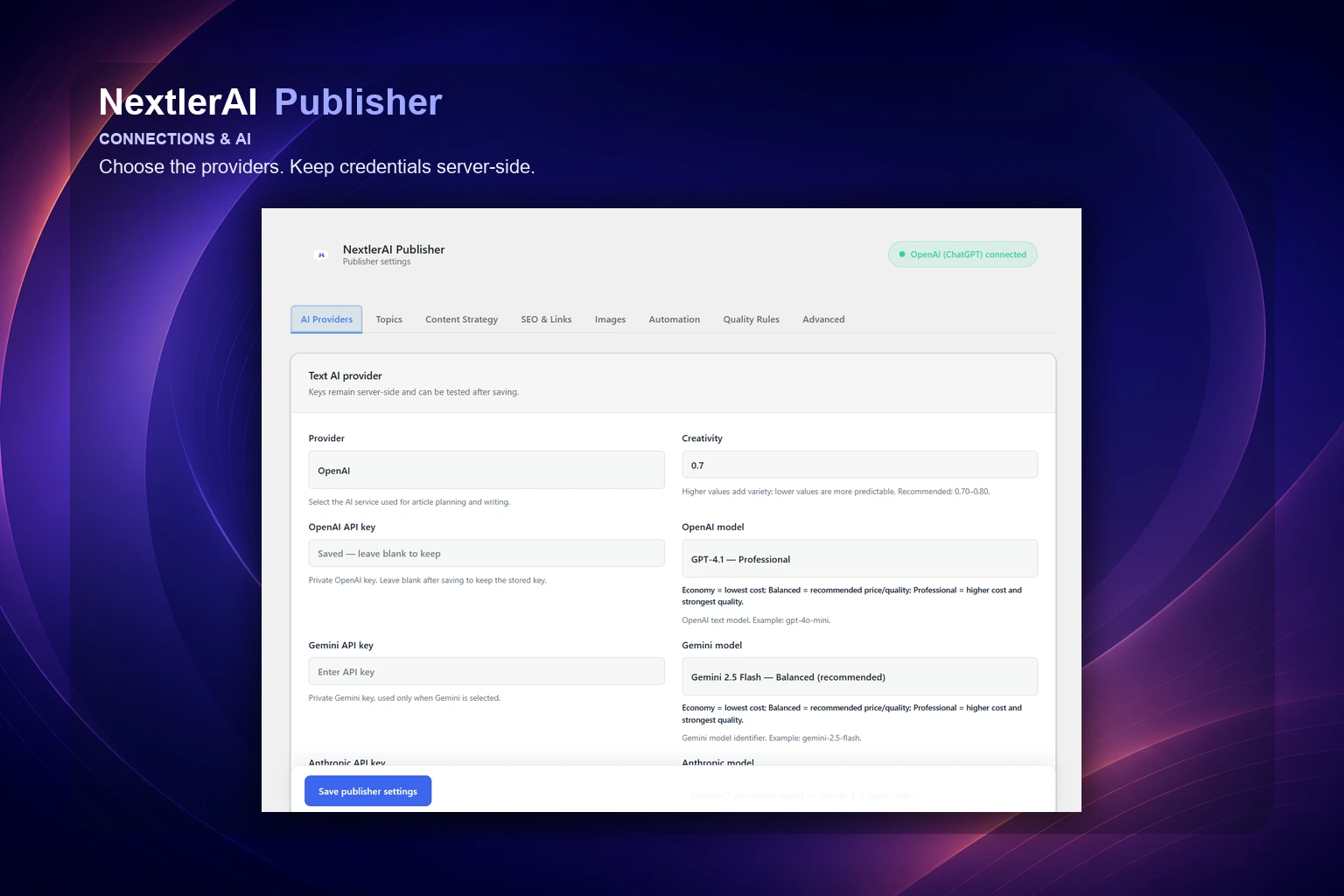
01 / CONNECTIONS
Choose your AI and keep credentials server-side.
Select OpenAI, Gemini, Claude or Grok for planning and writing. OpenAI or Gemini can create images. Customer-owned keys remain protected inside WordPress.
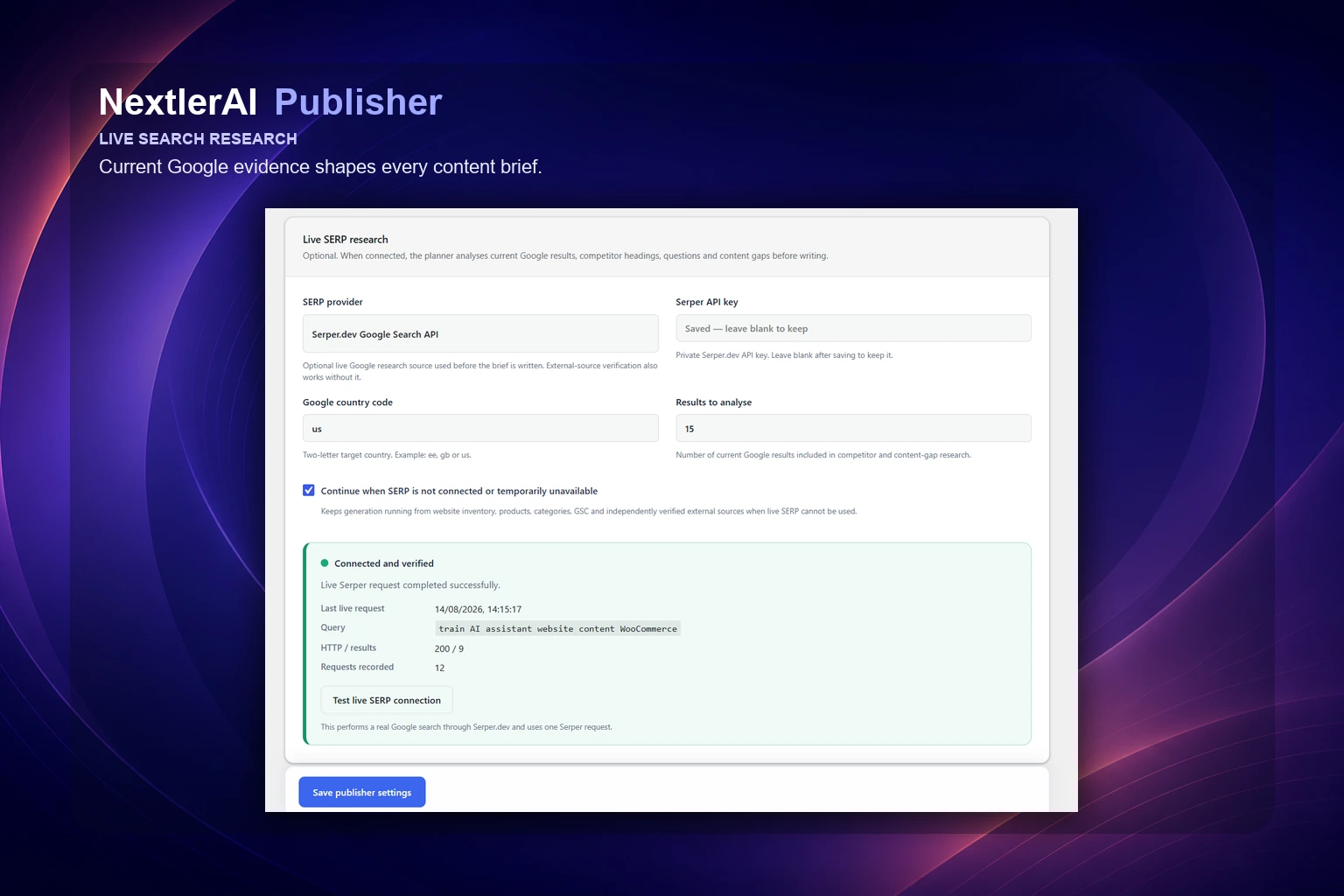
02 / OPTIONAL RESEARCH
Add live search evidence when it helps.
Serper and Search Console can enrich topics and briefs with current evidence, but neither is required—the pipeline continues with site inventory and model context.
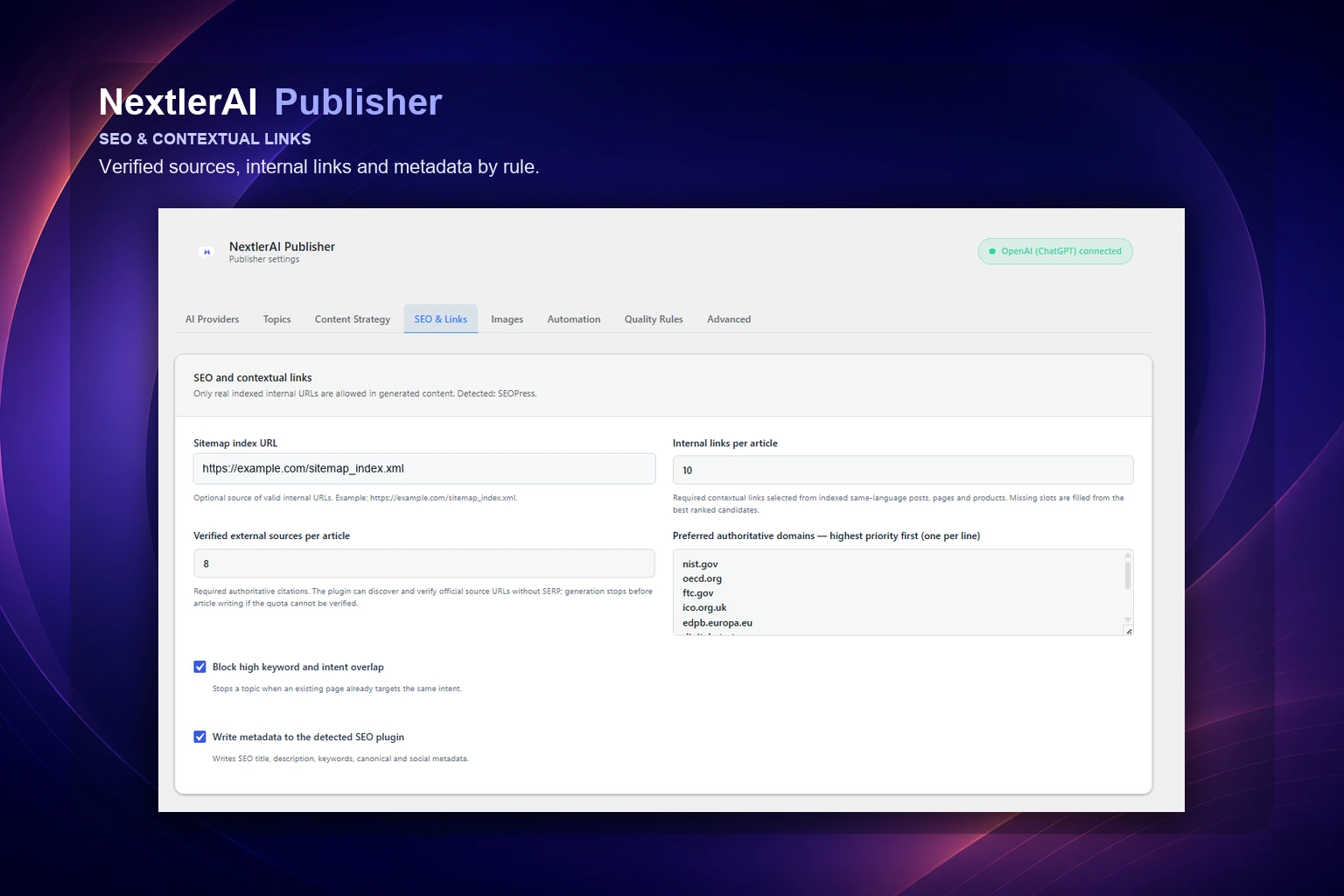
03 / CONTENT, SEO & LINKS
Define how every article should sound and connect.
Set brand voice, length, link targets, source expectations, section-aware images, quality threshold and compatible SEO-plugin metadata in one controlled workspace.
A COMPLETE CONTENT OPERATION
Research to publication.
One automatic workflow.
Publisher connects what normally lives in separate tools: what to write, what already exists, how to structure the article, which sources support it, how pages should link and when the finished asset should go live.
Research before generation
Site inventory always informs the brief. Optional Serper and Search Console data add current search evidence when connected, with a graceful fallback when they are not.
Protect existing authority
Language-aware inventory and high-overlap checks reveal conflicts, while contextual links connect each article to relevant existing content and verified sources.
Publish as a system
Structured long-form text, section-aware images, links, metadata, native WordPress attributes, quality checks and scheduling move through one resilient job.
THE PUBLISHER WORKFLOW
From opportunity to a finished, published WordPress asset.
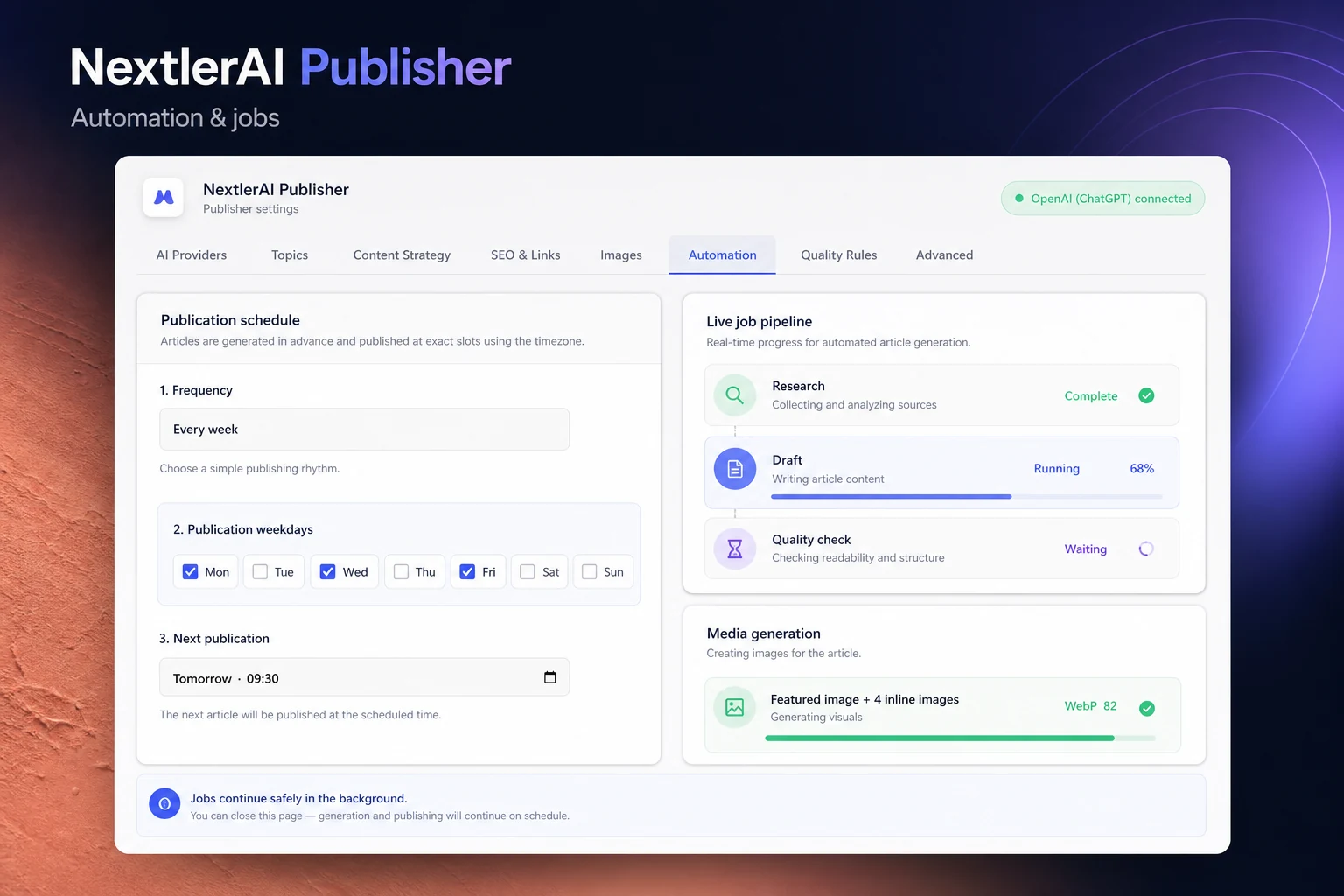
Inventories eligible public posts, pages, products and custom post types, including languages, taxonomy, headings and metadata.
Checks overlap, prepares real link candidates and combines site evidence with optional Serper and Search Console signals.
Creates a brief, selects a varied article structure and writes 1,000–10,000-word content section by section.
Adds relevant links and verified sources, then creates section-aware WebP media with contextual alt text.
Reports words, structure, links, sources, media and blockers. Relevant-link shortfalls remain visible instead of forcing unrelated URLs.
Creates a native WordPress post for draft, review or quality-gated automatic publishing, with checkpointed retry and recovery.
SEE THE COMPLETE OPERATION
Not a prompt box.
A publishing workspace.
Explore the real Publisher workflow—from site intelligence and topic strategy to controlled long-form production, multiple publication times and traceable reports.
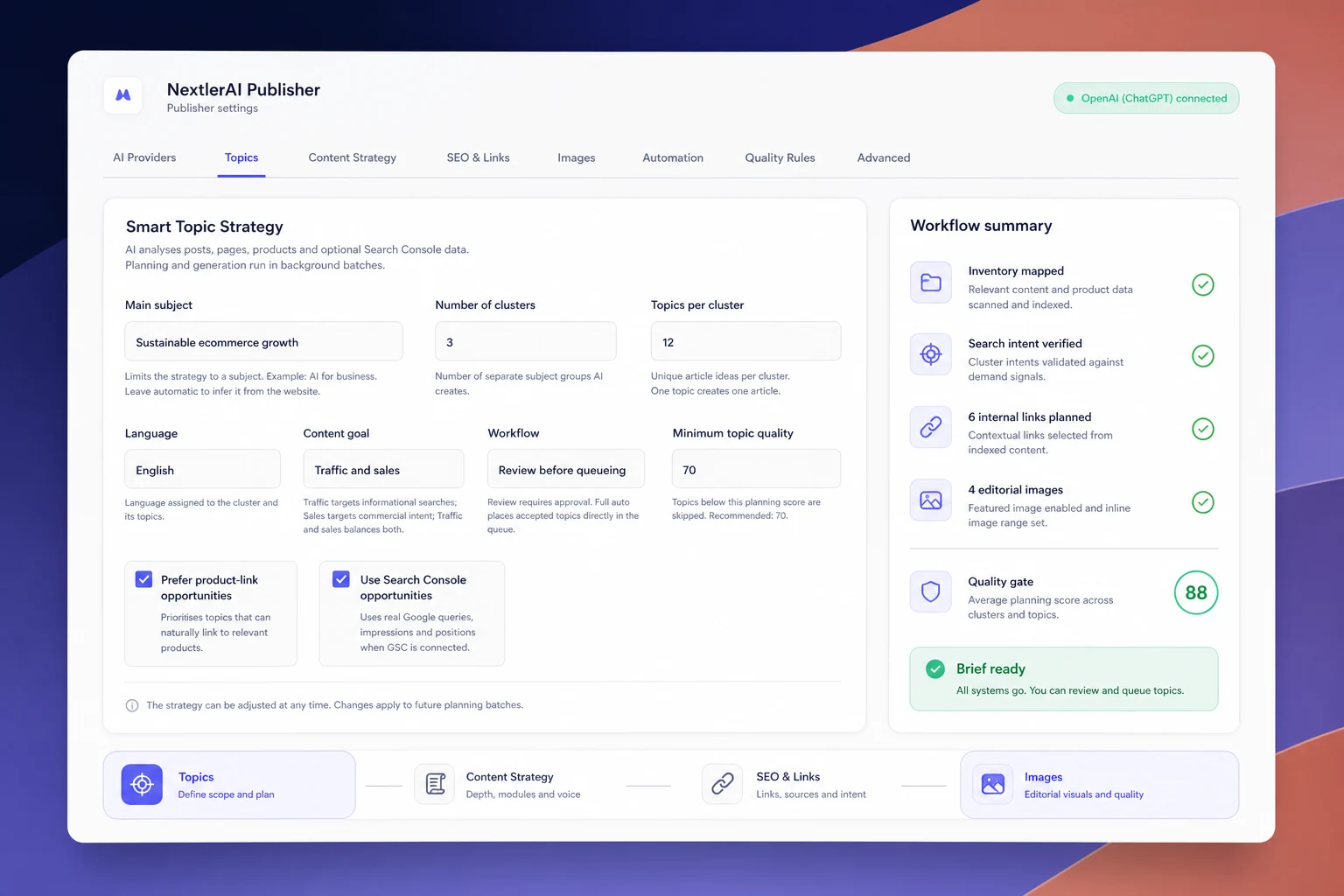
01 / STRATEGY
Turn the existing site into an editorial map.
Infer clusters from the website, choose the goal and language, set the score floor and review or approve topics before generation.
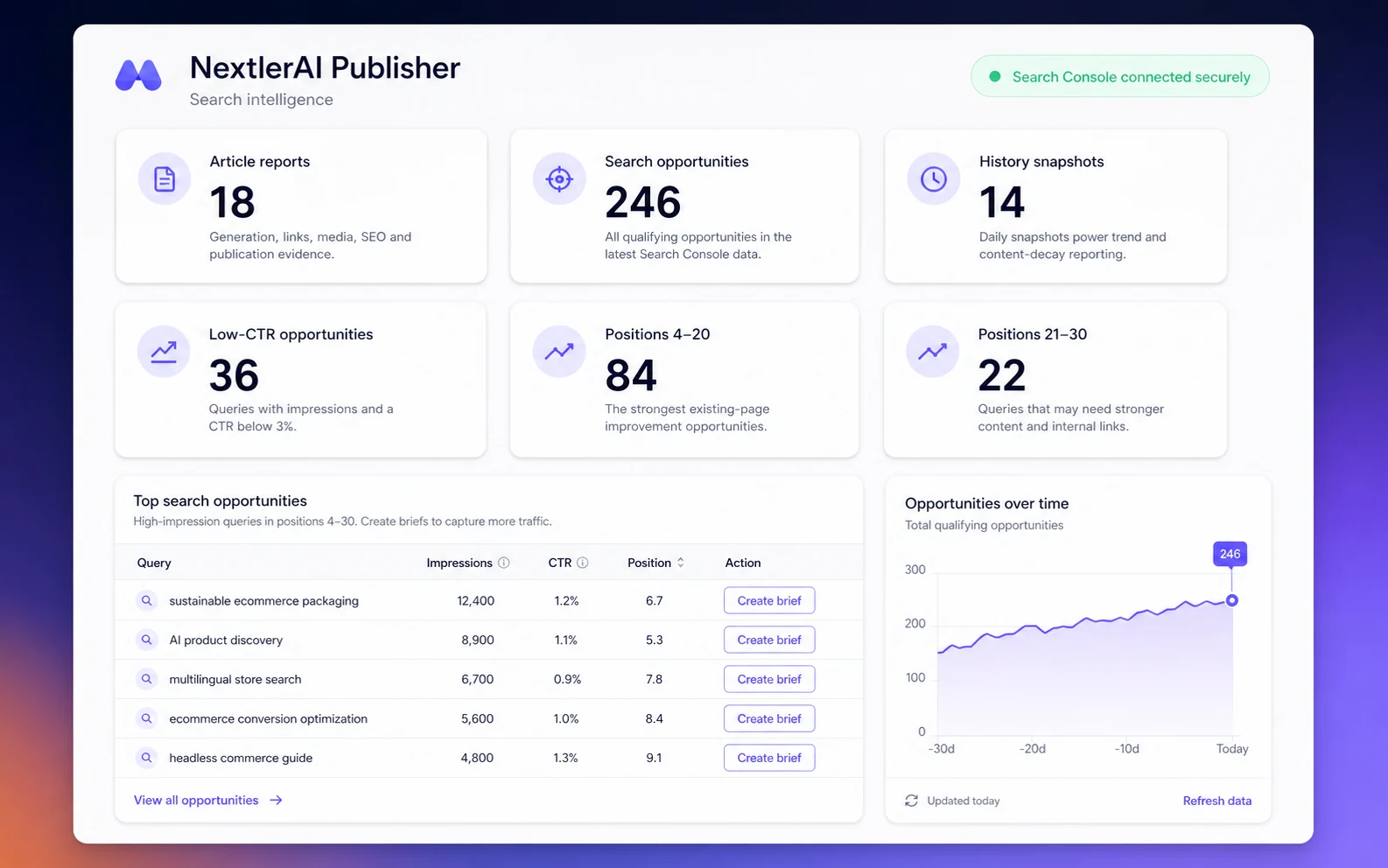
02 / EVIDENCE & REPORTS
Prioritise evidence, not guesses.
Combine inventory with optional search signals, then inspect requested-versus-actual words, links, media and quality evidence for every completed article.
03 / AUTOMATION
Schedule production without losing control.
Use multiple daily publication times, generate in advance, follow Live Pipeline checkpoints and choose draft, review or 100% automatic publishing.
A PUBLISHING OPERATION YOU CAN INSPECT
Plan it. Queue it. Publish it.
See what happened.
Automatic does not mean invisible. Multiple schedule slots, the topic pipeline, Live Pipeline, finished reports and generation history remain available whenever you need to review or intervene.
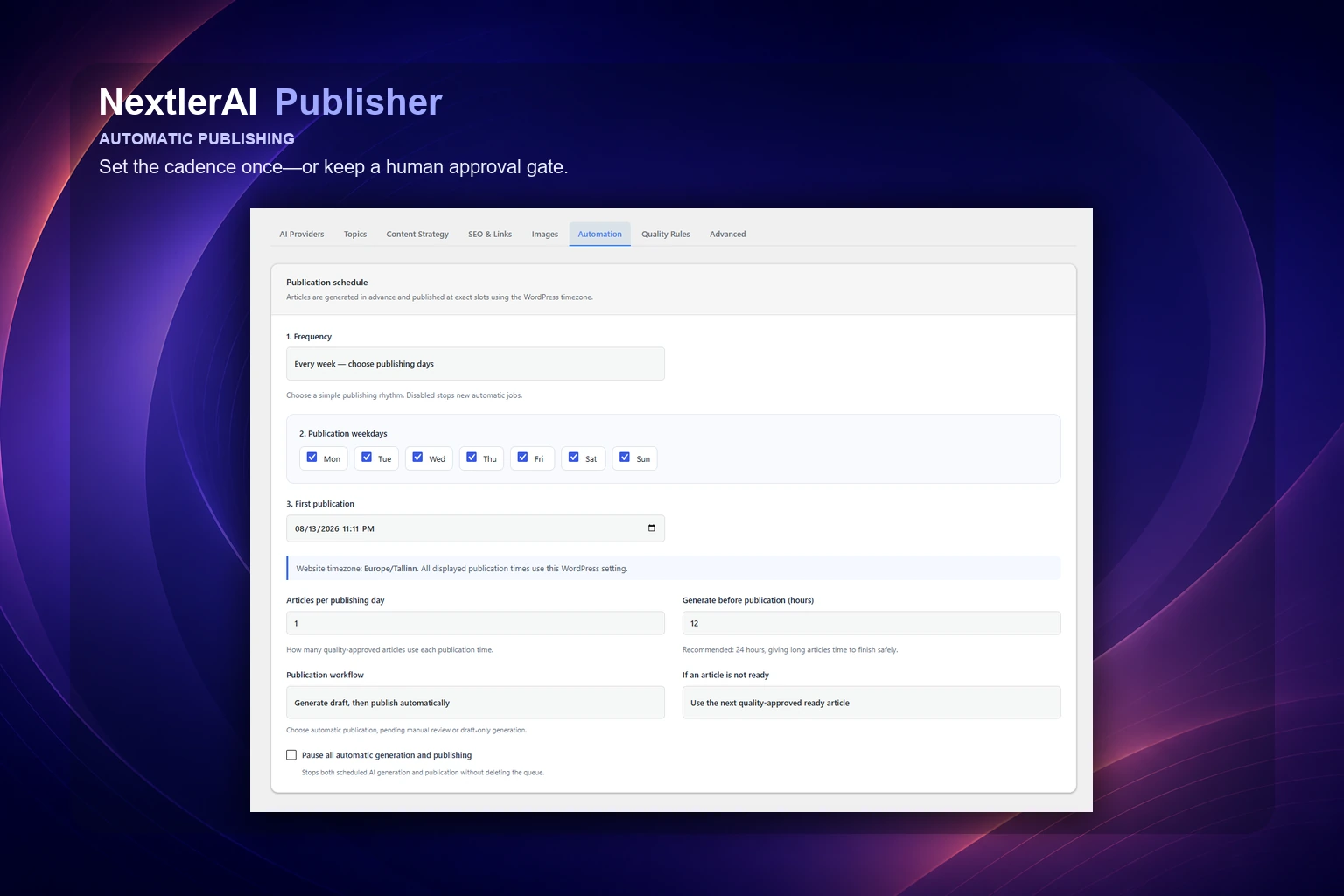
01 / SCHEDULE
Choose the cadence and approval mode.
Add up to 12 publication times per active day, generate in advance, set the daily limit and choose next-ready or skip for a missed slot.
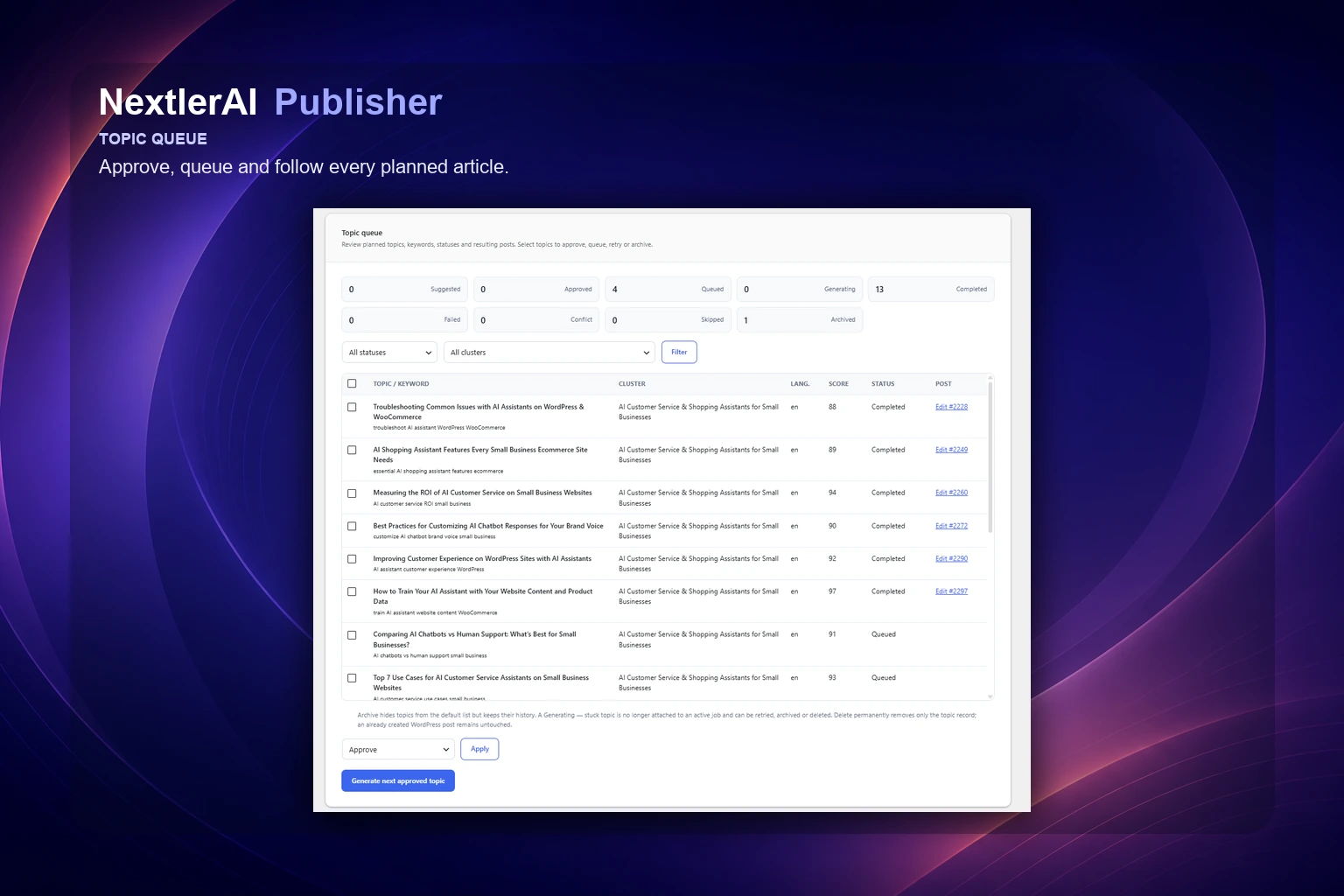
02 / TOPIC QUEUE
Know what is planned, approved and complete.
Filter topics by cluster, language and status, review scores and overlap, then approve, queue or archive work without losing editorial history.
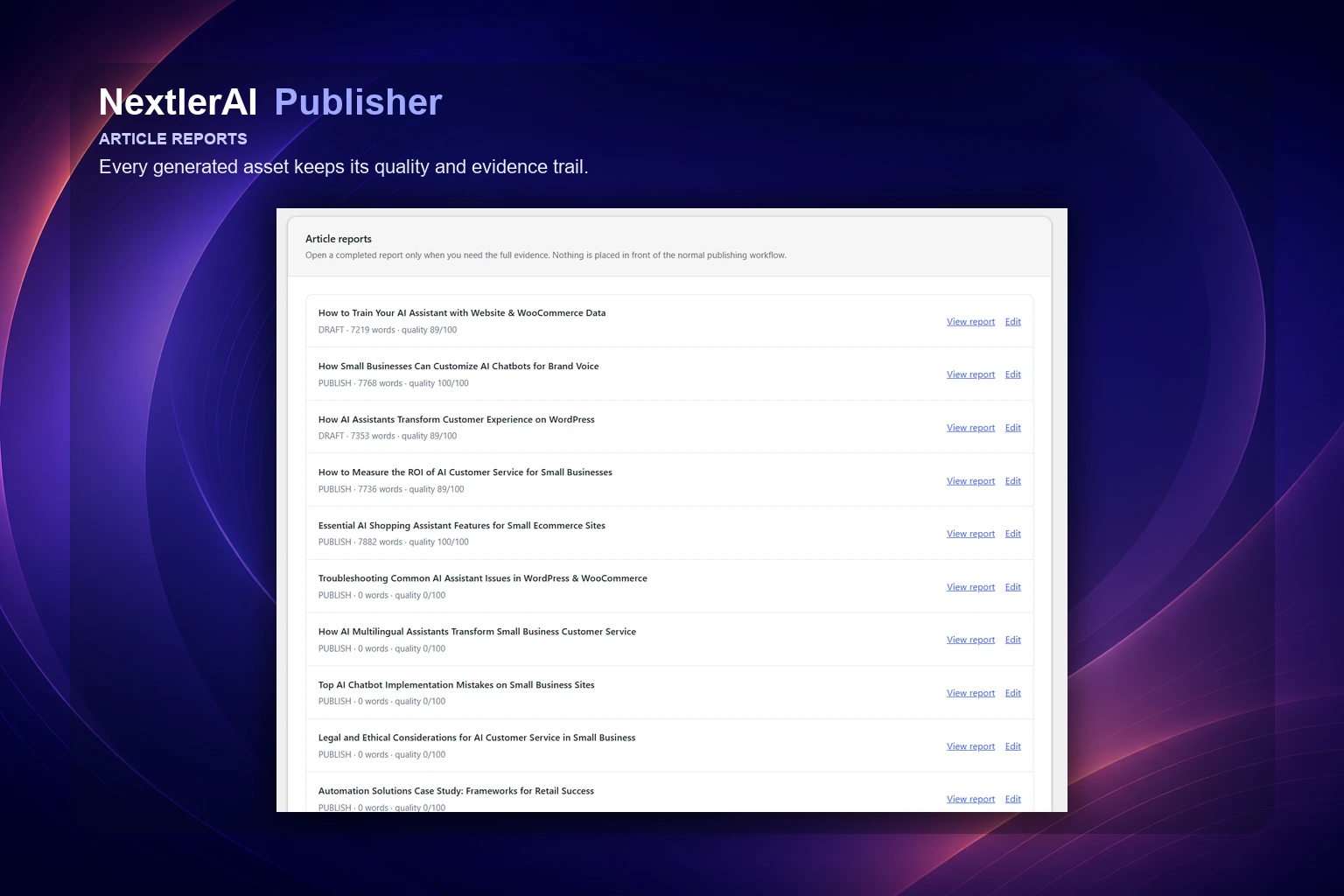
03 / ARTICLE REPORTS
Keep the evidence behind every generated asset.
Reports connect the native WordPress post with requested and actual words, links, sources, media, SEO hand-off, warnings and final quality score.
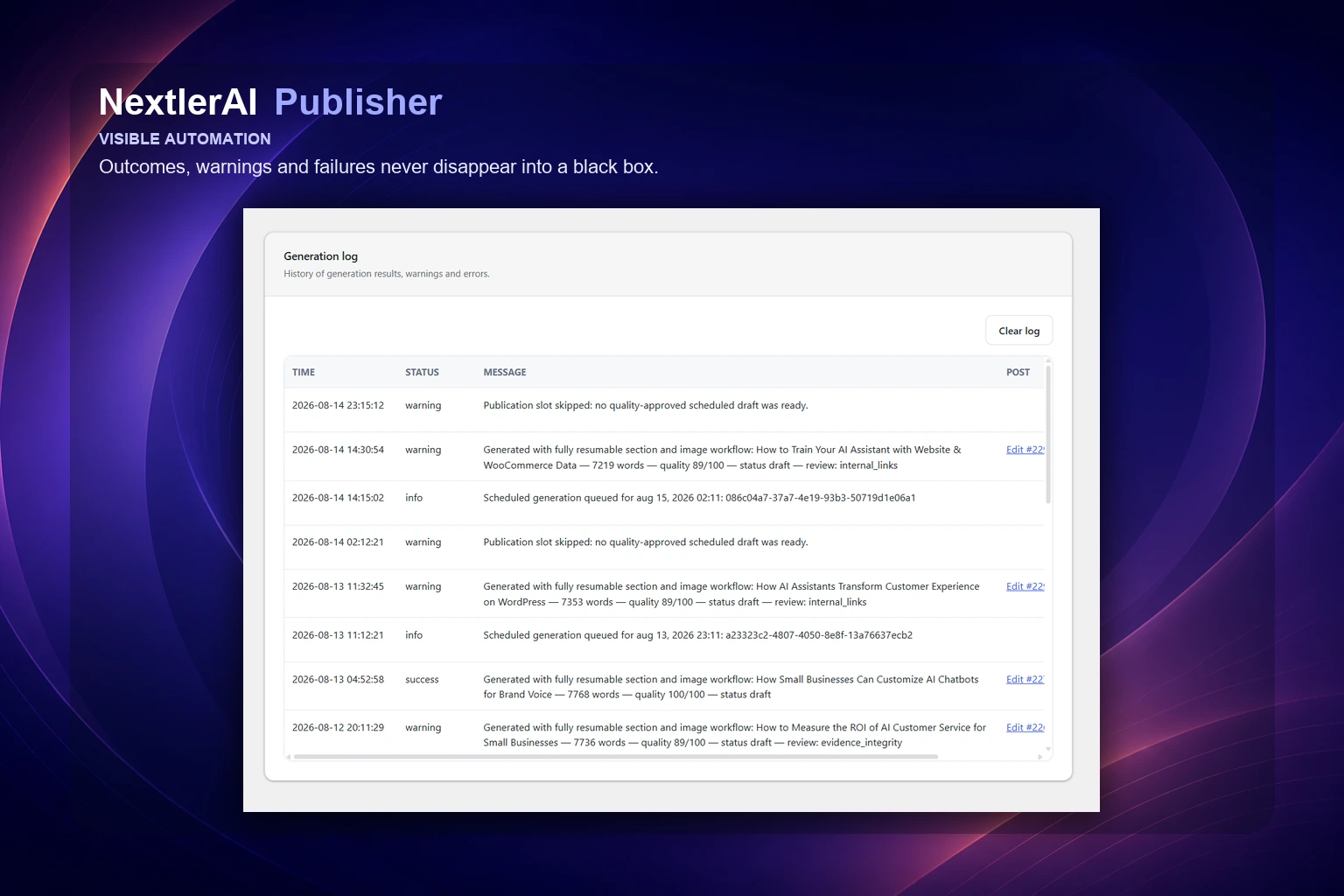
04 / CHECKPOINTS & RECOVERY
Warnings and failures do not disappear.
Safe checkpoints, retry with backoff, stale-job recovery and cooperative cancellation preserve useful progress and keep the next action visible.
REAL PUBLISHER OUTPUT
See the finished articles
in their WordPress context.
Open real NextlerAI blog posts to see the kind of long-form structure, contextual links, visual rhythm and native WordPress presentation Publisher is built to produce.
Explore the NextlerAI blog ↗
Sep 13, 2026 · WORDPRESS ARTICLE
NextlerAI Publisher Automated Blog Setup: Fixes
A practical mistakes-and-fixes guide to configuring NextlerAI Publisher for controlled WordPress blog creation, from topic queues and providers to approvals and scheduling.
Read the article ↗
Sep 12, 2026 · WORDPRESS ARTICLE
Optimizing AI Localization: NextlerAI Translator for WordPress
Discover actionable strategies for managing glossaries, protected terms, review workflows and multilingual plugin integration with NextlerAI Translator in WordPress.
Read the article ↗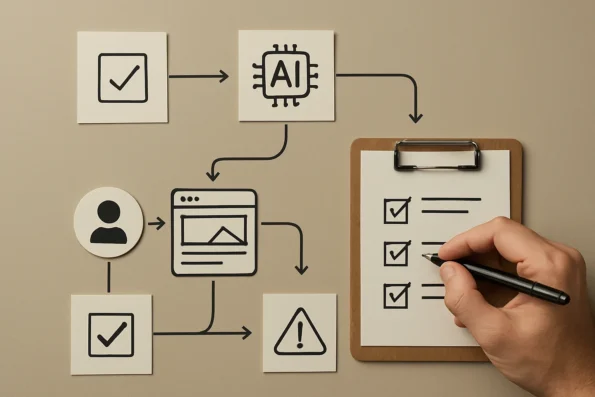
Sep 11, 2026 · WORDPRESS ARTICLE
Embedding Quality Assurance Checkpoints in AI Publishing with NextlerAI
Learn how to design, implement, and optimize quality assurance checkpoints at each stage of an AI-powered publishing workflow in WordPress using NextlerAI Publisher.
Read the article ↗Examples demonstrate the publishing format and editorial output. Search rankings, indexing and business results depend on the site, topic, market and ongoing editorial decisions.
WHAT YOU CONTROL
Automation with an editorial memory.
Every generated asset is informed by the site it will join—not treated as an isolated prompt.
Semantic content inventory
Maps eligible public posts, pages, products and custom post types so new work can extend topical coverage instead of competing with it.
PostsPagesProductsPublic CPTsLanguagesMetadata
Optional live SERP research
Serper can add current result-page evidence to planning. Publisher continues without it.
Optional Search Console signals
OAuth access can add Search Analytics and URL Inspection evidence without becoming a pipeline dependency.
Four text providers
Choose OpenAI, Google Gemini, Anthropic Claude or xAI Grok for the generation workflow.
1,000–10,000 words
Plan narrow articles or substantial long-form guides with adaptive sections and varied content modules.
Section-aware image generation
Create featured and inline images with OpenAI or Gemini, vary their section and paragraph placement, and prepare WebP media with contextual alt text.
FeaturedInlineSection contextWebPAlt text
Contextual links, safely
Use real same-language URLs and verified sources. A relevant-link shortage is reported instead of filled with unrelated links.
WordPress-native output
Create editable posts with an eligible author, categories, tags, comments, language and publication status.
SEO hand-off included
Writes compatible metadata for SEOPress, Yoast SEO, Rank Math and All in One SEO.
TitleDescriptionKeywordCanonicalSocialIndexNow
Keep publishing even when your team is busy.
Add up to 12 publication times per active day, generate ahead of each slot and choose how missed slots behave.
Checkpointed background jobs
Action Scheduler or WP-Cron jobs save safe progress, retry with backoff and recover stale workers.
See exactly what was created, checked and published.
Inspect words, structure, links, sources, media, warnings, blockers and final status without treating automation as a black box.
Requested vs actualWarningsBlockersHistory
MULTILINGUAL PUBLISHING, EXPLAINED
Three language layers.
One controlled workflow.
The language of the Publisher workspace, the language of the content it creates, and the languages detected from your WordPress site are separate settings. One never limits the others.
Operate Publisher in a clear WordPress workspace.
The administration language controls menus, settings and workflow labels only. It does not restrict which languages Publisher can research, write or publish.
Interface language ≠ content languageCreate each article for its actual market.
Select the target language per workflow. Publisher builds the brief, article, metadata, links and quality checks in that language, subject to the capabilities of your selected AI model.
🇬🇧 English🇪🇪 Estonian🇫🇮 Finnish🇩🇪 German🇫🇷 French🇪🇸 Spanish🇮🇹 Italian🇳🇱 Dutch🇸🇪 Swedish🇳🇴 Norwegian🇩🇰 Danish🇵🇱 Polish🇵🇹 Portuguese🌍 More model-supported languages
Respect the language structure already in WordPress.
Publisher reads the WordPress site language and recognises language relationships exposed by WPML and Polylang. Content inventory, duplicate checks and internal links stay inside the correct language context.
WordPress localeWPMLPolylang
Detected automatically from the connected siteSITE LANGUAGE→Market-specific research, brief and article→LOCAL PUBLISHINGCorrect inventory · language-relevant links · connected translations · separate workflow rules per market
BUILT INTO YOUR CONTENT STACK
Fourteen connections.
One publishing flow.
Connect the services you use. Search Console and Serper enrich research but remain optional; Publisher's core inventory-to-publication workflow continues without either.
WordPressPlatform
WooCommerceCommerce
OpenAIAI
Google GeminiAI
Anthropic ClaudeAI
xAI GrokAI
Search ConsoleResearch
Serper.devResearch
SEOPressSEO
Yoast SEOSEO
Rank MathSEO
All in One SEOSEO
PolylangLanguage
WPMLLanguage
TECHNICAL DETAILS
Designed for a real WordPress operation.
- Current tested sales version
- NextlerAI Publisher 3.7.3
- Platform
- WordPress 6.0+
- Runtime
- PHP 7.4+
- Text AI
- OpenAI, Gemini, Claude and Grok
- Image AI
- OpenAI and Gemini image generation
- Article length
- Configurable 1,000–10,000 words
- Optional research
- Serper Google SERP research
- Optional Google data
- Search Console Search Analytics and URL Inspection
- Background processing
- Action Scheduler with WP-Cron fallback
- Output
- Native WordPress post: draft, pending review or published
- Automation
- Up to 12 publication times per active day
- SEO plugins
- SEOPress, Yoast SEO, Rank Math, AIOSEO
- Multilingual
- Polylang and WPML aware
- Inventory context
- Eligible public post types, taxonomies and WooCommerce products
- Media
- Section-aware featured and inline images, WebP and alt text
LATEST PRODUCT UPDATES
Publisher evolves
with your workflow.
Current tested sales version: 3.7.3. Eligible customers get the correct Publisher ZIP and available version history inside My Products. Release announcements below may describe a newer staged update before it is available to every eligible licence.
Read the safe update and rollback guide ↗NextlerAI PublisherNextlerAI Publisher 3.7.6v3.7.6+
NextlerAI Publisher 3.7.6 makes every quality-approved automation article visible as a native WordPress Scheduled post with its exact publication date in the website timezone. WordPress handles the scheduled publication, while Publisher remains an independent watchdog that safely recovers a missed cron execution. Each generated article is reserved for one publication slot, and automation history now records the Generated, Scheduled and Published lifecycle clearly. This stability hotfix moves existing Ready-article reconciliation into a safe one-time background task so in-place plugin updates do not perform post-status transitions during plugin loading. Existing settings, licenses, topics, schedules, jobs, reports, generated posts and SEO metadata are preserved during direct upgrades.
WHAT CHANGED
• Added native WordPress Scheduled status for quality-approved automation articles.
• Stored the exact publication date and time using the configured WordPress website timezone.
• Kept the Publisher publication event as an independent watchdog that verifies every slot and recovers missed native cron publication safely.
• Reserved every generated article to exactly one publication slot and prevented reserved future articles from being reused by another slot.
• Added durable Generated, Scheduled and Published lifecycle timestamps and clearer automation-history messages.
• Added native-schedule reconciliation for existing Ready articles during upgrades.
• Made Pause, Disabled, Pending Review and Draft-only workflows remove native schedules safely while retaining generated content and slot history.
• Prevented fallback publishing from taking an article that is reserved for a later publication slot.
• Made the Publisher watchdog idempotent so a post already published by WordPress is never published twice or reported as skipped.
• Moved native-schedule migration out of the plugin bootstrap request into a safe one-time background reconciliation event.
• Prevented synchronous post-status transitions while WordPress is replacing or loading the plugin during an in-place update.
• Preserved all existing settings, licenses, API keys, topics, publication times, generated posts, jobs, reports and completed automation history.
WordPress 6.0PHP 7.4
Choose Publisher plan ↗Customers download this release from My Products.
NextlerAI PublisherNextlerAI Publisher 3.7.4v3.7.4+
NextlerAI Publisher 3.7.4 is a major production update introducing a redesigned responsive administration experience, durable multi-time publishing schedules, improved topic and content planning, stronger long-form article quality controls, more natural contextual linking, section-aware image placement, complete WordPress content inventory support, native author and taxonomy controls, detailed article reports and safer optional research integrations. Article length remains fully configurable from 1,000 to 10,000 words. Existing settings, licenses, topics, schedules, background jobs, reports, generated posts and SEO metadata remain compatible with direct upgrades from version 3.5.0.
WHAT CHANGED
• Reorganised the Publisher administration into Dashboard, Topics, Publisher, Articles, Insights, Settings and License workspaces.
• Added a polished responsive interface for desktop, tablet and mobile.
• Added durable automation slot tracking so generated, ready, scheduled, published, skipped and failed publication slots remain visible and cannot be queued twice.
• Added support for up to 12 separate publication times per active publishing day.
• Added configurable daily, selected-weekday and interval publishing schedules.
• Added the option to generate the first article immediately when activating a schedule.
• Added interactive Create articles and Live Pipeline views with live research, writing, linking, media and quality-stage progress.
• Added an article manager for generated, ready, review, scheduled and published articles, including archive, restore and WordPress Trash actions.
• Fixed the Dashboard automation card so active schedules always display the next valid publication and generation slot.
• Expanded the content inventory to every eligible public WordPress post type, including posts, pages, products, Guides, Portfolio and other public custom post types.
• Added custom post type taxonomy terms to automatic website topic inference, cluster generation, cannibalisation checks and internal-link selection.
• Added automatic sitemap discovery for Rank Math, Yoast, SEOPress, WordPress core and common sitemap locations.
• Retained manual sitemap configuration as an explicit override of the automatically detected sitemap.
• Strengthened contextual internal-link ranking using titles, headings, SEO keywords, taxonomies, full page content and language relevance.
• Added products, Guides and eligible custom post types as natural internal-link targets.
• Changed unavailable link quotas into non-blocking quality targets. Articles continue with all relevant verified links available, while reports clearly show the requested and achieved counts.
• Improved internal-link distribution so links appear naturally across relevant body sections instead of being grouped together.
• Added verified external-source handling with priority for official, primary and configured authoritative sources.
• Made Google Search Console and Serper optional. Missing, invalid or temporarily unavailable integrations no longer prevent article generation.
• Added clear per-article reporting for Search Console, SERP, internal-link and external-source availability.
• Added adaptive article architecture for every configured length from 1,000 to 10,000 words.
• Added dynamic section counts, section budgets, heading density and FAQ size while preserving the configured article-length contract.
• Strengthened section ownership and anti-repetition controls so definitions, comparisons, recommendations, steps, examples, recaps and FAQ material do not repeat across the article.
• Added automatic repair of sections that violate their assigned purpose or overlap substantially with other sections.
• Added multiple interchangeable comparison, workflow, decision, diagnostic, risk, checklist and actionable module families.
• Prevented consecutive articles from reusing the same article archetype and selected less-similar module sequences from recent articles.
• Added a stronger single-core-structure quality gate and guaranteed one accessible table of contents per article.
• Removed duplicate contents headings, duplicate navigation lists and reference placeholders.
• Blocked unsupported numerical and named-vendor comparison tables unless verified evidence supports the affected claims.
• Added qualitative evidence-aware table fallbacks when reliable numerical data is unavailable.
• Added native WordPress author selection, automatic or existing-only tags, configurable tag limits, categories and WordPress comment defaults.
• Improved featured and inline image prompts with article-specific and section-specific visual context.
• Added varied image formats, framing, lighting, palettes, eligible sections and natural paragraph positions.
• Prevented inline images from being inserted into the introduction, table of contents, FAQ or conclusion.
• Added non-repeating recent image-layout selection while preserving the configured image count.
• Cached approved media plans so resumed background jobs retain the same image plan while each new article receives a different layout.
• Improved article reports, quality scoring and final checks for repetition, section uniqueness, evidence integrity, valid jump links, clean HTML, heading density, unsupported tables, bare URLs and placeholders.
• Added a responsive Guides & Help link to the Publisher administration.
• Updated the default license server to nextlerai.com and retained secure migration from the previous endpoint.
• Kept generated FAQ questions and answers as normal, fully visible HTML on every WordPress site.
• Removed plugin-side FAQ JavaScript. WordPress themes may optionally enhance the visible FAQ markup with their own accordion behaviour.
• Preserved existing API keys, licenses, settings, topics, schedules, jobs, reports, posts, links, images and SEO metadata during the upgrade.
WordPress 6.0PHP 7.4
Choose Publisher plan ↗Customers download this release from My Products.
NextlerAI PublisherNextlerAI Publisher 3.5.0v3.5.0+
Research-first multilingual WordPress publishing with connected SEO and media workflows.
WHAT CHANGED
Initial NextlerAI customer release.
WordPress 6.0PHP 7.4WooCommerce 9.9
Choose Publisher plan ↗Customers download this release from My Products.
FROM DOWNLOAD TO FIRST DRAFT
One download.
A controlled publishing system.
Your NextlerAI account keeps the Publisher ZIP, available version history and its own licence key together.
Open the complete setup guide ↗Download
Open My Products and download the latest eligible Publisher ZIP.
Install
Upload the ZIP from WordPress → Plugins → Add New Plugin. Back up before replacing an existing version.
Activate
Use the Publisher licence displayed beside this product and select Production, Staging or Development accurately.
Connect
Add one required text provider, then test an approved topic as a Draft before enabling images, optional research or automation.
QUESTIONS, ANSWERED
Before Publisher joins your workflow.
Clear answers about automation, provider costs, optional integrations, native WordPress output and quality safeguards.
Does NextlerAI include AI usage?+
Publisher uses your own supported AI-provider keys. Provider usage is billed directly by that provider.
What does 100% automatic mean?+
Once providers, topics, quality rules and the schedule are configured, Publisher can run the complete research-to-publication workflow without manual hand-offs. You can still keep draft or pending-review approval.
Can it publish without review?+
Yes. Jobs may be drafted, sent to pending review or published automatically according to the workflow you configure. A quality gate runs before automatic release.
Will it duplicate content already on my website?+
Publisher inventories eligible public content and checks high title and keyword overlap before generation. It can block conflicting topics, but no heuristic replaces editorial judgement.
How long can Publisher articles be?+
The configured minimum and maximum can range from 1,000 to 10,000 words. Publisher adapts the brief, sections and content modules to the topic and target length.
Are Search Console and Serper required?+
No. Both integrations are optional. They can enrich topic and research evidence, while Publisher continues with the WordPress inventory and model context without them.
What happens if there are not enough relevant links?+
Publisher records the requested and actual counts and continues with a warning. It does not insert unrelated internal links or unverified sources only to satisfy a number.
Does Publisher generate into custom post types?+
Eligible public custom post types can inform inventory, topics and internal links. Publisher 3.7.3 generates an editable native WordPress post.
How are images created and placed?+
OpenAI or Gemini can create featured and inline images. Publisher uses section context, varies placement, avoids unsuitable sections, prepares WebP media and writes alt text.
Which SEO plugins are supported?+
SEOPress, Yoast SEO, Rank Math and All in One SEO metadata integrations are included.
Does it support multilingual sites?+
Publisher is aware of WordPress locale, WPML and Polylang. Inventory, duplicate checks, internal links, categories and generated posts stay in the selected language context.
What happens when quality fails?+
A blocker keeps the article out of automatic publication and remains visible in the report. Safe shortages such as fewer relevant links can remain warnings instead.
What happens if a long background job is interrupted?+
Publisher saves checkpoints, retries eligible temporary failures with backoff and can recover stale workers. Action Scheduler is used when available, with WP-Cron as a fallback.
How are updates and rollback handled?+
Publisher 3.7.3 uses a controlled manual ZIP replacement workflow. Back up, pause automation, drain jobs and verify a Draft after the update. There is no built-in one-click rollback.
Does Publisher guarantee rankings or traffic?+
No. Publisher automates a controlled content-production workflow and reports its quality evidence. Indexing, rankings, traffic and conversions depend on the site, topic, market and ongoing decisions.
NEXTLERAI PUBLISHER
Put your WordPress publishing workflow on 100% automatic.
A powerful publishing system that keeps your content, provider accounts, quality rules and final publishing control in your hands.




