


WYDAJNE PUBLIKOWANIE AI DLA WORDPRESSA — W PEŁNI AUTOMATYCZNE
NextlerAI Publisher
Automatyczne badanie, tworzenie i publikowanie treści z zachowaniem Twojej kontroliNextlerAI Publisher to wtyczka WordPress do pobrania, która automatycznie bada, tworzy, optymalizuje, planuje i publikuje kompletne artykuły. Znajduje wartościowe możliwości treści, planuje i tworzy uporządkowane artykuły o długości 1000–10 000 słów, dodaje kontekstowe linki i obrazy dopasowane do sekcji, sprawdza jakość oraz publikuje zgodnie z harmonogramem — opcjonalnie po zatwierdzeniu.
- Wtyczka ZIP do pobrania
- Zainstaluj na własnej witrynie WordPress
- Połącz własnego dostawcę AI
W pełni automatycznyPrzeprowadź cały proces od możliwości treści do opublikowanego artykułu WordPress.Źródła przed pisaniemInwentarz witryny, opcjonalne dane wyszukiwania i zweryfikowane źródła tworzą założenia treści.Automatyzacja pod Twoją kontroląPublikuj automatycznie albo zachowaj etap ręcznej weryfikacji.
DZIAŁA Z TWOIM SYSTEMEM
 WordPress
 Search Console
 OpenAI
 Gemini
 Claude
 Grok
Serper.dev
SEOPress
Grok
Serper.dev
SEOPress
 Yoast SEO
Rank Math
All in One SEO
Polylang
WPML
Yoast SEO
Rank Math
All in One SEO
Polylang
WPML
WordPress
Search Console
OpenAI
Gemini
Claude
Grok
Serper.dev
SEOPress
Yoast SEO
Rank Math
All in One SEO
Polylang
WPML
Wybrany zakupWordPress plugin ZIP · Instant download
Kup teraz ↗✓ Bezpieczna płatność · Natychmiastowe pobranie · 14-dniowa gwarancja zwrotu pieniędzy
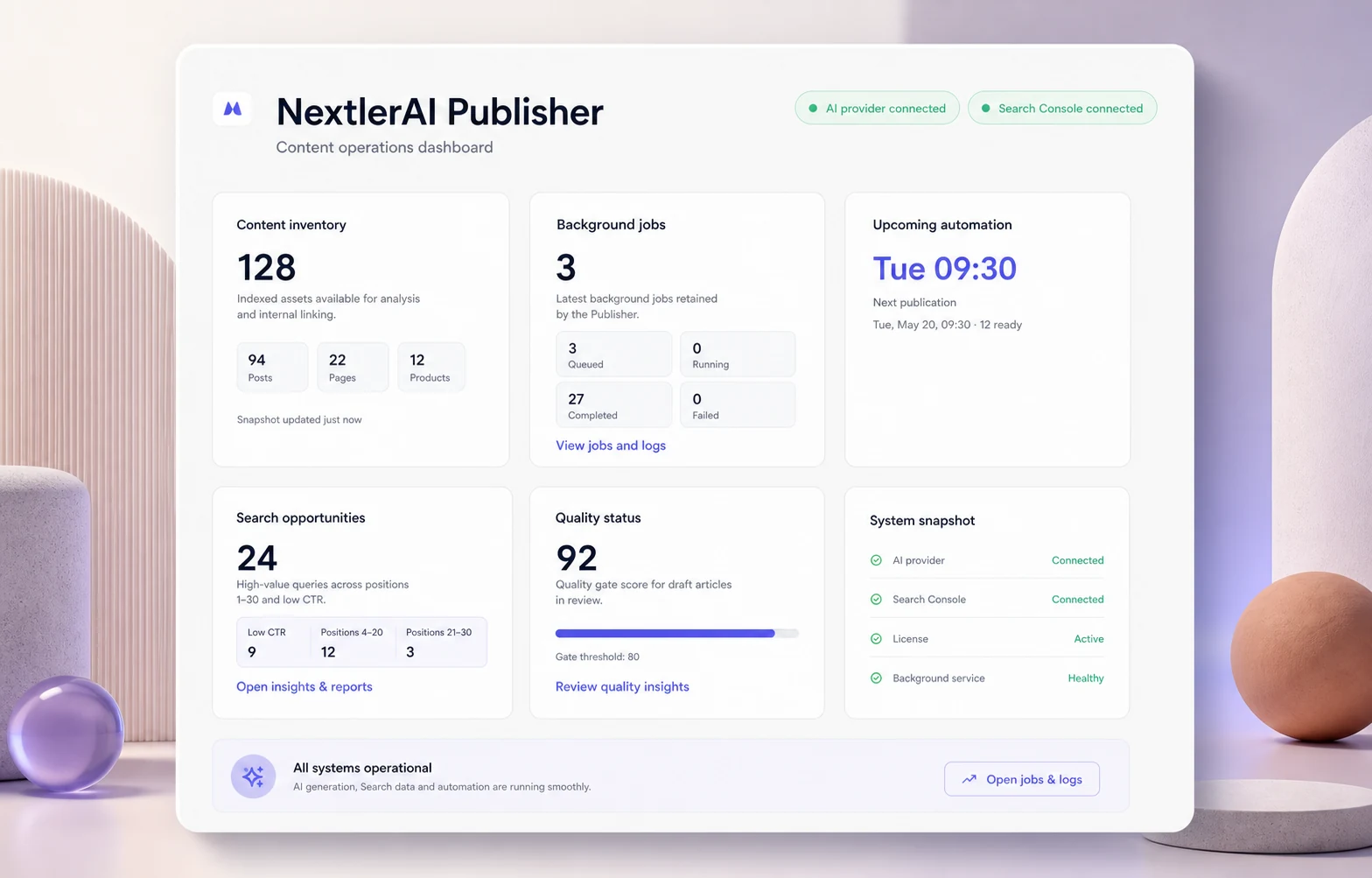
Od pomysłu do publikacji
BADAJ · TWÓRZ · OPTYMALIZUJ · PUBLIKUJTWÓJ WORDPRESS. TWOJE DANE. TWOJE KLUCZE AI.
CO OBEJMUJE ZAKUP
Kompletny system publikowania AI wewnątrz WordPressa.
Zakup obejmuje kompletną wtyczkę do instalacji, wybraną licencję witryny i narzędzia do automatyzacji publikacji z własnego panelu WordPress.
Wtyczka WordPress
Complete WordPress plugin
Pobierz gotowy do instalacji plik ZIP i zainstaluj NextlerAI Publisher bezpośrednio z panelu WordPress.
Plugin ZIPWordPress adminSelf-hosted
Automatyczny proces publikacji
Badaj, planuj, twórz, optymalizuj, harmonogramuj i publikuj kompletne artykuły WordPress w pełni automatycznie.
Kompletne długie artykuły
Twórz uporządkowane artykuły o długości 1000–10 000 słów z użytecznymi sekcjami, tabelami, listami, FAQ i czystym formatowaniem WordPress.
Obrazy, linki i SEO
Generuj obrazy wyróżniające i obrazy w treści, dodawaj linki kontekstowe i przygotowuj zgodne metadane SEO.
Harmonogram i zatwierdzanie
Zapisuj szkice, wymagaj weryfikacji albo automatycznie publikuj zatwierdzone jakościowo artykuły według harmonogramu.
Panel publikacji i raporty
Zarządzaj tematami, zadaniami, artykułami i harmonogramami oraz sprawdzaj oceny jakości, ostrzeżenia i historię publikacji.
Licencja, aktualizacje i pomoc
Aktywuj wtyczkę na liczbie witryn objętej planem i otrzymaj odpowiedni okres aktualizacji i pomocy.
Dokumentacja i poradniki konfiguracji
Korzystaj z poradników instalacji, dostawcy AI i procesu publikacji od pierwszego pobrania po automatyczne publikowanie.
InstallationAI setupAutomationPomoc
AI CONNECTIONPołącz własne konto OpenAI, Gemini, Claude lub Grok. Dostawca AI i opcjonalny Serper rozliczają użycie oddzielnie.
ŚCIEŻKA W PEŁNI AUTOMATYCZNEJ PUBLIKACJI
POŁĄCZ TREŚCI I SYSTEM WYSZUKIWANIAWybierz systemy raz. Publisher utrzymuje proces w ruchu wewnątrz WordPressa.
WordPressSearch ConsoleOpenAIGeminiClaudeYoast SEOOd możliwości w wyszukiwarce
do opublikowanego artykułu.
Publisher łączy wiedzę o witrynie, badanie, produkcję, kontrolę jakości i publikowanie WordPress w jeden wydajny, w pełni automatyczny proces.
Ustaw źródła i reguły
Połącz WordPress i dostawcę tekstu, a następnie wybierz opcjonalne integracje Search Console, Serper, obrazy i SEO. Określ język, jakość i zasady zatwierdzania.
Find content opportunities worth publishing.
Publisher mapuje odpowiednie treści publiczne, rozpoznaje klastry i tematy, ocenia możliwości oraz sprawdza duże podobieństwo przed generowaniem.
Twórz kompletne artykuły z linkami, źródłami, obrazami i metadanymi.
Tworzy założenia, zróżnicowany plan sekcji, artykuł 1000–10 000 słów, linki kontekstowe, zweryfikowane źródła, obrazy dopasowane do sekcji i metadane SEO.
Zatwierdź albo uruchom automatycznie
Zachowuj szkice lub oczekujące materiały albo pozwól gotowym jakościowo wpisom WordPress automatycznie wypełniać harmonogram dzięki odpornym zadaniom w tle.
BUSINESS VALUEConsistent publishing · less manual production · evidence-led topics · a content system that keeps moving
ZOBACZ, CO NAPRAWDĘ ŁĄCZY PUBLISHER
Twoje źródła, dane i reguły.
Visible before generation.
Publisher nie jest ukrytym łańcuchem poleceń. Widzisz aktywnych dostawców, dostępne źródła badawcze oraz zasady dotyczące stylu, linków, mediów, jakości i metadanych SEO.
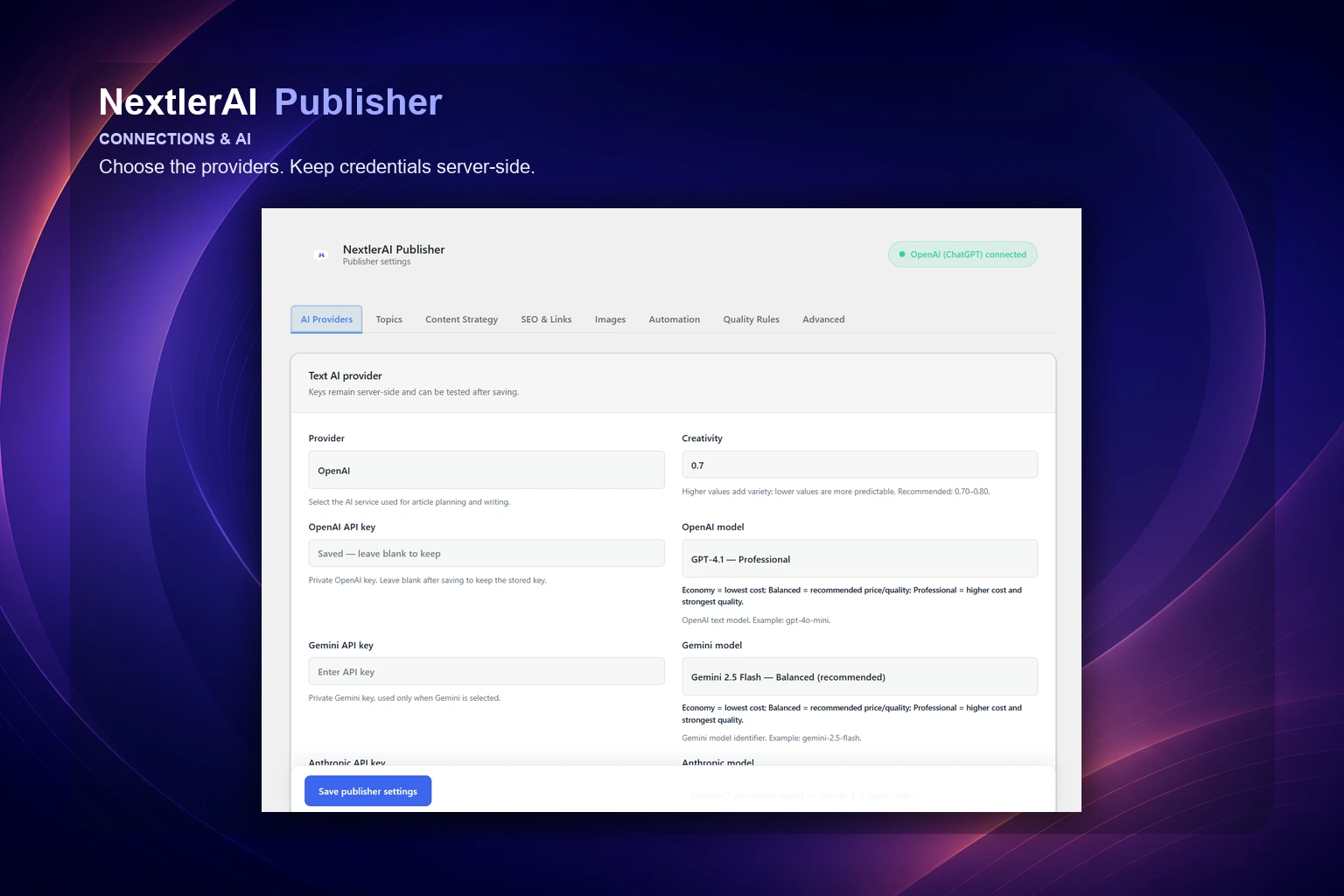
01 / CONNECTIONS
Wybierz AI i przechowuj dane dostępowe na serwerze.
Wybierz OpenAI, Gemini, Claude lub Grok do planowania i pisania. OpenAI lub Gemini mogą tworzyć obrazy. Klucze klienta pozostają chronione w WordPressie.
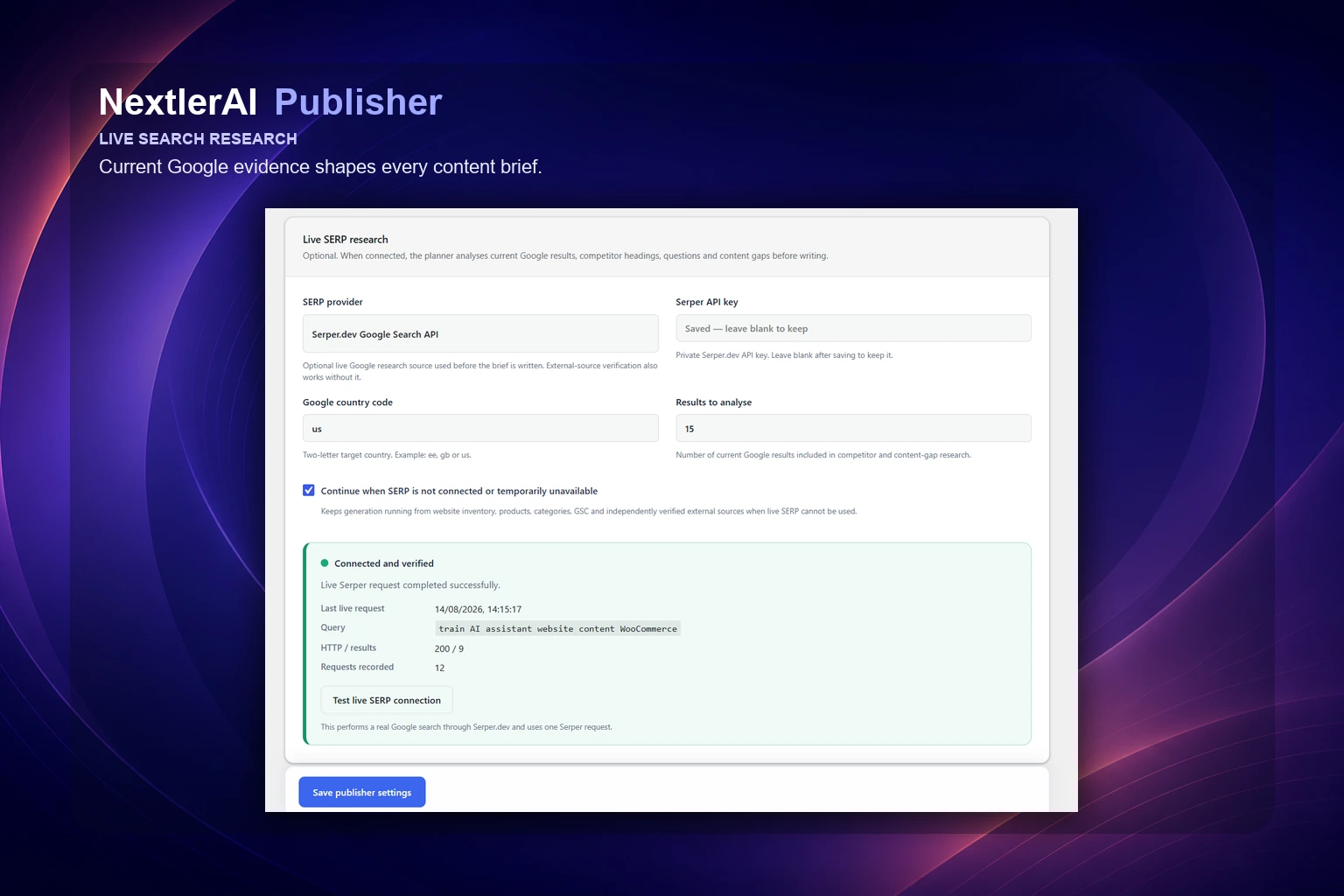
02 / OPTIONAL RESEARCH
Dodaj aktualne dane wyszukiwania, gdy są przydatne.
Serper i Search Console mogą wzbogacać tematy i założenia aktualnymi danymi, ale nie są wymagane — proces działa dalej z inwentarzem witryny i kontekstem modelu.
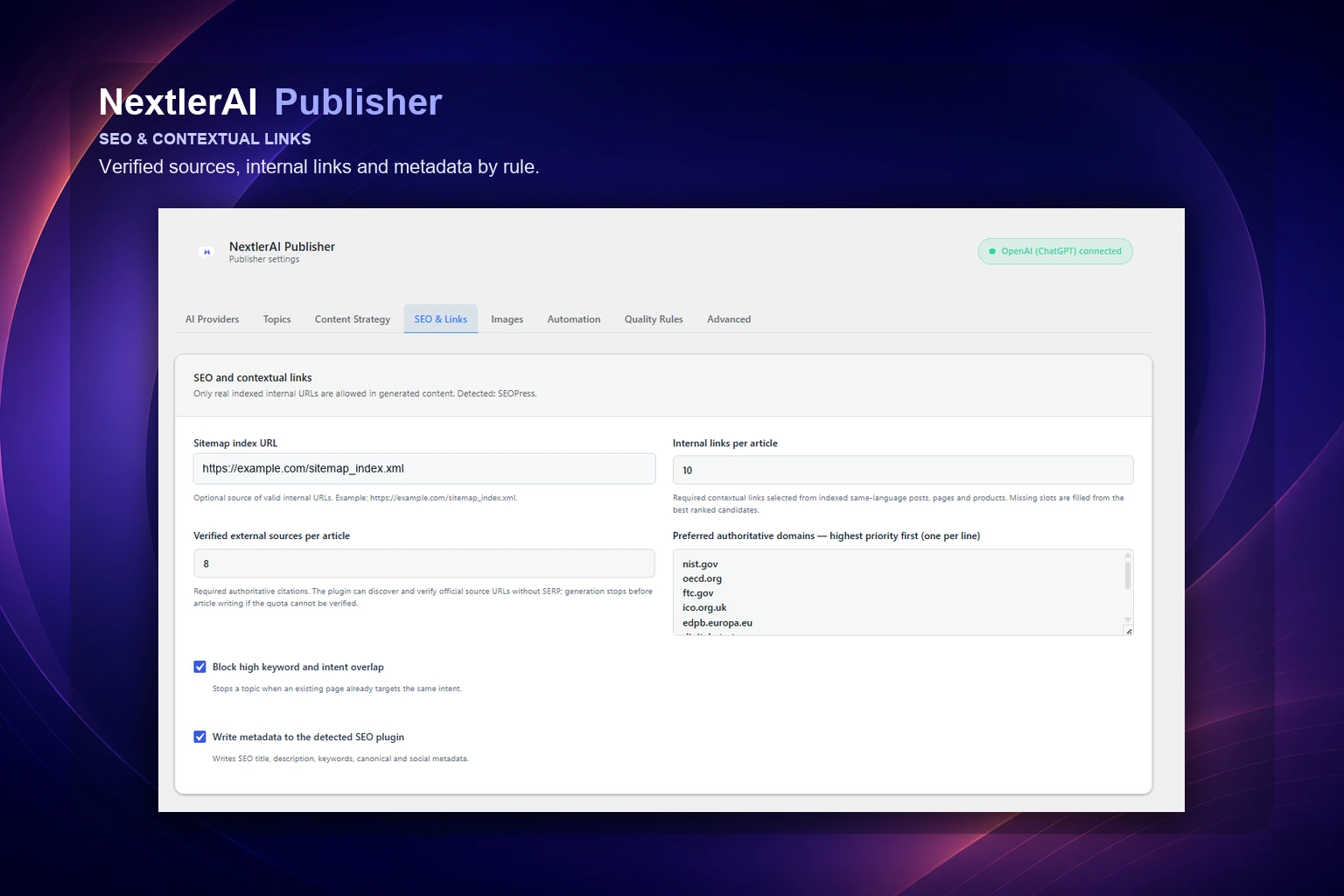
03 / CONTENT, SEO & LINKS
Określ brzmienie i powiązania każdego artykułu.
Ustaw styl marki, długość, cele linków, wymagania źródeł, obrazy dopasowane do sekcji, próg jakości i zgodne metadane wtyczek SEO w jednym kontrolowanym środowisku.
A COMPLETE CONTENT OPERATION
Od badania do publikacji.
One automatic workflow.
Publisher łączy to, co zwykle znajduje się w osobnych narzędziach: co napisać, co już istnieje, jak zbudować artykuł, które źródła go wspierają, jak łączyć strony i kiedy opublikować gotowy materiał.
Research before generation
Inwentarz witryny zawsze wpływa na założenia. Opcjonalne dane Serper i Search Console dodają aktualne informacje o wyszukiwaniu, a bez połączenia proces działa dalej.
Protect existing authority
Inwentarz uwzględniający język i kontrola podobieństwa ujawniają konflikty, a linki kontekstowe łączą artykuł z odpowiednią istniejącą treścią i zweryfikowanymi źródłami.
Publish as a system
Uporządkowany długi tekst, obrazy dopasowane do sekcji, linki, metadane, natywne atrybuty WordPress, kontrola jakości i harmonogram przechodzą przez jedno odporne zadanie.
PROCES PUBLISHER
Od możliwości do gotowego opublikowanego materiału WordPress.
Inwentaryzuje odpowiednie publiczne wpisy, strony, produkty i typy niestandardowe wraz z językami, taksonomią, nagłówkami i metadanymi.
Sprawdza podobieństwo, przygotowuje rzeczywiste linki i łączy dane witryny z opcjonalnymi sygnałami Serper i Search Console.
Tworzy założenia, wybiera zróżnicowaną strukturę artykułu i pisze treść o długości 1000–10 000 słów sekcja po sekcji.
Dodaje odpowiednie linki i zweryfikowane źródła, a następnie tworzy media WebP dopasowane do sekcji z kontekstowym tekstem ALT.
Raportuje słowa, strukturę, linki, źródła, media i blokady. Braki odpowiednich linków pozostają widoczne zamiast wymuszania niepowiązanych adresów.
Tworzy natywny wpis WordPress jako szkic, do weryfikacji lub automatycznej publikacji po kontroli jakości, z punktami kontrolnymi i odzyskiwaniem.
ZOBACZ CAŁY PROCES
Not a prompt box.
A publishing workspace.
Poznaj rzeczywisty proces Publisher: od wiedzy o witrynie i strategii tematów po kontrolowane tworzenie długich treści, wiele godzin publikacji i możliwe do prześledzenia raporty.
01 / STRATEGY
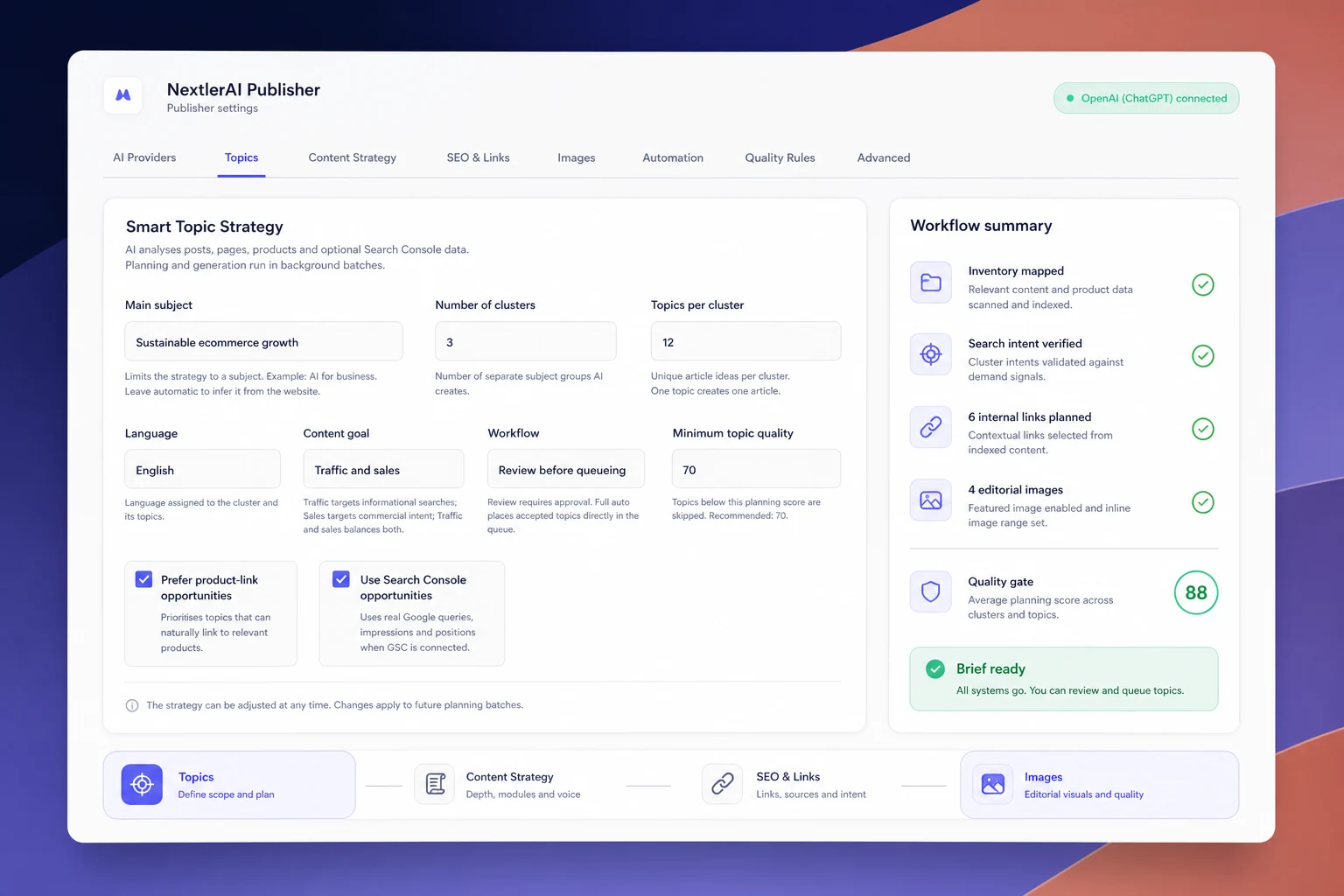
Zamień istniejącą witrynę w mapę redakcyjną.
Rozpoznaj klastry witryny, wybierz cel i język, ustaw minimalną ocenę oraz sprawdź lub zatwierdź tematy przed generowaniem.
02 / EVIDENCE & REPORTS
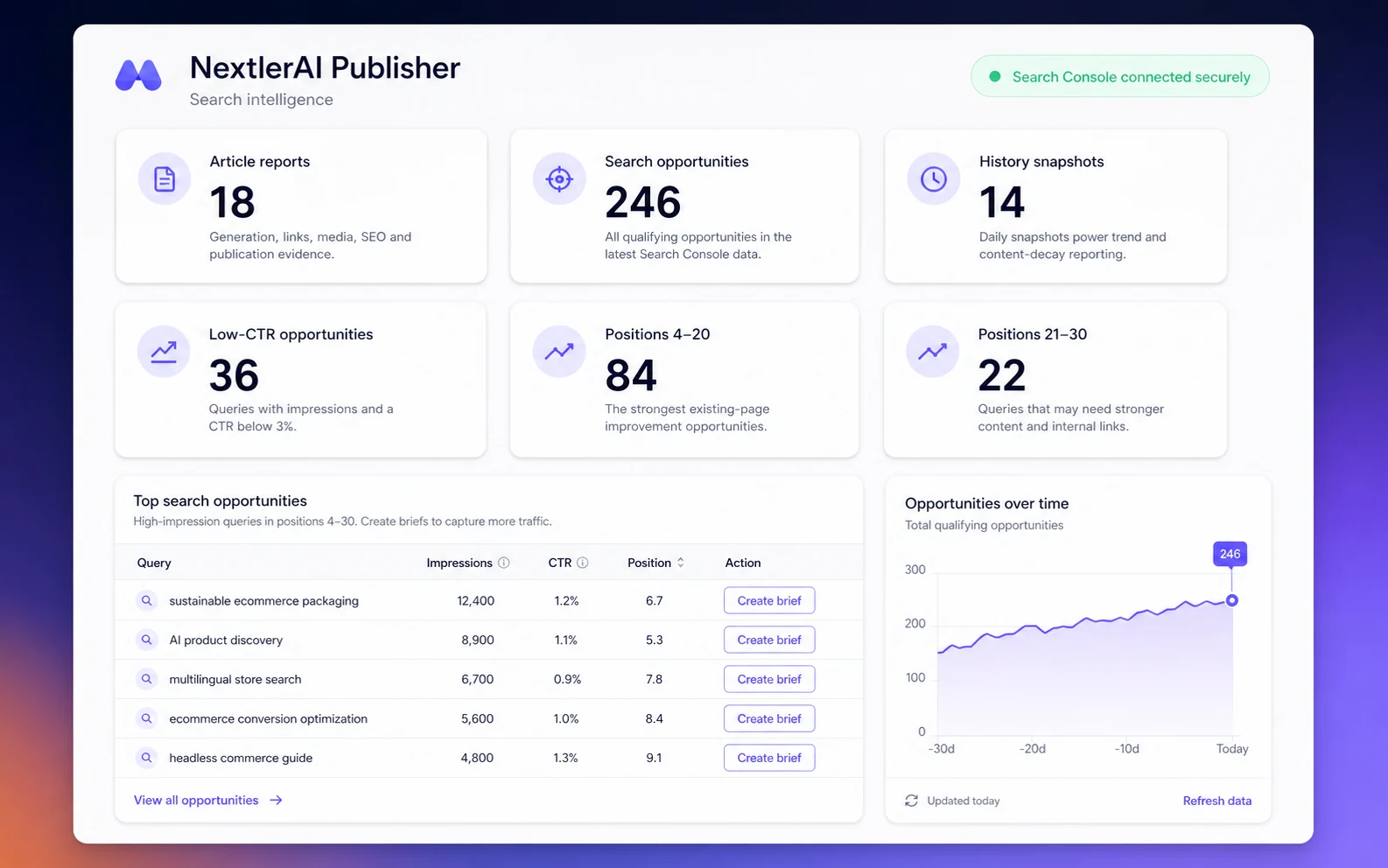
Prioritise evidence, not guesses.
Połącz inwentarz z opcjonalnymi sygnałami wyszukiwania, a następnie sprawdź planowaną i rzeczywistą liczbę słów, linki, media i dane jakości każdego artykułu.
03 / AUTOMATION
Schedule production without losing control.
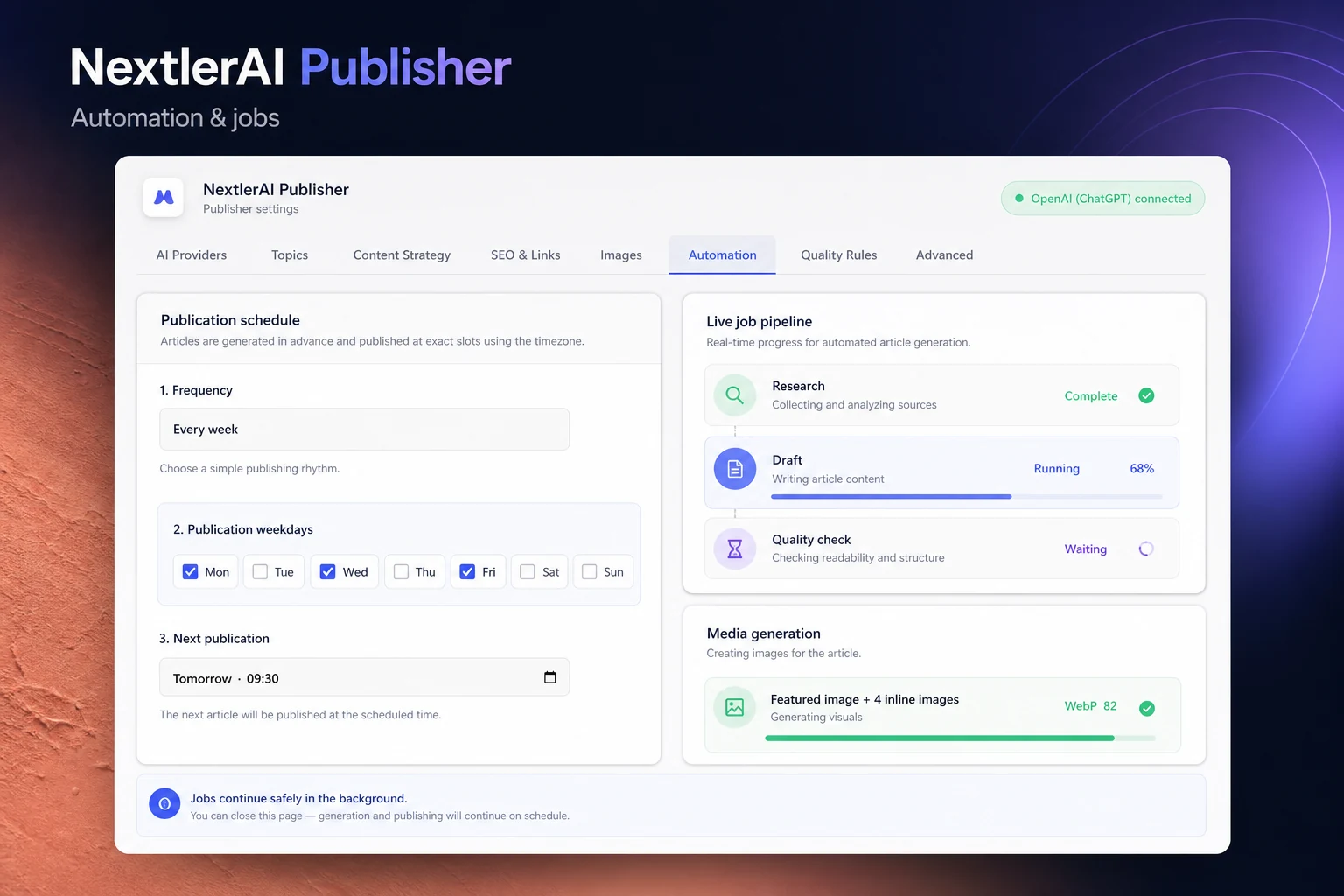
Używaj wielu dziennych godzin publikacji, generuj z wyprzedzeniem, śledź punkty Live Pipeline i wybierz szkic, weryfikację lub pełną automatyzację.
PROCES PUBLIKACJI, KTÓRY MOŻESZ KONTROLOWAĆ
Zaplanuj. Dodaj do kolejki. Opublikuj.
Zobacz, co się wydarzyło.
Automatyczne nie oznacza niewidoczne. Godziny harmonogramu, kolejka tematów, Live Pipeline, raporty i historia generowania pozostają dostępne do kontroli i interwencji.
01 / HARMONOGRAM
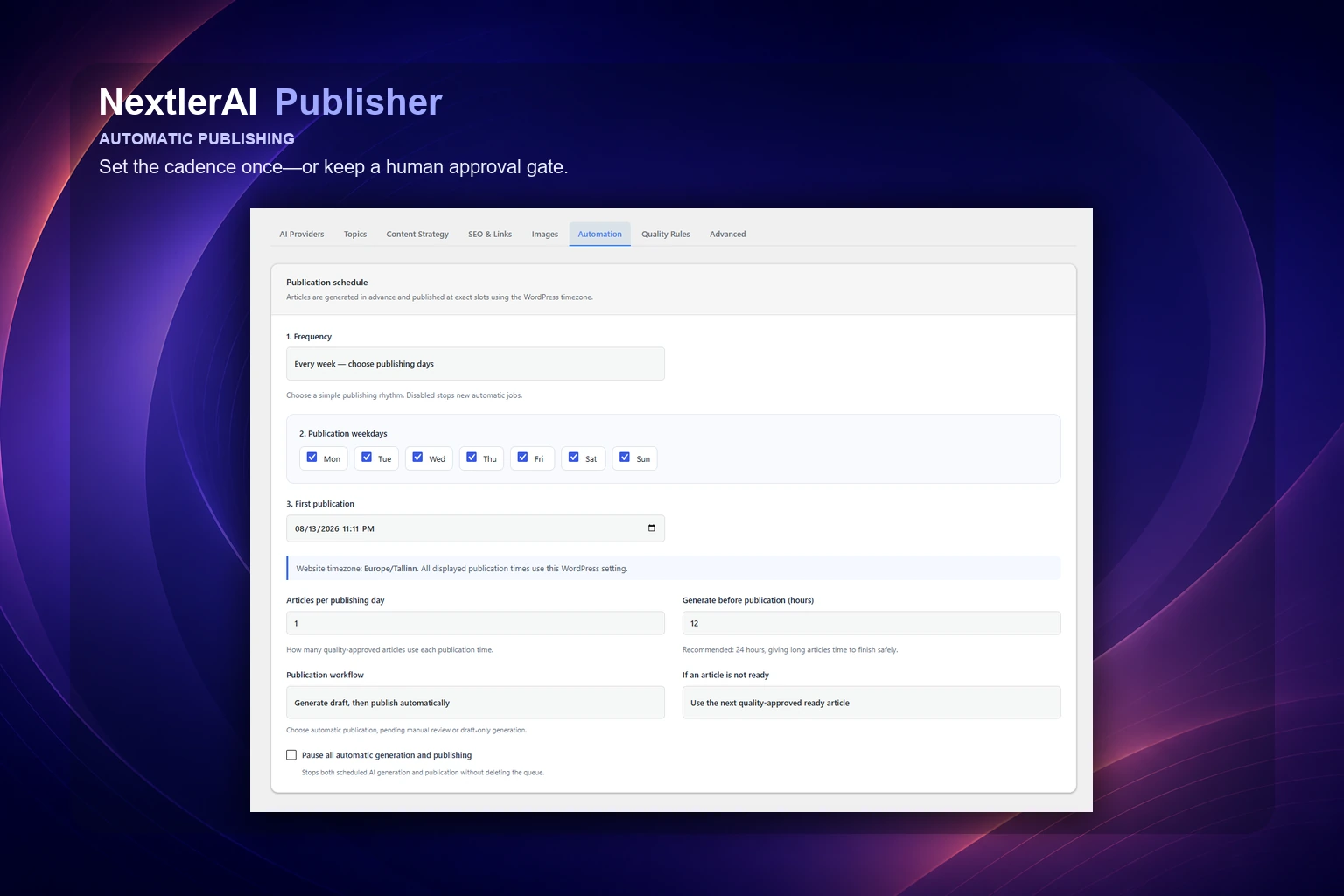
Wybierz częstotliwość i tryb zatwierdzania.
Dodaj do 12 godzin publikacji na aktywny dzień, generuj z wyprzedzeniem, ustaw limit dzienny i wybierz następny gotowy materiał lub pominięcie nieudanego terminu.
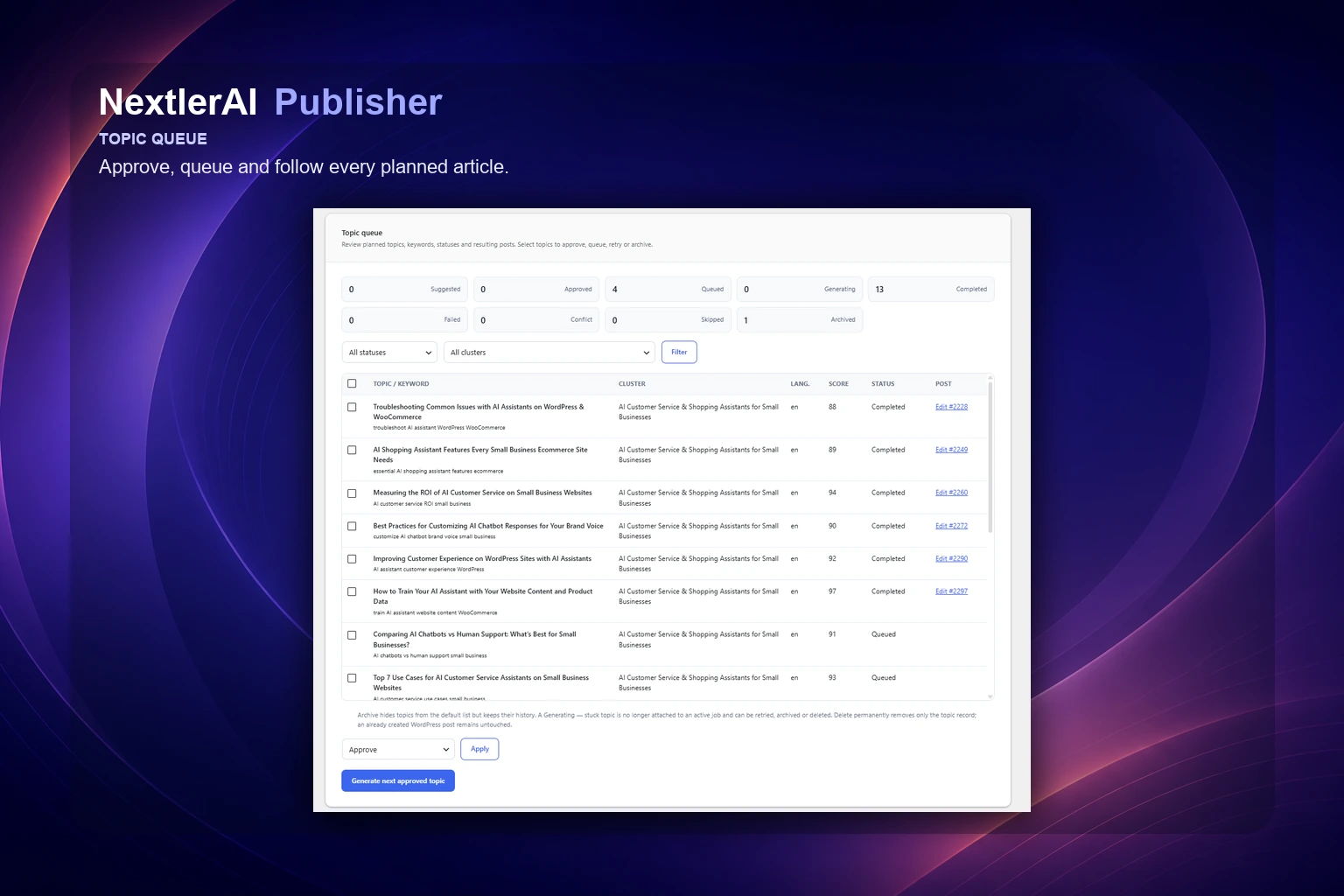
02 / KOLEJKA TEMATÓW
Wiedz, co jest zaplanowane, zatwierdzone i ukończone.
Filtruj tematy według klastra, języka i statusu, sprawdzaj oceny i podobieństwo, a następnie zatwierdzaj, kolejkuj lub archiwizuj bez utraty historii.
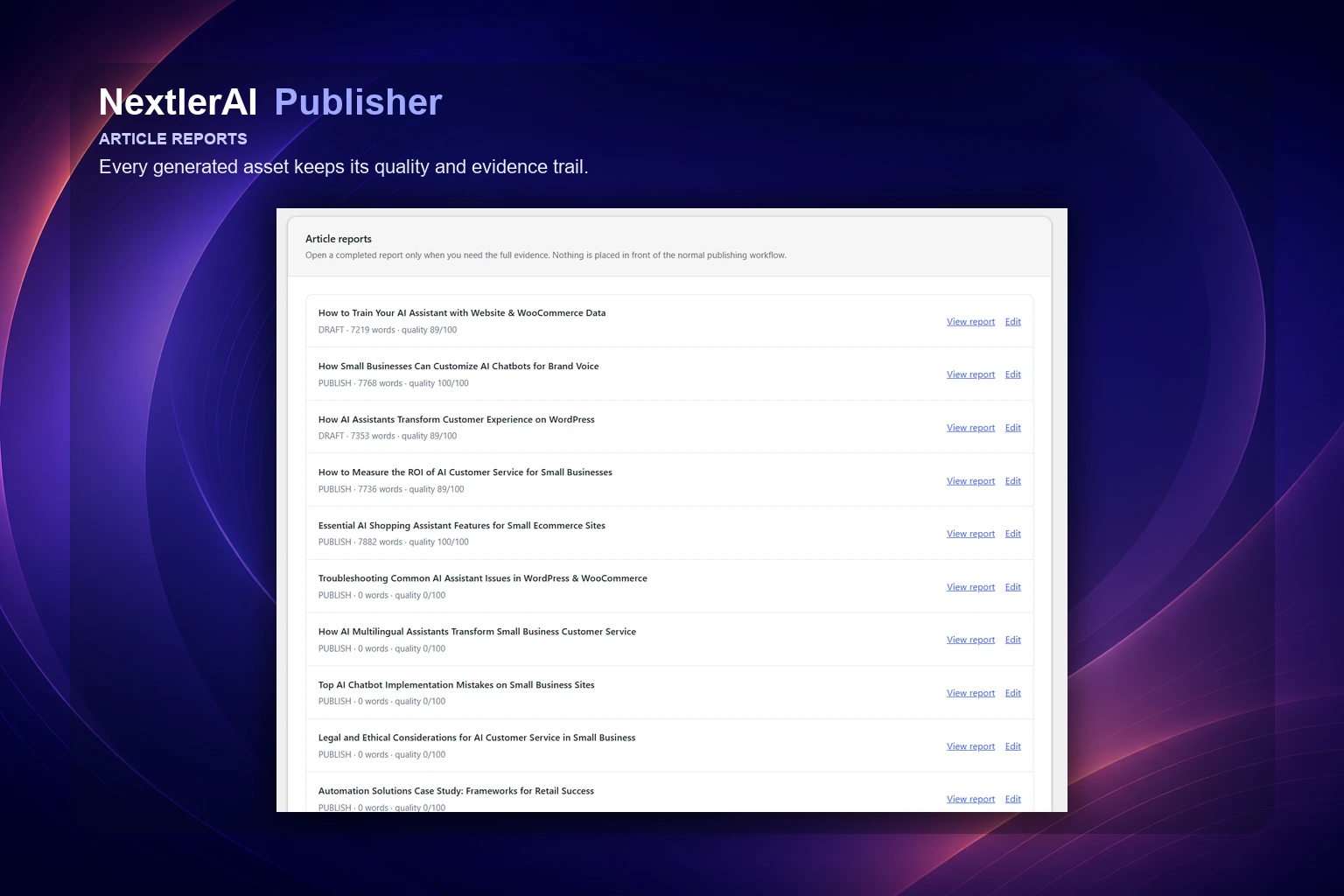
03 / RAPORTY ARTYKUŁÓW
Zachowaj dane stojące za każdym wygenerowanym materiałem.
Raporty łączą natywny wpis WordPress z planowaną i rzeczywistą liczbą słów, linkami, źródłami, mediami, SEO, ostrzeżeniami i końcową oceną jakości.
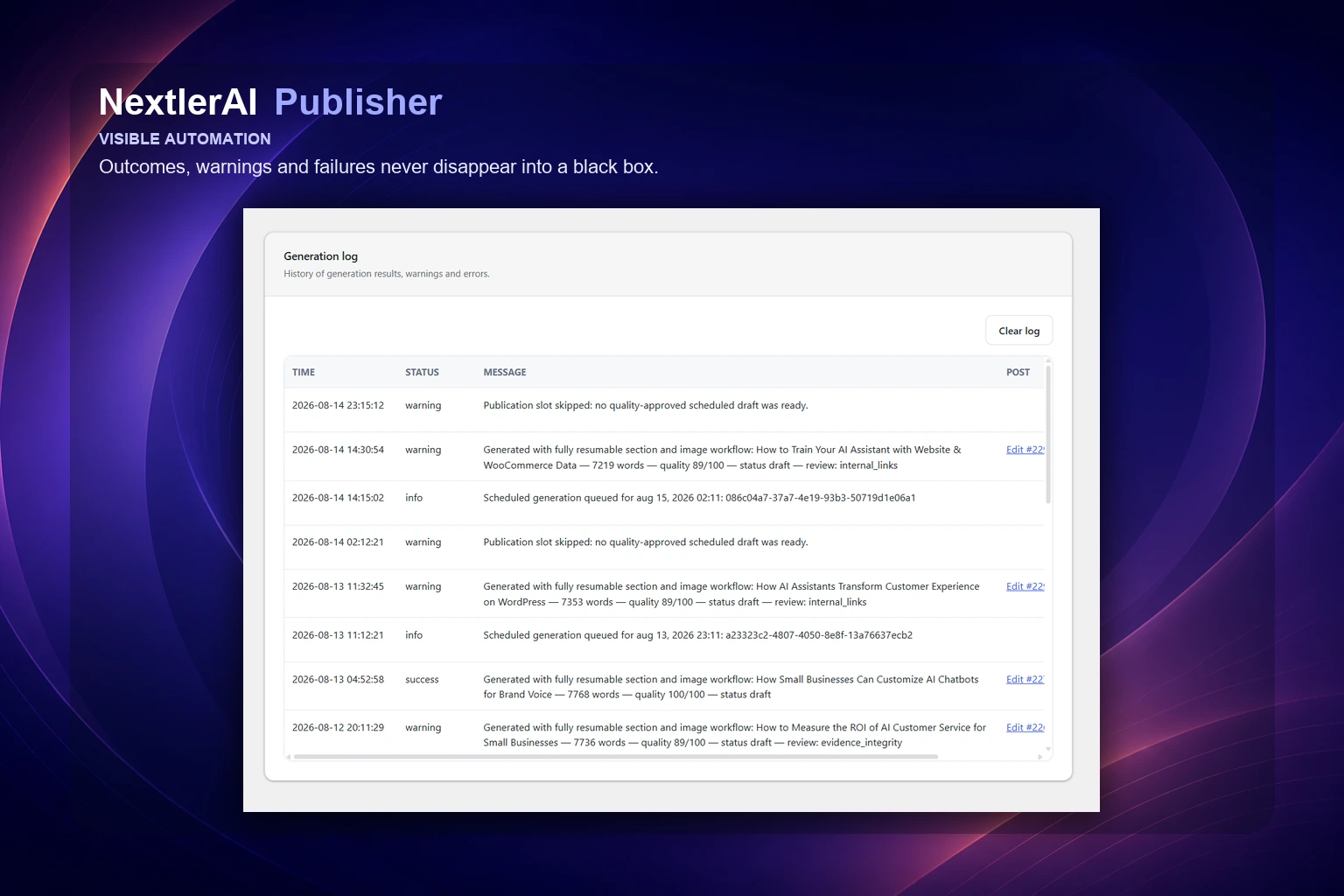
04 / CHECKPOINTS & RECOVERY
Ostrzeżenia i błędy nie znikają.
Bezpieczne punkty kontrolne, ponowienia, odzyskiwanie zatrzymanych zadań i kontrolowane anulowanie zachowują postęp oraz pokazują następne działanie.
REAL PUBLISHER OUTPUT
See the finished articles
in their WordPress context.
Open real NextlerAI blog posts to see the kind of long-form structure, contextual links, visual rhythm and native WordPress presentation Publisher is built to produce.
Explore the NextlerAI blog ↗Examples demonstrate the publishing format and editorial output. Search rankings, indexing and business results depend on the site, topic, market and ongoing editorial decisions.
WHAT YOU CONTROL
Automation with an editorial memory.
Every generated asset is informed by the site it will join—not treated as an isolated prompt.
Semantic content inventory
Maps eligible public posts, pages, products and custom post types so new work can extend topical coverage instead of competing with it.
PostsPagesProduktyPublic CPTsLanguagesMetadata
Optional live SERP research
Serper can add current result-page evidence to planning. Publisher continues without it.
Optional Search Console signals
OAuth access can add Search Analytics and URL Inspection evidence without becoming a pipeline dependency.
Four text providers
Choose OpenAI, Google Gemini, Anthropic Claude or xAI Grok for the generation workflow.
1,000–10,000 words
Plan narrow articles or substantial long-form guides with adaptive sections and varied content modules.
Section-aware image generation
Create featured and inline images with OpenAI or Gemini, vary their section and paragraph placement, and prepare WebP media with contextual alt text.
FeaturedInlineSection contextWebPAlt text
Contextual links, safely
Use real same-language URLs and verified sources. A relevant-link shortage is reported instead of filled with unrelated links.
WordPress-native output
Create editable posts with an eligible author, categories, tags, comments, language and publication status.
SEO hand-off included
Writes compatible metadata for SEOPress, Yoast SEO, Rank Math and All in One SEO.
TitleDescriptionKeywordCanonicalSocialIndexNow
Keep publishing even when your team is busy.
Add up to 12 publication times per active day, generate ahead of each slot and choose how missed slots behave.
Checkpointed background jobs
Action Scheduler or WP-Cron jobs save safe progress, retry with backoff and recover stale workers.
See exactly what was created, checked and published.
Inspect words, structure, links, sources, media, warnings, blockers and final status without treating automation as a black box.
Requested vs actualWarningsBlockersHistory
MULTILINGUAL PUBLISHING, EXPLAINED
Three language layers.
One controlled workflow.
The language of the Publisher workspace, the language of the content it creates, and the languages detected from your WordPress site are separate settings. One never limits the others.
Operate Publisher in a clear WordPress workspace.
The administration language controls menus, settings and workflow labels only. It does not restrict which languages Publisher can research, write or publish.
Interface language ≠ content languageCreate each article for its actual market.
Select the target language per workflow. Publisher builds the brief, article, metadata, links and quality checks in that language, subject to the capabilities of your selected AI model.
🇬🇧 English🇪🇪 Estonian🇫🇮 Finnish🇩🇪 German🇫🇷 French🇪🇸 Spanish🇮🇹 Italian🇳🇱 Dutch🇸🇪 Swedish🇳🇴 Norwegian🇩🇰 Danish🇵🇱 Polish🇵🇹 Portuguese🌍 More model-supported languages
Respect the language structure already in WordPress.
Publisher reads the WordPress site language and recognises language relationships exposed by WPML and Polylang. Content inventory, duplicate checks and internal links stay inside the correct language context.
WordPress localeWPMLPolylang
Detected automatically from the connected siteSITE LANGUAGE→Market-specific research, brief and article→LOCAL PUBLISHINGCorrect inventory · language-relevant links · connected translations · separate workflow rules per market
BUILT INTO YOUR CONTENT STACK
Fourteen connections.
One publishing flow.
Connect the services you use. Search Console and Serper enrich research but remain optional; Publisher's core inventory-to-publication workflow continues without either.
WordPressPlatform
WooCommerceCommerce
OpenAIAI
Google GeminiAI
Anthropic ClaudeAI
xAI GrokAI
Search ConsoleResearch
Serper.devResearch
SEOPressSEO
Yoast SEOSEO
Rank MathSEO
All in One SEOSEO
PolylangLanguage
WPMLLanguage
TECHNICAL DETAILS
Designed for a real WordPress operation.
- Current tested sales version
- NextlerAI Publisher 3.7.3
- Platform
- WordPress 6.0+
- Runtime
- PHP 7.4+
- Text AI
- OpenAI, Gemini, Claude and Grok
- Image AI
- OpenAI and Gemini image generation
- Article length
- Configurable 1,000–10,000 words
- Optional research
- Serper Google SERP research
- Optional Google data
- Search Console Search Analytics and URL Inspection
- Background processing
- Action Scheduler with WP-Cron fallback
- Output
- Native WordPress post: draft, pending review or published
- Automation
- Up to 12 publication times per active day
- SEO plugins
- SEOPress, Yoast SEO, Rank Math, AIOSEO
- Multilingual
- Polylang and WPML aware
- Inventory context
- Eligible public post types, taxonomies and WooCommerce products
- Media
- Section-aware featured and inline images, WebP and alt text
LATEST PRODUCT UPDATES
Publisher evolves
with your workflow.
Current tested sales version: 3.7.3. Eligible customers get the correct Publisher ZIP and available version history inside My Products. Release announcements below may describe a newer staged update before it is available to every eligible licence.
Read the safe update and rollback guide ↗NextlerAI PublisherNextlerAI Publisher 3.7.6v3.7.6+
NextlerAI Publisher 3.7.6 makes every quality-approved automation article visible as a native WordPress Scheduled post with its exact publication date in the website timezone. WordPress handles the scheduled publication, while Publisher remains an independent watchdog that safely recovers a missed cron execution. Each generated article is reserved for one publication slot, and automation history now records the Generated, Scheduled and Published lifecycle clearly. This stability hotfix moves existing Ready-article reconciliation into a safe one-time background task so in-place plugin updates do not perform post-status transitions during plugin loading. Existing settings, licenses, topics, schedules, jobs, reports, generated posts and SEO metadata are preserved during direct upgrades.
WHAT CHANGED
• Added native WordPress Scheduled status for quality-approved automation articles.
• Stored the exact publication date and time using the configured WordPress website timezone.
• Kept the Publisher publication event as an independent watchdog that verifies every slot and recovers missed native cron publication safely.
• Reserved every generated article to exactly one publication slot and prevented reserved future articles from being reused by another slot.
• Added durable Generated, Scheduled and Published lifecycle timestamps and clearer automation-history messages.
• Added native-schedule reconciliation for existing Ready articles during upgrades.
• Made Pause, Disabled, Pending Review and Draft-only workflows remove native schedules safely while retaining generated content and slot history.
• Prevented fallback publishing from taking an article that is reserved for a later publication slot.
• Made the Publisher watchdog idempotent so a post already published by WordPress is never published twice or reported as skipped.
• Moved native-schedule migration out of the plugin bootstrap request into a safe one-time background reconciliation event.
• Prevented synchronous post-status transitions while WordPress is replacing or loading the plugin during an in-place update.
• Preserved all existing settings, licenses, API keys, topics, publication times, generated posts, jobs, reports and completed automation history.
WordPress 6.0PHP 7.4
Choose Publisher plan ↗Customers download this release from My Products.
NextlerAI PublisherNextlerAI Publisher 3.7.4v3.7.4+
NextlerAI Publisher 3.7.4 is a major production update introducing a redesigned responsive administration experience, durable multi-time publishing schedules, improved topic and content planning, stronger long-form article quality controls, more natural contextual linking, section-aware image placement, complete WordPress content inventory support, native author and taxonomy controls, detailed article reports and safer optional research integrations. Article length remains fully configurable from 1,000 to 10,000 words. Existing settings, licenses, topics, schedules, background jobs, reports, generated posts and SEO metadata remain compatible with direct upgrades from version 3.5.0.
WHAT CHANGED
• Reorganised the Publisher administration into Dashboard, Topics, Publisher, Articles, Insights, Settings and License workspaces.
• Added a polished responsive interface for desktop, tablet and mobile.
• Added durable automation slot tracking so generated, ready, scheduled, published, skipped and failed publication slots remain visible and cannot be queued twice.
• Added support for up to 12 separate publication times per active publishing day.
• Added configurable daily, selected-weekday and interval publishing schedules.
• Added the option to generate the first article immediately when activating a schedule.
• Added interactive Create articles and Live Pipeline views with live research, writing, linking, media and quality-stage progress.
• Added an article manager for generated, ready, review, scheduled and published articles, including archive, restore and WordPress Trash actions.
• Fixed the Dashboard automation card so active schedules always display the next valid publication and generation slot.
• Expanded the content inventory to every eligible public WordPress post type, including posts, pages, products, Guides, Portfolio and other public custom post types.
• Added custom post type taxonomy terms to automatic website topic inference, cluster generation, cannibalisation checks and internal-link selection.
• Added automatic sitemap discovery for Rank Math, Yoast, SEOPress, WordPress core and common sitemap locations.
• Retained manual sitemap configuration as an explicit override of the automatically detected sitemap.
• Strengthened contextual internal-link ranking using titles, headings, SEO keywords, taxonomies, full page content and language relevance.
• Added products, Guides and eligible custom post types as natural internal-link targets.
• Changed unavailable link quotas into non-blocking quality targets. Articles continue with all relevant verified links available, while reports clearly show the requested and achieved counts.
• Improved internal-link distribution so links appear naturally across relevant body sections instead of being grouped together.
• Added verified external-source handling with priority for official, primary and configured authoritative sources.
• Made Google Search Console and Serper optional. Missing, invalid or temporarily unavailable integrations no longer prevent article generation.
• Added clear per-article reporting for Search Console, SERP, internal-link and external-source availability.
• Added adaptive article architecture for every configured length from 1,000 to 10,000 words.
• Added dynamic section counts, section budgets, heading density and FAQ size while preserving the configured article-length contract.
• Strengthened section ownership and anti-repetition controls so definitions, comparisons, recommendations, steps, examples, recaps and FAQ material do not repeat across the article.
• Added automatic repair of sections that violate their assigned purpose or overlap substantially with other sections.
• Added multiple interchangeable comparison, workflow, decision, diagnostic, risk, checklist and actionable module families.
• Prevented consecutive articles from reusing the same article archetype and selected less-similar module sequences from recent articles.
• Added a stronger single-core-structure quality gate and guaranteed one accessible table of contents per article.
• Removed duplicate contents headings, duplicate navigation lists and reference placeholders.
• Blocked unsupported numerical and named-vendor comparison tables unless verified evidence supports the affected claims.
• Added qualitative evidence-aware table fallbacks when reliable numerical data is unavailable.
• Added native WordPress author selection, automatic or existing-only tags, configurable tag limits, categories and WordPress comment defaults.
• Improved featured and inline image prompts with article-specific and section-specific visual context.
• Added varied image formats, framing, lighting, palettes, eligible sections and natural paragraph positions.
• Prevented inline images from being inserted into the introduction, table of contents, FAQ or conclusion.
• Added non-repeating recent image-layout selection while preserving the configured image count.
• Cached approved media plans so resumed background jobs retain the same image plan while each new article receives a different layout.
• Improved article reports, quality scoring and final checks for repetition, section uniqueness, evidence integrity, valid jump links, clean HTML, heading density, unsupported tables, bare URLs and placeholders.
• Added a responsive Guides & Help link to the Publisher administration.
• Updated the default license server to nextlerai.com and retained secure migration from the previous endpoint.
• Kept generated FAQ questions and answers as normal, fully visible HTML on every WordPress site.
• Removed plugin-side FAQ JavaScript. WordPress themes may optionally enhance the visible FAQ markup with their own accordion behaviour.
• Preserved existing API keys, licenses, settings, topics, schedules, jobs, reports, posts, links, images and SEO metadata during the upgrade.
WordPress 6.0PHP 7.4
Choose Publisher plan ↗Customers download this release from My Products.
NextlerAI PublisherNextlerAI Publisher 3.5.0v3.5.0+
Research-first multilingual WordPress publishing with connected SEO and media workflows.
WHAT CHANGED
Initial NextlerAI customer release.
WordPress 6.0PHP 7.4WooCommerce 9.9
Choose Publisher plan ↗Customers download this release from My Products.
FROM DOWNLOAD TO FIRST DRAFT
One download.
A controlled publishing system.
Your NextlerAI account keeps the Publisher ZIP, available version history and its own licence key together.
Open the complete setup guide ↗Download
Open My Products and download the latest eligible Publisher ZIP.
Install
Upload the ZIP from WordPress → Plugins → Add New Plugin. Back up before replacing an existing version.
Activate
Use the Publisher licence displayed beside this product and select Production, Staging or Development accurately.
Connect
Add one required text provider, then test an approved topic as a Draft before enabling images, optional research or automation.
QUESTIONS, ANSWERED
Before Publisher joins your workflow.
Clear answers about automation, provider costs, optional integrations, native WordPress output and quality safeguards.
Does NextlerAI include AI usage?+
Publisher uses your own supported AI-provider keys. Provider usage is billed directly by that provider.
What does 100% automatic mean?+
Once providers, topics, quality rules and the schedule are configured, Publisher can run the complete research-to-publication workflow without manual hand-offs. You can still keep draft or pending-review approval.
Can it publish without review?+
Yes. Jobs may be drafted, sent to pending review or published automatically according to the workflow you configure. A quality gate runs before automatic release.
Will it duplicate content already on my website?+
Publisher inventories eligible public content and checks high title and keyword overlap before generation. It can block conflicting topics, but no heuristic replaces editorial judgement.
How long can Publisher articles be?+
The configured minimum and maximum can range from 1,000 to 10,000 words. Publisher adapts the brief, sections and content modules to the topic and target length.
Are Search Console and Serper required?+
No. Both integrations are optional. They can enrich topic and research evidence, while Publisher continues with the WordPress inventory and model context without them.
What happens if there are not enough relevant links?+
Publisher records the requested and actual counts and continues with a warning. It does not insert unrelated internal links or unverified sources only to satisfy a number.
Does Publisher generate into custom post types?+
Eligible public custom post types can inform inventory, topics and internal links. Publisher 3.7.3 generates an editable native WordPress post.
How are images created and placed?+
OpenAI or Gemini can create featured and inline images. Publisher uses section context, varies placement, avoids unsuitable sections, prepares WebP media and writes alt text.
Which SEO plugins are supported?+
SEOPress, Yoast SEO, Rank Math and All in One SEO metadata integrations are included.
Does it support multilingual sites?+
Publisher is aware of WordPress locale, WPML and Polylang. Inventory, duplicate checks, internal links, categories and generated posts stay in the selected language context.
What happens when quality fails?+
A blocker keeps the article out of automatic publication and remains visible in the report. Safe shortages such as fewer relevant links can remain warnings instead.
What happens if a long background job is interrupted?+
Publisher saves checkpoints, retries eligible temporary failures with backoff and can recover stale workers. Action Scheduler is used when available, with WP-Cron as a fallback.
How are updates and rollback handled?+
Publisher 3.7.3 uses a controlled manual ZIP replacement workflow. Back up, pause automation, drain jobs and verify a Draft after the update. There is no built-in one-click rollback.
Does Publisher guarantee rankings or traffic?+
No. Publisher automates a controlled content-production workflow and reports its quality evidence. Indexing, rankings, traffic and conversions depend on the site, topic, market and ongoing decisions.
NEXTLERAI PUBLISHER
Put your WordPress publishing workflow on 100% automatic.
A powerful publishing system that keeps your content, provider accounts, quality rules and final publishing control in your hands.

