






Introduction
AI customer service automation has rapidly moved from concept to operational reality, promising customer support teams significant gains in responsiveness and efficiency. By deploying AI-powered assistants, organizations can automate answers for routine queries, offer always-on support, and reduce the manual burden on human agents. When implemented with care, these tools free skilled staff for complex, high-touch issues, while customers receive fast, consistent responses around the clock.
For teams working in WordPress and WooCommerce environments, the NextlerAI Assistant exemplifies this shift. It integrates directly with your digital storefront and leverages verified knowledge to deliver precise, context-aware support. Automation mechanisms include live product discovery, order status updates, and multilingual chat—all designed to streamline the customer journey while maintaining accuracy and compliance. NextlerAI Assistant’s direct integration allows it to access current catalogue data and respond to customer inquiries based on real-time information, ensuring that answers regarding inventory, product details, and order progress remain up-to-date. This reduces the risk of misinformation and allows your support operation to reflect the latest changes in your store automatically. Furthermore, with customizable chat profiles, teams can configure the assistant to handle multiple languages and tailor responses to specific customer segments, enhancing both reach and personalisation. These mechanisms enable organizations to address high volumes of repetitive support requests efficiently, and to delegate routine transactional tasks to AI without sacrificing oversight or control.
This article provides a clear, stepwise approach to the practical realities of automating customer service. You will learn how automation works at a technical and operational level, what is required to deploy it safely, and which criteria should drive your selection process. With evidence-backed distinctions, scenario-based explanations, and concrete implementation notes, you will be equipped to navigate the opportunities and challenges of AI-powered support—confidently aligning automation with your team’s goals and regulatory obligations.
Comprehensive automation mechanisms and team roles
AI customer service automation is most effective when it is purpose-built to manage repetitive queries and routine support tasks, freeing human agents for cases that demand nuanced problem-solving. The mechanisms that enable this division of labor depend on careful integration with live business data, robust knowledge source control, and operational safeguards. Below, the following implementation table details which tasks can be reliably automated, how advanced assistants such as NextlerAI access and use knowledge, and the practical ways team roles shift as automation takes hold in WordPress and WooCommerce environments. For detailed capabilities, see the NextlerAI Assistant product features. For a closer look at workflow automation triggers in NextlerAI products, this in-depth guide explains how trigger selection and role mapping affect operational safety and efficiency. AI Principles — Google AI documents the relevant background and implementation boundaries.
| Support Task or Query Type | Automation Mechanism | Team Role Adjustment | NextlerAI Assistant Capabilities | Source |
|---|---|---|---|---|
| Repetitive FAQs (e.g., shipping, returns, hours) | Automated response from verified knowledge base | Agents focus on exceptions or policy escalations | Direct retrieval from controlled WordPress content, custom Q&A | NextlerAI Assistant |
| Order status checks | Live lookup via WooCommerce integration | Manual order tracing only for unresolved or complex cases | Secure order information access through configured API connection | NextlerAI Assistant |
| Product discovery and comparison | Context-specific suggestions from live catalogue data | Staff refine recommendations for unusual needs or inventory issues | Catalogue search, visual search, and context-aware product guidance | NextlerAI Assistant |
| Multilingual support queries | Language detection and automated chat profile switching | Human review for nuanced localization or cultural context | Multiple independent chat profiles with language awareness | NextlerAI Assistant |
| Real-time response routing (24/7 coverage) | Automated triage; escalation to human agents as needed | Agents handle only flagged or high-priority after-hours cases | Configurable escalation triggers and persistent coverage | NextlerAI Assistant |
| Complex, multi-step, or sensitive issues | Manual intervention; AI may offer initial intake or routing | Agents retain full responsibility for outcome and compliance | Escalation controls prevent unsupported automation | NextlerAI Assistant |
| Knowledge base and data updates | Manual curation and review; AI indexes only verified content | Team must maintain accuracy and audit changes | Source selection, content exclusion, and regular index refresh | NextlerAI Assistant |
This table demonstrates that automation is best applied to well-defined, repeatable tasks—especially where responses can be grounded in source-controlled content and live store data. In practice, assistants such as NextlerAI can address FAQs, provide instant order updates, and guide product discovery in multiple languages, while human expertise remains critical for exceptions, compliance-sensitive issues, and ongoing knowledge maintenance. By making these operational boundaries explicit, support teams can safely scale efficiency and clarity without compromising on quality or oversight.
Implementing such automation requires a considered approach to knowledge source selection and escalations. For example, with NextlerAI Assistant, administrators must first designate which WordPress pages, WooCommerce catalogue sections, or custom Q&A entries are indexed. This process ensures only accurate and verified content is exposed to the AI, reducing the risk of outdated or incorrect information being provided to customers. When configuring multilingual support, each chat profile can be assigned its own language context and content boundaries. This means customers are automatically served in their preferred language, while agents retain oversight over how information is localized and presented.
Operationally, as AI assistants take over the majority of front-line queries, the team’s responsibilities shift towards curating the knowledge base, managing escalations, and monitoring unresolved or ambiguous queries surfaced by the system. The transition involves establishing clear escalation triggers—such as specific keywords, complex order statuses, or sensitive account matters—that automatically transfer conversations to a human agent. In the context of NextlerAI Assistant, these controls are configured within the WordPress admin interface, allowing ongoing adjustment based on real-world support patterns.
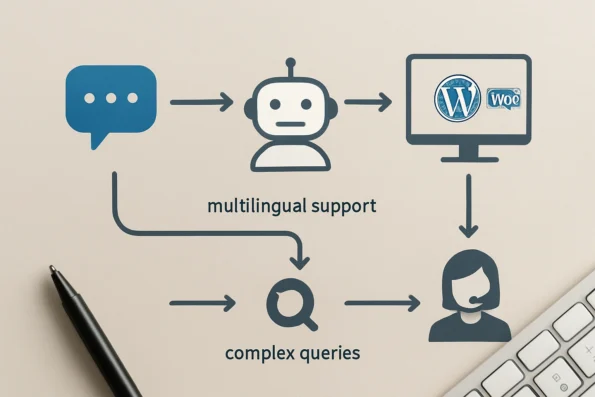
Ultimately, the most successful deployments are those where teams pair automation with robust oversight and clear boundaries. AI can dramatically increase first-contact resolution for routine tasks, but sustained quality depends on disciplined knowledge curation, explicit escalation paths, and regular audits of both automated and manual support interactions. This sets the stage for teams to address operational risks and expert cautions, which are covered in detail in the following section.
Operational risks and expert cautions for AI-powered support
Integrating AI-powered assistants into customer service workflows delivers speed and consistency, but it also introduces operational risks that require disciplined management. Teams must address not only technical limitations but also safeguards around data privacy, accuracy, and escalation to maintain trust and compliance. Checking your browser – reCAPTCHA documents the relevant background and implementation boundaries.
Risks of misinformed or incomplete answers
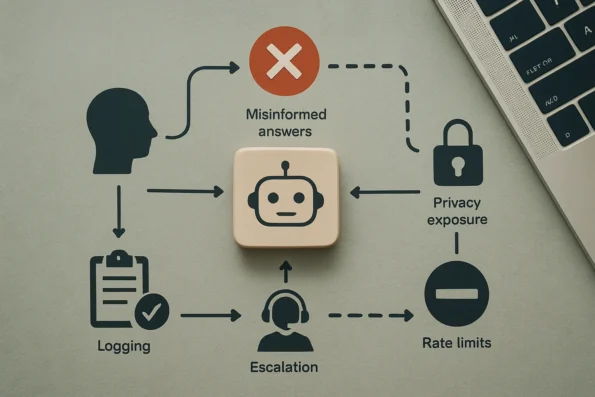
AI customer service automation relies on defined knowledge sources. If an assistant is permitted to reference unverified, outdated, or overly broad content, the risk of delivering inaccurate or misleading answers rises sharply. This can erode customer trust and expose the business to reputational harm. NextlerAI Assistant mitigates this by restricting answers to indexed WordPress pages, products, and administrator-curated Q&A, but responsibility remains with teams to routinely audit and update these sources.
Exposure of sensitive data and privacy boundaries
Automated assistants can inadvertently surface private, internal, or regulated information if knowledge base controls are misconfigured. In WordPress and WooCommerce environments, it is essential to verify that only public-facing content and approved custom entries are indexed. NextlerAI Assistant provides granular controls to include or exclude content types and individual pages, minimizing accidental exposure. Teams should also review in-chat forms and contact data to ensure alignment with current privacy policies and data handling agreements.
Escalation gaps and loss of human oversight
AI can resolve many standard queries, but there are clear boundaries where automation must defer to a human agent—such as nuanced complaints, legal disputes, or error-prone requests. Without explicit escalation paths and user-facing options to connect with a human, teams risk unresolved issues or increased customer frustration. NextlerAI Assistant supports escalation triggers, but operational success depends on configuring these triggers based on query type and agent availability.
Rate limiting and abuse prevention
Unrestricted access to AI-powered chat can expose APIs to spam, scripted attacks, or unintentional overload. Enforcing strict rate limits on both user sessions and backend provider calls is critical to system stability and cost control. NextlerAI Assistant offers configurable rate limiting at both the assistant and API key level, allowing organizations to set thresholds that reflect expected support volumes and risk tolerance. Teams must regularly review and adjust these settings as usage patterns evolve.
Bias, fairness, and regulatory alignment
AI systems can inadvertently introduce bias if underlying knowledge or model configurations are not representative. Responsible deployment—aligned with recognized frameworks for responsible AI—requires teams to review responses for fairness, avoid exclusionary or discriminatory language, and update knowledge bases to reflect diverse customer needs. In regulated industries, further steps such as enhanced logging, access controls, and consent mechanisms are recommended to meet legal and operational obligations.
Auditability, logging, and traceability
Effective oversight of AI automation depends on robust logging and audit trails. NextlerAI Assistant maintains response logs and enables teams to trace the knowledge sources used for each customer answer. This supports both real-time incident response and retrospective review of unresolved or problematic interactions. Regular audits of these logs help surface emerging risks, knowledge gaps, or unexpected customer needs.
Boundaries of automation: when to defer
Not every interaction should be automated. Teams must define and enforce boundaries where human judgment, empathy, or specialized expertise are required. Clear escalation protocols, visible user options, and regular reviews of assistant performance are essential to ensuring automation enhances—rather than replaces—quality customer support. This disciplined approach is central to any safe and effective AI customer service automation program.
Audit workflows for maintaining accuracy and compliance
Reliable AI customer service automation requires a disciplined, recurring audit process. Without systematic review, even the most advanced assistant can drift into outdated, noncompliant, or inaccurate responses—undermining customer trust and exposing your business to regulatory risk. The following actionable steps provide a structured workflow for teams to ensure the assistant’s knowledge, privacy, and operational performance remain current and aligned with business requirements. Conversational AI Platform Documentation documents the relevant background and implementation boundaries.
-
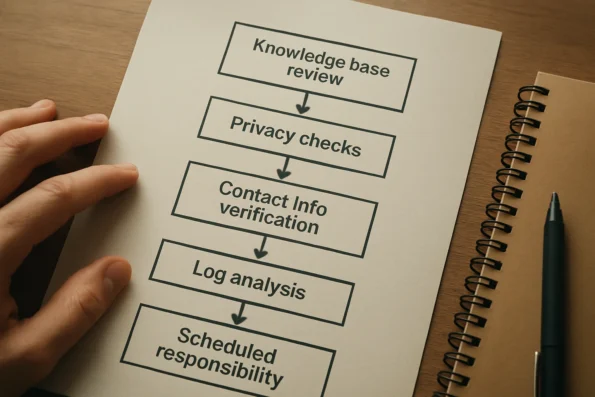
Review and update indexed knowledge bases and catalogue data.
Start by examining which WordPress pages, product information, and custom Q&A entries the assistant indexes. Confirm that only public, accurate, and approved sources are referenced. For NextlerAI Assistant, this includes verifying the relevance of live WooCommerce catalogue data and ensuring obsolete or draft content is excluded from AI retrieval. Any outdated product descriptions or policy pages should be updated or de-indexed immediately. Teams should use documented update procedures to re-index new product launches or retired items, and regularly audit the scope of content made available to the assistant to avoid indexing hidden, staging, or confidential material.
-
Check privacy policy alignment, user data handling, and customer consent.
Audit the assistant’s configuration to confirm all in-chat interactions adhere to your published privacy policy and applicable legal standards. This includes verifying that any in-chat forms (such as contact or lead capture forms) collect only necessary data, display clear consent requests, and never solicit sensitive information beyond what is permitted for the audience and jurisdiction. Assign a compliance lead to monitor for regulatory changes that may require workflow updates. With NextlerAI Assistant, review the form fields exposed to users and cross-reference with your privacy policy; update form logic promptly if regulations or internal rules change. Document each audit and record the basis for any modifications or new data collection practices.
-
Verify contact and location information, and in-chat forms.
Cross-check all contact details—business phone, public email, address, and opening hours—used by the assistant. For NextlerAI Assistant, ensure the information matches your current business facts and is suitable for public display. If using location-based answers or map links, confirm the address presented is appropriate for customer visits. In-chat forms should route submissions securely and respect consent parameters. Teams must verify that any updates to business operations (such as relocations or changed opening hours) are reflected both in public pages and in the assistant’s referenced sources. Regularly test form submissions to ensure data is delivered to the intended team and stored according to retention policies.
-
Review logs and analytics for unresolved queries and support trends.
Analyze audit logs and usage analytics to identify unanswered questions, repeated confusion points, or emerging support topics. This allows you to pinpoint knowledge gaps, retrain the assistant on new or revised information, and escalate complex topics to human support where needed. Look for patterns in off-hours queries, escalations, or high-frequency issues to refine both knowledge coverage and escalation protocols. For NextlerAI Assistant, make use of available log review features to filter for repeated fallback responses or queries that required human intervention. Use these insights to improve documentation, expand Q&A coverage, and adjust escalation triggers for better customer support continuity.
-
Schedule routine audit intervals and assign responsibilities.
Establish a clear calendar for knowledge, privacy, and compliance audits—quarterly is a common baseline, but adjust for product release cycles or regulatory deadlines. Assign specific team members to each audit area (content, privacy, technical, compliance) and document findings and actions taken. Integrate audit checkpoints into onboarding for new team members managing customer service automation. Ensure that each audit includes a review of the change log for the assistant’s configuration and the latest regulatory guidance affecting your region or industry. Where possible, use version control or audit trails to track what content or configuration changes were made, by whom, and why. This transparency supports accountability and simplifies future audits.
Maintaining operational confidence
This audit workflow is not a one-time exercise. Recurring, role-assigned reviews allow teams to adapt quickly to product, policy, or regulatory changes, reducing the risk of misinformation or noncompliance. As AI customer service automation expands, disciplined audits serve as a foundation for both customer satisfaction and operational safety. For guidance specific to WordPress and WooCommerce environments, refer to NextlerAI’s official implementation documentation and audit guides at NextlerAI Assistant Audit Guides.
Implementation notes: workflow design and practical pitfalls
Effectively launching AI customer service automation demands a clear grasp of what to automate, which channels to target, and how these decisions impact both workflow and ongoing support quality. Early configuration choices will shape the long-term reliability and efficiency of your automation—especially for teams working within WordPress or WooCommerce environments. To clarify how automation translates into measurable outcomes, the article on measuring team productivity gains details practical methods for tracking improvements after NextlerAI deployment. Salesforce Developers documents the relevant background and implementation boundaries.
Channel selection and multilingual structuring
Begin by identifying the customer touchpoints suited to AI automation. For many organizations, web-based chat is the primary candidate, given its capacity for instant, structured responses. NextlerAI Assistant enables deployment as a global floating widget or through multiple embedded chat profiles—each configurable by page, language, and mobile behavior. This flexibility allows teams to offer targeted experiences, such as language-specific support for international stores or context-sensitive product guidance on high-traffic landing pages.
When planning multilingual support, structure chat profiles so each aligns with a specific language audience. With NextlerAI Assistant, language detection can drive user assignment to the appropriate profile, ensuring more accurate automated answers and reducing confusion for non-English speakers. Avoid blending multiple languages in a single automated flow unless the underlying knowledge base has been rigorously curated and tested for consistent multilingual retrieval.
Aligning internal processes with AI-enabled roles
Introducing AI-powered assistants changes operational dynamics. Teams must redefine roles: frontline agents shift from handling repetitive queries to managing escalations, reviewing AI responses, and maintaining knowledge accuracy. Establish clear protocols for agent intervention, so when the assistant encounters ambiguous or unsupported questions, escalation paths remain seamless. Assign permissions carefully; NextlerAI Assistant supports granular team roles, allowing only authorized staff to modify knowledge sources, audit logs, or configure API access. This minimizes risk and ensures auditability.
Internal collaboration is also vital. Assign a dedicated owner for knowledge base content who collaborates closely with support leads and compliance officers. This role manages updates prompted by product launches, regulatory changes, or recurring customer feedback. Teams should formalize a review cadence—not only for content but also for escalation workflow effectiveness and the monitoring of chat logs for unresolved or misrouted issues. Documenting changes and decisions ensures knowledge continuity and helps new team members onboard quickly, even if staff rotates or roles evolve.
Knowledge base optimization and retrieval accuracy
The utility of AI customer service automation hinges on a well-structured, regularly updated knowledge base. NextlerAI Assistant retrieves answers from indexed WordPress pages, WooCommerce product data, and custom Q&A entries. To maximize answer accuracy, curate these sources meticulously—exclude out-of-date posts, restrict sensitive drafts, and segment content by relevance to each chat profile. As detailed in published guidance, optimized chunking and indexing routines are critical for reliable AI retrieval, especially when supporting diverse product catalogs or dynamic policy updates.
Prioritize the use of clear, concise language in all indexed content. Avoid jargon, ambiguous terms, or context-specific abbreviations unless they are defined within the knowledge base. Utilize metadata and tagging features in WordPress to further segment knowledge for different customer segments or regional requirements. Refer to NextlerAI’s official guidance on knowledge base optimization to inform indexing and content management strategies.
Operational pitfalls to avoid
Teams often make preventable mistakes when implementing AI automation. A frequent issue is neglecting to maintain or audit the knowledge base, leading to outdated or misleading answers. Another common pitfall is failing to define robust escalation protocols, resulting in unresolved queries or customer frustration. Over-automating sensitive or complex inquiries—such as those involving policy exceptions, refunds, or regulatory disclosures—can expose the organization to compliance and reputational risks. Always set clear boundaries on what AI is permitted to handle, and test escalation triggers before going live.
Finally, ensure API integrations (for catalog or CRM synchronization) are secured with least-privilege credentials and monitored for access anomalies. Assign responsibility for monitoring audit logs and updating permissions as team composition or business needs evolve. Routine checks and role reviews should be embedded into support team processes, not treated as one-off setup tasks.
Iterative improvement and feedback incorporation
AI customer service automation is not a set-and-forget deployment. Establish continuous feedback loops—solicit frontline agent input on AI errors or customer complaints, and integrate this feedback into periodic knowledge base reviews. NextlerAI Assistant provides audit logs and analytics to pinpoint recurring gaps or misclassifications, which should inform both technical tuning and staff training. Document lessons learned and adjust automation scope as product lines, compliance demands, or customer expectations change.
Decision criteria for selecting an automation solution
Evaluating AI customer service automation for WordPress and WooCommerce requires attention to mechanisms that directly impact operational reliability and long-term maintainability. Each decision point shapes how the automation will perform under load, adapt to evolving business requirements, and protect sensitive customer interactions. For teams in highly regulated sectors, regulated industry implementation for AI in WordPress automation outlines stepwise compliance actions and oversight controls tailored to NextlerAI Assistant.
Platform compatibility and deployment boundaries
Assessing platform compatibility means verifying that the automation solution is architected to work within the constraints of your CMS and e-commerce stack. For WordPress and WooCommerce, true native integration affects not only feature access but also how updates, plugin conflicts, and site migrations are handled. Decision-makers must account for the operational costs of maintaining compatibility through CMS version changes and plugin ecosystem shifts, as well as the potential need to coordinate with hosting or security configurations unique to WordPress environments.
Knowledge control and segmentation mechanisms
Beyond simply indexing content, a robust automation solution must allow precise segmentation and exclusion of knowledge sources. This includes the technical ability to dynamically include or exclude entire content types, custom fields, and taxonomy terms. Teams should examine if the solution supports on-the-fly updates to indexed material and how changes propagate to live AI responses. Control over knowledge segments is especially critical in multi-site or multi-brand deployments, where different audiences require tailored information boundaries.
Multilingual architecture and localization constraints
Multilingual support is not limited to simple translation of interface elements. Decision-makers must determine whether the solution supports isolated language-specific chat profiles and whether it reliably distinguishes between user language preferences at runtime. The ability to fully localize knowledge bases—including custom product attributes and dynamic catalogue data—can become a limiting factor as internationalization requirements grow. Constraints may include how language detection interacts with caching, SEO plugins, or personalized site experiences.
Auditability structures and change tracking
Auditability is defined by the granularity and accessibility of logs related to knowledge source changes, permission modifications, and AI answer history. It is important to verify whether the automation solution records timestamped events at the level of individual knowledge base entries and whether these logs are exportable for external review. The ability to reconstruct the state of the system at any point in time is essential for compliance investigations and incident response, especially in regulated environments.
Permission granularity and operational delegation
Operational security depends on the presence of fine-grained permission controls. This includes verifying that access to knowledge management, audit logs, and AI configuration is partitioned by user role and can be delegated without granting unnecessary privileges. Edge cases may arise when integrating with external identity providers or when multiple business units share a single WordPress installation, necessitating more complex permission hierarchies or custom access rules.
Integration pathways and system boundaries
Integration with internal systems, such as order management or CRM tools, is often constrained by available APIs and data security policies. Decision-makers must confirm whether the automation solution supports secure, credential-isolated connections to these systems and whether it can operate within firewall or network segmentation requirements. Diagnostic considerations include how the solution handles API failures, how data synchronization lags are surfaced to administrators, and what mechanisms exist for failover or manual intervention if integrations are disrupted.
Scalability and operational fit by team context
The optimal automation scope depends on the intersection of team size, compliance posture, and operational complexity. Small teams may be limited by lack of technical bandwidth for advanced configuration or audit, while larger enterprises may require multi-layered permissioning, detailed audit trails, and integration with existing compliance reporting systems. Edge cases include mergers, acquisitions, or rapid scaling events that alter workflow demands or introduce new regulatory obligations. A solution’s flexibility to accommodate these shifts without re-architecting core processes can be a deciding factor.
Reference to structured evaluation methodology
To anchor decisions in evidence, teams should consult structured evaluation frameworks for workflow automation specific to WordPress and WooCommerce, such as those available at NextlerAI’s official guide. These resources offer documented criteria and mechanisms for reviewing solutions against operational requirements, without making unsupported claims about product capabilities or performance.
FAQ
How do AI assistants automate routine customer service tasks?
AI-powered assistants streamline customer service by handling repetitive queries such as order status checks, product availability, and basic account support. By drawing from pre-verified knowledge sources and live product data, these systems provide immediate, consistent responses around the clock. This automation frees human agents to focus on complex issues and escalations, improving overall team efficiency and response times.
What risks or limitations should teams consider before deploying AI for customer service?
Teams must recognize that AI assistants rely strictly on the knowledge and data they are permitted to access. Incomplete or outdated information can lead to inaccurate responses. There are also privacy and data exposure risks if knowledge bases are not properly segmented, and clear escalation procedures should be established to avoid unresolved or sensitive queries being mishandled by automation.
What are the essential steps to audit and maintain an AI-powered customer service assistant?
Routine audits should include verifying that indexed knowledge and product data remain current, removing obsolete content, and confirming that only appropriate public information is accessible. Teams must also ensure that contact and consent mechanisms are up to date, and should regularly review logs and analytics to detect patterns of unresolved queries or policy non-compliance.
Which practical implementation notes help teams avoid common pitfalls in automation?
Success hinges on assigning clear ownership of knowledge base curation, defining explicit handoff points for complex cases, and enforcing regular content reviews. Teams should segment knowledge sources using platform features, leverage multilingual capabilities where needed, and document workflow changes to support sustainable automation. Securing API keys and permissions is essential to minimize potential breaches.
What criteria should drive the selection of an AI customer service automation solution?
Selection should be based on verified integration with your platform (such as native WordPress and WooCommerce support), granular control over knowledge indexing, support for multiple languages, audit and permission capabilities, and alignment with compliance requirements. Consider your team’s size, workflow complexity, and the degree of oversight needed when evaluating potential solutions.
How does NextlerAI Assistant compare to generic chatbots for WordPress support?
NextlerAI Assistant offers direct integration with WordPress and WooCommerce, supports multilingual and embedded chat profiles, and uses live site and catalogue knowledge for precise, context-aware responses. Unlike generic chatbots, it enables detailed knowledge segmentation, configurable access controls, and native support for structured product and policy data—tailoring automation specifically for these environments.
Conclusion
AI customer service automation now offers a clear path toward more responsive, efficient support—especially when grounded in disciplined configuration and regular oversight. For organizations operating on WordPress and WooCommerce, the right assistant can transform front-line service, but only when knowledge sources, multilingual needs, and workflow controls are managed with intent.
The decision to automate should be anchored in your team’s operational realities: integration fit, permission granularity, and capacity for ongoing audit. Solutions like NextlerAI Assistant enable live catalogue and knowledge integration, but responsibility for knowledge curation and escalation boundaries remains with your team. Automation will not eliminate the need for process vigilance—it amplifies both the reach and the impact of your support practices.
To achieve sustainable results, organizations must establish a feedback mechanism between automation performance and human oversight. This includes assigning clear roles for monitoring assistant behavior, reviewing unresolved or misrouted queries, and adapting workflows as new products, policies, or regulations emerge. It is essential to configure granular permissions within your automation platform to restrict sensitive data exposure and delineate editing rights. Regularly scheduled knowledge audits should be formalized into team routines, and documentation must be updated to reflect any changes in escalation processes or compliance requirements. These steps ensure that automation remains an extension of your support ethos, rather than a source of unmanaged risk.
As your next step, convene a focused team session to map current support workflows, identifying where AI-powered automation can safely take over and where expert human intervention is still required. Use this mapping to set clear automation boundaries and assign responsibilities for knowledge review, privacy policy alignment, and escalation monitoring. This groundwork ensures your implementation is both effective and accountable from day one.