







Introduction
NextlerAI Publisher advanced analytics equip WordPress editorial teams with a practical framework for monitoring, reporting, and improving content operations. Immediately upon installation, Publisher offers built-in dashboards that track content inventory, system status, and publication history—giving you clear visibility into your editorial pipeline without extra configuration. These built-in analytics provide at-a-glance overviews of article status, recent publication activity, and any workflow warnings, supporting day-to-day editorial oversight and compliance documentation.
For teams requiring deeper insights, such as search performance or advanced research data, Publisher supports connecting external analytics platforms like Google Search Console via secure OAuth integration. By authorizing access, you can supplement internal dashboards with verified search impression, click, and ranking data directly from Google Search Console. This optional integration is designed to enhance—not replace—Publisher’s native workflow: all core features, including inventory management, quality reports, and audit logs, remain fully functional whether or not an external analytics service is connected. Additionally, Publisher allows integration with third-party research tools such as Serper, providing supplementary keyword and search landscape data where supported, though these connections never automate or dictate editorial decisions.
This article provides a structured roadmap for leveraging NextlerAI Publisher reporting features, whether you rely solely on the comprehensive built-in analytics or choose to enhance your monitoring with external data sources. You will learn how to select the optimal analytics approach for your operational needs, understand the technical boundaries of each option, and interpret reporting results to support editorial decision-making. Throughout, guidance is grounded in official product documentation and verified integration guides, avoiding unsupported claims about automatic optimization or measurable performance gains. By the end, you will be prepared to make informed decisions about analytics in your publishing workflow and ensure every report directly supports your content goals.
Decision matrix: analytics tool options and use cases
| Analytics Option | Data Provided | Reporting Depth | Integration Required | Best Use Cases | Compliance/Audit Support | Source |
|---|---|---|---|---|---|---|
| Built-in Publisher Analytics | Content inventory, publication logs, system status, quality reports | Operational: pipeline status, workflow health, article readiness | None (native to Publisher installation) | Editorial oversight, inventory management, compliance audits, troubleshooting | Yes: logs and reports support internal and external compliance reviews | NextlerAI Publisher product page |
| Google Search Console Integration (via OAuth) | Search performance, indexing status, query data | External: search exposure, ranking data, external query insights | OAuth authentication with Google; optional | SEO monitoring, search analytics, performance benchmarking | Depends on GSC export/logging; not Publisher-native | Publisher Search Console OAuth guide |
| Serper Integration | Keyword research, competitive landscape, topical insights | External: research-driven, supports topic planning, not internal workflow logs | API key setup; optional | Content strategy, competitive analysis, topic research for editorial planning | Limited; relies on Serper API data retention and export | Publisher Serper research guide |
This decision matrix highlights the distinct mechanisms and decision points for each analytics approach in NextlerAI Publisher. The built-in analytics are architected to function immediately upon installation, leveraging direct integration with the Publisher workflow to surface real-time content inventory, system status, and quality report data—all without requiring third-party configuration. This direct connection enables editorial teams to track the exact status of articles, monitor workflow bottlenecks, and generate compliance-ready logs that reflect every publication and revision event. Such transparency is critical for meeting audit requirements or demonstrating process control for external stakeholders. For a deep dive on how data flows between content inventory and publication, see the detailed breakdown of data flow between content inventory and publication in NextlerAI Publisher’s CMS integration guide. What Is Advanced Analytics? | NetSuite documents the relevant background and implementation boundaries.
In contrast, connecting external analytics like Google Search Console or Serper introduces new layers of data, but each must be authenticated and configured explicitly. Google Search Console integration uses OAuth to securely access search visibility, indexing, and query metrics, providing insights into how published content is performing in Google Search. This data is not stored natively within Publisher, so reporting depth is limited to what is available via the Google interface or export functions. Serper integration, meanwhile, is provisioned by supplying an API key, enabling research into keyword trends and competitive positioning. Neither external tool modifies core Publisher workflows; instead, they supplement editorial decision-making with research and benchmarking data drawn from outside the WordPress environment.
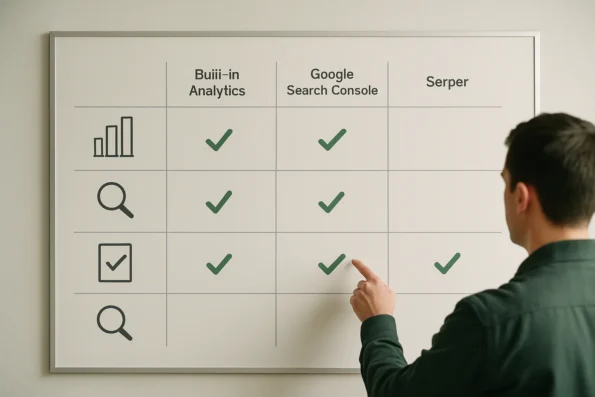
The choice between built-in and external analytics hinges on several nuanced factors. Built-in analytics are implemented as an internal Publisher module, designed for immediate operational monitoring and compliance tracking, and are maintained solely within the WordPress environment. These analytics use Publisher’s own inventory and status logs, ensuring data is consistent with the actual editorial workflow, and reducing the risk of discrepancies between reported and real-time content states. All access and logging are governed by WordPress permissions, which simplifies internal auditing and aligns with privacy-by-design principles. External analytics, however, operate through secure handshakes—such as OAuth or API key exchanges—that authorize data retrieval from outside platforms. This approach enables organizations to inject competitive or search performance data directly into editorial discussions, but it also introduces an additional layer of access control and potential data governance review, especially in regulated industries or multi-stakeholder settings. Each decision point—native vs external, operational vs research—should align with both the immediate reporting requirements and the organization’s long-term governance objectives. For details on connecting and managing these integrations, see the next section on implementation notes.
Implementation notes: connecting internal and external analytics
Configuring analytics in NextlerAI Publisher involves distinct mechanisms depending on whether you use internal dashboards or optional external integrations. Understanding these boundaries ensures accurate reporting, secure data exchanges, and clarity about what each analytics path enables within the publishing workflow. When evaluating analytics tools, consider how they interact with editorial calendar automation to maintain visibility and control over scheduled publishing slots and workflow checkpoints. NIST Big Data Interoperability Framework: Volume 4, Security documents the relevant background and implementation boundaries.
Built-in analytics: native setup and operational scope
Publisher’s internal analytics are activated as part of the standard plugin installation and setup in WordPress. Once the initial configuration is complete, no further steps are required to access inventory status, publication logs, or quality reports. These features operate entirely within your controlled WordPress environment, governed by existing user permissions and audit policies. Built-in dashboards provide near real-time visibility into the entire content pipeline without transmitting analytic data outside your site.
Integrating Google Search Console: secure OAuth connection
Connecting Publisher to Google Search Console adds external search performance data for deeper insights. This integration is optional and designed to be additive—Publisher’s workflow, scheduling, and reporting remain fully functional if the external connection is omitted. To link Search Console, Publisher requires OAuth authorization, which establishes a secure, permissioned channel for data retrieval. During the setup process, users are prompted to authenticate with Google and grant Publisher access to relevant site property data. OAuth ensures only authorized accounts can share or retrieve analytics, maintaining compliance with best practices for data protection.
External research tools: boundaries and supported platforms
Publisher also supports integration with external research platforms such as Serper, specifically for competitive and topical research rather than direct reporting. These connections use API keys and are governed by explicit configuration screens in Publisher’s settings. External integrations do not alter Publisher’s core analytic mechanisms or automate any publishing decision—they supply raw research data to supplement editorial judgment.
System independence and technical boundaries
Publisher’s architecture is intentionally decoupled: internal analytics operate natively, and external tools are strictly optional. Analytics integration does not change how articles are created, reviewed or published; it only expands the available data for editorial teams. Full technical boundaries, supported platforms, and security implications for each integration are detailed in the official Publisher guides, ensuring teams can align implementation with organizational policies and compliance needs.
Checklist: ensuring data integrity and actionable reporting
Maintaining the reliability of analytics and reporting in NextlerAI Publisher is essential for informed editorial decisions and compliance. The following checklist provides clear, practical steps to help your team safeguard data integrity and ensure that analytics outputs directly support your publishing objectives. If your workflow includes automated content brief generation, you can further leverage reporting on brief status and readiness within NextlerAI Publisher. IEEE Xplore: Advanced Data Analytics in Business Intelligence documents the relevant background and implementation boundaries.

- Confirm permissions: Verify that both Publisher-specific and WordPress user permissions are correctly configured before enabling analytics features. This step is essential to control access and prevent unauthorized changes to reporting data.
- Validate external integrations: Where external tools such as Google Search Console are in use, confirm that OAuth or API-based connections have been established securely and are delivering expected datasets. Conduct periodic checks to ensure continued connectivity.
- Review quality reports regularly: Systematically examine Publisher’s native quality reports and address any warnings or flagged issues before articles move to publication. These reports are designed to highlight readiness and compliance gaps, minimizing downstream corrections.
- Audit publication logs: Routinely audit Publisher’s detailed publication logs to identify any workflow failures, skipped steps, or anomalies. Immediate investigation of these logs supports prompt troubleshooting and maintains process transparency.
- Document configuration changes: Keep a clear record of all modifications to analytics and reporting configurations. This documentation underpins future audit trails and supports team knowledge continuity, especially when adapting workflows or onboarding new staff.
- Enforce consistent data input policies: Ensure editorial staff follow standardized data entry and status tagging practices within the Publisher interface. Uniform data input reduces the risk of inconsistencies in content inventory metrics and supports more reliable reporting.
- Schedule regular system status reviews: Use Publisher’s dashboard and system status tools (official guide) to monitor the health of analytics modules and identify any configuration drift or platform-level anomalies that could affect data integrity.
- Monitor for permission changes over time: Periodically audit user roles and access levels for both Publisher and WordPress to detect unauthorized changes. Since analytics configuration relies on permissions, unapproved modifications may compromise reporting accuracy or data confidentiality.
- Cross-reference reported metrics with source content: Occasionally compare selected analytics outputs—such as article inventory counts or publication statuses—against the actual content database to detect and resolve discrepancies at source.
- Establish a reporting calibration schedule: Coordinate periodic meetings to review analytics configuration, reporting accuracy, and integration health. Including both editorial and technical stakeholders ensures that the data continues to meet business and compliance needs.
Each item in this checklist is grounded in official product documentation (Publisher quality rules and reports) and reflects operational controls essential for editorial teams relying on automated analytics. By embedding these checkpoints into routine workflows, organizations can proactively identify issues, uphold reporting confidence, and align analytics outputs with editorial and governance requirements.
Visual summary: analytics data flow and decision points
Effective use of NextlerAI Publisher advanced analytics begins with a clear understanding of how data progresses through each stage of the publishing pipeline, and where key editorial decisions shape outcomes. This section provides a visual summary to map the flow of analytics-relevant information and highlight actionable decision points for WordPress editorial teams. Teams seeking to extend reporting capabilities may evaluate a custom API integration approach to connect additional external analytics sources with NextlerAI Publisher. Search | Stanford Graduate School of Education documents the relevant background and implementation boundaries.
Analytics data flow in Publisher
Every article in NextlerAI Publisher starts as a draft, immediately entering the plugin’s built-in content inventory. This inventory tracks each piece from creation through scheduled publication, providing editors with real-time visibility into what is in queue, under review, or already published. Built-in dashboards—such as the system status and publication history—aggregate this data, enabling at-a-glance assessment of workflow health and bottlenecks.
Quality control is integrated directly into the workflow. Each draft passes through automated quality checks, with results surfaced in the quality report panel. Here, editors can identify missing sections, warnings, or mandatory review flags before content progresses. Only after passing these checks and a final editorial review does a draft move to the publication log, where every scheduled, published, or failed job is recorded for compliance and troubleshooting.
Additional analytics data points are generated throughout this lifecycle. Metrics such as draft age, time-in-queue, and author or reviewer assignments are captured in real time by the Publisher’s inventory engine. These details are surfaced not only for operational oversight, but also for auditability—allowing organizations to maintain a traceable chain of editorial custody. Publisher’s system status dashboard offers a visual summary of active jobs, pending reviews, and recently completed publications, which assists in identifying process inefficiencies or publication delays. All analytics records are tied to unique article identifiers for precise tracking and retrospective analysis.
Optional integration with external analytics
For organizations requiring deeper performance insights, external analytics platforms—such as Google Search Console—can be connected via supported OAuth flows. When enabled, Publisher can surface search performance data alongside native inventory, allowing editorial teams to correlate workflow status with organic reach and search trends. However, this integration is strictly additive: Publisher’s internal pipeline and reporting continue to function independently if no external analytics are configured.
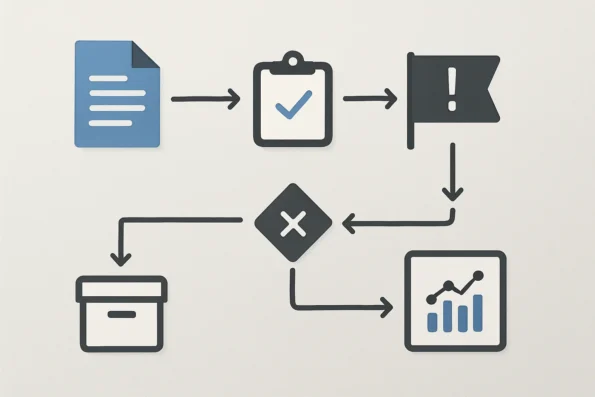
The flow of external data is clearly segregated from internal metrics. Search Console integration fetches search queries, impressions, and click data, which can be viewed within Publisher dashboards but does not alter the underlying content status or inventory records. User access to these external insights is managed via Publisher’s permissions model, ensuring compliance with organizational data policies. This separation preserves the integrity of Publisher’s core analytics, while optionally enriching editorial decisions with external context.
Key decision points and control mechanisms
Editorial decision-making is embedded throughout the analytics data flow. Initial topic approval determines which drafts enter the workflow. Quality review checkpoints, informed by built-in reports, gate progress to publication. Publication scheduling—controlled directly within Publisher—sets when approved articles go live, with all actions logged for accountability. Content strategists and editors use system dashboards to monitor trends, identify capacity constraints, and validate that each published piece meets organizational standards.
Throughout this process, access to analytics and reporting is governed by WordPress role permissions and Publisher-specific controls, ensuring that only authorized users can approve, publish, or modify critical workflow data. The resulting audit logs and system health dashboards provide both day-to-day operational oversight and a defensible record for compliance or incident review. This structured flow, from draft to published asset, with granular checkpoints and transparent reporting, supports a resilient editorial workflow and facilitates rapid identification of issues or improvement opportunities.
Decision criteria: when to use built-in vs external analytics
Making a sound analytics choice in NextlerAI Publisher depends on how your organization balances operational oversight, compliance, and the need for external content performance data. Each analytics approach serves distinct purposes, and the right fit hinges on aligning capabilities with your editorial and regulatory context. Ensuring analytics data is reliable and actionable is especially critical for compliance-centric workflows in regulated sectors, where auditability and traceability are required.
When built-in analytics are sufficient
Opt for Publisher’s native analytics if your primary goal is to monitor internal operations, track content inventory, and maintain audit-ready records within WordPress. The built-in dashboards and logs provide granular visibility into system status, publication history, and article pipeline health. These features are managed entirely within the Publisher environment, leveraging WordPress permissions and audit trails. For teams focused on workflow transparency, operational reliability, and regulatory readiness—especially where data minimization and internal auditability matter—built-in reporting is a practical choice.
When to add external analytics
External analytics become valuable if your organization requires search performance insights or competitive research data that extend beyond Publisher’s internal scope. For example, integrating Google Search Console via OAuth enables editorial teams to access real search impression and click data directly associated with published articles. Similarly, connecting to research APIs such as Serper can provide supplementary competitive context for content strategy. These integrations supply data not available in native dashboards, supporting informed editorial decisions about search visibility and market positioning.
Compliance and governance factors
Compliance requirements may dictate your analytics architecture. If your workflows are subject to strict data minimization, access controls, or external audit obligations, evaluate how each analytics option aligns with your policies. Built-in analytics can be limited to internal users, simplifying compliance with privacy rules and reducing exposure to third-party processors. External integrations, while additive, introduce third-party data flows and may require additional due diligence, documented in official guides and regulatory frameworks. Always map analytics tool selection to your organization’s documented audit and data handling obligations.
Workflow independence and integration boundaries
Importantly, NextlerAI Publisher’s core publishing workflow remains fully functional regardless of external analytics settings. The system does not require, nor does it adapt to, external reporting data for its primary operations. This separation ensures that your editorial process and compliance controls are not dependent on any third-party service’s availability or data retention policy. Use external analytics only to enhance decision support where explicitly needed, without compromising workflow reliability or audit integrity.
Actionable how-to steps: from configuration to monitoring
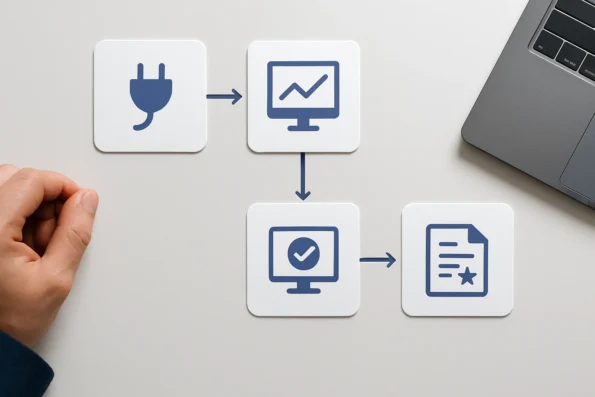
To leverage NextlerAI Publisher advanced analytics effectively, a structured approach is essential. The following sequence ensures reliable setup, accurate data collection, and actionable oversight for WordPress editorial teams.
- Install and activate NextlerAI Publisher: Begin by installing the Publisher plugin from your verified source and activate it within your WordPress environment. This action establishes the core analytics foundation and enables access to Publisher’s native dashboards and inventory modules. Installation from the official directory also ensures compatibility with your WordPress version, initializing the permissions and status tracking needed for full analytics functionality (official setup guide).
- Complete initial configuration: Configure the content inventory and dashboard analytics in Publisher. Assign appropriate WordPress roles and permissions to restrict access to analytics and publishing functions. Within Publisher settings, define which editorial roles may access quality reports or modify inventory records, aligning access controls with your organization’s editorial hierarchy. Review the system-generated audit logs to confirm all configuration changes are recorded for future reference.
- Optionally connect Google Search Console: If your workflow requires search performance data, connect Google Search Console using OAuth authentication. This secure integration allows Publisher to incorporate external search metrics without exposing your WordPress credentials. OAuth permissions are scoped to the minimum required for data retrieval, ensuring compliance with data minimization principles. Integration status is visible on the Publisher dashboard, and connections can be revoked at any time in accordance with your compliance policies.
- Monitor built-in dashboards regularly: Use Publisher’s built-in dashboards to track workflow status, content inventory, and article production logs. These dashboards provide at-a-glance operational insights and help identify bottlenecks or missed deadlines. Schedule routine reviews—such as weekly editorial meetings—to keep teams informed of progress and emerging issues. Built-in metrics include draft aging, review assignments, and publication throughput, supporting proactive editorial management.
- Act on quality report insights before publication: Before any article is published, review the Publisher quality report for flagged issues, compliance warnings, or policy exceptions. Address these findings through manual editorial intervention as Publisher does not automate content optimization or enforce changes based on analytics. The quality report details specific issues, such as missing meta tags or policy violations, and references the corresponding editorial guidelines (see Publisher quality rules). This final check ensures audit readiness and supports a compliant publishing workflow.
Once these steps are completed, your team will have a robust process for configuring and interpreting analytics, supporting both operational efficiency and editorial oversight. The next section details known reporting boundaries and product limitations.
Limitations: boundaries and known reporting constraints
While NextlerAI Publisher offers robust analytics features for tracking editorial workflow, it is essential to understand the boundaries and inherent constraints of its reporting capabilities. These limitations define what the Publisher platform can—and cannot—do in the context of automated content operations and performance monitoring.
Publisher does not automate optimization or adaptive actions
Publisher’s analytics modules provide clear visibility into content status, inventory, and workflow events. However, the system does not automatically optimize content or adapt publishing schedules in response to analytics data. Any editorial decision or workflow adjustment—such as refining article topics or reprioritizing posts—remains a manual process. This ensures that human oversight remains at the center of editorial governance and compliance, rather than relying on automated or predictive mechanisms that are not supported by the platform.
Analytics features do not guarantee performance outcomes
Access to analytics data—whether from built-in dashboards or connected external sources—does not equate to measurable improvements in content performance. Publisher does not promise or provide automated traffic, ranking, or engagement gains as a result of enabling analytics or integrating with external tools. Editorial teams are responsible for interpreting analytics insights and taking appropriate follow-up actions based on their unique goals and compliance requirements.
External analytics integrations are entirely optional
Publisher’s core publishing, inventory, and workflow features operate independently of any external analytics connection. Integrating tools such as Google Search Console via OAuth, or connecting external research providers, is strictly additive. These integrations supply supplementary data for decision support but are not required for the platform’s essential publishing or reporting functions. Teams can maintain a fully functional workflow—and meet internal audit requirements—using only Publisher’s built-in analytics modules.
Reporting boundaries: permissions and platform constraints
Analytics data access and reporting are governed by the user permissions defined within WordPress and, where applicable, by the external platforms themselves. This means that the depth and granularity of available analytics may be restricted according to user roles, site configuration, or third-party API limitations. Publisher cannot circumvent WordPress’s role-based access controls, nor can it retrieve data beyond the scope authorized by external services. Teams should review their WordPress user structure and external integration settings to ensure proper access and data governance.
Troubleshooting and support resources
Should issues arise—such as incomplete analytics data, job failures, or reporting discrepancies—Publisher provides system status dashboards and detailed job logs to support rapid troubleshooting. Official guides offer step-by-step instructions for diagnosing, retrying, or recovering from analytics and reporting errors. These resources are invaluable for maintaining operational continuity and audit readiness in complex, multi-user environments.
FAQ
Which analytics options can I use with NextlerAI Publisher?
NextlerAI Publisher offers native analytics for content inventory, workflow status, and publication logs. For organizations seeking additional data, integration with Google Search Console via OAuth is available, providing external search performance metrics. Serper integration supports research insights but does not automate reporting. External analytics tools are optional and do not alter Publisher’s core publishing pipeline.
How do I implement and connect external analytics tools?
To add Google Search Console, use the Publisher dashboard to initiate OAuth authentication and connect the relevant account. Access is controlled through assigned WordPress roles. For Serper, supply an API key according to the official integration steps. Only authorized users can manage or view external analytics connections, ensuring security and compliance with organizational policies.
What steps ensure analytics data is reliable and actionable?
Maintain reliable analytics by verifying correct WordPress permissions, confirming successful integration of external tools, and monitoring system status dashboards for anomalies. Regularly review inventory health, publication logs, and quality reports for discrepancies. Cross-check reported metrics against live articles, and conduct periodic audits to ensure compliance and data accuracy.
How does the analytics data flow within Publisher’s workflow?
Analytics are generated at each workflow stage: draft creation, editorial review, quality check, and publication. Each article’s status and metrics are logged within Publisher’s inventory system. If external analytics are connected, Publisher surfaces supplemental data separately, maintaining a clear boundary between internal workflow status and external search or research metrics.
What decision criteria matter most when choosing analytics tools?
Base your selection on reporting requirements, regulatory obligations, and operational needs. Use built-in analytics for compliance, audit trails, and inventory management. Choose external integrations if you require search performance data or competitive research. Consider data privacy, access controls, and the technical effort required for secure configuration and ongoing management.
What limitations should I know about Publisher’s analytics and reporting?
Publisher’s analytics do not provide predictive performance, adaptive scheduling, or automated content optimization. External analytics integration is strictly optional and does not influence core publishing functions. Data access is governed by WordPress permissions and external API constraints. Reporting reflects current workflow and cannot guarantee or project measurable outcomes.
Conclusion
Choosing the right analytics configuration in NextlerAI Publisher sets the foundation for actionable editorial oversight and compliance. The platform ensures that all critical content and workflow data is systematically logged and available for review—whether or not you engage external analytics providers. This design empowers publishing teams to directly interpret inventory health, publication history, and quality signals within their established WordPress environment, without introducing unnecessary complexity or dependency on third-party data flows.
For organizations with advanced reporting or search performance needs, external integrations are purposefully designed to be additive. They extend your visibility into search metrics and research data without altering core publishing functionality or diminishing audit traceability. This clear separation lets you build a layered analytics strategy that aligns with your operational and regulatory priorities.
On a deeper level, the decision to use built-in versus external analytics involves evaluating specific mechanisms of data ownership and system boundaries. Built-in analytics operate entirely within your WordPress environment, leveraging platform-level permissions and providing audit logs traceable to individual articles and users. External integrations, such as Google Search Console, are linked via OAuth authentication, ensuring that only permitted data is shared, and that access is strictly scoped according to your policies. This architecture protects sensitive editorial information while allowing selective augmentation of your reporting stack. Decisions about which analytics pathway to emphasize should be based on your organization’s tolerance for third-party data flows, internal audit requirements, and the specific compliance standards you must meet.
To move forward, schedule a review of your current reporting requirements with both editorial and technical leads. Map these needs to Publisher’s internal dashboards and optional integration points, then assign responsibility for ongoing analytics monitoring. This targeted approach will help you maintain reliable, audit-ready insights and enable confident editorial decision-making as your publishing operations scale.