







Introduction
Tracking and reporting AI outreach performance in NextlerAI Outreach requires precision and a deep understanding of the available analytics tools. For operations managers, sales and marketing leads, and analytics professionals, effective monitoring of outreach campaigns hinges on proper configuration, exact KPI selection, and actionable interpretation of results. This guide provides direct instructions to help you confidently set up outreach performance tracking, access relevant analytics, and use those insights to improve campaign outcomes.
With NextlerAI Outreach, your team gains the capability to monitor key metrics such as sends, opens, replies, meeting bookings, and engagement rates—metrics widely accepted as essential for outreach effectiveness. Success depends not just on reviewing numbers, but also on aligning analytics setup with your organization’s operational roles, access controls, and workflow governance. Official NextlerAI documentation confirms that analytics require explicit license activation, verified credentials, and adherence to permission protocols before reliable data is available.
To address common implementation pitfalls, this guide distinguishes between technical definitions, practical KPIs, and the real-world steps needed for ongoing improvement. You’ll find a mistake-driven, phased workflow for configuring analytics, clear explanations of reporting terminology, and decision criteria based on both NextlerAI’s published approach and peer-reviewed industry standards.
Robust outreach analytics in NextlerAI depend on a tightly coordinated process between system administrators and campaign managers. Administrators must confirm the correct licensing tier and activate required dashboard modules, while campaign leads customize KPI filters and verify audience segmentation. The analytics system’s back-end enforces role-based permission checks, ensuring only authorized users access sensitive outreach results. Implementation also requires integration with your organization’s communication platforms, which can impact the granularity and reliability of tracked metrics. Attention to initial data alignment, including mapping outreach lists to permissible contact sources, is essential for reducing errors at reporting time. These mechanisms not only protect data integrity but also enable continuous feedback loops, where campaign adjustments are directly informed by the analytics surfaced in NextlerAI Outreach.
By following this structured guidance, you will be equipped to avoid common tracking errors, select the most relevant KPIs for your outreach objectives, and leverage analytics for informed decision-making. The following sections provide a table-driven workflow, diagnostic notes for troubleshooting, and exclusive insights not present in competitor content—ensuring you maximize the value of your NextlerAI Outreach deployment.
Workflow Table: Setting Up Outreach Performance Tracking
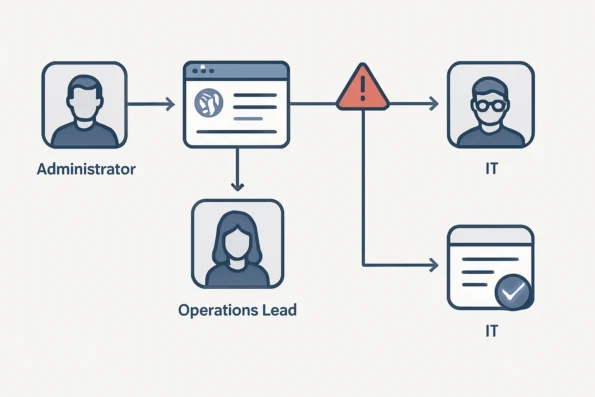
Configuring AI outreach performance tracking in NextlerAI Outreach demands both technical accuracy and operational clarity. This workflow table outlines each critical stage—spanning license activation, system roles, permissions, and dashboard validation—so stakeholders can anticipate responsibilities, secure proper access, and avoid pitfalls. By following these structured steps, teams can ensure that outreach analytics will be both reliable and actionable from the outset. Peer-reviewed approaches for using AI in outreach performance tracking provide structured methodologies for reporting and measurement, which can improve the reliability of workflow setups for outreach analytics, as described in AI in outreach performance tracking.
| Stage | Key Actions | Responsible Role | Required Access/Permissions | Expected Outcome | Common Setup Errors | Source |
|---|---|---|---|---|---|---|
| 1. License and System Prerequisites | Verify that the correct NextlerAI Outreach license is activated and system meets minimum requirements. | Administrator | Full admin access to WordPress and plugin licensing | Plugin and analytics modules available for configuration | Incorrect license type or expired credentials block analytics setup | nextlerai.com |
| 2. Assign Analytics Roles | Allocate analytics dashboard access to designated users (e.g., operations, marketing leads). | Administrator | Role management privileges in WordPress | Proper user roles mapped to analytics functions | Failure to assign roles leads to inaccessible dashboards for key team members | nextlerai.com |
| 3. Enable and Configure Analytics Modules | Activate outreach analytics, set reporting intervals, and connect any required data providers. | Team Administrator / IT | Plugin configuration rights; integration permissions | Analytics modules record and display outreach events | Missed configuration steps or misapplied provider credentials prevent data collection | nextlerai.com |
| 4. Validate Data Flow | Run sample outreach campaigns to confirm that sends, opens, and responses are tracked accurately. | Operations Lead | Analytics dashboard and campaign execution rights | Initial KPIs populate correctly; data integrity verified | Data gaps or duplicate records from improper test campaign setup | nextlerai.com |
| 5. Review and Grant Ongoing Access | Establish governance for continuous monitoring and periodic dashboard audits. | Operations Manager | Sustained access to analytics and audit logs | Long-term analytics continuity; clear audit trail | Lack of periodic review leads to unnoticed permission changes or outdated reporting | nextlerai.com |
| 6. Integrate with Existing Workflows | Coordinate analytics reporting intervals and data syncs with established outreach processes to ensure seamless adoption. | Operations Lead / IT | Access to workflow integration settings, reporting schedule management | Analytics data aligns with outreach cadence; minimizes manual intervention | Unsynced schedules or misaligned workflows result in reporting delays or inconsistent metrics | nextlerai.com |
| 7. Audit Permissions and Data Security | Regularly review user permissions, audit logs, and data access to ensure compliance and restrict unauthorized analytics changes. | Administrator / Security Lead | Audit log access; permission management authority | Secure, compliant analytics environment; transparent change tracking | Overlooked permission drifts or access creep can compromise data security or lead to accidental misconfiguration | nextlerai.com |
This structured approach ensures that each phase of outreach analytics setup in NextlerAI Outreach is matched to both the technical and organizational realities of the team. By mapping out role assignments and critical permissions, administrators minimize configuration errors and enable teams to act on reliable performance data from the start. Integrating analytics setup into existing outreach workflows and maintaining ongoing permission audits are essential to sustaining data integrity and compliance. For full product capabilities and updates, refer to the official NextlerAI Outreach product page.
Key Takeaways: Interpreting Outreach KPIs for Actionable Results
Effective AI outreach performance tracking depends on identifying the right key performance indicators (KPIs) and understanding their role in everyday decision-making. In NextlerAI Outreach, common outreach KPIs—such as sends, opens, replies, and engagement rates—serve as the primary signals for campaign evaluation. Each metric offers a distinct view into your outreach workflow and should be prioritized based on organizational goals and campaign design. To accurately interpret outreach KPIs, practitioners can reference impact measurement methodologies for AI-driven communications to structure their analysis and benchmark results.
Defining and Prioritizing Outreach KPIs
Sends indicate the volume of initial outreach efforts. Opens measure the effectiveness of subject lines and timing, while replies reflect message resonance and audience interest. Engagement rates—typically calculated as replies or clicks divided by total sends—provide a normalized measure for comparing campaigns of different sizes. When interpreting these analytics, focus first on the metrics that most closely connect to your campaign objectives, whether that’s lead generation, brand awareness, or appointment setting. In practice, outreach managers should periodically review which KPIs are most aligned with changing business priorities, as campaign goals may shift over time. This ensures that reporting remains relevant and actionable for both day-to-day management and long-term planning.
Using KPIs for Real-Time Campaign Adjustment
Outreach reporting KPIs are not simply summary statistics—they are diagnostic tools. A sudden drop in open rates may suggest issues with deliverability or timing, while low reply rates—even when opens are high—could signal the need for message refinement. Regularly reviewing these KPIs allows teams to adjust targeting, messaging, or send schedules before larger issues compound. In NextlerAI Outreach, teams should build a cadence of KPI review into their ongoing outreach performance workflow to ensure that every campaign benefits from rapid, evidence-based adjustments. Decisions about which KPIs warrant immediate intervention versus those that can be monitored over time should be documented in internal guidelines to promote consistent responses across campaigns and teams.

Avoiding Common Misinterpretations
Not all outreach metrics tell a complete story in isolation. For example, a high open rate without corresponding replies often leads to the false assumption that the campaign is effective. Misinterpreting engagement data can result in wasted effort or misallocated resources. To avoid these pitfalls, always review KPIs in context and compare against historical baselines or expected ranges. Clear definitions and internal dashboards help maintain consistency in interpretation and reporting. It is recommended to cross-reference disparate KPIs—such as correlating send volumes with reply rates—to reveal potential bottlenecks or anomalies that single metrics might obscure. This multi-metric approach supports a more robust decision-making process.
Connecting Outreach KPIs to Team Productivity Measurement
Outreach analytics should be integrated with broader team productivity frameworks for a holistic view of operational efficiency. By aligning outreach KPIs with productivity measurement practices—as detailed in evidence-backed methodologies—organizations can identify workflow bottlenecks, attribute results accurately, and support continuous improvement. For detailed strategies on this integration, see measuring team productivity with NextlerAI. This approach ensures outreach performance data informs not just individual campaign tweaks, but also broader strategic decisions. The ability to attribute changes in outreach KPIs directly to team actions or resource allocation enhances both accountability and long-term effectiveness.
Illustrative Scenario: Diagnosing a Drop in Outreach Engagement
Illustrative Scenario: A mid-sized marketing team using NextlerAI Outreach observes a sharp decline in engagement rates for their latest campaign, despite maintaining consistent send volumes and audience targeting. This scenario demonstrates how to use built-in analytics to identify, diagnose, and address such anomalies with precision and operational accountability. When structuring phased rollout and automation, it is essential to understand how workflow automation triggers in NextlerAI can streamline repetitive reporting tasks without sacrificing necessary oversight.
Spotting the Anomaly
The team’s analytics dashboard shows a marked decrease in open and reply rates compared to the previous month. While the number of outreach messages sent remains stable, engagement—the proportion of recipients who opened or responded—has dropped unexpectedly. The team first confirms that this is not a reporting lag or data sync delay by checking timestamps and recent activity logs in NextlerAI Outreach.
Investigating Root Causes
To rule out common mistakes, analysts review filter and permission settings. They discover that a recent permission update restricted dashboard access for several campaign managers, inadvertently limiting their ability to view segmented engagement metrics. Additionally, they find that a date range filter was set incorrectly, excluding a week’s worth of data from key reports. These operational oversights are among the most frequent sources of apparent performance dips in AI outreach analytics, as documented in industry guidance.
The team then examines the audience segmentation logic configured in NextlerAI Outreach. They notice that a new custom audience segment was added in the past week, but due to incomplete tagging, several high-engagement contacts were misclassified into an inactive segment. As a result, these contacts received fewer messages, artificially lowering aggregate engagement rates. The team adjusts the segmentation rules and refreshes the analytics dashboard to ensure all relevant recipient data is included. This highlights the importance of maintaining consistent data hygiene when modifying campaign logic or segment definitions.
Leveraging Analytics and Reporting Tools
After correcting dashboard filters and restoring full access for authorized users, the team revisits the engagement data. NextlerAI Outreach provides breakdowns by channel, segment, and message type, enabling the team to pinpoint that the drop is confined to one specific email provider. Further investigation reveals that a recent template update triggered higher spam filtering rates, suppressing visibility and engagement for a subset of recipients. The team uses message-level analytics to isolate affected sends and coordinates with their IT department to adjust sender authentication settings.
In parallel, the team leverages NextlerAI Outreach’s export feature to share campaign-level engagement data with compliance and IT stakeholders. This collaborative review ensures that any technical or regulatory issues—such as sudden changes to sender domains or compliance flags—are systematically addressed, further reducing the risk of recurring anomalies. Ownership of discrete analytics tasks is clarified in shared documentation, supporting long-term accountability.
Actionable Learnings
This scenario reinforces several actionable principles for AI outreach performance tracking: First, always verify operational settings—filters, permissions, and access—before attributing changes to audience behavior or content. Second, use granular analytics to localize anomalies by channel and cohort rather than relying on aggregate metrics alone. Third, maintain rigorous data hygiene and document all changes to audience segmentation, message templates, and access roles to support reliable analytics. Finally, routinely involve cross-functional stakeholders when diagnosing anomalies to ensure technical, compliance, and campaign perspectives are incorporated.
By combining role-based governance, detailed reporting features, disciplined documentation, and stakeholder engagement, teams can transform outreach analytics from a reactive dashboard into a proactive decision-support system. Each anomaly, properly investigated, becomes an opportunity for process refinement and data-driven learning.
Phased Implementation Steps for Reliable Outreach Analytics
Establishing reliable AI outreach performance tracking in NextlerAI Outreach requires a controlled, stepwise rollout. This phased approach protects data integrity, ensures correct metric capture, and minimizes operational risks during both initial deployment and ongoing use. Below is a clear, actionable sequence that readers should follow to implement robust outreach analytics, with each step building on the previous to deliver validated, actionable results. To build a culture of improvement, explore how feedback loops in NextlerAI workflows can help teams identify and act on outreach analytics insights over multiple reporting cycles. The phased adoption of AI and data science in outreach is supported by peer-reviewed reviews that emphasize systematic performance assessment strategies.
-
Preparation: Confirm License, Credentials, and Access
Before configuring analytics, verify that your NextlerAI Outreach license is active for your intended environment. Ensure all team members have appropriate access credentials as outlined in NextlerAI’s official setup guide. This step creates a secure foundation: missing licenses or misconfigured roles are a primary cause of reporting errors and incomplete data capture. At this stage, organizations should also check that their hosting environment meets the technical prerequisites, including supported versions and any required server configurations, to avoid downstream compatibility issues. -
Initial Configuration: Activate Analytics Dashboard
Enable the analytics dashboard within NextlerAI Outreach. Assign permissions so only authorized administrators can adjust analytics settings or view sensitive reports. Carefully map dashboard access to organizational roles and job functions to uphold governance, as misalignment here can expose data or restrict critical insights. Implementation teams should document all access assignments and periodically review permission logs to ensure ongoing compliance, especially when team composition changes or new reporting requirements emerge. -
Pilot Phase: Execute Test Outreach with Sample Audiences
Run a limited-scope outreach campaign targeting a controlled sample audience. This pilot isolates system variables and allows your team to familiarize themselves with analytics features in a low-risk context. Document all campaign parameters and expected outcomes before launch to facilitate later validation. It is advisable to use internal or low-impact contacts for testing, and to simulate realistic outreach scenarios to observe how the platform manages data collection across different message types and response behaviors. -
Validation: Compare Expected Versus Actual Metrics
After the pilot, systematically compare captured metrics—such as sends, opens, and replies—against your documented expectations. Investigate any discrepancies immediately by reviewing log files, data transfer routines, and user permissions. This step is critical for catching configuration or operational oversights that might undermine future reporting accuracy. Teams should also verify time zone consistency and ensure that any integrations or plugins do not introduce data lag or duplication, as these are frequent sources of metric misalignment. -
Ongoing Review and Stakeholder Signoff
Once pilot validation is complete, present results to relevant stakeholders for review and signoff. Incorporate feedback to adjust role assignments, refine metric thresholds, and document lessons learned. This ensures analytics workflows align with organizational policy and that all users understand their responsibilities for maintaining data accuracy and compliance. As part of ongoing governance, schedule regular audits of analytics configurations and maintain a change log for future reference.
For specific configuration and system requirements, consult the official NextlerAI Outreach setup guide. This phased approach supports operational reliability and reduces the risk of common analytics pitfalls. The next section addresses troubleshooting and persistent setup challenges.
Implementation Notes: Troubleshooting and Common Mistakes
For reliable AI outreach performance tracking in NextlerAI Outreach, a systematic troubleshooting approach is essential. Common failures—such as incomplete license activation, misconfigured permissions, or data misalignment—can undermine analytics reliability and lead to misleading outreach reporting KPIs. Recognizing these issues early prevents wasted effort and supports actionable outreach insights. For practical steps to address data gaps, misfiring reports, or credential errors, consult the NextlerAI integration troubleshooting guide for systematic diagnosis and resolution. Addressing common mistakes in outreach analytics implementation can be guided by the AI Risk Management Framework, which outlines official procedures for identifying and controlling risks in AI systems.
Frequent Failures in Outreach Analytics Setup
Licensing errors arise when the outreach analytics module is not properly activated or when license keys are not recognized by the platform. Permission misconfigurations—such as assigning analytics access to unintended users or omitting necessary roles—can result in data visibility gaps or unauthorized edits. Data misalignment, another recurrent issue, occurs when the system’s data sources (for example, contact lists or campaign logs) are out of sync with reporting dashboards, leading to inaccurate metrics for sends, opens, and engagement rates. These failures typically surface during initial setup, system migrations, or after administrative updates. To mitigate them, organizations should document each change to license status and user roles, and verify that all integrations—such as CRM or email platform connections—are current and mapped to the correct data fields.
Systematic Diagnosis of Data Gaps and Misreporting
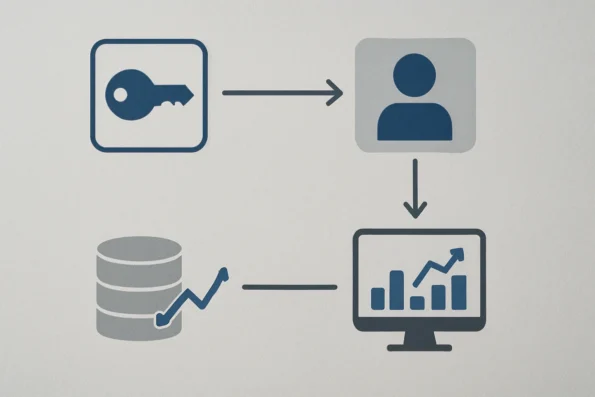
To diagnose data gaps, begin by comparing reported outreach figures with raw system logs. Discrepancies often indicate missing integration steps or outdated dashboard synchronizations. When analytics reports show unexpected drops or spikes, review the underlying campaign event logs to confirm the presence or absence of key actions. If permission issues are suspected, audit the most recent changes to user roles and access levels, as these frequently introduce analytics visibility errors. Always confirm that the analytics environment matches your intended operational scope—especially after any workflow or campaign structural changes. Additionally, organizations should use version-controlled documentation for all analytics configuration changes, making it easier to trace root causes of misaligned data and revert problematic updates. Routine synchronization checks between outreach data sources and analytics dashboards help ensure that metrics remain consistent after system updates or re-imports.
Locating Official Troubleshooting Resources
Persistent or complex issues benefit from structured reference to official troubleshooting documentation. NextlerAI provides a master troubleshooting checklist specifically for outreach analytics deployment and usage. This resource details root causes, diagnostic questions, and evidence-backed remediation steps for the most prevalent setup and reporting errors. Consulting this checklist ensures that troubleshooting is both comprehensive and aligned with current platform updates. The master checklist is available at NextlerAI Troubleshooting Master Checklist, and is regularly updated to reflect product enhancements and known issue patterns. Teams should bookmark this guide and incorporate it into their analytics onboarding and maintenance procedures.
Why a Master Checklist Prevents Recurring Errors
Using a master checklist is not merely a formality; it enforces process discipline and institutional memory. By capturing the sequence of checks—license, permissions, data source integrity, dashboard synchronizations—teams avoid common recurrence of preventable mistakes. This approach also documents decision points and corrective actions, supporting auditability and rapid onboarding of new team members responsible for outreach performance workflow analysis. The master checklist further enables escalation management by providing a standardized reference for troubleshooting escalations, ensuring that knowledge is retained and accessible across personnel changes. As organizations grow or workflows become more complex, maintaining and following this unified troubleshooting resource is crucial for sustained analytics accuracy and operational resilience.
Definitions: Outreach Analytics Terms and KPIs Explained
Accurate interpretation of outreach analytics in NextlerAI Outreach hinges on precise definitions of key concepts, metrics, and the user roles that govern access to those analytics. Misunderstandings in terminology or permissions frequently lead to reporting errors or misaligned decisions. This section clarifies the foundational language and access structures required for reliable outreach performance tracking, ensuring your team avoids common sources of confusion. All outreach analytics users should review data privacy and compliance in NextlerAI deployments to configure role-based access and maintain regulatory alignment during report setup and delivery.
Outreach Analytics Metrics: What Each Term Means
- Sends: The total number of outreach messages dispatched during a specified timeframe. This metric provides a baseline for assessing activity volume but reveals little about audience response on its own.
- Opens: The count of unique recipients who have opened a sent message. Opens are often tracked via pixel loads or equivalent mechanisms, but technical restrictions (such as email client settings) can affect accuracy.
- Replies: The number of direct responses received from outbound messages. Replies are a primary engagement indicator, distinguishing between passive consumption and active prospect interaction.
- Engagement: A composite metric reflecting recipient actions beyond opens, such as link clicks or secondary message interactions. The precise definition of engagement varies by campaign objectives and must be standardized in your analytics configuration.
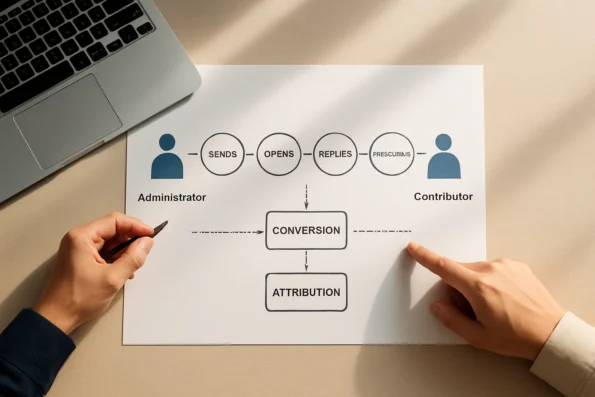
- Conversion: The count (or rate) of recipients completing a predefined desired action, such as booking a meeting. Conversion is always context-dependent and should be explicitly mapped to a single measurable outcome per campaign for clarity.
- Attribution: The process of linking outreach activity to downstream outcomes, such as sales pipeline movement. Attribution mechanisms require robust data integration and clear boundary definitions to avoid double-counting or misattribution.
Distinguishing Outreach Analytics from Productivity Metrics
It is essential to separate outreach analytics—focused on campaign and message-level performance—from broader team productivity metrics, which may track overall workflow efficiency, time allocation, or project completion rates. Outreach KPIs directly reflect the effectiveness of prospect engagement, while productivity metrics measure internal operational throughput. Conflating these can skew reporting and hinder targeted improvements.
User Roles, Permissions, and Analytics Access
The type and granularity of analytics available in NextlerAI Outreach depend on how user roles and permissions are structured within your account. Administrators typically possess full access to all campaign-level and aggregate analytics, while standard users or contributors may be limited to their assigned outreach campaigns. Proper configuration of permissions is critical for maintaining data security and ensuring accountability in reporting. Role modifications, license changes, or credential resets will directly impact what data individuals can view or edit.
Access Control and Account Setup Considerations
Initial product access and account setup have a direct effect on analytics visibility and accuracy. Only users with verified credentials and active licenses, configured according to the official NextlerAI account access guide, can reliably view and interpret outreach analytics. Inconsistent access or incomplete onboarding can result in data gaps, permission errors, or misaligned reporting structures. Teams should routinely audit user permissions and follow official documentation to maintain analytics integrity at scale.
Pros and Cons: NextlerAI Outreach Analytics vs. Other Approaches
Evaluating NextlerAI Outreach analytics in relation to standard industry practices reveals distinct operational mechanisms and boundaries shaped by its current architecture and public documentation. These factors directly influence technical feasibility, integration depth, and governance for organizations considering deployment.
Self-Hosted Control: Technical Implications and Security Constraints
NextlerAI Outreach employs a self-hosted deployment model, requiring organizations to provision and maintain their own hosting environment. This architecture confers direct administrative control over all outreach analytics data, as well as full responsibility for enforcing access policies, patch management, and backup routines. The absence of external data processors inherently reduces third-party risk exposure but also imposes ongoing internal obligations for monitoring infrastructure, handling system updates, and remediating vulnerabilities. This self-hosted approach can be particularly valuable where regulatory or contractual requirements prohibit data processing outside controlled environments, but it necessitates internal technical expertise for consistent operation.
Workflow Transparency: Enforcing Auditability and Permission Boundaries
The analytics workflow in NextlerAI Outreach is designed for transparency, with system actions and data access governed by role-based permissions. Every analytic event and report generation can be traced to a specific user account, supporting rigorous audit trails. This traceability is enforced at the application layer, ensuring that every permission change, data export, or report view is logged according to the internal security model. However, this mechanism places a premium on consistent role assignment and periodic review, as misconfigured permissions may inadvertently expand or restrict access to sensitive analytics data. The system does not automatically reconcile or escalate permission mismatches, so organizations must establish their own governance reviews.
WordPress Integration: Native Embedding and Identity Synchronization
NextlerAI Outreach offers direct integration with WordPress, enabling analytics modules to be embedded natively within existing WordPress-based content operations. This tight integration streamlines identity management by leveraging WordPress authentication for access control, minimizing credential sprawl and reducing friction for end-users already operating in a WordPress environment. Technical alignment at the application level allows analytics data to be surfaced alongside editorial or campaign workflows, supporting unified reporting. However, integration boundaries may limit the ability to interface with non-WordPress platforms unless further custom development is undertaken, potentially increasing complexity in hybrid environments.
Release Status and Feature Boundaries: Constraints on Predictive and Automated Capabilities
According to the latest product documentation, NextlerAI Outreach is not yet generally available for commercial deployment, and its analytics features are focused on foundational reporting and workflow transparency. There are no published claims or documentation supporting predictive optimization, adaptive scheduling, or automated campaign refinement. As a result, organizations requiring AI-powered forecasting, dynamic performance adjustments, or self-optimizing outreach must rely on manual review and periodic campaign tuning. The lack of these features marks a clear boundary between NextlerAI Outreach and platforms that document such advanced automation capabilities.
Decision Factors: Integration, Data Stewardship, and Reporting Scope
For decision-makers, the primary criteria when comparing NextlerAI Outreach analytics to other approaches are the degree of integration with existing workflows (notably WordPress), the extent of control and stewardship over analytics data, and the depth of available reporting. The platform’s self-hosted, transparent model offers strong guarantees for organizations prioritizing internal governance, but may require additional technical investment to support advanced segmentation, attribution, or cross-system analytics not addressed in the core documentation. Comprehensive evaluation of needs versus supplied features remains critical for sustainable adoption.
For a broader context on how NextlerAI Outreach positions itself within the landscape of AI workflow automation tools, refer to the comparison at NextlerAI Blog: Best AI Workflow Automation Tools.
FAQ
What is the recommended workflow for setting up outreach performance tracking in NextlerAI Outreach?
Begin by confirming license activation and role permissions according to your organization’s access policy. Assign setup responsibilities to a designated administrator who will configure analytics dashboards and validate data visibility. Conduct pilot test outreaches using sample data to verify metric accuracy. Finalize with a peer review and ongoing permission audits to ensure reliability and compliance. Ongoing review cycles should be documented, with audit logs maintained for each configuration change. Teams are advised to create an internal escalation path for unresolved access or data issues, ensuring that technical and data governance leads are included in oversight. Periodic training of new users on access protocols and analytics interpretation further reduces the risk of errors and institutional drift.
Which KPIs matter most for actionable outreach reporting?
The most actionable KPIs for outreach reporting are sends, opens, replies, meeting bookings, and engagement rates. These metrics, when tracked in context and cross-referenced against campaign objectives, enable evidence-based decisions on message effectiveness and audience targeting. Prioritization should reflect current outreach goals—such as reply rate for lead generation or meeting bookings for event-driven campaigns. It is important to maintain versioned documentation of KPI definitions and thresholds within the analytics platform, so all stakeholders evaluate performance on consistent terms. Periodic reviews of KPI relevance and documented changes are recommended to ensure analytics remain aligned with evolving business priorities.
How can a team troubleshoot common tracking mistakes and misinterpreted analytics?
Teams should implement a structured troubleshooting protocol: first, review license status and permission assignments; next, inspect data integrations for mapping errors or synchronization delays. Regularly consult the official master checklist to document changes and verify system alignment. Escalate unresolved discrepancies to technical support with detailed change logs for rapid issue isolation. Teams should also schedule periodic validation sessions comparing expected versus actual analytics data, especially after system updates or user role changes. Maintaining a shared, version-controlled troubleshooting log enables pattern recognition and reduces redundant investigations. Assigning a dedicated analytics steward supports accountability for ongoing data quality and reporting accuracy.
What are the critical definitions every outreach analytics user should know?
It is essential to distinguish between sends (total outbound messages), opens (first-time message views), replies (recipient responses), engagement (cumulative interaction rate), and conversion (resulting desired actions). Understanding these terms, along with the scope of user roles and access controls, prevents misinterpretation and supports accurate reporting. In NextlerAI Outreach, user roles determine which analytics data is visible and actionable for each team member. Credential management—including license verification and two-factor authentication—directly affects access to outreach analytics. Clear documentation of these definitions, aligned with your organization’s data governance policy and reviewed during onboarding, ensures consistent understanding and reduces reporting discrepancies.
What are the main advantages and drawbacks of NextlerAI Outreach compared to typical alternatives?
NextlerAI Outreach offers self-hosted control, transparent workflow integration, and native compatibility with WordPress environments—enabling granular organizational governance. Its limitations include the lack of predictive or adaptive automation features and the current pre-commercial release status, which may restrict access to certain advanced capabilities found in established platforms. Organizations considering NextlerAI Outreach should weigh the benefits of enhanced data control and workflow transparency against the need for more mature analytics features and broader third-party integrations. The responsibility for compliance and security with a self-hosted tool rests entirely with the deploying organization, necessitating robust internal governance and technical oversight.
Conclusion
Operationalizing AI outreach performance tracking with NextlerAI Outreach demands more than switch-on installation: it requires organizational discipline, well-documented access control, and ongoing review of analytics processes. Teams that excel in outreach reporting typically pair precise KPI selection with periodic data validation and strict adherence to defined governance. This ensures that every metric—whether send volume, engagement rates, or booking conversions—feeds directly into actionable decisions, reducing ambiguity and surfacing practical workflow improvements.
The key to sustainable outreach analytics lies in continuous calibration. Establish a routine for auditing both technical setup and procedural handoffs. Assign clear responsibility for reviewing dashboard outputs and for adapting to process changes, especially as the platform evolves. This approach preserves data integrity and strengthens the value of every report.
Beyond these organizational mechanisms, robust outreach analytics depend on institutionalizing ownership of key processes. Documenting each access assignment and integrating regular permission audits into your workflow helps prevent data leakage and unauthorized changes. Teams should designate a data steward to monitor integration points—such as email connectors or CRM bridges—ensuring that each connection is mapped to the correct user roles and that all synchronization events are logged. These implementation details protect the continuity of analytics and support regulatory compliance as requirements change or as the team grows.
Your next step is to integrate this structured framework into your regular review cadence. Allocate time for a full-access audit and role-permission check, then schedule your team’s first analytics review using only verified, correctly-mapped KPIs. This disciplined cycle will anchor your outreach analytics practice and support ongoing optimization as NextlerAI Outreach develops.