







Introduction
Integrating AI outreach data with your CRM streamlines lead management, aligns engagement tracking, and automates critical sales workflows. For CRM administrators and outreach managers, this means less manual data entry and more actionable insights from every interaction. Using a workflow-centric approach, this guide focuses on connecting NextlerAI Outreach with your chosen CRM—equipping you with precise steps, comparison criteria, and technical safeguards. Whether you manage a large sales pipeline or oversee integration strategy, you’ll find clear explanations and practical checklists for a secure, phased rollout. By the end, you’ll understand exactly how to bridge your AI outreach platform with your CRM for reliable, automated lead handling and data consistency.
This article is designed for both technical and non-technical stakeholders who need a pragmatic path from isolated outreach data to a unified, actionable CRM environment. Integrating outreach automation with your CRM lets sales, marketing, and management teams access up-to-date engagement records, reducing the risk of duplicated outreach or missed follow-ups. The guide covers not only the high-level business value but also the technical requirements, including field mapping, permission handling, and compliance needs—ensuring you comply with relevant data protection regulations when handling personal data or sensitive business information.
Throughout this resource, you will learn how integration decisions affect sales velocity, reporting quality, and workflow reliability. It explains the practical trade-offs between different integration approaches so you can select the best fit for your organization’s systems, technical capacity, and compliance obligations. The outcome: you will be prepared to drive an integration project that delivers both operational clarity and long-term data consistency, while managing the complexities of system interoperability and user adoption. Next, we begin by weighing the core advantages and potential challenges of AI outreach CRM integration, laying the foundation for informed decision-making throughout your project.
AI Outreach CRM Integration: Pros and Cons
Integrating AI outreach data with your CRM delivers measurable operational clarity but introduces practical trade-offs that technical leads and sales operations managers must weigh carefully. Below, we examine the distinct advantages and limitations that define successful implementation, drawing from supported integration frameworks and verified provider documentation.
Core Advantages: Streamlined Workflows and Data Accuracy
The most immediate benefit of AI outreach CRM integration is streamlined lead management. By centralizing engagement data directly within CRM records, teams gain a unified view of prospect interactions, which reduces the risk of duplicate or outdated entries. For instance, when NextlerAI Outreach syncs with a CRM, lead statuses, communication notes, and follow-up tasks are automatically reflected across both systems. This unified approach eliminates the need for manual updates and supports more reliable pipeline tracking—a capability explicitly supported in documented Outreach and Salesforce integrations.
Automation extends beyond data entry. Workflow automation, such as auto-updating lead stages or assigning tasks based on outreach responses, becomes feasible once AI-generated engagement data feeds into CRM fields. This reduces repetitive administrative work and helps sales representatives focus on high-value activities. Maintaining data consistency is easier, too, because mapped fields and standardized formats help prevent common human errors in manual processes.

Potential Limitations: Complexity, Maintenance, and Compliance Overhead
Despite the operational appeal, integration introduces complexity at the setup and maintenance stages. Technical challenges frequently arise during initial mapping of outreach fields to CRM contacts and leads. Each platform may organize data differently, requiring careful configuration to avoid mismatches or lost information. Ongoing maintenance is necessary to accommodate API changes, CRM upgrades, or evolving outreach workflows, which may demand technical intervention and cross-team coordination.
Another often underestimated challenge is ensuring data privacy and compliance. Integration expands the flow of personal and engagement data, increasing regulatory obligations for organizations subject to frameworks such as the EU AI Act or NIST AI Risk Management Framework. Mapping sensitive data and configuring security permissions require additional diligence, especially for teams handling cross-border or industry-regulated information. Provider documentation highlights the need for explicit consent management and audit trails to maintain compliance after integration.
Operational Impact: Reporting, Visibility, and Training Requirements
Enhanced reporting is a notable upside—integrated systems make it easier to create comprehensive dashboards and track outcomes across outreach and sales operations. However, this benefit comes with a learning curve. Staff may need extra training to interpret new reports, use automated workflows, or troubleshoot integration-related issues. Allocating time for upskilling and documentation is essential to ensure teams fully leverage the combined platform capabilities without disruption.
Essential Definitions: What AI Outreach CRM Integration Means
Understanding AI outreach CRM integration begins with the practical connection of an AI-powered outreach automation tool—such as NextlerAI Outreach—with customer relationship management (CRM) software. This integration allows organizations to synchronize leads, contacts, communication history, and engagement data across both systems, supporting a unified approach to lead management and workflow automation. If you encounter issues, refer to the integration troubleshooting guide for structured problem-solving. AI Act | Shaping Europe’s digital future documents the relevant background and implementation boundaries.
Key Integration Terminology Explained
- Data Mapping: The process of aligning data fields (e.g., lead name, email, engagement score) from the outreach platform with corresponding fields in the CRM. Accurate mapping ensures that information is transferred correctly and updates in one system reflect in the other.
- API (Application Programming Interface): A defined method for programs to communicate. APIs enable automated data exchange between NextlerAI Outreach and the CRM, making custom integrations possible when built-in connectors do not exist.
- Webhook: An automated notification sent from one system to another when a specified event occurs (such as a new lead captured or status changed). Webhooks are often used for near-instant updates between outreach tools and CRMs.
- Workflow Automation: The configuration of triggers and actions that move data or initiate tasks automatically across systems. For instance, a workflow may create a new CRM contact when an outreach sequence is completed.
- Lead Capture: The automated intake of prospect information—often from web forms or campaign responses—directly into both the outreach tool and the CRM, reducing manual entry and ensuring no lead is lost.
- Bidirectional Sync: A synchronization method where changes made in either system (outreach or CRM) are reflected in the other, maintaining consistent and current records.
Integration Types: Native vs. Custom Approaches
AI outreach CRM integration is implemented in two primary ways:
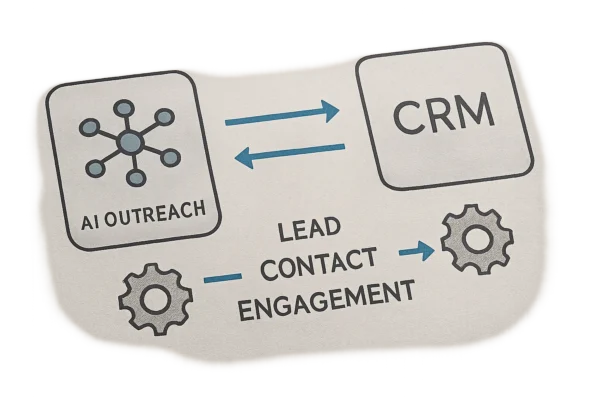
- Native Integration: Built-in connectors provided by either the outreach platform or CRM vendor. These are designed for ease of use, usually requiring minimal configuration and supporting standard data flows. For example, connecting NextlerAI Outreach to a major CRM might involve activating a prebuilt connector and mapping core fields.
- Custom Integration: Developed using APIs or middleware platforms, custom integrations offer greater flexibility. This approach is often chosen when standardized connectors do not support required data fields, unique workflows, or advanced automation. Middleware solutions can act as translators, synchronizing data between systems with additional logic as needed.
Understanding these definitions and options is essential before planning how to connect NextlerAI Outreach with your CRM, as each approach carries distinct technical considerations and operational impacts.
Comparison Criteria for AI Outreach CRM Integration
To select the most effective AI outreach CRM integration approach, it is essential to compare native connectors, API-based custom integrations, and middleware solutions across several operational and technical criteria. These factors directly influence setup complexity, required expertise, synchronization reliability, automation depth, and long-term maintainability. The table below presents a structured analysis, enabling decision-makers to align integration strategy with workflow needs, in-house skills, and CRM compatibility constraints. To further strengthen your CRM integration strategy, consider how multi-provider outreach integration can add resilience and flexibility to your workflow. AI Risk Management Framework | NIST documents the relevant background and implementation boundaries.
| Integration Approach | Ease of Setup | Technical Skills Required | Data Sync Capabilities | Workflow Automation Potential | Security Considerations | CRM Compatibility | Source |
|---|---|---|---|---|---|---|---|
| Native Integration (Built-in Connector) | High—guided setup, minimal coding | Basic admin skills | Real-time or scheduled, limited to supported fields | Integrated triggers and basic automation in platform | Vendor-managed security; standardized permissions | Restricted to officially supported CRMs | People.ai Integration Setup in the Salesforce Plugin |
| API-Based Custom Integration | Moderate to Low—requires development and testing | Advanced (API, scripting, mapping) | Flexible; field-level, bidirectional, custom mapping | Full customization; event-based and conditional automation | Requires explicit authentication and secure data handling | Broad—any CRM with accessible API | NextlerAI official blog |
| Middleware Connector (e.g., Zapier, n8n) | Moderate—no-code/low-code tools, but manual mapping | Intermediate (platform familiarity) | Batch or triggered sync, may have rate limits | Conditional logic and multi-step workflows supported | Depends on middleware; review third-party data access | Wide—supports many CRMs and outreach tools | NextlerAI official blog |
This comparison clarifies that native integrations prioritize ease and security within a limited ecosystem, while API-based approaches offer maximum flexibility at the cost of greater technical demand. Middleware platforms bridge the gap for teams needing rapid deployment and broad compatibility, though they introduce additional data governance considerations. Decision-makers should note that the choice of integration method not only affects the initial implementation workload but also ongoing support and adaptability as workflow requirements evolve.
For instance, organizations evaluating NextlerAI Outreach must consider both technical and operational priorities. A native integration, when available, often enables the quickest route to production, with vendor support for standard field mapping and user management. However, this method is bounded by the fields and triggers natively supported by both the outreach platform and the CRM, potentially limiting custom workflows or complex reporting needs. In contrast, an API-based custom integration with NextlerAI Outreach, as outlined in the official provider documentation, allows for granular control over record syncing, the creation of bespoke automation logic, and adaptation to complex data structures. This comes with increased setup complexity, requiring in-house or contracted development expertise, as well as ongoing monitoring for API changes and error handling routines.
Middleware connectors, such as those supported by no-code automation tools, present a middle ground: they offer a user-friendly interface for mapping data and building conditional automation without full-scale development. However, organizations must assess the data access policies and operational reliability of the middleware provider, especially with respect to privacy, latency, and integration limits. This is particularly important for teams subject to strict regulatory or security requirements, as middleware may introduce an additional point of data exposure. Therefore, the integration approach should be selected by weighing current and projected workflow demands, available technical resources, and risk tolerance, ensuring that the solution remains sustainable as both outreach and CRM platforms evolve over time. The next section will address specific technical notes essential for secure and efficient integration.
Technical Notes for Secure and Efficient Integration
Achieving a stable and compliant integration between NextlerAI Outreach and your CRM requires attention to several technical details beyond initial setup. The following notes address critical considerations for mapping outreach fields, managing access, safeguarding data, and handling operational exceptions—each of which can impact integration reliability and auditability. Including outreach performance tracking in your checklist ensures you can measure the impact of your integration and adjust workflows for ongoing improvement. Salesforce Help documents the relevant background and implementation boundaries.
Field Mapping Consistency
Begin by confirming that each outreach data field correctly corresponds to the intended CRM record—most commonly Contact or Lead objects. Mismatched or ambiguous mappings can cause data loss, duplication, or workflow errors. For example, outreach engagement status or AI-suggested lead scores must be mapped to CRM fields with compatible data types and constraints. Consult your CRM’s field definitions and enforce standardized naming conventions where possible to avoid downstream reconciliation problems.
User Permissions and API Credential Management
Restrict integration actions to users with appropriate administrative or integration-specific roles. This limits the risk of unauthorized data exposure or accidental changes. NextlerAI Outreach integrations require valid API credentials; always test these credentials in a controlled environment before full deployment. Rotate credentials regularly and revoke obsolete accounts to uphold least-privilege principles throughout the integration lifecycle.
Data Privacy and Regulatory Compliance
Integration projects involving AI and CRM data are subject to jurisdiction-specific regulations. The EU AI Act, for example, imposes risk-based obligations on deployers and providers regarding transparency, data minimization, and auditability. The NIST AI Risk Management Framework further recommends controls for data lineage and access logging. Ensure that your integration captures necessary audit trails, limits data transfers to what is strictly required, and aligns with both organizational policy and legal frameworks in all relevant regions.
Rollback and Audit Procedures
Maintain documented rollback procedures to address failed syncs or data corruption. Automated logging of all integration actions—field changes, user authentications, and sync events—supports both troubleshooting and regulatory audits. Design your process so that logs are retained securely and can be filtered by event type or user for rapid investigation.
Common Technical Issues and Troubleshooting
Frequent challenges include API rate limits, unexpected field changes in the CRM, or permission mismatches following staff transitions. Proactively monitor integration logs for errors and set up notification triggers for critical failures. For persistent problems, reference your CRM and outreach integration documentation to isolate whether the root cause lies with configuration, credentials, or platform updates. Detailed troubleshooting guidance for NextlerAI product integrations is available and should be part of your standard operating procedures.
Key Takeaways for Planning Your Integration
Effective AI outreach CRM integration hinges on rigorous early-stage planning. Defining required data fields and mapping outreach objects to CRM records at the outset prevents downstream complications. This foundational step ensures that both automated workflows and manual processes remain consistent and auditable as your integration matures. If your setup requires unique connections or advanced data mapping, a custom API integration may address constraints not covered by standard approaches.
Piloting the integration in a controlled test environment is critical. By using a sandbox or limited data set, your team can surface mapping errors, permission mismatches, and workflow bottlenecks before they impact production systems. This approach is supported by integration best practices outlined in official documentation for platforms like Outreach and NextlerAI Outreach.
Comprehensive documentation is not optional. Track each integration point, API credential, and mapped field in a shared resource accessible to both technical and operational stakeholders. Clear records make troubleshooting faster and support compliance obligations under frameworks such as the EU AI Act and NIST’s AI Risk Management Framework, especially when handling regulated lead or contact data.
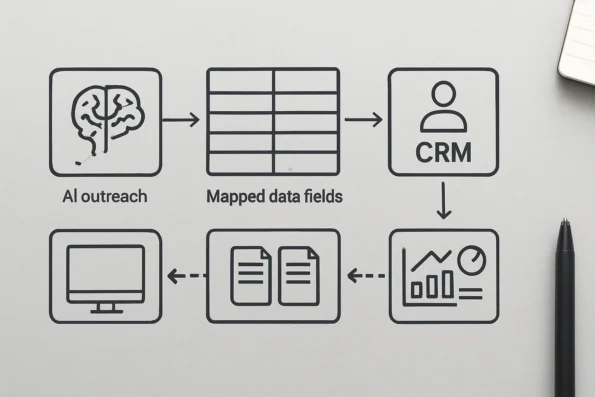
Post-launch, ongoing monitoring is essential. Establish systematic checks on data sync performance and solicit feedback from end users to identify friction in new workflows. This vigilance enables quick intervention if sync failures or data quality concerns emerge, supporting operational resilience and long-term user adoption.
Critical Mechanisms for Sustainable Integration
Assign clear ownership for integration maintenance. Designate a team or individual responsible for updating field mappings and reviewing API changes as either the outreach tool or CRM evolves. This role should monitor vendor release notes and maintain version compatibility, as even minor changes to API endpoints or data schemas can disrupt automated workflows. Establishing this accountability prevents overlooked issues that could cascade into data loss or reporting inaccuracies.
Align integration scope with actual operational needs. Resist the urge to sync every available field or object; instead, prioritize only data that directly supports sales, compliance, or reporting goals. Overly broad integrations can increase risk, introduce unnecessary complexity, and create privacy or retention challenges, especially under regulatory frameworks that restrict data minimization and storage practices. Consult legal or compliance teams early if sensitive attributes or regulated industries are involved.
Regularly review and refine integration workflows in response to user feedback and emerging business requirements. Build in a cadence for periodic audits—at least quarterly—to verify that data flows remain accurate, permissions up to date, and that integration points still match organizational processes. Document all changes and communicate updates to relevant stakeholders to ensure continuous alignment and avoid workflow drift.
For integrations involving multiple outreach providers or custom API logic, weigh the decision to use middleware or direct API integration based on the internal technical expertise available. Middleware platforms can simplify ongoing maintenance but may limit granular control over field-level mapping or error handling. Conversely, direct API integrations offer more transparency and customization but require deeper technical investment to keep pace with changes in either system’s API. This decision should be revisited as your organization’s needs, team capacity, or vendor ecosystem evolve, ensuring that your integration strategy remains both efficient and resilient over time.
Phased Rollout Steps for Integration
Rolling out an AI outreach CRM integration, such as connecting NextlerAI Outreach to your CRM, is best accomplished through a deliberate, phased approach. This minimizes risk, safeguards data integrity, and ensures each stage can be verified before escalating to broader production use. By following a sequenced implementation, teams prevent disruptive errors and lay a foundation for reliable, ongoing data sync and workflow automation. For an expanded view on selecting and deploying the best AI workflow automation tools, review solutions that complement CRM-integrated outreach processes.
-
Preparation: Audit Versions and Prerequisites
Begin by auditing both your CRM and NextlerAI Outreach versions to confirm compatibility. Check that all required modules, API endpoints, and authentication methods are available on both platforms. Review relevant permissions and ensure that your technical environment meets all prerequisites outlined in official documentation. This initial step avoids common blockers that can halt integration mid-process.
-
Initial Connection in a Sandbox Environment
Set up the integration in a dedicated test or sandbox account, never in production first. Limit the initial field mapping to the absolute minimum—typically key identifiers and primary contact fields. This controlled environment allows you to validate the connection logic and ensure that the structural mapping between outreach and CRM objects is correct, without putting live operational data at risk.
-
Test Sync with a Small Data Batch
With the minimal fields mapped, execute a data sync involving a small, representative set of test records. Review the results in both systems, confirming that all mapped fields are populated accurately and that no unintended record creation or data overwriting occurs. Document any discrepancies and correct your mapping or sync rules as needed. This step is crucial for catching mapping or transformation errors before production.
-
Controlled Expansion to Production Data
Once test sync accuracy is confirmed, progressively expand the integration to cover a broader dataset in the production environment. Monitor the sync closely for performance issues, error logs, and unanticipated data flows. Maintain open communication across technical and operational teams so that any emerging issues can be addressed rapidly. This staged expansion prevents a single error from impacting your full production records.
-
Establish Rollback and Recovery Procedures
Before the final go-live, formalize rollback and recovery plans following the guidance in official product documentation. Ensure you have recent data backups and that both CRM and outreach platforms support reverting changes if a critical issue occurs. Thoroughly test your recovery process in a controlled setting—do not assume rollback works until validated. This step is required for operational resilience and is especially important for regulated environments where data integrity and auditability are paramount.
Each phase is designed to catch issues early, document decisions, and maintain operational control. Structured, incremental rollout is essential for sustainable AI outreach CRM integration and aligns with best practices for enterprise systems deployment.
Checklist for Pre- and Post-Integration Steps
Managing the integration of NextlerAI Outreach data with your CRM requires rigorous attention to detail before, during, and after connection. The following checklist distills evidence-backed steps to help technical leads and operations teams maintain data integrity, compliance, and user clarity throughout the process.
- Verify CRM and Outreach Tool Credentials and Compatibility
Ensure that all API keys, authentication tokens, and user permissions are current, valid, and restricted to authorized staff. Confirm that your CRM and NextlerAI Outreach versions meet all technical prerequisites for integration. This preempts common connection failures and permission conflicts noted in official setup documentation. - Document Field Mappings and Permissions
Map each outreach data field (such as lead contact, engagement score, and status) to its precise CRM counterpart. Clearly document read/write permissions for each mapped field, as misalignment causes sync errors and downstream reporting inconsistencies. Revisit your mapping documentation with each CRM schema or outreach update to ensure ongoing alignment. - Configure Lead Capture and Workflow Automation Settings
In both NextlerAI Outreach and your CRM, enable or adjust lead capture logic and automation triggers to reflect your operational requirements. Specify which data updates or events (e.g., new lead creation, engagement response) should initiate automated actions, referencing established workflow automation guides for NextlerAI Outreach. Review automation trigger dependencies and confirm that automation targets the intended CRM objects without redundancy or workflow conflicts (official workflow automation reference). - Run a Controlled Test Sync and Validate Data Integrity
Prior to live deployment, perform a limited sync using a test or sandbox environment. Confirm that all mapped fields populate as intended, with no data truncation, duplication, or permission errors. Scrutinize audit logs for unexpected behavior or incomplete transactions. Validate that the test dataset includes a range of typical records (including edge cases) to surface mapping or sync logic issues. - Monitor for Errors and Gather User Feedback
Actively track integration logs and error reports within both platforms. Solicit feedback from operations staff to identify usability issues, unanticipated automation outcomes, or emerging compliance concerns. Set up automated alerts for critical sync or permission failures to allow prompt remediation. Adjust configurations promptly to address validated findings and maintain compliance. - Update Internal Documentation After Each Change
After every integration adjustment or field mapping revision, update your internal process documentation. This ensures that onboarding, troubleshooting, and compliance audits remain accurate, reducing organizational risk and onboarding delays. Version control your documentation to track changes over time and facilitate rollback or audits as needed.
This practical checklist provides a robust framework for teams managing the technical and operational demands of integrating NextlerAI Outreach with their CRM. Addressing these points supports data quality, workflow efficiency, and ongoing adaptability as integration requirements evolve. For more in-depth guidance on configuring lead capture and automation in NextlerAI Outreach, refer to the official implementation guide.
FAQ
What are the concrete benefits and drawbacks of integrating AI outreach data into a CRM?
Integrating AI outreach data with a CRM enables unified lead visibility, less manual entry, and more efficient follow-up by synchronizing engagement activity automatically. This centralization streamlines workflow automation and reporting. However, integration can introduce technical complexity, require ongoing maintenance, and increase compliance obligations—especially for regulated data environments. The resource commitment to initial mapping and documentation should be factored into project planning.
What does ‘AI outreach CRM integration’ actually mean, and which terms should users know?
AI outreach CRM integration refers to connecting an AI-driven outreach tool, such as NextlerAI Outreach, with a CRM to exchange lead, contact, and engagement data in near real time. Essential terms include data mapping (aligning fields between systems), API (application programming interface for automated data exchange), webhook (event-driven triggers), and bidirectional sync (updating both systems based on changes).
How do different integration approaches compare for NextlerAI Outreach and CRMs?
Integration can be achieved using native connectors, custom APIs, or middleware tools. Native connectors simplify setup for supported CRMs but may limit customization. API-based integrations provide maximum flexibility and advanced workflow design but require technical expertise and maintenance. Middleware platforms offer no-code or low-code setups, rapid deployment, and broader compatibility, but may introduce additional data-handling considerations and operational limits.
What specific technical notes are essential for a secure, efficient integration?
Key technical requirements include precise field mapping between outreach and CRM data models, granular user permissions, secure storage of API credentials, and monitoring for sync errors. Audit logs and rollback procedures are critical for troubleshooting and compliance, especially when regulated data is involved. Regular testing and documented escalation paths help minimize operational risk during and after deployment.
What are the key actionable takeaways when planning integration?
Prioritize early planning of data mapping and workflow logic to prevent issues downstream. Use a test environment for piloting the integration. Maintain comprehensive documentation of data flows and field mappings. Assign ownership for ongoing monitoring and support. Schedule regular reviews to ensure the integration remains aligned with operational and compliance needs as business requirements evolve.
Conclusion
Successfully integrating AI outreach data with your CRM elevates lead management by enabling a single, reliable source of truth for sales and outreach teams. The value of this integration is realized only when process ownership, security responsibilities, and compliance obligations are clearly defined from the outset. For organizations subject to regulatory frameworks such as the EU AI Act or NIST guidelines, distinguishing between the roles of data controller, processor, and AI provider is essential to maintain accountability and minimize risk.
Implementation goes beyond technical connection: it requires ongoing review of data flows, user roles, and new regulatory developments. Assigning a technical lead is critical not only for initial deployment, but also for establishing protocols for periodic audit, handling integration errors, and updating system documentation as tools or compliance standards evolve. This leader should coordinate with privacy and operations experts to ensure that any updates—such as CRM schema adjustments or outreach workflow changes—are evaluated for downstream impact and documented for traceability. Proactively managing API keys, permission boundaries, and incident response plans further reduces the risk of data exposure or non-compliance. Teams must regularly revisit responsibilities as part of change management, especially if integrating third-party middleware or extending automation capabilities.
The next practical step: schedule a cross-functional review meeting to confirm technical prerequisites, assign integration ownership, and align compliance documentation—ensuring all stakeholders are prepared for a controlled, auditable rollout.