






Introduction
Integrating AI workflow automation tools into legacy business systems is a complex process that demands both strategic planning and technical precision. For business process managers, IT decision-makers, and operations leads, the primary challenge is not simply selecting an automation platform—it is ensuring that tool fits seamlessly with existing processes, security boundaries, and real-world constraints. Immediate results are rare; successful AI workflow automation integration requires a stepwise approach that reflects the unique characteristics of your environment and the platform you select.
This guide delivers a clear, actionable roadmap for AI workflow automation integration. You will learn how to evaluate platforms based on native compatibility, such as WordPress or WooCommerce support, understand the technical and business distinctions between licensing and API management, and recognize where careful mapping of data flows and permissions is required. Common enterprise pain points—credential confusion, data mapping mismatches, and permission errors—are addressed with platform-verified steps and product-specific recommendations.
You can expect to gain practical insight into integration best practices, including how to stage rollouts, validate configurations, and maintain operational oversight. By focusing on documented capabilities from products like NextlerAI Publisher and Assistant, and drawing on official integration advice from leading platforms, this guide avoids generic overviews and instead grounds every recommendation in verified evidence and real-world decisions. The outcome: a confident, informed path forward for integrating AI workflow automation with your legacy systems, tailored to your organization’s needs and constraints.
Throughout this guide, complex integration challenges are broken down into manageable decisions that reflect the requirements of both business and technical stakeholders. You will identify how operational boundaries, such as role-based access controls and data protection requirements, directly shape the integration path. Emphasis is placed on the importance of matching integration methods—whether native plugins or custom API connections—to your infrastructure’s current capabilities, while considering the support and documentation that each tool provides. This ensures you are equipped to anticipate and solve technical hurdles in a way that aligns with your organization’s policies and continuity plans.
Evaluating Integration Decision Criteria
Integration decisions for AI workflow automation tools require a precise match between candidate capabilities and the realities of each business’s operational environment. This section details the technical mechanisms, organisational constraints, and diagnostic considerations involved in selecting a suitable tool for seamless integration—without relying on generalized or marketing-driven assumptions. For a detailed AI workflow automation tool comparison, see this reference for feature-by-feature insights. Official Microsoft Power Automate documentation – Power Automate documents the relevant background and implementation boundaries.
Assessing System Compatibility Constraints
Compatibility checks extend beyond surface-level data formats and include less-obvious interoperability concerns. For instance, integration success may hinge on how strictly the workflow tool enforces supported authentication methods or legacy encryption standards. Some platforms limit the range of supported user directory services or rely on outdated protocols, which can quietly block integration or require workarounds that introduce risk. Reviewing changelogs and platform deprecation notices is necessary to confirm ongoing compatibility as system versions evolve.
Defining Automation Oversight and Regulatory Boundaries
Business continuity and regulatory needs impose technical boundaries on integration logic. Organisations subject to regulated data handling must ensure the automation tool respects jurisdictional requirements—such as data residency or access logging—at every stage of the workflow. Furthermore, if the automation scope overlaps with critical review processes, the tool must support configurable approval checkpoints to prevent unauthorized changes. These requirements are sometimes constrained by the tool’s architecture and level of granularity in role-based controls.
Investigating Native Integration Depth and API Coverage
Native integration claims should be validated against specific use cases. Some tools advertise compatibility with platforms like WordPress or WooCommerce but may only support a subset of available features, such as content publishing but not custom field mapping. For extensibility, API documentation must be scrutinised for endpoint limitations, rate limits, and authentication flows. Tools that provide webhook support or granular event triggers can reduce manual maintenance, but only if their API coverage aligns with your core workflows.

Licensing and Credential Isolation Mechanisms
Licensing strategies introduce operational constraints that affect deployment flexibility. For example, separating product licences from AI provider API keys—as with NextlerAI—enables distinct revocation, rotation, and environment-specific assignment. This mechanism supports safer staging and production environments but may require additional credential management infrastructure. Some tools lack the ability to segregate keys by environment, which can complicate rollback or recovery procedures in the event of integration failure.
Evaluating Support Escalation Paths and Documentation Depth
Technical support models vary in responsiveness and coverage, impacting how quickly integration-blocking issues can be resolved. The availability of environment-specific troubleshooting documentation is as important as the existence of a general knowledge base. Candidate tools should be evaluated for the clarity of their error diagnostics, the presence of migration and rollback guides, and the ease of escalating unresolved problems to a qualified support engineer.
Validating Fit with Operational Environment Realities
Decision criteria must be stress-tested against the unique constraints of the operational environment. This includes confirming whether the integration respects system-specific dependencies, such as custom authentication plugins or data retention configurations. Non-standard network topologies, firewall rules, or segmented infrastructure may expose edge cases that only become apparent through targeted diagnostics. Documenting these findings—and cross-referencing them with verified product capabilities—helps ensure the chosen tool will operate reliably in production.
Clarifying Integration Terms and Mechanisms
For a successful AI workflow automation integration, a clear grasp of core terms and mechanisms is essential. This section brings precision to the technical and business language encountered when connecting platforms like NextlerAI to legacy systems, ensuring you avoid confusion as you scope, configure, and maintain integrations. Specific guidance on NextlerAI Publisher CMS integration can clarify the technical terms and mechanisms you’ll use. UiPath Documentation documents the relevant background and implementation boundaries.
Defining Key Terms: Automation Integration and Legacy Systems
AI workflow automation integration describes the process of connecting automation tools with existing business software to streamline, coordinate, and monitor processes. A legacy system refers to any critical application or infrastructure in use that was not designed for modern automation, often requiring careful adaptation to interface with newer platforms. Legacy environments may have idiosyncratic data structures, rigid authentication protocols, or undocumented dependencies, all of which must be considered when planning integration. Recognizing these constraints is key to minimizing disruption and ensuring that automation works harmoniously alongside established business logic.
Understanding Credentials: API Keys vs. Licence Keys
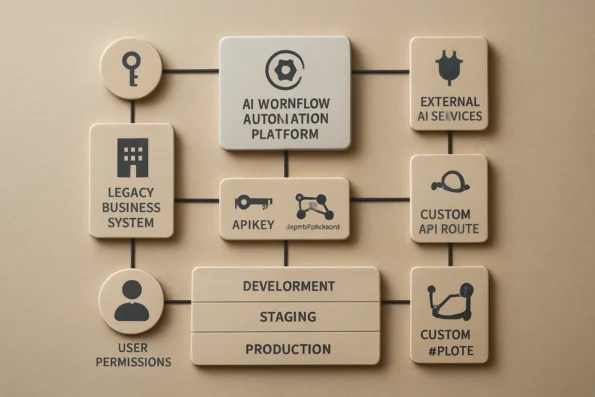
Two types of credentials are foundational. An API key enables a product to interact with an external AI provider’s service—for example, allowing NextlerAI to access language model outputs. In contrast, a licence key validates access to the workflow automation product itself (such as activating NextlerAI Publisher or Assistant in your environment). Official NextlerAI documentation emphasizes that these credentials serve distinct roles and must not be interchanged; confusing them is a common source of integration errors. The API key is typically issued by the AI provider and controls quota, security, and invocation tracking, while the licence key is managed by the product vendor and governs installation, feature access, and support eligibility. This separation ensures that the automation platform and the AI provider remain independently manageable and secure.
Native Plugins vs. Custom API Integrations
Native plugin integrations are purpose-built components that connect automation tools directly to platforms like WordPress or WooCommerce without requiring bespoke development. These plugins typically offer guided installation, predictable update procedures, and pre-mapped data flows. In contrast, a custom API integration requires defining endpoints, data formats, authentication routines, and error handling to connect systems not supported natively. Platform guides from NextlerAI and leading automation vendors underscore that native plugins minimize risk and complexity, while custom APIs offer flexibility at the cost of additional design and validation work. Implementers must decide between the convenience, support, and stability provided by plugins and the adaptability but greater technical overhead of custom integration pathways, especially when proprietary or non-standard systems are involved.
Mapping Data, Permissions, and Environment Settings
Effective integration depends on data mapping—the process of aligning fields, formats, and values between systems to ensure accurate information flow. User permissions must be carefully controlled; each tool should enforce granular access so that only authorized personnel can trigger automations or view sensitive outputs. Environment-specific settings (such as separate configurations for development, staging, and production) are necessary to prevent accidental cross-environment data leaks or disruptions. NextlerAI’s setup guides recommend assigning distinct credentials and permission profiles for each environment as a fundamental best practice. Additional mechanisms, such as environment variable management and access logging, help maintain auditability and facilitate incident response in regulated or high-risk settings.
Structured Content Flows and Automation Domains in NextlerAI Publisher
NextlerAI Publisher exemplifies structured workflow design by separating content automation from publication approval and inventory management. Automation domains—such as content generation, metadata creation, and workflow routing—are isolated within the platform to maintain editorial oversight and compliance. This separation enables teams to automate content assembly while preserving the ability to review, revise, and control publication timing within familiar CMS environments. According to platform documentation, this architecture is especially valuable in legacy system contexts, where unchecked automation can risk data integrity and process reliability. The platform’s modular approach allows organizations to incrementally enable or restrict automation functions based on department, content type, or compliance category, supporting granular governance throughout the content lifecycle.
Key Takeaways from Real Integration Experiences
Practical integration of AI workflow automation tools into legacy business systems consistently reveals that seamless, one-click deployment is the exception—not the rule. Most organizations discover that a successful rollout involves careful staging, thorough testing, and the flexibility to adjust configurations in response to unforeseen issues. Native integrations—such as those offered by NextlerAI Publisher for WordPress and WooCommerce—simplify certain steps but do not eliminate the need for structured pre-launch validation and staged deployment. When mapping data flows and defining integration boundaries, understanding the available workflow automation triggers in NextlerAI is essential for aligning automation with your team’s operational structure. IBM Documentation documents the relevant background and implementation boundaries.
Clear delineation of responsibilities is a cornerstone of resilient automation. Teams benefit from explicitly separating product licensing, AI provider API credentials, and administrative roles. This separation reduces confusion, narrows the risk of misconfiguration, and ensures that access rights and billing responsibilities are traceable throughout the integration lifecycle. Verified documentation for NextlerAI and other leading platforms reinforces the need for credential transparency and environment-specific licence management as a core best practice.
Long-term reliability hinges on continuous oversight. Organizations frequently encounter issues such as credential mismatches, permission errors, or data mapping inconsistencies after the initial deployment phase. Regular monitoring and troubleshooting routines are not a luxury but an operational necessity for sustaining automation performance. Evidence from both NextlerAI’s own integration troubleshooting guides and external platform documentation underscores the importance of maintaining up-to-date diagnostic procedures and rollback options.
Decision-Making in Real Environments
Experienced practitioners emphasize that integration success depends on carefully adapting to unique organizational workflows and risk profiles. Instead of relying solely on vendor marketing, teams document every environment-specific adjustment, including plugin version dependencies, credential scopes, and custom mapping rules for sensitive data. Many deployments require iterative reconfiguration, especially when business rules or compliance policies evolve during or after rollout. This often means building a collaborative feedback loop between system administrators, compliance officers, and end users to ensure that automation augments—rather than disrupts—core business processes.
Mechanisms for Safe Incremental Rollout
Incremental rollout mechanisms are crucial to minimize operational disruption and data risk. For example, with NextlerAI Publisher in a WordPress content team, teams often activate features in isolated sandboxes before mirroring changes to production. Audit trails are implemented to track automation actions and manual overrides, supporting accountability and compliance. Automated backup routines and clear rollback triggers are defined in advance, informed by both official NextlerAI guides and platform-specific best practices. This staged approach allows for rapid detection and recovery from misconfigurations and supports regulatory obligations for data integrity and user consent management where applicable.
One deeper mechanism that has proven effective is the use of environment-specific configuration files and automated deployment scripts, which ensure consistent integration settings across development, testing, and production environments. Teams managing NextlerAI Publisher integrations often rely on these scripts to synchronize custom field mappings and user permission sets, reducing manual errors and supporting auditability for compliance reviews. Change management protocols—such as mandatory peer reviews for configuration changes and versioned rollback points—are instituted to prevent unauthorized or accidental modifications. Additionally, organizations formalize decision checkpoints at each rollout phase, requiring sign-off from business owners, technical leads, and compliance officers before progressing. This structure ensures that integration decisions remain aligned with evolving operational requirements and that any deviations are documented for future troubleshooting or audit purposes.
By combining transparent documentation, precise separation of credentials and roles, and a phased deployment methodology, teams achieve greater resilience and agility. These insights, drawn from real integration experiences and grounded in documented troubleshooting resources, empower organizations to extend AI-driven automation while maintaining rigorous control over business continuity and compliance. The next section examines common integration mistakes and the tested remedies that support long-term operational health.
Avoiding and Fixing Common Integration Mistakes
Successful AI workflow automation integration with legacy business systems routinely encounters several avoidable pitfalls. Teams can minimize disruption, data risk, and project delays by proactively addressing these specific errors, each of which has a well-documented resolution. The following guidance draws directly from platform documentation and industry best practices. To avoid overlooked risks, review these AI multilingual content automation pitfalls for guidance on managing integration challenges related to language support and data consistency. AI and Machine Learning Products and Services | documents the relevant background and implementation boundaries.
Distinguishing Product Licence Keys from AI Provider API Keys
A common misstep is the confusion between a product’s own licence key and the separate API credentials required by the underlying AI provider. For example, NextlerAI products require a valid NextlerAI licence key for activation within WordPress or WooCommerce, but connecting to the AI engine itself—such as OpenAI or another provider—demands the correct API key as well. Attempting to substitute one for the other results in authentication failures or incomplete integration. The resolution is to consult the relevant vendor documentation for each key type, ensuring both are applied in their designated fields and managed according to product-specific instructions.
Skipping Documented Pre-Launch Testing
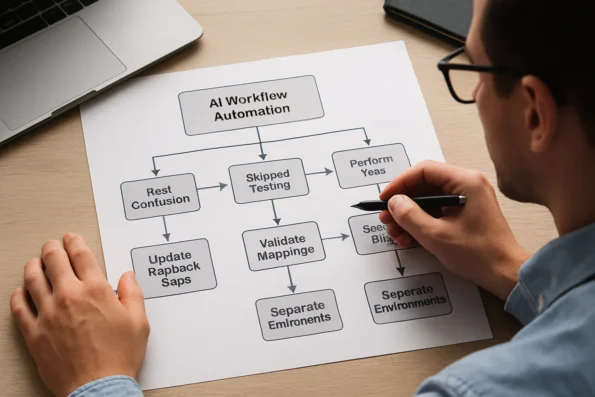
Bypassing recommended test plans can expose operational systems to unanticipated errors or data inconsistencies. For workflow automation tools like NextlerAI Publisher or Assistant, official guides specify structured pre-launch validation—covering everything from sample data flows to permission checks. Failing to perform these tests means that data mapping errors or workflow interruptions may not be detected until after deployment, magnifying risk. The remedy is to follow a documented test plan and retain a working rollback procedure to revert to a known-good state if issues are found. This staged approach is supported in both platform-specific and general automation documentation.
Overlooking Data Field Mapping and Permissions
Effective integration requires precise mapping of data fields and user or process permissions between the automation layer and legacy systems. In practice, mismatches can cause partial automation, data loss, or inadvertent privilege escalation. NextlerAI integration guides recommend staged validation of all mapped fields and explicit definition of control boundaries—essential for environments where editorial or transactional integrity is critical. Adopting this systematic approach to validation ensures that only the intended data is accessed and modified, reducing downstream troubleshooting.
Neglecting Update and Rollback Protocols
Plugin and integration updates introduce another layer of risk, especially in production environments. Without clear protocols for update and rollback, organizations may find themselves unable to recover quickly from a failed deployment or incompatible change. NextlerAI and other leading platforms provide explicit update and recovery guides that should be followed rigorously. Maintaining current, tested backups and documented rollback procedures is essential for any critical business automation.
Failing to Separate Staging, Test, and Production Environments
Finally, a frequent oversight is the lack of clear separation between staging, testing, and production environments. This can lead to accidental data exposure, licensing conflicts, or propagation of untested changes to live systems. For NextlerAI deployments and similar tools, environment-specific licence management and strict environment boundaries are required to prevent these risks. Teams should segment licences, credentials, and integration endpoints according to environment, following both product documentation and internal governance policies.
Implementation Table: Tool-by-Tool Integration Steps
Effective AI workflow automation integration in legacy business systems requires structured, phase-by-phase planning. Each platform and product—such as NextlerAI Publisher or Assistant—demands specific technical preparations, credential handling, plugin installations, and environment safeguards. The table below maps these steps, highlighting platform-verified distinctions and directing you to official resources for setup and troubleshooting. Administrator-level access and current backups are essential before implementing any structural change. Differences become critical at the credential and environment stages, especially where product licences must be managed separately from AI provider API keys. The table clarifies these distinctions, equipping you to avoid common missteps when automating workflows in complex environments. Once your integration is live, refer to this resource on measuring team productivity gains after NextlerAI implementation to help define realistic KPIs and validate process improvements.

| Integration Phase | NextlerAI Publisher | NextlerAI Assistant | UiPath / Power Automate / IBM / Google Cloud | Key Requirements | Setup & Troubleshooting Resource | Source |
|---|---|---|---|---|---|---|
| Requirements Analysis | Define editorial workflow, user permissions, and content domain boundaries in WordPress. | Specify WooCommerce automation use-cases, eligible data flows, and approval checkpoints. | Identify process triggers, legacy system interfaces, and compliance constraints. | Stakeholder input, current-state documentation, IT and business sign-off. | Official setup guides for each product or platform. | NextlerAI, Microsoft, UiPath, IBM, Google Cloud |
| Environment Preparation | Verify WordPress version, backup database and files, assign admin roles. | Check WooCommerce version compatibility, enforce separate test/staging environments. | Prepare API endpoints, network permissions, and sandbox accounts. | Administrator access, recent backups, staging/testing infrastructure. | Platform installation and backup protocols. | NextlerAI, Microsoft, UiPath, IBM, Google Cloud |
| Credential Management | Separate product licence key from AI provider API key; configure both in plugin settings. | Product and AI provider keys managed per environment; document each dependency. | API credentials issued per environment, often with role-based access controls. | Clear credential inventory and segregation for production vs. test. | Credential setup and troubleshooting documentation. | NextlerAI, Microsoft, UiPath, IBM, Google Cloud |
| Plugin or Extension Installation | Install official WordPress plugin (ZIP), activate, then validate with product and API keys. | Install WooCommerce-specific extension, confirm dependency readiness before activation. | Deploy platform connectors, custom scripts, or workflow bots as required. | Access to plugin/extension repositories, install privileges, audit logs. | Product/plugin installation guides. | NextlerAI, Microsoft, UiPath, IBM, Google Cloud |
| Data Mapping & Permissions | Map content types, categories, and editorial controls at each workflow stage. | Align WooCommerce data fields and order processing states with automation triggers. | Define field mappings, user roles, and API data boundaries for each integration. | Data schema documentation, permission assignment, change tracking. | Data mapping and permissions configuration documentation. | NextlerAI, Microsoft, UiPath, IBM, Google Cloud |
| Staged Rollout | Deploy in test/staging, validate automation and rollback options before production go-live. | Sequence rollout: test each trigger in WooCommerce sandbox prior to enabling live orders. | Pilot in controlled environment, monitor logs, adjust workflows iteratively. | Rollback protocols, staged deployment checklists, user acceptance testing. | Pre-launch test plan, rollback and recovery guides. | NextlerAI, Microsoft, UiPath, IBM, Google Cloud |
| Monitoring & Troubleshooting | Enable plugin logs, monitor editorial automation checkpoints, audit API usage. | Track WooCommerce action logs, review error reports, update dependencies as needed. | Utilize built-in monitoring dashboards, audit logs, and automated alerts. | Log review, error diagnostics, and escalation protocols. | Official troubleshooting and monitoring documentation. | NextlerAI, Microsoft, UiPath, IBM, Google Cloud |
Final Decision Steps for Safe AI Workflow Integration
Before launching any AI workflow automation into a live business environment, a methodical final review is essential. Even with extensive planning, the step from testing to production introduces real-world variables that can impact stability, compliance, and business continuity. This section details the critical closing actions that make the difference between a resilient integration and one prone to failure. For insight into maintaining quality and SEO oversight, explore how automated SEO in AI publishing pipelines addresses editorial control in integrated workflows.
Essential Pre-Launch and Go-Live Actions
- Execute a Controlled Pre-Launch Test Plan: Validate every aspect of your AI workflow automation integration within a non-production environment. Follow an explicit test plan that covers all automation triggers, data flows, and user permissions. For platforms like NextlerAI, use their structured test plan resources to ensure all edge cases and environment-specific behaviors are addressed.
- Establish and Document Rollback Protocols: Before switching automation live, develop and clearly document rollback and recovery actions. This includes preparing backup snapshots, version control checkpoints, and a stepwise plan to revert to the previous state if the integration causes unexpected issues. NextlerAI’s official update and recovery guides are designed to support this process, but the same principle applies across modern workflow platforms.
- Activate Automation with Staged Monitoring: Go live during a maintenance window or low-risk period, enabling enhanced logging and monitoring. Assign team members to monitor system behavior, automation outputs, and error logs from the very first production run. Early incident detection is critical for prompt response and rollback if needed.
- Implement Continuous Monitoring and Troubleshooting: Post-launch, maintain a schedule of routine checks on system logs, automation outputs, and API health. For tools like NextlerAI, establish diagnostic routines based on their documented monitoring practices. When issues arise, record root causes and corrective actions for future reference.
- Document Lessons Learned and Plan Incremental Improvements: After the initial rollout, gather operational feedback from all stakeholders. Document both technical and process-related insights—such as bottlenecks, unexpected behaviors, or unanticipated user needs. Use this feedback to inform incremental changes, adjust test plans, and improve long-term automation governance.
Platform-Specific Guidance Matters
Strict adherence to platform-specific resources—such as NextlerAI’s pre-launch and monitoring guides—significantly reduces integration risk. While high-level best practices are valuable, only vendor-verified instructions account for unique deployment, credentialing, and recovery mechanisms. This approach is confirmed across leading automation platforms, including those from Microsoft, IBM, UiPath, and Google Cloud, which each require tailored checklists and testing protocols aligned to their products’ operational models.
Continuous Improvement: The Path Forward
Workflow automation is not a one-time project. As process requirements and system environments evolve, so must your integration. Systematically capturing lessons learned and embedding them in revised procedures is essential for ongoing reliability and value realization in business process automation.
FAQ
How do I select the right AI workflow automation platform for integration with my existing systems?
Start by mapping your current environment’s technical boundaries, including supported data formats, user roles, and security frameworks. Confirm that any platform under consideration offers documented integration support for your core systems, such as WordPress or WooCommerce, and aligns with your business continuity and compliance needs. Prioritize platforms with clear separation between product licensing and AI provider credentials. Evaluate not just the advertised compatibility, but also the availability of integration mechanisms such as native plugins or robust APIs, and confirm that these mechanisms are supported in the environments and versions you currently operate. Assess the degree of administrative control offered—such as granular permissions, access logging, and support for environment-specific deployments—to ensure you can maintain oversight and enforce organizational policies during both implementation and ongoing operations.
What technical and business terms are essential to understand before starting integration?
Familiarity with terms like API key, licence key, native plugin integration, data mapping, and environment-specific deployment is fundamental. Understanding these concepts ensures you will not confuse licensing responsibilities or deployment boundaries during planning or rollout. It is also important to distinguish between the roles of data controllers (who determine the purposes and means of processing data), processors (who process data on behalf of controllers), providers (who supply the AI platform), and deployers (who integrate and maintain the system within your organization). This distinction is critical for regulatory compliance and for assigning technical ownership throughout the system lifecycle.
What are the key insights and takeaways from successful AI workflow automation integrations?
Most successful integrations are the result of phased implementation, granular permissions management, and comprehensive environment-specific configuration. Teams who document each step, maintain distinct admin and user roles, and implement robust backup and rollback plans achieve more resilient outcomes. Another critical takeaway is the importance of integrating continuous monitoring and diagnostic routines after go-live, supported by clear escalation paths for troubleshooting. Use audit trails and versioned configuration files to track changes and establish accountability. Reliance on vendor-supplied documentation and support channels, alongside internal change management protocols, further increases reliability and ensures that integrations remain aligned with both operational objectives and compliance requirements as environments evolve.
What are the most frequent mistakes during integration, and how can they be fixed?
Common errors include confusing product and AI provider credentials, skipping required staging or test phases, and overlooking detailed data mapping. These can be prevented by referencing official documentation, conducting structured pre-launch testing, and maintaining clear licensing and environment separation for each deployment. Another frequent mistake is neglecting to assign specific technical owners for each part of the integration, which can create confusion in troubleshooting or update processes. Ensure that all plugin or integration updates are performed within defined maintenance windows and under administrator supervision, using validated rollback procedures. Finally, regularly review access and permission assignments to avoid scope creep or unauthorized changes over time.
What are the exact steps to safely implement and roll out AI workflow automation in a legacy environment?
Begin with a requirements analysis and review of supporting documentation. Prepare isolated test and production environments, configure all credentials according to vendor guidance, map data and permissions for each workflow, and stage initial rollouts with full monitoring. Only proceed to live deployment after successful testing and establishing rollback protocols. During rollout, maintain detailed records of each step and ensure that technical and business stakeholders are aligned on acceptance criteria. After deployment, implement ongoing monitoring and logging to detect anomalies or integration failures early, and schedule periodic reviews to assess performance, compliance, and alignment with evolving business requirements. This structured, documented approach minimizes risk and enables controlled scaling of automation capabilities.
Conclusion
Integrating AI workflow automation into legacy business systems is a technical and operational commitment that demands deliberate control at every stage. Success comes not from shortcuts or generalized approaches, but from respecting the unique boundaries, licensing distinctions, and integration mechanisms defined by each platform. The separation between product licensing and AI provider credentials, the need for robust data mapping, and the importance of environment-specific validation are not optional—they are foundational safeguards documented by both NextlerAI and leading enterprise automation vendors.
Decision-makers must recognize that integration is not a one-off technical task, but a continuous process governed by the intricate interplay of existing infrastructure, compliance frameworks, and operational workflows. This means that every integration point—whether a native plugin, API-based connector, or custom automation—requires persistent maintenance of access controls, periodic validation of license status, and review of user permissions as business roles evolve. Integrations with platforms such as WordPress or WooCommerce, as supported by NextlerAI, further necessitate explicit mapping of automation domains to prevent cross-environment interference and maintain editorial or transactional integrity. These mechanisms must be thoroughly documented, versioned, and regularly cross-checked with the official resources of each vendor to ensure alignment with both security and business continuity requirements. Ultimately, integration is a shared responsibility: while product providers define technical boundaries and support protocols, deployment teams must operationalize them in accordance with real-world constraints and organizational priorities.
As your next action, assemble a cross-functional validation team to oversee the final pre-launch review. Empower this team to confirm all licensing relationships, credential boundaries, and automation permissions in your target environment. Mandate that every operational step is cross-checked against official documentation. This structured oversight—grounded in verified processes, not assumptions—will minimize integration risks and enable a controlled, resilient rollout of AI workflow automation within your organization.