







Introduction
A reliable NextlerAI Publisher automated blog setup in WordPress is not a switch for unattended publishing. It is a controlled editorial workflow in which the team decides what may be drafted, what requires review, and what is authorized for publication. NextlerAI Publisher is described as turning source material into structured, consistent content ready to review and publish; “ready” should be treated as an editorial handoff, not a final quality verdict.
The practical goal is to establish clear boundaries between content planning, generation, review, and WordPress publication. That distinction matters because a topic can be suitable for the editorial calendar while a particular draft still needs factual checking, voice editing, source validation, or a decision not to publish. Likewise, a planned WordPress slot is an operational arrangement, not an editorial approval.
For site owners, editors, and administrators, the intended outcome is a setup that makes those decisions visible and accountable rather than obscuring them behind automation. Publisher can support structured content production, but the publication’s standards, priorities, and authority remain with the people responsible for the site. A well-scoped setup therefore supports editorial control across routine publishing work without changing who is accountable for what appears on the WordPress site.
This guide helps site owners, editors, and administrators correct the setup choices that most often blur those boundaries. You will create a workflow that preserves accountable human decisions while using Publisher for structured content production. The next section establishes the readiness conditions for controlled automation.
Set Readiness Criteria Before You Automate
Before enabling a NextlerAI Publisher automated blog setup, establish who can make each editorial and technical decision. Publisher is positioned to turn source material into structured, consistent content ready for review and publication. That positioning makes review responsibility essential: generated content should enter a controlled process, not be treated as automatically authorised for publication. Use Automated Internal Linking in WordPress: NextlerAI Publisher Guide to apply the section’s recommendations to the website’s existing content. The practical details in Mastering NextlerAI Product Integration for WordPress & WooCommerce clarify how this decision fits the wider site structure.
Readiness is not a pass-or-fail assessment of the site or the product. Each criterion identifies a distinct dependency: access enables administration, approved material supports editorial review, provider access enables the relevant generation capability, and a working scheduling path supports the publication layer. Keeping those decisions separate helps a team avoid treating a completed technical connection as permission to publish.

| Criterion | Evidence to confirm | Owner | Fix when not ready |
|---|---|---|---|
| Installation access | An administrator can install, activate, update, and inspect Publisher within the intended WordPress environment. | WordPress administrator | Delay plugin activation until access and responsibility are assigned; do not work around missing administrative control. |
| Defined editorial owner | One named role can decide whether a topic, draft, and publication request meet the publication’s standards. | Editor or content lead | Keep generation and publication layers inactive until a responsible reviewer is identified. |
| Source-material availability | The team has the approved materials needed to support the intended articles and can determine what requires verification before publication. | Subject-matter owner and editor | Delay generation for topics without usable source material; obtain or validate the material first. |
| Topic-approval decision | The proposed subject fits the editorial plan and has been considered against the existing content inventory. Publisher documentation describes a controlled, scored queue intended to reduce near-duplicate articles. | Content lead or SEO editor | Do not activate the topic workflow for unapproved subjects; resolve overlap or editorial-fit questions first. |
| Provider-account readiness | Required text and, where applicable, image provider accounts have valid keys and the necessary model access. | Technical administrator | Delay the relevant generation layer until credentials and access are confirmed. A missing provider connection is a configuration dependency, not a product failure. |
| WordPress scheduling check | The site’s publication schedule, approval path, and WordPress cron-dependent execution can be checked by an accountable administrator. | WordPress administrator and editor | Keep scheduled publication inactive until the team can verify the scheduling path and monitor its operation. |
A failed row does not mean the entire deployment must stop. It identifies the workflow layer that should remain inactive while the team resolves its dependency. The owner column matters because it identifies who can attest to the evidence, rather than merely who has access to the system. This separation prevents a technical connection from being mistaken for editorial permission, and it preserves a clear record of responsibility when automation moves beyond reviewed drafts.
Configure the Workflow in a Controlled Sequence
A reliable NextlerAI Publisher automated blog setup starts with a manual draft, not a publication calendar. Configure each layer in the order below so the topic queue controls what may be created, provider connections support the intended generation path, and WordPress scheduling is enabled only after the draft process is accepted. The practical details in Configuring Automated Multi-Stage Approval Workflows in NextlerAI clarify how this decision fits the wider site structure.
-
Activate Publisher and prove a text-only Draft workflow
Activate the plugin, then create one manual, text-only article as a WordPress Draft. This is the documented first rollout stage. It isolates the core drafting path before image configuration, scheduling, or recurring automation can complicate troubleshooting. Confirm that the draft reaches the expected WordPress status and can be opened by the editor responsible for review.
-
Build the queue from the existing content inventory
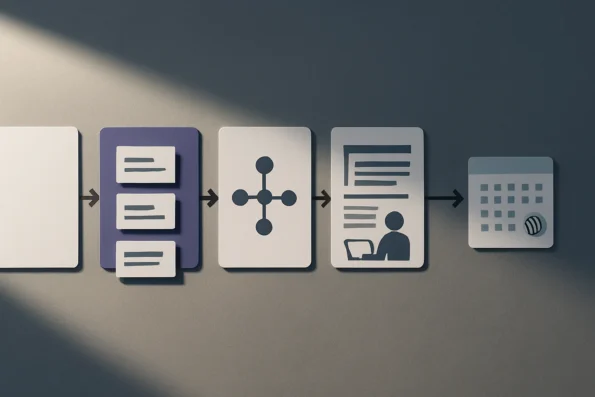
Inspect published and planned content before approving a topic. Add only subjects that serve the editorial plan and have a sufficiently distinct purpose from existing coverage. Use Publisher’s topic workflow as a controlled editorial queue: it is designed to score and manage topics while helping teams avoid overlap and near-duplicate articles. Topic approval authorizes drafting consideration; it does not authorize publication.
-
Connect only the providers the workflow requires
Set up the text provider needed for the initial draft path. Add an image provider only when images are part of the intended workflow. For each connection, verify the credential and confirm that the selected model is available to that account before starting generation. Keeping connections limited to the required services makes it easier to identify which dependency needs attention if a job cannot proceed.
-
Set the available template fields for your publication
Configure the article-template fields available in your installed Publisher version to reflect the required article structure, voice instructions, metadata requirements, and review status. Record decisions such as required sections, source-handling instructions, and expected metadata in the template where the available fields support them. Do not assume a setting exists because it appears in a different version, screen, or workflow; verify each option in the installation you administer.
-
Generate and assess one complete draft
Run one approved queue item through the configured template and review the resulting draft before reserving any publication time. Check whether its structure, instructions, metadata, and intended review state are usable in the WordPress editorial process. If a template or provider setting needs adjustment, revise it and repeat the manual draft test. This keeps configuration changes separate from live publication timing.
-
Enable scheduling only after draft acceptance
Once the draft workflow is accepted, configure the WordPress schedule and the approval state required before a post may enter a publication slot. Publisher documentation describes native WordPress scheduling, approvals, and a cron-dependent publication path; it also describes planning content before a slot and reserving an approved article to one slot. Confirm that WordPress cron can run the scheduled path in the site environment, then monitor the first scheduled item through completion.
Assign Ownership for Ongoing Operation
Once the workflow is operating, ownership must follow decisions rather than plugin screens. Assign a named editorial owner for topic approval, a reviewer for factual accuracy and brand fit, and a separate person or role with authority to permit publication. Technical monitoring should also have an owner, typically a WordPress administrator or the person responsible for the site’s publishing operations. One person may hold more than one role on a small site, but the decisions should remain distinguishable in the operating record. For the site-specific implementation step, Automating Product Content Updates: NextlerAI Publisher for WooCommerce provides the relevant destination and context.
Maintain a publication standard outside the plugin
Keep the site’s editorial standard in a document that Publisher configuration does not replace. It should state which sources require verification, which claims are prohibited unless substantiated, the intended destination category, and the publication’s authoring conventions. Include who may approve an exception, such as a departure from the usual sourcing rule or category choice. This gives reviewers a stable standard when templates, providers, or staff change.
Publisher documentation covers SEO metadata, contextual internal links, citations, and sitemaps. Decide which of those elements require editorial inspection on your site and record that decision in the same standard. Their presence in a workflow is not, by itself, approval of the surrounding content or its claims.
Separate timing from permission
A planned WordPress publication slot answers a timing question: when could an article be released? Editorial permission answers a different question: may this specific article be released at all? Keep those controls separate. Documentation for Publisher scheduling describes planning content before a publication slot and reserving an approved article to one slot; that reservation should not weaken the final publication decision. If review identifies an unsupported statement, inaccurate source use, or a brand issue, the article should remain unapproved even when a slot exists.
Search evidence and multilingual context can strengthen an established process, but neither is a prerequisite for the core operating pipeline. Add them only when a responsible owner can define their purpose, review standard, and handling rules. Search Console or Serper-derived research, for instance, needs an editorial decision about how it informs topic or source judgment; it does not replace that judgment.
Use a defined recovery route for background work
Do not recreate a job simply because it appears delayed. First, the technical owner should inspect the available job logs to establish its state and any reported error. Where appropriate, use the documented cancellation, retry, and recovery controls, then record what happened and who authorized the action. This preserves traceability and avoids creating duplicate work while a prior job may still be active. Escalate unresolved issues to the person responsible for WordPress and the publishing environment, rather than asking an editor to make technical recovery decisions.
Illustrative Scenario: Moving From Drafts to Scheduled Posts
Illustrative scenario: A WordPress editor is preparing a limited set of approved article ideas for a publication’s next editorial window. This is not a customer case study and does not describe measured results. The editor begins with the existing content inventory, comparing proposed subjects with already published pages and planned work. Two ideas appear too close to existing coverage, so they are held back. The remaining topics form a small queue whose status records that they are suitable to draft, rather than automatically cleared for publication. The approach connects directly with Leveraging NextlerAI for Automated Content Brief Generation when the reader moves from planning to implementation.
Drafting remains a reviewable editorial handoff
For the selected topics, the editor confirms the provider configuration needed for the intended text workflow. They apply the publication’s available template settings, including its established article structure and metadata requirements. The editor then creates a manual draft for each topic. This preserves a distinct handoff: the queue identifies what may be developed, while the draft gives the editorial team a specific article to assess.
One draft contains a framing choice that does not fit the publication’s planned angle. The reviewer returns it with a recorded request to revise the scope and supporting material. It stays outside the publication path while that decision is open. A second draft meets the team’s editorial requirements and receives approval for a single WordPress publication slot. Approval is attached to that article and slot; it is not treated as a blanket instruction to release every item in the queue.
Scheduling does not end editorial accountability
Once the approved article is reserved to its slot, the editor monitors the scheduled workflow through the publication window. Native WordPress scheduling and cron processing are operational dependencies, so the editor checks the workflow status rather than assuming that a planned time alone resolves the handoff. If a job needs attention, the team can use its established record to determine whether review, technical investigation, or a changed editorial decision is required.
The record for this scenario includes the topic-overlap decision, the template used, the reviewer’s return note, the approval tied to the selected article, and the publication-slot decision. That history gives the team a clear account of who made each decision and why. It also keeps a returned draft distinct from an approved scheduled article, which is essential when several items are moving through the same WordPress workflow.
Recognize Automation Mistakes Before They Reach Publication
Publication controls should treat automation as a chain of separate decisions, not a single approval. A topic can be appropriate while its draft contains an unsupported statement; a scheduled post can be approved while the WordPress process responsible for releasing it has not completed. The right response depends on whether the issue calls for editorial judgment, a hard stop, or technical recovery. Use Complete Guide to AI Workflow Automation with NextlerAI to apply the section’s recommendations to the website’s existing content.
An approved topic does not approve every claim
Topic approval establishes scope, not factual accuracy. Before publication, a human reviewer should test material claims against appropriate source material, check that citations support the statements they accompany, and remove claims that cannot be substantiated. This is particularly important where a draft turns a broad source into a specific assertion. Do not resolve uncertainty by publishing with softer wording if the underlying claim still lacks support; return the draft for revision or hold it.
Do not override overlap signals casually
A seemingly useful topic may compete with an existing article, duplicate a close variant, or divide a single search intent across multiple pages. Review the content inventory and cannibalisation controls before authorizing a new article. An overlap signal is not necessarily an automatic rejection: it may indicate that the proposed article needs a narrower angle, consolidation with an existing page, or a deliberate editorial exception. Record the reason for any override so later reviewers can distinguish a planned content relationship from accidental duplication.
Separate warnings from publication blockers
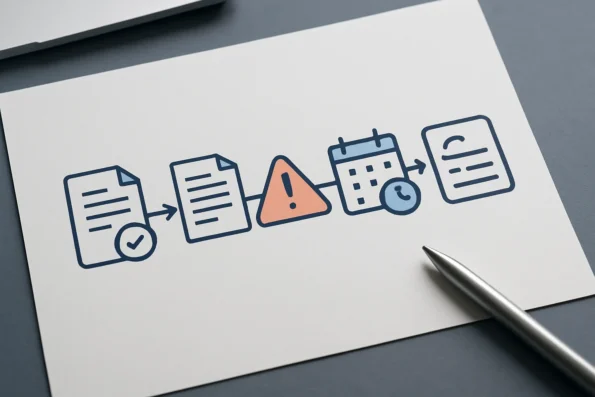
Quality reports are evidence for a decision, not a substitute for one. A warning may require an editor to assess context, relevance, or proportionality. A blocker should stop publication until the underlying condition is resolved or an authorized exception is documented. Treating both states as equally optional weakens the control system; treating every warning as a blocker can create unnecessary holds. Use the report category and the article’s editorial context to choose the response.
Scheduled is not the same as published
A reserved WordPress slot confirms an intended release point, not successful completion. WordPress cron is an operational dependency, and background processing can require investigation after a missed or stalled release. Monitor cron execution and job history around scheduled activity. If a job does not complete, inspect its recorded state before taking action; use the available cancellation, retry, and recovery controls rather than assuming that creating a second job is safe.
Make configuration changes recoverable
Broad changes to templates, provider settings, approval rules, or plugin versions can affect work already in progress. Administrators should limit changes to a defined scope, preserve the prior working state, and ensure a rollback path exists before applying an update or configuration change. When recovery is needed, identify what changed, protect affected drafts from unintended publication, and restore deliberately. A reversible change is easier to investigate than a wide change made without a recovery record.
FAQ
What must be ready before configuring NextlerAI Publisher automated blog setup in WordPress?
You need an accountable person with WordPress administrative access, approved source material, and a clear decision on who may authorize content for the site. Also confirm that the provider accounts your intended workflow requires are available and that WordPress can perform its scheduled tasks. These are operating dependencies, not optional finishing touches.
How should a team configure a topic queue, providers, templates, and schedule without skipping control points?
Keep a record of the decision at each handoff: why a topic belongs in the queue, which provider connection is authorized, which publication standard applies, and who accepted the draft. Do not let a later scheduling decision substitute for those records. A schedule allocates a time; it does not document editorial acceptance.
Which implementation settings should remain under editorial ownership after automation is enabled?
Editors should retain authority over the publication’s subject boundaries, acceptable evidence, claims that need specialist review, voice conventions, destination categories, and exceptions to normal practice. Technical administrators can maintain access and processing, but they should not silently redefine editorial standards through configuration changes.
What does a controlled automated-blog workflow look like in an illustrative WordPress scenario?
Illustrative scenario: A content lead records a topic decision and assigns a reviewer before work begins. The reviewer marks the resulting post as either accepted, returned with a specific change request, or unsuitable for release. A separate publication decision then identifies the responsible editor and the intended WordPress slot. The retained record makes the status understandable even when staff responsibilities change.
Which mistakes can cause unsafe, duplicate, stalled, or poorly reviewed automated posts?
Common failures include unclear status names, shared accounts that obscure who approved a decision, undocumented template edits, and treating a retry as proof that a job completed correctly. Another frequent problem is changing several settings at once: when processing then fails, the cause cannot be isolated. Preserve a dated change record and verify the final post state after any intervention.
Conclusion
A reliable NextlerAI Publisher automated blog setup is not defined by how quickly content can move through WordPress. It is defined by whether each handoff has a clear decision boundary: what enters the production route, what may proceed, what must pause, and who can intervene when the expected path fails. That distinction keeps automation aligned with the publication’s editorial responsibility rather than treating a configured workflow as permission to publish unattended.
Your practical next action is to hold a formal go-live decision for the first live publishing cycle. Record the workflow version being released, the people authorized to change it, the conditions that require a pause, and the person accountable for deciding whether the cycle proceeds. Keep that record with your operating documentation. It gives editors and administrators a shared reference when settings change, a job needs attention, or a publication decision is questioned later. Start with a deliberately limited live cycle, then expand only when the team can explain and manage every handoff with confidence.