






Introduction
For WordPress administrators and localization leads seeking reliable, high-quality AI-driven multilingual content, NextlerAI Translator delivers a purpose-built solution. It is specifically designed to localize not just posts and pages, but also WooCommerce products, public custom post types, taxonomies, SEO metadata, and supported structured content—while carefully preserving your site’s technical structure and layout.
This guide addresses the most relevant best practices for deploying NextlerAI Translator in a WordPress environment, with an emphasis on proven strategies to protect brand terminology, ensure translation accuracy, and streamline workflow reliability. You will learn how to configure glossaries and protected terms, integrate with major multilingual plugins, and apply staged review controls to minimize errors before publishing. These practices are essential for maintaining consistency and quality across all localized content.
By following a step-by-step approach, you will gain a practical understanding of how to set up, manage, and troubleshoot the complete localization process. This includes critical decision points such as glossary curation, managing plugin compatibility, and implementing robust review workflows. The outcome is a dependable, scalable AI translation workflow tailored for WordPress, allowing you to confidently deliver multilingual experiences to your users.
NextlerAI Translator empowers WordPress site owners to automate large portions of the translation process, yet retains granular control over terminology and workflow boundaries. You can define glossary entries for brand-specific or technical terms, ensuring these critical phrases remain consistent across languages. Protected terms prevent unwanted substitutions, which is especially vital for product names and regulated terminology. The plugin’s architecture ensures that translated content respects the formatting and SEO structure of the original site. Integration with established multilingual plugins extends compatibility across diverse site configurations. Throughout the process, you maintain ownership of review and approval stages, preventing unreviewed AI translations from being published. This foundation supports both small-scale and enterprise localization projects, making your WordPress site accessible and accurate for global audiences.
Core Concepts: Glossaries, Protected Terms, and Translation Workflow
Effective localization in WordPress with NextlerAI Translator depends on understanding the precise role of glossaries, protected terms, and a structured workflow. Each element acts as a control point to ensure that translations are accurate, brand-consistent, and technically robust across posts, pages, WooCommerce products, custom post types, taxonomies, and SEO metadata. Glossaries and protected terms play a vital role in maintaining consistency across languages, as recognized in W3C web localization standards that emphasize the importance of accurate multilingual content management.
Glossary Management: Safeguarding Brand and Technical Terms
A glossary in localization is a curated list of terms—such as brand names, specialized vocabulary, or industry-specific jargon—that must be translated in a consistent way or not at all. Within NextlerAI Translator, glossary management allows you to specify these terms so that the AI translation engine respects your requirements. This is critical for legal names, product identifiers, and regulated terminology, which, if mistranslated, can cause confusion or compliance issues. Glossary configuration is performed before initiating translation, ensuring that protected terminology is recognized and handled correctly throughout the workflow.
Protected Terms: Preventing Critical Mistranslations
Protected terms are a subset of glossary entries that the translation workflow actively exempts from change. These terms remain unaltered during AI processing, protecting intellectual property and technical accuracy. In practice, protected terms might include model numbers, trademarks, or core product descriptors. NextlerAI Translator empowers administrators to define protected terms at the project level, establishing a boundary that the AI respects throughout translation operations.
Content Coverage in NextlerAI Translator
NextlerAI Translator is engineered to localize a comprehensive range of WordPress content types. This includes standard posts and pages, WooCommerce products, public custom post types, hierarchical taxonomies (such as categories and tags), and SEO metadata. The system preserves WordPress layouts and structured data, ensuring that both frontend display and technical underpinnings remain intact after translation. This capability is essential for maintaining site performance and user experience in multilingual environments.
Structured Workflow: From Term Setup to Review
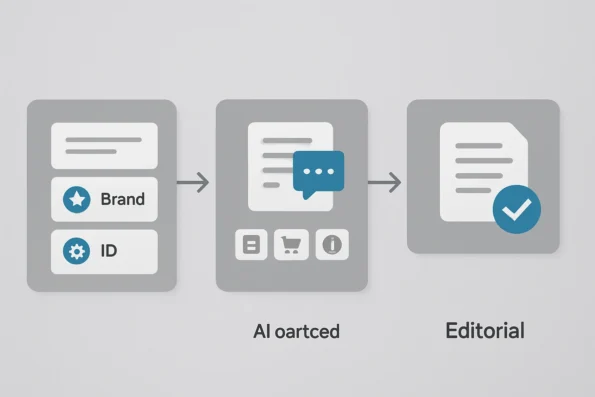
The translation process in NextlerAI Translator is structured into discrete phases. First, term setup involves configuring glossaries and protected terms. Only after these controls are in place does the translation process begin, leveraging AI to generate target-language versions of specified content. A separate review phase follows, where translations are checked for accuracy and compliance with brand or regulatory standards before publication. This staged approach reduces the risk of errors and ensures editorial accountability.
Explicit Workflow Boundaries
It is essential to recognize the boundaries between term configuration, translation, and review. Glossary and protected term settings must be finalized prior to translation initiation; changes afterward do not retroactively alter completed translations. Similarly, review and approval processes act as a final checkpoint before content goes live. By maintaining these workflow boundaries, site owners and localization managers can systematically control translation quality, reduce error rates, and facilitate compliance with organizational standards.
Limitations and Risks of AI-Driven Localization
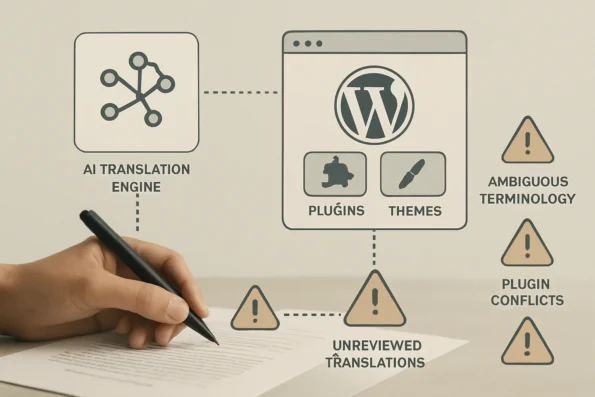
AI-powered localization in WordPress, even with specialized tools like NextlerAI Translator, presents clear technical and operational boundaries. While these solutions accelerate multilingual publishing, several constraints require careful planning and ongoing management to prevent errors that could undermine site quality or regulatory posture. To understand the exact WordPress and WooCommerce integration boundaries for NextlerAI Translator and minimize interoperability risks, consult the comprehensive guide on WordPress and WooCommerce integration boundaries. AI-driven localization tools, such as the Google Cloud Translation API, can rapidly translate content but may struggle with context, idioms, or protected terms without further human review.
Contextual Misinterpretation and Polysemy
AI translation models can misinterpret nuanced language—especially polysemous terms that carry multiple meanings. For instance, technical jargon, brand names, or context-dependent expressions may be translated incorrectly unless a robust glossary and protected terms list is in place. Without this, AI may substitute or alter critical terminology, leading to inaccurate or confusing output. This risk is heightened if the site’s glossary is incomplete or not maintained before each translation cycle.
Plugin Interoperability and Theme Conflicts
WordPress sites often run multiple plugins and custom themes. NextlerAI Translator is designed for broad compatibility, but interoperability issues can emerge—particularly when other plugins modify post structures or intercept language hooks. Such conflicts may disrupt the localization process, cause untranslated elements to appear, or break page layouts in target languages. Administrators should confirm compatibility between all active plugins, especially major multilingual plugins, before applying large-scale translations.
Recognition of Emerging and Domain-Specific Terms
AI models are limited by their training data and may not recognize new, domain-specific, or organization-internal terminology unless those terms are explicitly protected. If new product names, legal terms, or campaign-specific language is added to a site, updating the glossary and protected terms list is essential. Failure to do so can result in mistranslations or loss of critical meaning, particularly as site content evolves.
Review Workflows and Quality Assurance
One of the most significant operational risks in AI-driven localization is the publication of unreviewed content. Automated translation alone does not guarantee linguistic accuracy, local legal compliance, or alignment with brand standards. A staged review process—where translations are checked, edited, and approved before going live—remains essential. Bypassing these workflows can introduce errors that are difficult to detect after deployment, affecting both user trust and site functionality.
Compliance, Privacy, and Security Boundaries
Localization in WordPress environments must also address compliance and privacy risks. Depending on the jurisdiction, translated content may be subject to legal requirements around data handling, disclosure, and accessibility. For example, sites handling personal data of EU residents must ensure all localization processes—including those driven by NextlerAI Translator—align with GDPR mandates on data minimization, consent, and auditability. Additionally, localization workflows should be reviewed for potential leakage of sensitive terms or metadata, particularly when integrating with external translation APIs or plugins.
Localization Workflow Implementation Table
Implementing high-quality WordPress AI localization with NextlerAI Translator relies on a disciplined, stage-oriented workflow. The following table details responsibilities and boundaries for each key stage—from glossary and protected term management through review, plugin integration, and publishing. This structure is essential for maintaining translation integrity, minimizing workflow errors, and ensuring compatibility with major multilingual plugins. Each row clarifies the recommended actions, handoffs, and evidence-backed distinctions unique to the NextlerAI Translator process. If your project involves high content volumes or multiple languages, large-scale localization strategies provide proven models for orchestrating batch processing and editorial oversight with NextlerAI Translator. For teams implementing automated translation in their workflow, Microsoft Translator integration guidance recommends careful configuration and validation steps to ensure translation quality.
| Workflow Stage | Primary Responsibility | Key Actions & Boundaries | Plugin Integration Points | Documentation Source |
|---|---|---|---|---|
| Glossary & Protected Term Setup | Localization Manager or Content Lead | Define, approve, and lock core terminology and protected terms before initiating translation. Ensure lists are comprehensive for all supported languages. Changes after translation initiation require full review. Glossary management must be finalized prior to translation to ensure that consistent, brand-specific, or technical terms are not altered in the AI output. This stage serves as a quality gate, preventing ambiguity or accidental modification of mission-critical vocabulary. | Pre-translation: Independent of multilingual plugin; ensures consistency across all language variants. | NextlerAI Translator product page |
| Translation Initiation | Site Administrator | Trigger AI-powered translation for posts, pages, WooCommerce products, custom post types, taxonomies, and SEO metadata. Confirm term protections are enforced before proceeding. This initiation step establishes the foundation for consistent localization by ensuring protected and glossary terms are actively referenced by the AI engine. Translators should double-check that language codes and plugin settings align to prevent misrouting or duplication of translation jobs. | Native compatibility with Polylang, WPML, and TranslatePress; match language codes/settings prior to job launch. | NextlerAI Translator product page |
| Review & Quality Assurance | Designated Reviewer(s) | Manually verify the accuracy of translated content, with special attention to glossary terms and protected vocabulary. Staged review prevents unapproved changes from publishing. Reviewers are tasked with detecting inconsistencies, ensuring that localized technical, legal, and branded terminology adheres to established standards. Edits or corrections at this stage must be documented and, if systematic, should prompt updates to the glossary for future workflows. | Staged review supported within WordPress editorial workflows; workflow boundaries enforced by plugin roles. | NextlerAI Translator product page |
| Publishing & Final QA | Content Lead / Site Admin | Approve and publish reviewed translations. Confirm structural integrity, taxonomy mapping, and plugin compatibility prior to live deployment. This includes validating URL structures, multilingual navigation, and SEO metadata to avoid cross-language confusion or broken links. The final QA check ensures that the localized content integrates seamlessly with existing site elements and plugin outputs. | Integrates with multilingual plugin publishing logic; review multilingual URL and menu outputs post-publication. | NextlerAI Translator product page |
| Plugin Setup & Activation | Site Administrator | Install, activate, and update NextlerAI Translator following official guidelines. Coordinate plugin versioning with multilingual tools to prevent conflicts. Administrators are responsible for ensuring that all plugins are compatible and licensed, and that the activation sequence follows recommended best practices for stability and security. | Ensure plugin activation order and licensing match documented integration best practices for WordPress plugins. | Buy, Download, Install and Activate a NextlerAI Product |
This implementation table highlights the importance of clear role assignments, workflow boundaries, and explicit handoffs at each stage of the NextlerAI Translator localization process. By maintaining strict separation between terminology setup, translation, review, and publishing, site administrators and content managers can prevent quality lapses, reduce integration errors, and ensure that multilingual WordPress sites remain robust and scalable. Thorough plugin setup and documentation adherence further minimize the risk of workflow disruption, enabling a repeatable and transparent localization pipeline.
Illustrative Scenario: Managing a Multilingual WordPress Site
This scenario illustrates how a WordPress site owner might implement the complete localization workflow for a multi-product WooCommerce site using NextlerAI Translator. All details below are illustrative and not based on measured outcomes or any specific organization. When managing industry-specific glossaries or protected terms, it is crucial to consider compliance-centric localization controls to align with sectoral data privacy and audit requirements.
Defining Glossary and Protected Terms
The site owner begins by cataloging product names, technical jargon, and branded vocabulary unique to their WooCommerce catalog. These entries are reviewed with product managers to ensure consistency across all product categories. The site owner configures a glossary with preferred translations for recurring terms and designates certain brand names and regulatory disclaimers as protected terms. This step prevents accidental mistranslation or alteration of critical language during AI processing, directly reflecting the platform’s capacity to safeguard key terminology.
Initiating AI Translation and Plugin Integration
With term lists finalized, the owner activates NextlerAI Translator and selects all relevant posts, pages, WooCommerce products, custom post types, and SEO metadata for localization. Multilingual plugin integration is enabled, with language settings coordinated between NextlerAI Translator and a supported plugin such as WPML or Polylang. Translations are generated for each target language, and the AI respects the configured glossary and protected terms throughout. Newly created language versions are staged for review within the WordPress admin, rather than being published immediately.
Staged Review and Error Mitigation
The review team accesses the staged translations and systematically checks adherence to glossary mappings and the integrity of protected terms. Any detected inconsistencies or contextual errors are flagged for revision before approval. The workflow ensures that no translation reaches the live site without human oversight, aligning with best practices for error reduction and quality assurance in AI-driven localization environments.
Publishing and Quality Control
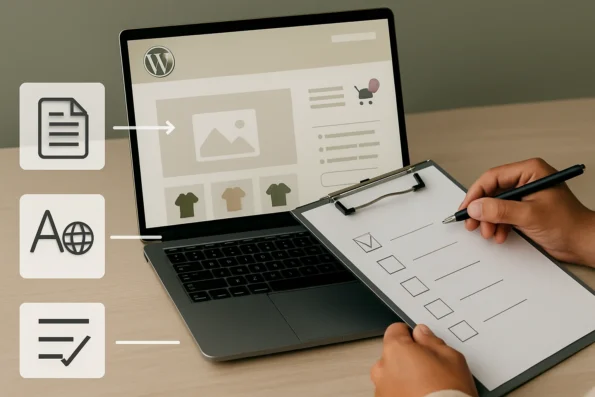
Upon successful review, approved translations are published to the production site. The owner cross-references a pre-launch checklist—covering language display, navigation structure, taxonomy assignments, and SEO metadata integrity—to confirm that all localized content is accessible and accurately presented. This checklist-driven approach supports a controlled, reliable launch of multilingual content and mitigates risks associated with overlooked errors or incomplete localization steps.
Illustrative Outcome
Through this workflow, the site owner achieves a coherent multilingual storefront where product information, taxonomy, and metadata remain consistent across languages. The disciplined application of glossaries and protected terms, coupled with staged review and plugin integration, underpins quality and reduces the likelihood of critical translation errors. This scenario demonstrates the practical mechanisms available with NextlerAI Translator for managing WordPress AI localization, without attributing specific results or performance metrics.
Diagnostic Steps for WordPress Localization Issues
Effective troubleshooting of localization issues in WordPress—especially when using NextlerAI Translator—requires a structured, stepwise approach. The following process will help you quickly isolate root causes and restore accurate multilingual functionality. For technical teams seeking reliable troubleshooting, reviewing CMS workflow automation steps helps ensure safe integration, rollback, and recovery procedures when using NextlerAI products in WordPress.
-
Confirm Plugin and Theme Compatibility
Begin by ensuring that NextlerAI Translator, your WordPress version, and any active multilingual plugins (such as Polylang, WPML, or TranslatePress) are fully compatible. Incompatibility often leads to unexpected translation gaps, broken layouts, or missing content. Check for recent updates or known conflicts in official documentation before investigating further. It is also important to review changelogs and known issues published by each plugin’s developer, as even minor version mismatches can introduce subtle conflicts. Always deactivate and reactivate plugins one at a time to observe whether a specific extension causes the issue, and document the state of your system before making changes for reliable rollback if needed. -
Audit Glossary and Protected Term Settings
Review your glossary and protected term configurations. Errors here can cause brand names, technical terms, or key phrases to be mistranslated or omitted. Verify that all critical vocabulary is correctly listed and that there are no accidental exclusions or overlaps. Adjust term lists before re-running translation processes to prevent repeated errors. Pay particular attention to case sensitivity, plurals, or synonyms that could be inconsistently handled. If your protected terms are not being respected, confirm that the protected term list is properly linked to each translation job and that any recent edits have been saved and propagated throughout your workflow. -
Pinpoint the Workflow Stage of the Error
Identify whether the issue arises during term setup, AI translation, or review. For example, if a mistranslation persists across multiple languages, it may signal a configuration oversight at the glossary stage. If errors appear after review and before publishing, evaluate your review workflow discipline and staging practices. Utilize WordPress’s revision history or plugin-specific logs to correlate when and where a problematic change occurred. This can help distinguish between an initial setup misconfiguration and an error introduced during human review, such as accidental overwrites or missed approval steps. -
Systematically Apply Structured Troubleshooting Checklists
Use a thorough checklist to guide your investigation. This should include verifying language pair support, confirming content eligibility (such as public custom post types and SEO metadata), and ensuring no plugin conflicts are present. Following an established checklist reduces the risk of overlooking common misconfigurations and accelerates root cause identification. For deeper process control, schedule periodic audits using these checklists and involve both technical and editorial stakeholders to ensure all workflow aspects are covered. -
Reference the Official Troubleshooting Master Checklist for In-Depth Issues
For complex or persistent problems—such as translation failures affecting WooCommerce products or SEO fields—consult the comprehensive troubleshooting master checklist provided by NextlerAI at nextlerai.com. This resource details advanced diagnostics, including stepwise plugin integration verification, database integrity checks, and specific instructions for isolating issues that only present under certain site configurations. It is especially useful for scenarios where routine troubleshooting reveals no obvious misconfiguration, supporting thorough remediation of even the most intricate localization breakdowns.
By following this ordered process, WordPress administrators and localization managers can efficiently resolve most workflow, terminology, and integration issues encountered with AI-driven translation. The next section addresses key takeaways for maximizing localization quality and efficiency.
Key Takeaways for Maximizing Quality and Efficiency
Effective WordPress localization with NextlerAI Translator depends on a disciplined approach to terminology control and workflow structure. Glossary management is critical—not just beneficial—for protecting core brand, product, and technical terms from mistranslation. By setting clear, unambiguous glossary entries and protected terms before initiating AI translation, you ensure that complex or sensitive vocabulary remains consistent across all localized content types, from WooCommerce products to SEO metadata. Understanding plugin compatibility in custom pipelines is essential when integrating NextlerAI Translator alongside other WordPress multilingual tools for niche market localization.
Staged review and approval processes are essential for translation integrity. Implementing a multi-step review—distinct from initial translation—helps catch contextual misinterpretations and enforces adherence to glossary and protected term guidelines. This approach reduces the risk of inaccuracies reaching published content, especially as localized materials expand in volume and complexity. Assign clear responsibilities for review at each stage to maintain editorial accountability.
Plugin compatibility checks are a proactive safeguard against workflow breakdowns. Verifying integration with major multilingual plugins prior to activation prevents conflicts that could disrupt language switching, content display, or taxonomy mapping. This step is especially important for sites using advanced content structures or third-party theme customizations. When evaluating new plugins or updates, confirm that all components operate as expected within your established localization workflow.
Integrating localization with established WordPress editorial practices supports scalable, reliable content management. Aligning translation stages—such as draft, review, and publish—with your existing editorial calendar and permissions structure streamlines quality assurance and reduces process friction. This integration enables teams to manage multilingual content with the same rigor as original posts and pages, ensuring a consistent user experience in every supported language.
Regularly updating glossaries and workflow documentation is necessary as your site evolves. New product launches, branding changes, or expansions into additional markets may introduce terminology not covered by initial glossaries or protected terms lists. Schedule periodic reviews to capture these changes, and adjust your staged approval process accordingly to sustain translation accuracy and workflow efficiency over time.
Additionally, the configuration of glossary and protected terms in NextlerAI Translator should be tightly version-controlled and tracked. Assign editorial ownership for glossary updates, ensuring proposed changes are reviewed and approved before deployment. Document each glossary revision with context—such as product releases or rebranding—to support future audits or rollbacks if inconsistencies are detected. Establishing a clear protocol for glossary amendment, including stakeholder sign-off, helps avoid unintentional term drift and ensures that all localization stakeholders are informed about terminology standards. Maintaining audit trails for glossary and protected term changes is especially valuable in large teams or regulated industries, where accountability and traceability are vital. This disciplined approach minimizes the risk of fragmented or inconsistent translations as your content library and team grow.
Implementation Notes: Plugin Compatibility and Integration Tips
Integrating NextlerAI Translator with your WordPress site and any multilingual plugins requires careful attention to version compatibility and configuration alignment. Before activation, verify that your WordPress installation, NextlerAI Translator, and any multilingual plugins such as Polylang, WPML, or TranslatePress are all running supported versions. Incompatibility between plugin releases or outdated WordPress cores is a common cause of workflow disruption and language display errors. When developing or selecting plugins for a multilingual WordPress site, it is essential to follow WordPress internationalization best practices to ensure all text strings are translatable and the site remains compatible with localization tools.
Coordinate language settings across all systems to avoid inconsistencies in site presentation or fallback language selection. NextlerAI Translator depends on clear language mapping between the WordPress core, the plugin’s own configuration, and any third-party multilingual interfaces. When working with multiple plugins, consult the official documentation for each to confirm how language attributes, slugs, and meta fields are handled in parallel.
Appearance and content presentation settings should always be managed according to the published guidelines for both NextlerAI Translator and your chosen multilingual plugin.
Quality assurance for multilingual display should include thorough interface testing in each enabled language. Review both static content and dynamic interface elements to confirm that translations are correctly rendered and that no duplication or omission occurs. Where possible, use the plugin’s built-in preview features prior to publishing changes.
Maintain a schedule for updating all plugins and conduct compatibility tests after each major update to WordPress or any component plugin. This ongoing diligence is essential for sustaining localization quality and workflow stability, as even minor updates can introduce changes in API handling or content hooks that affect translation coverage.
Mechanisms for Achieving Stable Integration
Stable, predictable localization performance is achieved through a combination of technical and operational strategies. When deploying NextlerAI Translator alongside other multilingual plugins, enforce strict version control by documenting the exact plugin and WordPress versions in use prior to any update or integration. This allows for rapid rollback if an incompatibility is detected. Develop a habit of reading release notes and changelogs for each plugin before updating, as these often highlight new features or deprecated functions that could impact translation workflows.
For language mapping, ensure that each enabled language in WordPress exactly matches the configuration in NextlerAI Translator and any third-party plugin. Misalignment—such as mismatched locale codes or country variants—can cause untranslated content, broken navigation, or fallback to default language. Explicitly verify that taxonomies, custom post types, and WooCommerce product attributes are included in the language structure and supported by all plugins in use.
Dedicate responsibility for plugin and integration management to a specific role—such as a site administrator or technical lead—who regularly audits plugin health, language mapping, and compatibility. Assigning ownership ensures that issues are detected early and that updates, rollbacks, or emergency patches are coordinated in a controlled way, preventing accidental workflow disruption.
When encountering integration-specific issues—such as interface elements failing to localize, or language switchers not displaying as expected—leverage both the NextlerAI Translator documentation and the official guides of your multilingual plugins to systematically troubleshoot. If issues persist, consult community forums or support channels with detailed version and configuration information to expedite resolution.
FAQ
What localization concepts are essential for using NextlerAI Translator in WordPress?
Key concepts include glossary management for consistent terminology, protected terms to prevent unwanted translation of names or technical language, and a staged review process to ensure translation accuracy. Understanding these elements is fundamental for configuring and maintaining high-quality AI localization workflows.
What limitations and risks should users expect with AI-driven WordPress localization?
Users should be aware that AI translation may struggle with ambiguous or domain-specific terms unless these are explicitly managed. Plugin and theme conflicts can disrupt workflows, and there is a risk of unintended publication if review processes are bypassed. Glossary maintenance and compatibility monitoring are necessary to mitigate these risks.
How can site owners implement a robust localization workflow with NextlerAI Translator?
Owners should first define and finalize glossaries and protected terms before translating any content. Assigning clear responsibilities for review and approval at each workflow stage is crucial. Coordination with multilingual plugins and strict adherence to documented procedures ensures reliable localization outcomes.
How does AI-driven translation typically work for multilingual WordPress content?
After configuring glossaries and protected terms, the AI generates translations for eligible post types, taxonomies, and metadata. Content is then staged for human review, allowing for corrections before publishing. This process maintains terminology accuracy and supports multilingual site consistency.
What are effective steps to diagnose and resolve localization issues?
Start by checking plugin and theme compatibility, followed by auditing glossary and protected term settings. Trace issues to specific workflow stages and consult official troubleshooting checklists for persistent problems. Involving multiple stakeholders often clarifies the root cause and expedites resolution.
Conclusion
Effective localization in WordPress hinges on systematic controls, not shortcuts. With NextlerAI Translator, the real differentiator is how you operationalize its features: disciplined glossary curation, rigorous protected term management, and a clearly defined review stage. These mechanisms minimize ambiguity and shield your site from the most common pitfalls of AI-driven translation, especially in complex or regulated environments.
Robust localization outcomes depend on a deep understanding of workflow accountability and technical boundaries. Glossary and protected term maintenance must be enforced as a non-negotiable precondition for initiating any translation task. Assigning clear ownership for terminology updates and review checkpoints ensures that no changes bypass required oversight. In NextlerAI Translator’s context, this means restricting term edits to designated roles, maintaining audit logs of each modification, and separating translation execution from approval decisions to avoid inadvertent content release. Integration points between content, translation, and multilingual plugins should be periodically tested after every major WordPress, plugin, or theme update to proactively identify interoperability issues before they reach production. This disciplined approach not only preserves terminology but also maintains the structural and SEO integrity of your site across languages.
To ensure your multilingual deployment remains robust and future-proof, establish a recurring review cycle that includes both content and configuration. This proactive approach catches terminology drift, assesses plugin compatibility after updates, and keeps your workflow aligned with organizational demands. Assign responsibility for ongoing audits to a named team member or role, integrating localization health checks into your broader site maintenance protocol.
Your next step: schedule a quarterly localization audit using your preferred project management tool. Document any required updates to glossaries, protected terms, and plugin settings. This process not only sustains translation quality but also supports a stable, scalable workflow as your content and language needs evolve.