







Introduction
Configuring NextlerAI products for GDPR compliance within WordPress and WooCommerce is essential for organizations that process the personal data of EU residents. The General Data Protection Regulation (GDPR) establishes specific requirements for how personal data is collected, handled, accessed, and erased. As a site owner or technical administrator, your responsibility is to ensure that every deployment of NextlerAI Assistant, Publisher, and Translator aligns with these legal standards, minimizing risk and supporting individual privacy rights.
NextlerAI’s suite of WordPress plugins is designed to process user and content data in ways that can be tailored for compliance. Each product offers configuration options for managing data access, capturing and recording consent, controlling data retention, supporting data subject requests, and maintaining audit logs. When properly configured, these features enable you to demonstrate compliance with GDPR and respond effectively to regulatory requirements or user inquiries.
This guide gives you a structured, role-focused roadmap for aligning NextlerAI plugin settings with GDPR obligations and, where relevant, other major industry standards. By mapping concrete configuration tasks—such as enabling consent mechanisms or setting up audit logs—to the legal roles of data controller and processor, you gain clarity on both your responsibilities and the practical steps required for compliance. The sections ahead will walk you through typical privacy risks, diagnostic checks, core legal definitions, decision criteria, actionable configuration steps, and a comparison of GDPR-oriented settings with other regulatory frameworks.
By following this approach, you will be prepared to meet the expectations of the European Data Protection Board and the European Commission, and to ensure your AI-powered WordPress and WooCommerce workflows remain both effective and legally sound.
Risk register: Common data privacy and compliance pitfalls
When deploying NextlerAI Assistant, Publisher, or Translator within WordPress and WooCommerce, organizations encounter several nuanced risks that require proactive configuration and oversight. Each risk outlined below reflects a distinct technical or organizational challenge, highlighting the need for precise alignment between product settings, operational workflows, and GDPR obligations. Many deployments encounter recurring challenges with privacy and compliance in NextlerAI deployments.
Data Persistence Beyond Intended Retention
Unintentional retention of personal data can occur when default log or analytics settings in NextlerAI products are not updated to match organizational retention limits. Overlapping plugin integrations may create redundant storage locations, increasing the likelihood that copies of user data persist beyond the required period. This risk is compounded if deletion mechanisms are isolated to specific modules or do not propagate across all touchpoints where data is collected or processed.
Consent Mechanism Gaps in Multi-Channel Workflows
Missing or incomplete user consent arises when consent prompts are not uniformly enforced across every interface where personal data is collected, such as chat widgets, content submission forms, or WooCommerce checkout flows. For NextlerAI Assistant and Publisher, the technical challenge lies in ensuring that consent hooks are triggered regardless of entry point, including custom shortcodes or third-party embed scenarios that may bypass default consent checks.
Insufficient Audit Log Detail and Access Controls
Effective audit logging within NextlerAI deployments depends on both the depth of information captured and the accessibility of those logs for regulatory reporting. Risks emerge when logging parameters are set at too coarse a level, omitting critical detail about which user, administrator, or plugin component accessed or modified personal data. Furthermore, if audit logs are not protected by granular permissions, unauthorized staff or external parties might gain access to sensitive historical records.
Fragmented Data Subject Rights Implementation
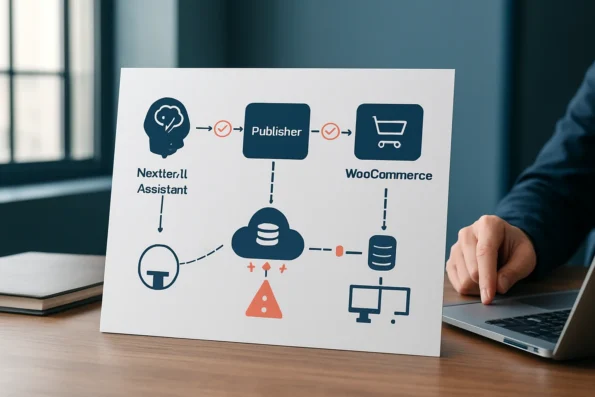
Efficiently fulfilling data access and erasure requests under GDPR is complicated by fragmented storage across Assistant, Publisher, and WooCommerce systems. The risk is heightened where automated deletion workflows are not available for all data types, or where erasure is only partially implemented (e.g., removing chat content but not associated metadata). Data subject requests may remain unaddressed if search and deletion tools are confined to a single plugin’s admin panel.
Exposure Through Permissions and Endpoints
Data overexposure often results from misconfigured role-based permissions or public endpoints within WooCommerce or NextlerAI plugin settings. For example, an administrative misstep might allow non-privileged users to view customer conversations or analytics containing personal data. Edge cases include forgotten API endpoints or legacy integrations that are still active but lack up-to-date access controls, creating unmonitored vectors for unauthorized disclosure.
Unclear Delineation of Controller and Processor Roles
Ambiguity around controller and processor responsibilities is common when NextlerAI products are integrated with external providers, such as translation APIs or cloud storage services. Without explicit assignment of roles, accountability for compliance actions—like honoring erasure requests or conducting Data Protection Impact Assessments as required by the European Commission (commission.europa.eu)—may fall through the cracks. Implementation constraints include the need to document data flows and responsibilities in both configuration settings and vendor agreements.
Diagnostic steps: Identify compliance gaps and misconfigurations
To ensure your NextlerAI Assistant, Publisher, and Translator plugins meet GDPR and WordPress privacy requirements, it is essential to systematically examine each product’s setup. The following stepwise diagnostic process is designed for administrators to uncover, document, and address compliance gaps, with an emphasis on actionable verification and documentation rather than assumptions or generic best practices.
- Examine all NextlerAI Assistant chat, contact forms, and WooCommerce touchpoints to confirm they collect only the minimum data necessary for stated purposes. Review plugin configuration screens for options that restrict unnecessary data collection. Validate that no additional personal data is stored or transmitted by default in user-facing workflows. Check that all integrations with WooCommerce, including automated responses and checkout flows, do not introduce hidden fields or metadata that capture extraneous identifying information. Correlate these checks with the permitted data collection boundaries as described in the official NextlerAI Assistant security documentation.
- Test explicit consent capture prior to any personal data processing. Interact with each user-facing component—such as chatbots or forms—to verify that consent prompts are clear, granular, and mandatory before submission. Check that consent is recorded and traceable within plugin logs or records. Inspect whether consent is versioned, and if any changes to privacy notices or processing purposes require new consent. This step should also include verifying that consent withdrawal is as easy as granting it, as required under Article 7 of the GDPR (EDPB guidance).
- Audit Publisher and Translator data flows for inadvertent personal data storage. Map content publishing and translation activities to actual data handling. Inspect whether draft content, comments, or translation memory inadvertently retain user data beyond intended retention periods. Disable or adjust features that store unnecessary data. For the Translator plugin, review whether localized content or translation cache includes personal identifiers, and document any retention controls available for such data.
- Review audit log and analytics settings for retention and access control. Access each plugin’s logging settings to ensure audit trails are retained only as long as necessary and are accessible solely to authorized roles. Confirm the absence of excessive or unnecessary logging of personal information. Pay specific attention to the log rotation, export, and deletion options provided by NextlerAI plugins, and record which WordPress user roles have access to sensitive audit records.
- Simulate data subject requests for access and erasure. Submit test requests through your site’s official mechanisms to access or delete personal data. Time and document the entire process to confirm that statutory deadlines, such as those defined by the GDPR, can be met efficiently. Where possible, use plugin features to demonstrate the full lifecycle—request receipt, data collation, delivery, and erasure confirmation—ensuring traceability at every step.
- Maintain a living register of all plugin-initiated processing activities. Document each instance where NextlerAI plugins initiate, store, or transmit personal data. This register should support compliance accountability, facilitate regulatory inspection, and inform future risk assessments. Include the nature of the processing, the associated legal basis, and any data flows involving third-party providers as required by your controller or processor obligations. Update this register whenever plugin updates, configuration changes, or new integrations are introduced to your WordPress or WooCommerce environment.
By methodically applying these steps, administrators can identify and remediate compliance gaps, ensuring that WordPress and WooCommerce deployments using NextlerAI products align with both GDPR and platform-specific data protection obligations. Next, definitions of key GDPR concepts will clarify the practical implications of each configuration decision.
Definitions: Core GDPR terms in the context of NextlerAI
Understanding GDPR terminology is essential for configuring NextlerAI Assistant, Publisher, and Translator plugins within WordPress or WooCommerce. Accurately mapping these terms to your deployment ensures that privacy controls are both effective and aligned with regulatory expectations. This section clarifies the foundational GDPR concepts as they explicitly apply to the configuration and operation of NextlerAI products. To further strengthen your GDPR compliance workflow, review the step-by-step privacy controls for GDPR-compliant AI outreach to ensure explicit consent and auditability at each stage.
Data subject
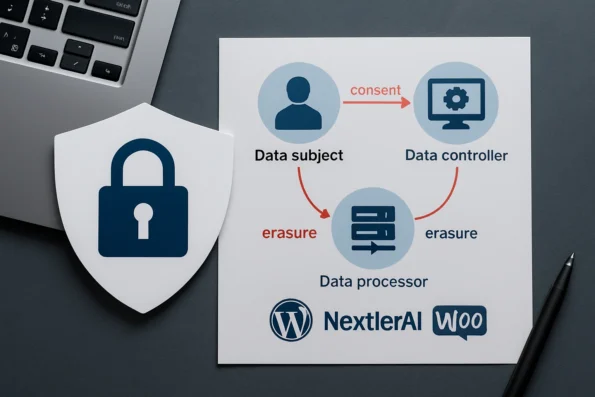
A data subject is any identifiable natural person whose personal data may be processed by your WordPress site or store through NextlerAI plugins. This includes customers, site visitors, staff, or any individual whose information—such as names, emails, or purchase details—might be collected or processed during plugin operation. Recognizing who qualifies as a data subject is the starting point for determining the scope of your compliance obligations.
Data controller
As outlined in GDPR and confirmed by official regulatory guidelines, the data controller is the site owner or administrator who determines the purposes and means of processing personal data. When deploying NextlerAI plugins, the controller is responsible for configuring plugin settings, defining consent mechanisms, and ensuring that all data processing aligns with legal requirements. Controllers must be able to demonstrate compliance and respond to data subject rights such as access or erasure requests.
Data processor
A data processor is any entity or plugin—including NextlerAI products—that processes personal data on behalf of the controller. The processor follows instructions from the controller and must implement appropriate technical and organizational measures for data security and privacy. When configuring NextlerAI, it is critical to distinguish processor responsibilities from those of the controller, especially if integrating external AI providers or services that act as sub-processors.
Personal data
Personal data, as defined by the GDPR, refers to any information relating to an identified or identifiable person. In NextlerAI’s context, this includes user input in chatbots, metadata stored by Publisher, or translation logs containing customer information. Correctly identifying personal data within plugin workflows allows for precise application of consent, access, and erasure controls.
Consent
Consent is a freely given, specific, informed, and unambiguous indication of a data subject’s wishes regarding the processing of their personal data. Under GDPR, consent must be obtained before any non-essential data processing begins within NextlerAI plugins. This requirement applies to chat interactions, content submissions, and analytics where personal data is involved. The mechanism for capturing and recording consent—such as checkboxes or pop-ups—should be auditable and reversible.
Erasure (right to be forgotten)
The right to erasure means that data subjects can request deletion of their personal data from your WordPress or WooCommerce site, including data collected or processed via NextlerAI plugins. Unless there is a statutory reason to retain specific data (for example, legal or contractual obligations), the controller must act on such requests promptly. Configuring NextlerAI to support erasure workflows is a direct compliance requirement under GDPR.
Decision criteria: Choosing privacy and logging settings
Configuring NextlerAI products for GDPR compliance within WordPress and WooCommerce requires a disciplined approach to data privacy, grounded in both regulatory mandates and operational realities. Each decision must be justified not only by the technical capabilities of NextlerAI Assistant, Publisher, and Translator, but also by their alignment with GDPR requirements as interpreted by the European Data Protection Board and the product’s documented data flows. For a deeper technical overview, NextlerAI product integration for WordPress and WooCommerce outlines phased setup steps and compliance considerations specific to each plugin. Guidelines 07/2020 on the concepts of controller and documents the relevant background and implementation boundaries.
Map data flows to GDPR obligations
Begin by cataloging every data flow initiated by each NextlerAI plugin. This includes chat interactions, content publishing, and translation caches that may process personal information. For every data touchpoint, determine if explicit user consent, comprehensive logging, or the capacity for data deletion is required in accordance with GDPR articles on data minimization, consent, and erasure. For example, if NextlerAI Assistant collects chat histories containing user names or contact details, ensure consent capture is enforced before processing begins. Reference the official GDPR text and plugin documentation to distinguish controller and processor responsibilities for each workflow.
Balance operational usefulness with retention minimization
Organizations often require data retention for analytics, customer support, or editorial tracking. However, GDPR’s data minimization principle limits storage to what is strictly necessary. Assess which records—such as support chat logs or publishing histories—are operationally essential, then configure plugin retention settings to minimize duration and scope. Do not default to retaining all logs or backups; review each retention period and establish a documented rationale for exceptions, as recommended in regulatory guidance for small businesses and data controllers.
Tailor audit logging to regulatory and internal needs
Audit logs support both regulatory compliance and internal oversight. Select logging granularity and retention periods that satisfy GDPR’s accountability requirements and your organization’s policy for data access tracking. For sensitive activities—such as content moderation or user data modification—enable detailed audit trails. Set regular reviews of log access and ensure only authorized roles within WordPress or WooCommerce can view or export logs. This approach reduces exposure while maintaining traceability for inevitable regulatory audit requests.
Maintain accessible deletion workflows
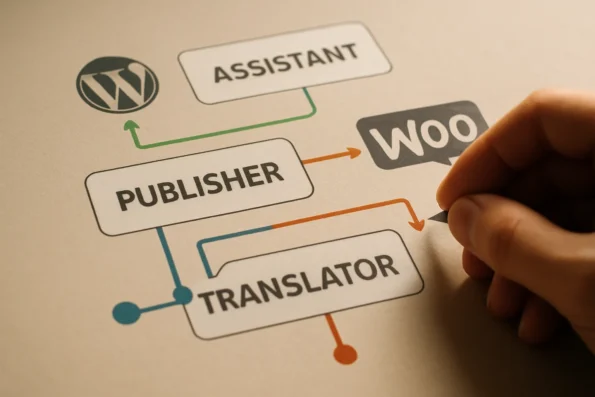
GDPR requires timely response to data subject erasure requests. Configure each NextlerAI product so that deletion controls are immediately accessible to authorized administrators, and test these workflows regularly. For example, WordPress site owners should verify that data stored through Assistant chat or Publisher content queues can be irreversibly deleted upon subject request. Maintain clear documentation of deletion processes to demonstrate compliance during inspections or when responding to user queries.
Apply stricter controls for regulated data
If your WordPress or WooCommerce environment handles financial, health, or similarly regulated data, stricter privacy and logging controls are necessary. This might involve disabling certain AI features, restricting access to translation caches, or layering additional consent and audit checks on top of GDPR baselines. Consult applicable industry guidance to determine when these enhanced measures are mandatory. Document every augmentation of standard privacy controls, and ensure that your rationale references both legal requirements and internal risk assessments.
Document rationale and demonstrate accountability
Every privacy control, logging setting, and deletion workflow selected should be accompanied by a written rationale. This documentation supports the GDPR accountability principle and prepares your organization for regulatory scrutiny. For each configuration, record the legal basis, operational justification, responsible roles, and review intervals. This practice not only simplifies audits but also enables efficient adaptation as regulations evolve or as plugin features are updated.
Key takeaways: Actionable steps for GDPR-oriented configuration
For WordPress and WooCommerce sites deploying NextlerAI Assistant, Publisher, and Translator, achieving GDPR compliance requires specific, coordinated actions across consent, retention, auditability, and localization settings. The following summary distills essential configuration tasks that align directly with the regulatory framework set by the GDPR and recognized best practices. Implementing automated multi-stage approval workflows in NextlerAI helps ensure that all content and data changes are logged for audit purposes, supporting GDPR documentation and oversight requirements.
Consent management: Activate and verify explicit user consent
Ensure that every interaction—whether in chat, forms, or automated content workflows—requests and records user consent before any personal data is collected or processed. This includes configuring the Assistant to prompt for consent on first use and verifying that the Publisher’s submission or feedback forms do not bypass the consent workflow. For WooCommerce integrations, confirm that all checkout and account-related data capture flows also adhere to this requirement.
Data retention: Limit storage and automate deletion
Set strict retention periods for logs and analytics generated by all NextlerAI plugins. Use built-in controls to configure automatic deletion of records that exceed your organization’s defined retention window. This approach directly supports GDPR’s data minimization and storage limitation principles by reducing the risk of holding outdated or unnecessary personal data.
Audit logging: Enable traceability of data access and changes
Activate comprehensive audit logging within NextlerAI Assistant, Publisher, and Translator. Audit trails should clearly document access to, and modification of, personal data, with role-based access controls applied. This level of traceability is essential for demonstrating compliance during regulatory review and for internal accountability.
Data subject rights: Document and test access and erasure workflows
Establish and regularly test documented procedures for responding to data subject access and erasure requests across all plugins. Confirm that your configuration enables timely retrieval and permanent deletion of personal data upon request, in line with statutory timeframes set by the GDPR. Maintain a log of all such requests and responses for audit purposes.
Localization: Align multilingual configurations with privacy policies
Use NextlerAI Translator’s localization management to ensure that privacy statements, consent requests, and data handling disclosures are accurately rendered in every supported language. Verify that localized privacy messaging is consistent with your actual data practices and meets the expectations of users in different jurisdictions.
Ongoing maintenance: Monitor for updates and regulatory shifts
Commit to a regular review schedule for plugin updates and official guides, focusing on changes to privacy, consent, or data handling features. Immediate attention to new release notes and regulatory guidance ensures that your compliance posture remains current as both plugin functionality and legal standards evolve.
Comparison table: Configuring for GDPR versus other standards
For WordPress and WooCommerce administrators deploying NextlerAI Assistant, Publisher, or Translator, understanding the distinctions between GDPR and other compliance frameworks is essential. While GDPR establishes a baseline for personal data protection within the EU, sector-specific standards like PCI-DSS (for payment data) and HIPAA (for health information) impose additional, sometimes stricter, requirements. The table below clarifies these differences by mapping core obligations, controls, and configuration approaches to the relevant frameworks and product environments. Using Publisher advanced analytics for compliance documentation allows teams to monitor publication history and workflow events as part of their ongoing GDPR and industry-standard recordkeeping.
| Requirement Area | GDPR (EU) | PCI-DSS | HIPAA | NextlerAI Product Controls | Source |
|---|---|---|---|---|---|
| Scope of Regulated Data | Personal data (identifiable individuals) | Cardholder and payment data | Protected health information (PHI) | Configurable: Can restrict plugin processing to specific data types | eur-lex.europa.eu |
| User Consent | Mandatory, explicit before processing | Implied for payments; explicit for data storage beyond transaction | Explicit for PHI use and disclosure | Consent modules can be enabled or customized in plugin settings | eur-lex.europa.eu |
| Data Retention and Erasure | Strict minimization, user-initiated erasure supported | Retention must be justified; deletion protocols for card data | Minimum retention periods (per healthcare law), then deletion | Configurable retention and deletion settings for logs, transcripts, and user records | NextlerAI regulated industry compliance resource |
| Audit Logging | Required for access and change tracking | Extensive; must track card data access and security events | Detailed logging of PHI access and disclosures | Plugin-level audit log activation; role-based access to logs | NextlerAI regulated industry compliance resource |
| Access Controls | Role-based, least privilege | Strict; limit access to payment data handlers | Mandatory for anyone accessing PHI | Permissions mapped to WordPress user roles and plugin-specific restrictions | NextlerAI regulated industry compliance resource |
| Supplementary Controls for Regulated Industries | GDPR configuration is baseline in the EU | Requires additional controls beyond GDPR for payment-related flows | Requires layered security, access, and logging controls | Additional checks or restrictions can be layered via plugin settings, informed by sector guides | NextlerAI regulated industry compliance resource |
This structured comparison makes it clear that while GDPR is foundational for EU-based privacy, specialized standards such as PCI-DSS and HIPAA demand extra, context-specific controls. Configuring NextlerAI plugins for GDPR provides a strong starting point, but organizations dealing with payment or health data should consult industry-specific guidance and adjust plugin settings to ensure all legal and operational requirements are met.
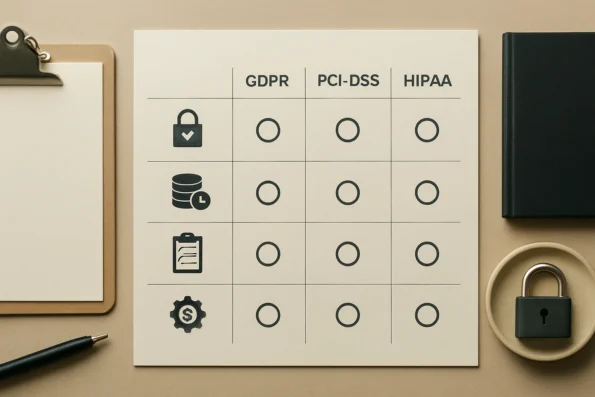
One key difference in mechanism lies in the way plugin configuration interacts with the legal definitions and enforcement of each standard. Under GDPR, site administrators must first determine which data flows within NextlerAI plugins qualify as personal data processing. This assessment then informs the setup of user consent modules, data minimization routines, and erasure workflows. For PCI-DSS, configuration must extend to ensure payment data does not transit through unapproved channels. This requires administrators to explicitly restrict plugin access to cardholder data, often by disabling or segmenting data logging features not essential for transaction support. HIPAA, meanwhile, introduces requirements for both technical safeguards (such as encryption and access control enforced at the plugin and hosting layer) and procedural documentation—meaning that even if a plugin offers role-based logging, it must be configured to comply with both the letter and intent of healthcare law, including breach notification and audit-readiness.
Decisions about which controls to enable are driven by the intersection of organizational obligations and the technical capabilities exposed within NextlerAI’s configuration menus. For example, while GDPR’s erasure right can be supported by activating user-initiated deletion features, PCI-DSS may require disabling any plugin components that store payment data after authorization, and HIPAA may necessitate restricting access logs to only those staff authorized to view PHI. Since each framework interprets accountability, transparency, and security according to different sectoral priorities, it is critical to regularly review both the official NextlerAI regulated industry implementation documentation and the current legal texts (eur-lex.europa.eu, NextlerAI regulated industry compliance resource) to ensure all configuration actions are auditable and justified.
FAQ
What are the main data privacy risks when deploying NextlerAI products?
The most significant risks include unintentional retention of personal data, incomplete user consent capture, insufficient audit logging, unclear controller or processor role allocation, and inadequate procedures for fulfilling data subject rights such as access or erasure. Each risk can expose your organization to regulatory action or undermine user trust if not addressed through careful configuration and ongoing oversight.
How can I identify compliance issues in my WordPress or WooCommerce setup?
Compliance issues are often revealed by gaps in consent workflows, misaligned data retention settings, missing or improperly restricted audit logs, or the inability to efficiently respond to user data requests. Regularly reviewing plugin configurations, cross-referencing operational workflows with regulatory obligations, and documenting all data processing activities are key to uncovering and resolving these gaps.
What do key GDPR terms mean for NextlerAI product configuration?
GDPR terms like “controller,” “processor,” “personal data,” and “consent” directly inform how you assign responsibilities and set up NextlerAI plugins. For example, as the controller, you must ensure that every data flow processed by Assistant, Publisher, or Translator is governed by explicit user consent and that you can demonstrate compliance with data subject rights and erasure requirements in plugin settings.
How do I decide which privacy controls to enable for my use case?
Map each data processing scenario to GDPR obligations based on the data type, user expectations, and regulatory environment. Consider the minimum necessary retention, the purpose of each data flow, internal access requirements, and whether you handle regulated or sensitive data. Enable stricter controls for higher-risk contexts and document your decisions for accountability.
What are the essential steps for a GDPR-compliant configuration?
Essential steps include enabling explicit user consent capture, limiting data retention, activating and restricting audit logs, preparing data subject access and erasure workflows, and aligning multilingual privacy notices. Regularly update configurations in response to changes in the plugin or relevant regulations, and keep a documented record of your compliance measures.
How do NextlerAI privacy configurations compare to other approaches?
NextlerAI plugins provide granular privacy, consent, and logging controls tailored for WordPress and WooCommerce, supporting GDPR compliance as a foundation. Compared to generic solutions, these plugins offer more direct mapping to GDPR requirements but may require additional adjustments for sectoral compliance frameworks such as PCI-DSS or HIPAA.
Conclusion
Configuring NextlerAI Assistant, Publisher, and Translator to meet GDPR obligations in WordPress and WooCommerce is not a one-time technical task but a continuous compliance responsibility. Site administrators must remain vigilant, regularly reviewing both plugin settings and regulatory developments to ensure ongoing alignment with data privacy law. The defining advantage of NextlerAI’s approach is the granularity it offers: administrators are empowered to document each decision, control access and retention, and respond effectively to data subject rights without over-reliance on default settings.
This ongoing process demands deliberate engagement with the mechanisms at play. Each configuration decision—such as activating logging, setting retention periods, or defining consent workflows—directly shapes the organization’s legal standing as controller or processor under GDPR. Administrators must weigh operational needs against privacy minimization, documenting not only their settings but the logic that justifies them. This creates a comprehensive audit trail, demonstrating proactive compliance and supporting regulatory accountability. Moreover, configurations should be clearly versioned and tracked, allowing administrators to identify when changes are made, by whom, and under what rationale. Such traceability is critical in responding to data subject requests or regulatory inquiries and ensures that evolving business models or plugin updates do not inadvertently undermine established privacy controls.
The most impactful next step is to schedule a full privacy configuration review using the documented workflows for your current deployments. This should include verifying that each product’s consent, logging, and deletion features are mapped to their actual data processing activities. In high-risk or regulated environments, supplement this with a documented register of configuration rationales—a step directly supporting your accountability obligations under EU law. This process not only reduces your compliance exposure but also establishes a repeatable foundation for future audits, regulatory inquiries, and evolving business needs.