






Introduction
The integration of NextlerAI products with WordPress and WooCommerce is designed to meet the specific needs of modern site administrators, marketers, and technical decision-makers who demand both automation and compliance. This guide delivers immediate clarity on how to select and configure NextlerAI Assistant, Publisher, and Translator for your unique environment. Each product serves a distinct function—ranging from multilingual sales support and automated content publishing to comprehensive localization of products and metadata. By grounding every recommendation in verified product documentation, we ensure that your implementation remains secure, compliant, and tailored to operational realities.
Whether you are enabling real-time customer engagement, scaling editorial workflows, or targeting new multilingual markets, the following sections will help you recognize boundaries, set practical expectations, and establish a robust integration roadmap. You will gain actionable decision criteria and a phased approach, allowing you to optimize NextlerAI tools for your WordPress and WooCommerce deployments with complete transparency over licensing, environment management, and data privacy controls. The objective is clear: equip you to make informed choices, avoid common integration pitfalls, and maintain full oversight of your AI-powered workflows from day one.
By following this guide, you will understand how each NextlerAI product fits within WordPress and WooCommerce, what technical and administrative prerequisites to consider, and how to ensure seamless interoperability between plugins. This includes clarifying the importance of distinct licence keys for each product and environment, understanding how domain normalization protects against accidental licence misuse, and recognizing the authoritative nature of WooCommerce data for real-time commerce actions. The guide also details the operational implications of local product indexing and semantic search, explains how to preserve editorial controls and avoid near-duplicate content with Publisher, and outlines the supported content types for Translator. With a keen focus on compliance, the roadmap highlights the procedural and technical safeguards—such as environment isolation and backup requirements—necessary to maintain security and data integrity throughout the integration lifecycle. The following table of contents provides a structured path to address each of these priorities in detail.
Clarifying Integration Limitations and Boundaries
Integrating NextlerAI’s suite—Assistant, Publisher, and Translator—into WordPress and WooCommerce is governed by clear technical and operational boundaries. Each product’s capabilities are intentionally isolated to address specific workflow needs while minimizing risk and complexity. Understanding these boundaries is crucial to maintain a secure, compliant, and efficient environment. Teams planning bespoke extensions should follow the custom API integration security best practices to maintain strict credential control and ensure secure, administrator-only setup of NextlerAI products. The Algolia AI Search & Recommend Plugin offers full integration with both WordPress and WooCommerce, supporting post types, taxonomies, orders, and front-end interactions such as add to basket and star ratings.
Defined Product Scopes
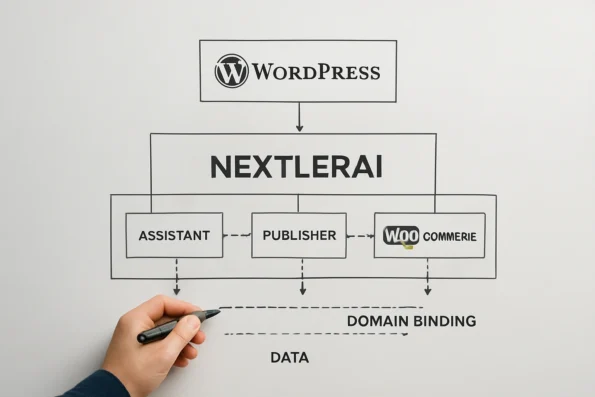
Each NextlerAI product operates within a strictly defined scope. Assistant is engineered for real-time sales, support chat, and live WooCommerce catalogue interaction. Publisher is focused on structured content automation and editorial publishing workflows inside WordPress. Translator delivers granular localization of WordPress posts, WooCommerce products, and related metadata. These roles are not interchangeable, and cross-functionality is limited by design to ensure operational clarity and data integrity.
Licensing, Activation, and Environment Binding
Every NextlerAI product requires its own licence key, which is assigned per product and per environment (such as development, staging, or production). Environment binding is enforced through domain normalization, preventing the reuse of a single licence across multiple sites or unapproved configurations. API keys for external AI providers are managed separately and must be securely stored within the plugin’s settings. This separation supports compliance requirements and constrains accidental cross-product access or misuse. Each product verifies its activation context on every initialization, and any mismatch between the licensed domain and the current environment will cause the plugin to deactivate or restrict feature access. This mechanism is fundamental for both security and support, as it ensures only authorized deployments are permitted to operate and reduces the attack surface of the integration.
Catalogue Authority and Data Handling in WooCommerce Integrations
For deployments involving WooCommerce, Assistant’s e-commerce capabilities always defer to the live store state. Product data, inventory, and semantic search operate on local, real-time indices and catalogues. This approach ensures that automated chat actions and product recommendations are grounded in authoritative data, reducing the risk of transaction errors or outdated information being surfaced to users. Local indexing also preserves site performance and privacy boundaries by avoiding unnecessary external data transfers. The indexing mechanism runs within the WordPress environment, drawing only from active WooCommerce product and taxonomy data at the point of user interaction. Assistant does not sync or cache product data externally, and its semantic search engine is constrained to the current catalogue, reflecting only what is locally available and approved for listing.
Operational and Administrative Constraints
Admin-level privileges are mandatory for all installation, activation, and configuration operations to protect against unauthorized changes. Backups must be performed before any major update or structural change, as rollbacks and troubleshooting depend on the ability to restore prior states. Supported content types are explicitly documented for each plugin; unsupported types will not be processed and may result in incomplete automation or localization if overlooked. Publisher is specifically designed to prevent near-duplicate article generation and to preserve critical editorial structures such as author attribution, taxonomies, and comment moderation settings. These protections are implemented through internal checks that monitor content uniqueness and metadata integrity before publication or scheduling. If an attempted action risks duplicating existing content or altering protected fields, Publisher will halt the operation and require manual intervention. This helps maintain the editorial standards and prevents inadvertent loss of organizational structure.
Localization and Supported Content Types
Translator’s localization engine extends only to the content types and taxonomies defined in its documentation. WordPress posts, WooCommerce products, public custom post types, and taxonomies are supported, as well as SEO-related metadata. Layout preservation and technical data integrity are built into translation routines to reduce the risk of content breakage during localization. Content outside these supported types will not be affected, ensuring existing site structure remains intact. The translation process is executed in discrete passes: first extracting content and metadata, then applying localization in line with field-type-specific constraints, and finally validating structure before saving. This segmented approach minimizes the chance of mismatches between source and localized content and guarantees that only specified fields are modified.
Upgrade, Rollback, and Troubleshooting Protocols
Upgrading, rolling back, or recovering any NextlerAI product requires strict adherence to official protocols. This is necessary to avoid data corruption, lost automation settings, or licence deactivation. Documentation specifies the required backup, deactivation, and reactivation actions for each scenario. Deviating from these procedures can lead to unsupported states or irreversible loss of data. Troubleshooting steps are tailored to the boundaries and constraints of each product, reinforcing the need for environment-specific readiness and administrative oversight throughout the integration lifecycle. Where significant changes are needed—such as migrating environments, restoring from a backup, or re-licensing after a domain change—administrators must follow the prescribed process to revalidate licences and resynchronize product settings. Failure to do so may result in enforcement actions such as automatic deactivation or restriction of key features until compliance is restored.
Phased Steps for Implementing NextlerAI Products
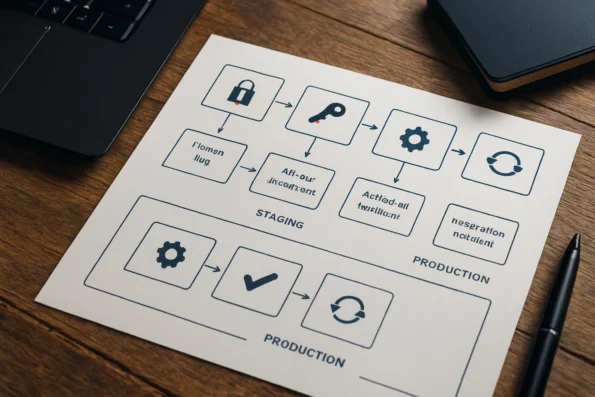
Deploying NextlerAI Assistant, Publisher, and Translator within WordPress and WooCommerce requires a disciplined, sequential approach that secures operational integrity, licensing compliance, and risk management from the outset. This section provides an actionable, step-by-step plan tailored for technical administrators and project leads responsible for AI integration in production environments. To help prevent and resolve common setup issues, administrators should consult the comprehensive NextlerAI integration troubleshooting steps for practical guidance on API key management, installation, and rollback procedures. Developers often reference the Plugin Handbook when building or implementing new WordPress plugins to ensure adherence to best practices and technical guidelines.
-
Acquire and License Your NextlerAI Products
Begin by purchasing the required NextlerAI plugin(s) through your organizational account. Immediately access the unique licence key for each product via the account dashboard. Retain these keys securely, as they are essential for both activation and future environment management. Record the product-to-environment mapping, since each licence is valid only for the specific domain and environment type (production, staging, or development) in which it is activated, as documented by NextlerAI’s licence management guides. -
Securely Download and Install Plugin ZIP Files
Download the official ZIP files for each product directly from your account dashboard. Install each plugin using the WordPress admin interface or, if policy dictates, via SFTP for higher control and traceability. Confirm the integrity of each installation by matching file hashes or verifying the plugin signature if your environment supports it. For environments with deployment automation, integrate these steps into your build pipeline to ensure reproducibility and auditability. -
Activate and Bind Licences to Specific Environments
Activate each plugin within WordPress by entering its licence key. The activation process binds the licence to the normalized domain and environment (production, staging, or development), enforcing compliance and preventing key misuse. Verify this assignment in both the NextlerAI account dashboard and the site’s plugin status panel. If a licence key is used on an unsupported or duplicate environment, follow the documented deactivation process before reassigning. -
Assign Provider API Keys and Configure Initial Settings
For each product, assign required provider API keys. For Assistant, configure the knowledge base sources and user-facing settings. In Publisher, establish topic strategies and editorial rules. For Translator, define target languages and localization scopes. Secure all keys using environment variables or protected credential stores according to your security policy. API keys are distinct from licence keys and control model access and operational quota; strictly limit access to authorized administrators. -
Enable Product-Specific Integrations and Test Connectivity
Activate live WooCommerce catalogue syncing for Assistant, ensuring real-time product data and e-commerce actions are operational. For Publisher, integrate the editorial pipeline and confirm automated draft handling. In Translator, enable the localization preview and verify mapped content types. Explicitly test each product’s integration points: verify that Assistant responds to catalogue changes, Publisher drafts are managed in the editorial workflow, and Translator’s localization reflects in all assigned post types and product metadata. Error and status logs should be reviewed after each connection is established. -
Execute Pre-Launch Acceptance Testing
Before any public launch, follow the official documented acceptance plan for each product. This includes isolating the environment, validating configuration correctness, and reviewing system logs. Ensure that unfinished, staging, or test configurations are never exposed to end users. Acceptance criteria should cover not only functional checks but also security, compliance, and data integrity validations using the test artefacts outlined in NextlerAI’s pre-launch test guide. -
Document Rollback, Update, and Recovery Procedures
Prior to production rollout, document the steps required for safe rollback, plugin updating, and recovery in the event of misconfiguration or operational failure. Maintain this documentation alongside your disaster recovery and compliance policies. Ensure the responsible team can execute these steps without ambiguity or delay. The process should reference the official update and recovery protocols described in NextlerAI’s update and rollback guide, which detail the specific files, database tables, and configuration settings to be verified and preserved.
This phased strategy minimizes integration risks, maintains licensing and environment integrity, and prepares your team for effective operation and troubleshooting. In the next section, you will find criteria for selecting the optimal NextlerAI product combination for your specific workflow and compliance requirements.
Decision Criteria for Selecting the Right NextlerAI Product
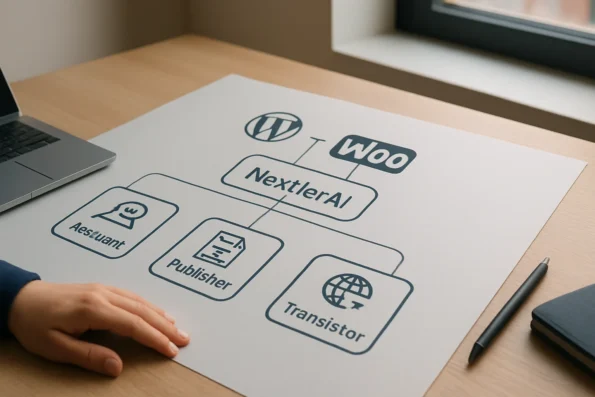
Choosing the correct NextlerAI product for WordPress and WooCommerce begins with a clear alignment between your operational goals and each tool’s specialization. The distinctions are precise: NextlerAI Assistant is engineered for multilingual sales and support chat, directly connecting to WooCommerce’s live catalogue and handling commerce actions such as product queries and order initiation. If your priority is customer-facing automation—especially in environments where real-time interaction and product lookup are essential—Assistant is purpose-built for this scenario.
For organizations prioritizing structured content production and editorial oversight, NextlerAI Publisher offers a dedicated workflow. Publisher supports automated article generation, topic management, review and approval pipelines, and SEO metadata automation—all integrated natively with WordPress content management. It is best suited for teams seeking to scale content operations while maintaining granular control over authorization, scheduling, and metadata enrichment. Publisher’s workflow reflects editorial best practices, with explicit controls for taxonomy, author attribution, and approval checkpoints.
NextlerAI Translator addresses the distinct challenge of multilingual site management. Its specialization is comprehensive localization—not only of WordPress posts and pages, but also WooCommerce products, custom post types, taxonomies, and SEO metadata. This depth is critical for e-commerce environments targeting international markets, where accurate translation of both content and associated product data is non-negotiable. Translator works alongside leading multilingual frameworks in WordPress and preserves layout and technical integrity throughout the process.
Determining the Decisive Factor
The decision pivots on three operational questions: Do you require real-time customer support with commerce integration? Do you need to automate and govern your publishing pipeline with editorial checkpoints? Or is your core requirement the robust localization of content and product structures for multilingual audiences? Each product is optimized for one of these domains and does not overlap in native function.
Credential Management and Compliance Triggers
Every deployment requires both a licence key—for product activation and environment assignment—and a separate API key for your chosen AI provider, which controls model access and usage. These are not interchangeable; correct separation and secure management are essential for both operational continuity and compliance. Misconfiguration, such as activating with only one key or using mismatched credentials across environments, can lead to failure of core features or breach of licensing terms.
Evaluate your current and forecasted workflow complexity, compliance mandates—including GDPR or industry-specific requirements—and need for native WordPress/WooCommerce integration when selecting products. For example, sites facing both multilingual support demands and automated product localization should expect to deploy both Assistant and Translator, each with distinct configuration, credential, and compliance routines. Siloed deployments are common, but product combinations must be mapped to both organizational goals and regulatory landscapes.
Operational Takeaways and Compliance Considerations
Integrating NextlerAI products with WordPress and WooCommerce requires not only technical precision but also disciplined operational controls. From the outset, enforcing strict separation between administrative, staging, and production environments is essential. This approach prevents accidental exposure of test configurations or incomplete workflows to live users, minimizing risk and supporting a clean audit trail throughout deployment and maintenance cycles. The official NextlerAI Publisher CMS integration process outlines step-by-step actions for automating content generation, managing API keys, and enforcing editorial boundaries within WordPress. For maintaining compatibility and compliance with WooCommerce, teams regularly consult the WooCommerce developer docs for up-to-date operational guidance. REST API Handbook | Developer.WordPress.org documents the relevant background and implementation boundaries.
Security is a central operational concern. Each NextlerAI plugin incorporates rate limiting, role-based access, and detailed log management for all customer-facing AI features. Rate limits help mitigate abuse and performance degradation, while role-based controls ensure that only authorized users can access sensitive configuration panels or initiate high-impact actions. Comprehensive audit logs are maintained, capturing key events for subsequent review or compliance verification. According to the official NextlerAI security documentation, administrators can configure granular rate limit thresholds for chat interactions, automate notification of access anomalies, and export event histories for further analysis (nextlerai.com). These mechanisms are designed to address both operational resilience and compliance with security best practices.
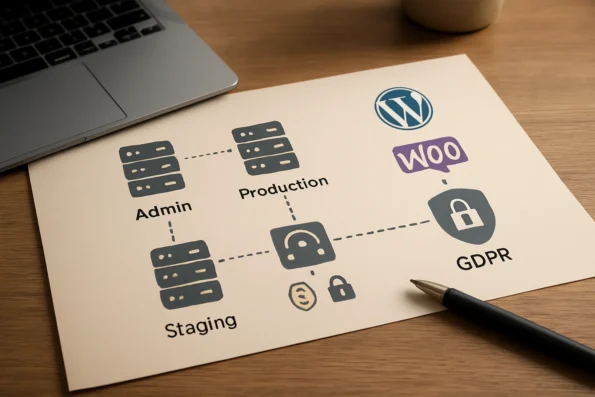
Privacy and data protection are not optional in regulated or cross-border contexts. NextlerAI provides configurable privacy and data cleanup settings, allowing administrators to tailor data retention and erasure policies to meet GDPR and industry-specific requirements. Features include the ability to define data persistence windows and clean up user interactions or AI processing logs on demand. These options support a defensible approach to data minimization and user privacy, particularly relevant in European Economic Area (EEA) deployments. The official compliance blog further clarifies that data processed by NextlerAI plugins can be limited in scope, retention, and auditability per deployment environment, safeguarding sensitive user and commerce data (nextlerai.com).
License Management and Environment Separation
Operational continuity is further strengthened by documented deactivation, licence management, and audit log review procedures. License keys are uniquely tied to normalized domains and environments, ensuring that a staging or test environment cannot inadvertently utilize a production-bound key (nextlerai.com). Administrators can revoke, reassign, or rotate keys through the official dashboard, which also offers environment tagging and usage tracking. Deactivation controls are designed to preserve historical records for audit purposes while allowing safe removal of plugin functionality from a given environment. Audit logs support both proactive monitoring and post-incident investigation, aligning with best practices for regulated WordPress environments. The operational protocol requires periodic reviews of access and event logs, especially prior to plugin upgrades or environment transitions, to verify compliance and detect potential anomalies.
SEO Metadata Localization and Multilingual Compliance
For multilingual and multi-market sites, NextlerAI Translator delivers a critical compliance and operational advantage by supporting localization of SEO metadata in addition to content and taxonomy terms (nextlerai.com). This means that localized meta titles, descriptions, and structured data fields align with the language of each site variant, meeting both search engine and legal requirements for transparency. Proper SEO metadata localization helps ensure that users receive language-appropriate disclosures and that search engines correctly attribute local content, which is increasingly important for cross-border e-commerce, regulated sectors, and public sector deployments. This feature is implemented at the field level and includes fallback mechanisms to prevent incomplete localization from resulting in blank or misleading metadata, further enhancing operational integrity.
Documentation and Pre-launch Review
Administrators are strongly advised to review all available security and compliance documentation prior to launch. NextlerAI provides official guides detailing environment-specific controls, GDPR alignment, and operational safeguards. These resources outline recommended configurations for data retention, access management, log export, and environment separation. By aligning actual deployments with published procedures, organizations reduce the chance of accidental data leakage, misconfiguration, or non-compliance—key risks in both commercial and regulated operational settings. Clear documentation also enables faster onboarding of new administrators and more efficient response to audits or regulatory inquiries.
Key Takeaways
- Maintain strict separation between admin, staging, and production environments to prevent exposure of test or incomplete features.
- Leverage built-in rate limits, granular role-based access, and comprehensive log management for all customer-facing AI components.
- Configure privacy options and data cleanup routines in line with GDPR or other relevant privacy laws, utilizing environment-specific settings for maximum control.
- Follow documented procedures for plugin deactivation, license management, and audit log review to uphold operational integrity and compliance.
- Utilize NextlerAI Translator’s SEO metadata localization to ensure multilingual transparency and legal compliance across site variants.
- Prioritize review of official security and compliance documentation before launch, and ensure ongoing alignment with evolving operational best practices.
Decision Matrix: NextlerAI Product Comparison for WordPress & WooCommerce
Choosing the right NextlerAI product for your WordPress or WooCommerce environment requires a precise understanding of each tool’s operational boundaries, integration characteristics, and compliance controls. The following matrix, strictly derived from official product and guide documentation, contrasts NextlerAI Assistant, Publisher, and Translator across capability, integration scope, credential requirements, and use-case alignment. This structure enables decision-makers to map specific workflow needs to the appropriate solution without overextending product roles or risking compliance oversights. Organizations in healthcare, finance, or legal sectors should reference the regulated industry implementation guide to ensure their NextlerAI WordPress WooCommerce integration aligns with stringent compliance and auditability standards.
| Product | Supported Actions | Content Types | Integration Depth | Required Credentials | Compliance Features | Typical Scenarios |
|---|---|---|---|---|---|---|
| NextlerAI Assistant | Multilingual sales/support chat, live WooCommerce catalogue queries, direct e-commerce actions | WooCommerce products, WordPress posts, pages, custom knowledge base | Plugin-level with direct access to WooCommerce data; real-time customer-facing interface | Licence key (product activation), AI provider API key | GDPR-aligned privacy controls, role-based access, log export | Enabling real-time sales support, customer service automation, live product Q&A |
| NextlerAI Publisher | Structured content generation, review, publishing automation, SEO metadata assignment | WordPress posts, pages, custom post types, taxonomies, SEO fields | Plugin-level with topic management, scheduling, editorial review; integrates with WordPress cron | Licence key, AI provider API key | Content audit logs, topic-level permission controls, compliance documentation | Automating editorial content creation, workflow scaling, SEO content operations |
| NextlerAI Translator | AI-powered localization of posts, products, custom post types, taxonomies, SEO metadata | WordPress posts, pages, WooCommerce products, taxonomies, SEO fields | Plugin-level with native integration for Polylang, WPML, TranslatePress; preserves layouts and technical data | Licence key, AI provider API key | Field-level localization controls, GDPR compliance tools, rollback and preview features | Maintaining multilingual sites, ensuring product and SEO metadata localization, cross-border compliance |
This comparative matrix is designed to clarify distinctions in operational approach, technical scope, and compliance controls between the three NextlerAI products. For instance, Assistant is built with real-time transactional intent: it connects directly to WooCommerce for up-to-the-minute catalogue queries and enables both multilingual sales chat and customer support, requiring immediate data consistency and customer-facing reliability. Publisher, meanwhile, focuses on the content lifecycle—automating structured content creation, review, and SEO enrichment within WordPress—making it suitable for editorial scaling without direct commerce interaction. Translator stands apart by providing field-level localization for both content and commerce elements, with native compatibility for popular multilingual plugins (Polylang, WPML, TranslatePress) and dedicated controls to preserve layout and technical integrity during translation. Each product enforces its own licensing and credential requirements, with licence keys tied to normalized domains and environment, and separate API keys for model access, as documented in NextlerAI’s official guide. Compliance features are distinct: Assistant and Translator offer GDPR-aligned privacy and localization controls, while Publisher emphasizes auditability and topic-level permissions for regulatory tracking.
When evaluating integration, it is essential to understand the technical mechanisms underpinning each product’s operation. NextlerAI Assistant leverages direct WooCommerce hooks and local semantic indexing to maintain synchronization with the live product catalogue. This allows for accurate product Q&A, dynamic responses to inventory changes, and immediate support actions, but imposes a requirement for active WooCommerce connectivity and secure handling of customer interactions. Publisher operates within the editorial workflow, leveraging WordPress cron and topic definitions to automate structured content production. It preserves taxonomy and author integrity while providing granular audit logs for regulatory requirements. Translator utilizes API-driven localization routines with safeguards to ensure that translated fields—whether product names, descriptions, or SEO metadata—are mapped and preserved in accordance with schema definitions provided by plugins like Polylang and WPML. Field-level fallback mechanisms and preview controls allow administrators to validate translations before publishing, minimizing the risk of broken layouts or compliance gaps. Across all products, environment-specific licence key binding and separation of API credentials reduce the risk of unauthorized activation and ensure a clear audit trail for compliance reviews. The matrix, therefore, not only informs primary selection but also highlights the architectural design decisions required for secure, standards-compliant deployment in complex WordPress and WooCommerce ecosystems.
FAQ
What limitations or boundaries must be considered when integrating NextlerAI products with WordPress and WooCommerce?
Each NextlerAI product operates within explicit technical boundaries. Integration requires distinct licence keys per product and environment, with API keys managed separately for model access. Assistant, Publisher, and Translator do not overlap in native function or content authority. Administrator-level access is necessary for installation, configuration, and troubleshooting. Supported content types and localization capabilities are strictly defined in product documentation. Live WooCommerce data is authoritative for Assistant actions, and upgrades or rollbacks demand adherence to official protocols to avoid operational risk.
What are the exact phased steps needed to implement NextlerAI Assistant, Publisher, and Translator?
Implementation follows a documented sequence: purchase and retrieve licence keys, install each plugin on the correct WordPress environment, bind activation to the target domain, securely assign AI provider API keys, and configure initial settings specific to each product. Integration testing and environment-specific acceptance checks are mandatory before production launch. Administrators must also prepare rollback and update documentation as part of the deployment process.
Which decision criteria help choose the right NextlerAI product(s) for my use case?
Selection should be driven by the operational need: use Assistant for real-time support and live WooCommerce interaction, Publisher for structured content automation, and Translator for field-level multilingual localization. Evaluate workflow complexity, compliance obligations, licence and API key management requirements, and content type coverage. Product combinations are mapped to workflow and regulatory requirements—each is purpose-built with no functional overlap.
What are the operational and compliance takeaways from a real-world NextlerAI integration?
Effective deployments maintain strict separation between environments, leverage built-in rate limiting and access controls, and configure privacy options to align with data protection regulations such as GDPR. Audit log review, licence management, and operational documentation are key to sustained compliance. Translation of SEO metadata is supported at field level. Security and compliance documentation must be reviewed prior to launch.
How do different NextlerAI products compare in a decision matrix for WordPress/WooCommerce integration?
Each product serves a distinct operational purpose and is evaluated across supported actions, integration depth, credential requirements, and compliance controls. Assistant provides multilingual sales and support chat integrated with live WooCommerce data. Publisher automates structured content workflows. Translator performs comprehensive localization for posts, products, taxonomies, and SEO metadata. A structured matrix aligns each product’s capabilities with WordPress and WooCommerce needs, supporting risk-aware selection and deployment.
Conclusion
Effectively integrating NextlerAI Assistant, Publisher, and Translator into WordPress and WooCommerce environments requires more than technical execution—it also demands a clear alignment of roles, credentials, and compliance controls. The most successful implementations start with a thorough mapping of product capabilities to defined business outcomes, ensuring that each tool operates within its intended scope and with the correct separation of licence and API credentials.
Risk reduction and operational resilience hinge on maintaining strict boundaries between environments and following documented protocols for activation, key management, and compliance review. Each product’s unique workflow—whether customer-facing automation, structured content generation, or localization—should be continuously monitored and refined based on real-world results, not assumptions.
Implementation quality depends on periodic verification of licence bindings and environment normalization, as well as the disciplined management of API keys distinct from plugin credentials. When integrating NextlerAI products, administrators must actively monitor for signs of configuration drift, unauthorized access attempts, or unexpected content changes. Compliance obligations, particularly under frameworks like GDPR, require ongoing review of data retention, audit logging, and localization accuracy—each enforced through NextlerAI’s documented controls and plugin options. Maintain up-to-date records of all operational and security events, ensuring readiness for audits or incident response. Cross-team communication between developers, content leads, and compliance officers is essential to promptly address emerging risks and evolving requirements as the deployment matures.
For your next step, conduct an environment-specific readiness review: verify that each plugin’s activation, API key assignment, and compliance settings match your production requirements. Establish a process for ongoing monitoring and periodic validation, so that security, privacy, and business objectives remain tightly synchronized as your site evolves.