


AI SALES & KNOWLEDGE AGENT FOR WORDPRESS
NextlerAI Assistant
Un assistente WordPress affidabile per vendite, servizio clienti e supporto post-venditaNextlerAI Assistant è un plugin scaricabile per WordPress e WooCommerce che aggiunge al tuo sito un assistente IA multilingue per vendite e supporto. Risponde a ogni visitatore nella sua lingua, trova il prodotto giusto nel catalogo aggiornato e accompagna il cliente dalla prima domanda al carrello, al pagamento e all’assistenza post-vendita.
- Plugin ZIP scaricabile
- Installalo sul tuo sito WordPress
- Collega il tuo provider IA
Converti più visitatoriTrasforma le domande spontanee in prodotti pertinenti e decisioni d’acquisto consapevoli.Usa i dati aggiornati del negozioUtilizza prodotti, prezzi, disponibilità, varianti, carrello e pagamento in tempo reale.Vendi in più lingueRileva la lingua del negozio o della conversazione e risponde tramite il provider IA scelto.
COMPATIBILE CON IL TUO ECOSISTEMA
 WordPress
WooCommerce
WordPress
WooCommerce
 Elementor
 OpenAI
 Gemini
 Claude
 Grok
Polylang
WPML
TranslatePress
Grok
Polylang
WPML
TranslatePress
WordPress
WooCommerce
Elementor
OpenAI
Gemini
Claude
Grok
Polylang
WPML
TranslatePress
Acquisto selezionatoWordPress plugin ZIP · Instant download
Acquista ora ↗✓ Pagamento sicuro · Download immediato · Garanzia di rimborso di 14 giorni
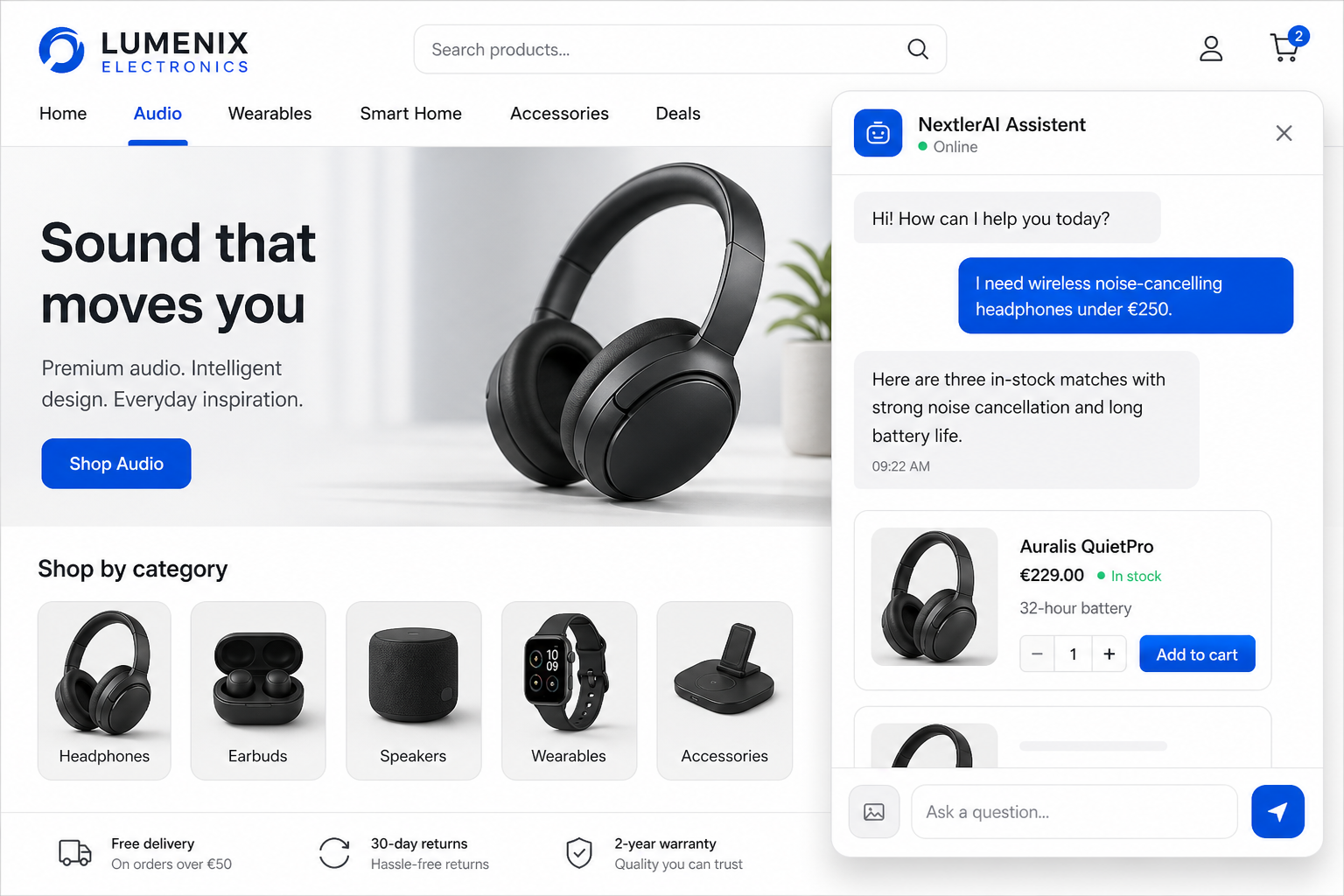
Across the customer journey
DISCOVER · DECIDE · BUY · SUPPORTYOUR PRODUCTS. YOUR KNOWLEDGE. YOUR AI KEY.
COSA INCLUDE IL TUO ACQUISTO
Tutto il necessario per aggiungere un assistente di vendita AI a WordPress.
Il tuo acquisto ti dà il plugin completo installabile, la licenza del sito selezionata e gli strumenti necessari per eseguire Assistant dal tuo dashboard WordPress.
WordPress plugin
Plugin WordPress completo
Scarica il file ZIP pronto per l’installazione e installa NextlerAI Assistant direttamente dalla bacheca di WordPress.
Plugin ZIPWordPress adminSelf-hosted
Assistente IA per vendite e supporto
Aiuta i clienti a fare domande, scoprire prodotti, confrontare le opzioni e arrivare all’acquisto o alla richiesta di assistenza più adatta.
WooCommerce
Strumenti di acquisto per WooCommerce
Ricerca prodotti, consigli, confronti, prezzi e disponibilità aggiornati, varianti, carrello, pagamento, stato dell’ordine e avvisi di scorta.
Più modalità di visualizzazione
Usa l’assistente mobile, lo shortcode, il blocco Gutenberg, i widget Elementor oppure incorporalo in un sito esterno autorizzato.
Pannello di controllo WordPress
Gestisci provider, fonti di conoscenza, aspetto, lingue, indicizzazione, statistiche e comportamento dell’assistente direttamente da WordPress.
Licenza, aggiornamenti e supporto
Attiva il plugin sul numero di siti web inclusi nel tuo piano e ricevi il periodo di aggiornamento e supporto corrispondente.
Guide di documentazione e configurazione
Segui le guide di installazione, configurazione e collegamento del provider IA per passare dal download a un assistente clienti operativo.
InstallazioneConfigurazione IAConfigurazioneAssistenza
COLLEGAMENTO IACollegare il proprio account Gemini, OpenAI, Claude o Grok. L'utilizzo del fornitore di AI viene fatturato separatamente dal fornitore che si sceglie.
IL PERCORSO DI NEXTLERAI ASSISTANT
COLLEGA IL TUO ECOSISTEMAConfigura una volta. Assistant mantiene i prodotti e le conoscenze selezionate in sincronia.
WordPressWooCommerceElementorOpenAIGeminiClaudeFrom connected data
to a confident purchase.
Assistant trasforma una domanda naturale del cliente in una risposta verificata e una azione successiva utile, senza spostare il catalogo o la conoscenza da WordPress.
Scegli fonti affidabili
Collegare WordPress, WooCommerce e il fornitore AI che si sceglie. Selezionare il contenuto Assistente è permesso di utilizzare.
Mantieni aggiornati i dati aziendali
I prodotti, i prezzi, le scorte, le variazioni e le conoscenze selezionate sono indicizzati nei lotti di sfondo e aggiornati quando cambiano.
Collega l’intento a dati verificati
Assistente riconosce la lingua e la necessità del visitatore, quindi recupera i dati relativi al catalogo, le politiche o le informazioni di servizio.
Rispondi, consiglia e passa all’azione
Spiega le migliori opzioni e guide selezione prodotti, carrello, checkout o l'azione di supporto giusta.
VALORE PER L’AZIENDArisposte più veloci · più facile scoperta del prodotto · meno dubbi di acquisto · più utili conversazioni dei clienti
01 / COMPRENDI L’INTENTO
Ask naturally.
Find precisely.
Gli acquirenti possono descrivere un bisogno invece di indovinare la terminologia del catalogo. L'assistente trasforma le richieste di conversazione in filtri WooCommerce reali e recupero semantico a terra.
02 / DALLA DOMANDA ALL’ORDINE
One conversation.
The complete buying journey.
Ricerca semantica e chiarimento delle domande rivelano i prodotti giusti.
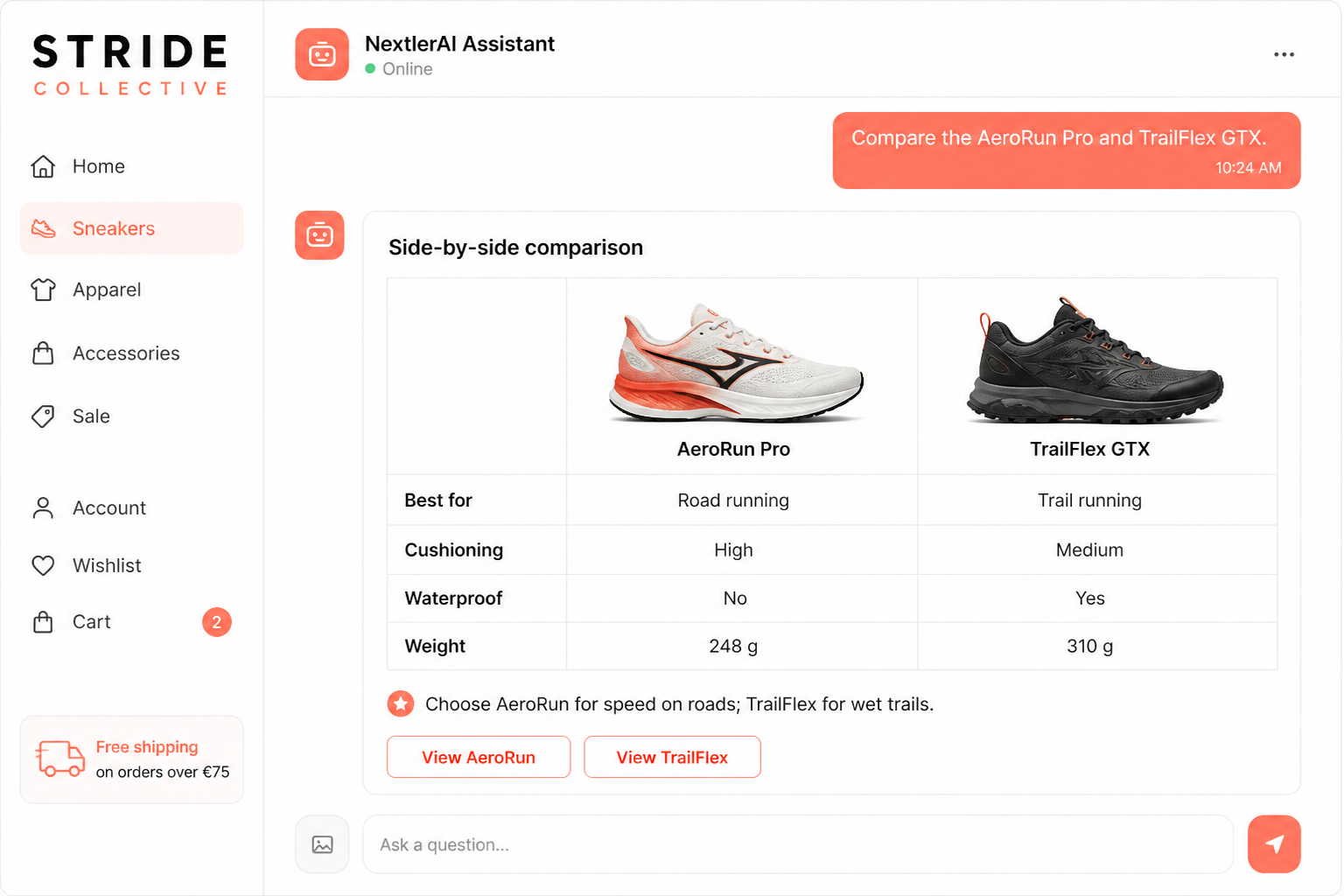
Due o tre prodotti reali, fianco a fianco, con scambi chiari.
Fattori di prodotto precisi, politiche e quantità calcolate eliminano il dubbio.
Carrello, spedizione, totali e checkout possono continuare all'interno della conversazione.
REAL CUSTOMER JOURNEYS
See what customers can complete.
Inside one conversation.
Each example uses a different demo-store category to show that Assistant is not tied to one industry, catalogue or visual style.
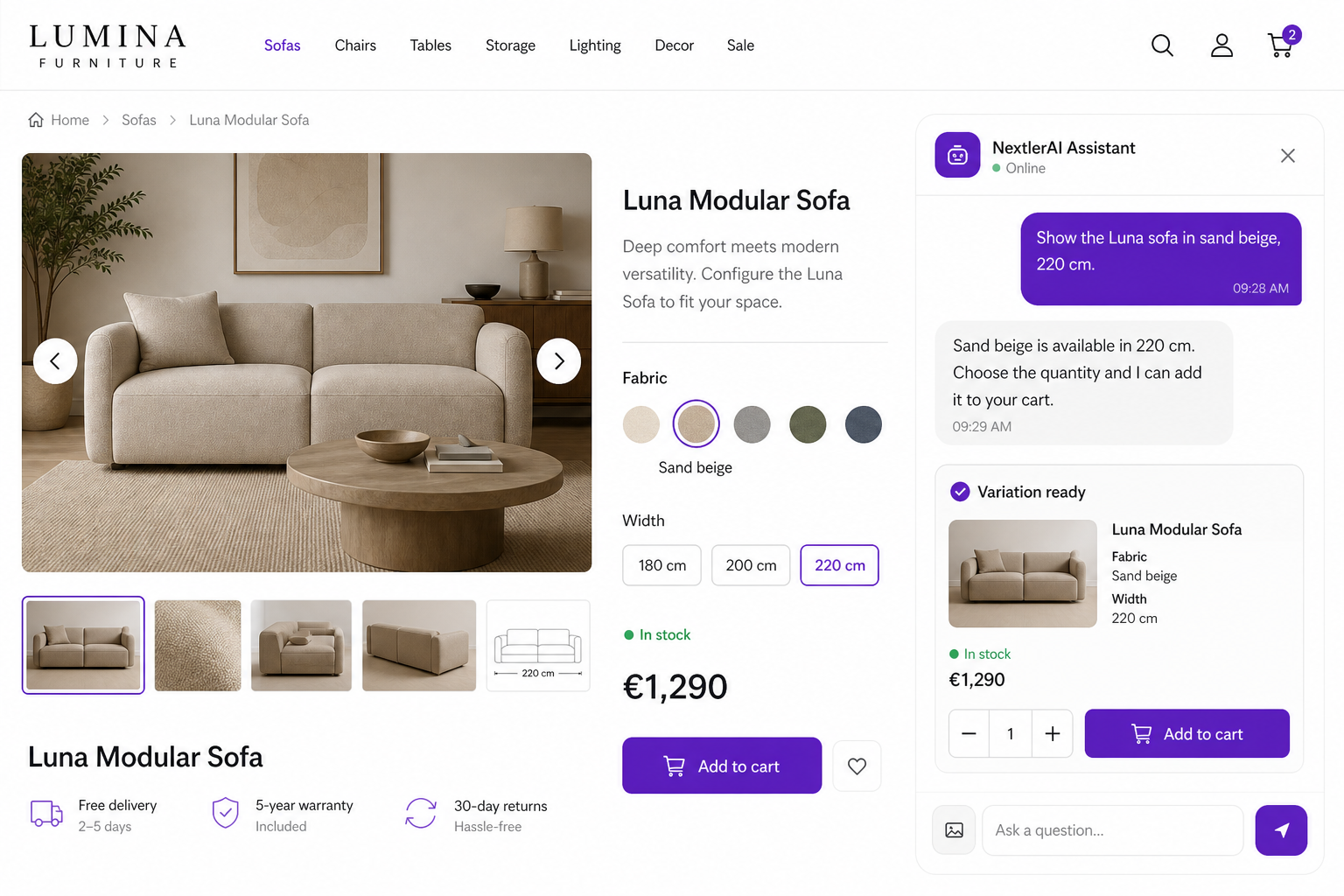
01 / VARIATIONS
Choose the exact configuration
Assistant resolves real WooCommerce attributes, confirms stock and sends the selected variation to the cart.
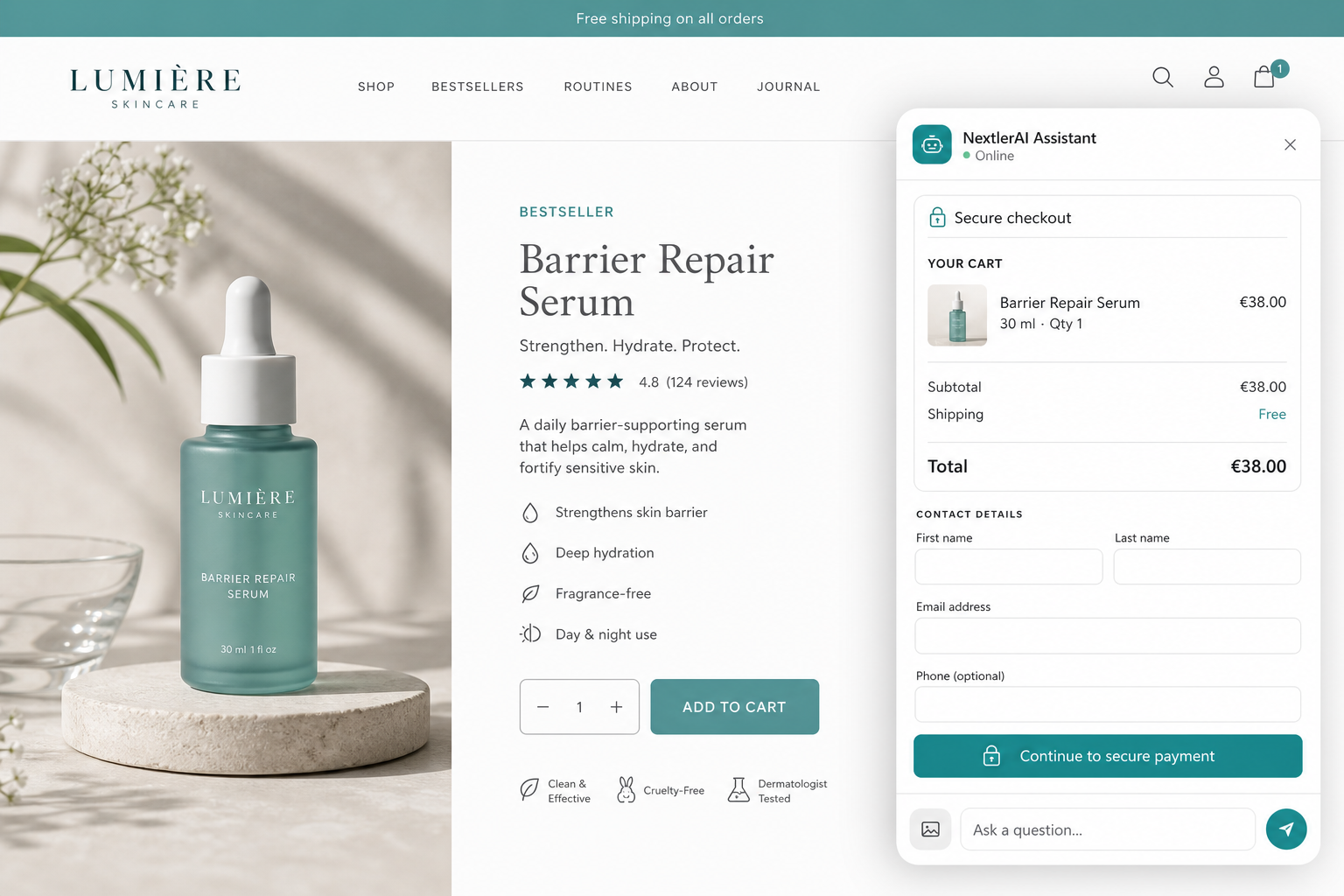
02 / CHECKOUT
Keep purchase momentum
Customers can review products, shipping and totals before continuing to the store’s secure payment flow.
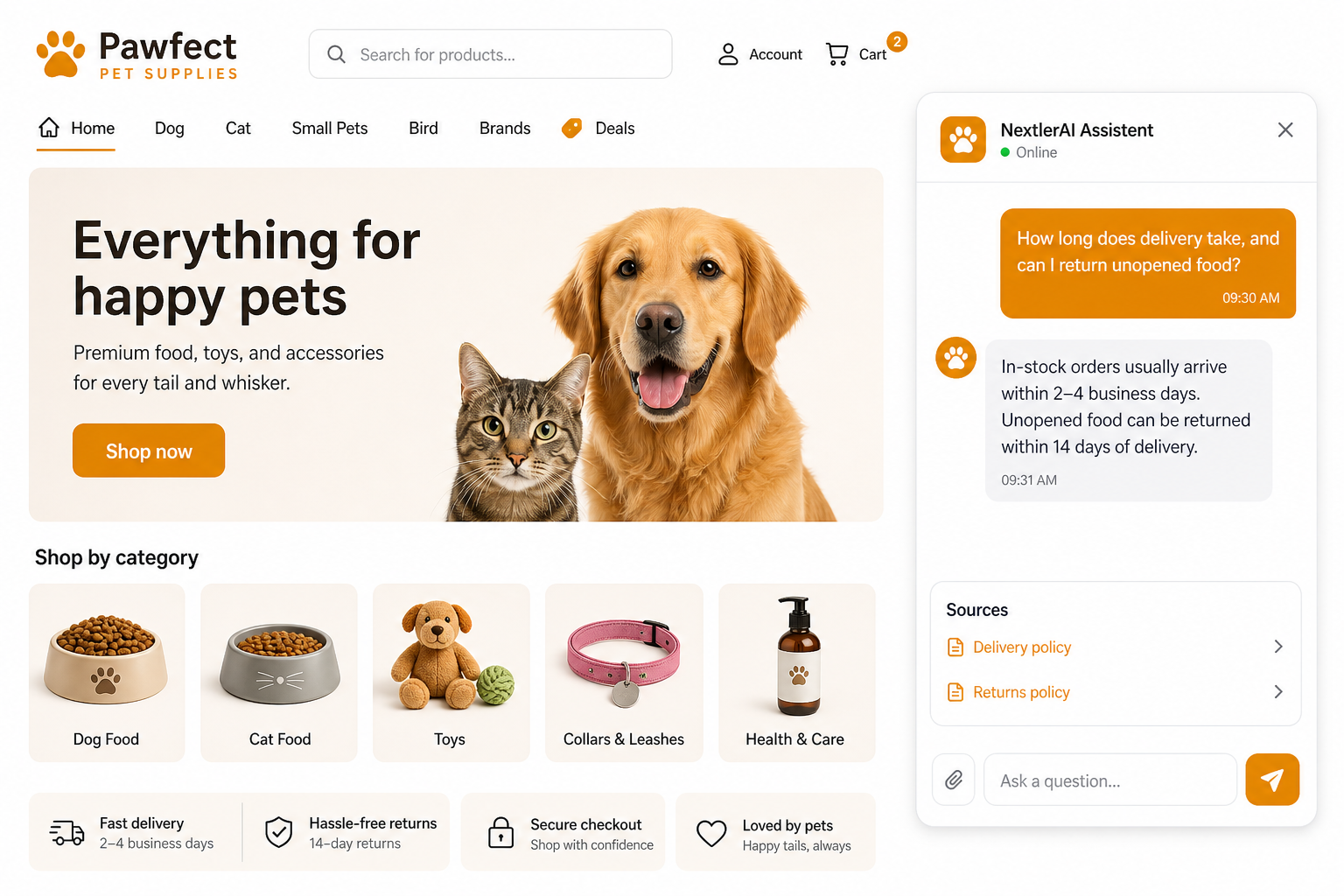
03 / SUPPORT
Answer from trusted policies
Delivery, returns and service answers stay connected to the source pages selected by the merchant.
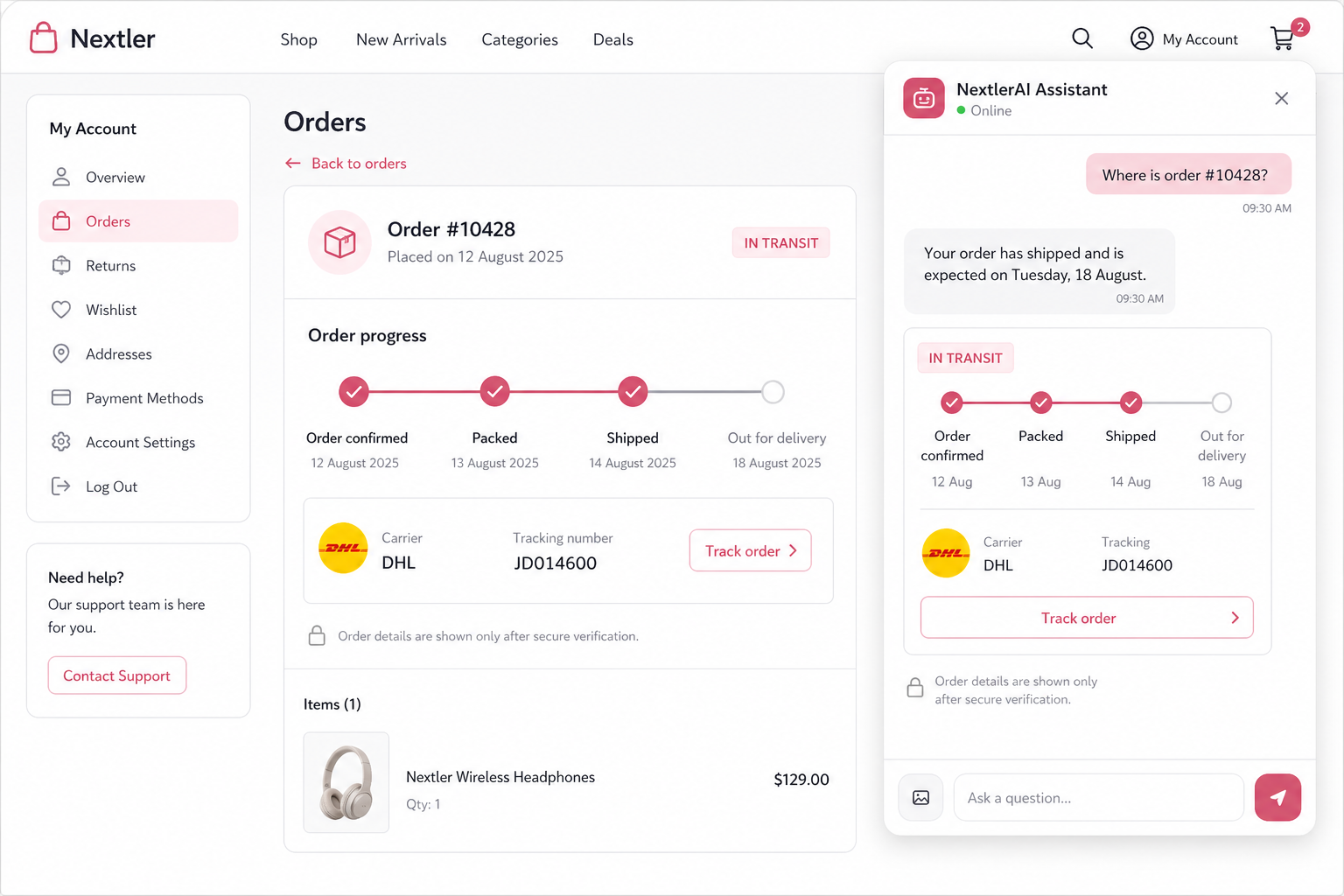
04 / AFTER PURCHASE
Continue after checkout
Verified customers can follow fulfilment progress and reach the correct post-purchase action.
BEYOND THE PRODUCT CATALOGUE
Services become
conversational too.
Assistant can retrieve service details from WordPress content, clarify the visitor's need and guide them toward a real booking, contact or quote action.
GROUNDED BY YOUR BUSINESS
Your catalogue.
Your knowledge.
Nothing invented.
Product answers come from live WooCommerce data. Policies, guides, services and FAQs come from your selected WordPress content and knowledge base. A validation layer blocks unsupported facts before the customer sees them.
WooCommerce catalogueWordPress contentCustom Q&AProduct knowledge
GROUNDING + VALIDATIONNEXTLER AI AGENTVerified answerProduct cardsSafe actions
THE COMPLETE CAPABILITY SYSTEM
Built for the moments that decide a sale.
Every capability is connected to the same conversation state, live catalogue and evidence layer.
Help every shopper find the right product.
Semantic search, natural-language price/colour/size/brand/category filters, sorting, exclusions and concise clarifying questions.
Turn a customer’s photo into relevant product matches.
Upload an image. A vision-capable provider identifies the item type and matches similar products in the catalogue.
Make buying decisions easier with clear comparisons.
Compare two or three grounded products with deterministic price and dimension ordering plus an AI-written trade-off.
Increase order value with relevant add-ons.
Suggest genuinely complementary products based on what is already in the customer’s WooCommerce cart.
Let customers add products to cart without leaving the conversation.
Add, remove and change quantities; review totals, choose shipping and continue through supported checkout flows.
Answer delivery, returns and service questions from trusted content.
Retrieve policies, delivery information, FAQs, guides, articles, services, contact details and quote actions from real site content.
PoliciesGuideFAQServicesArticles
Deterministic calculations
Calculate quantities and coverage from verified product facts—not numbers invented by a language model.
Order and stock support
Verified order-status lookup and back-in-stock subscriptions extend assistance beyond discovery.
Conversion recovery
Exit-intent re-engagement, quick replies and cart-aware next actions bring stalled journeys back into motion.
MULTILINGUAL ASSISTANT, EXPLAINED
Admin language.
Customer language.
Site language.
These are three separate layers. The seven bundled admin translations do not limit customer conversations: Assistant can detect the visitor’s language and use the multilingual capability of your selected AI provider and model.
Admin interface in seven languages.
Settings, knowledge sources and operational controls are translated independently from the customer-facing conversation.
🇬🇧 English🇩🇪 German🇪🇪 Estonian🇫🇮 Finnish🇫🇷 French🇪🇸 Spanish🇷🇺 Russian
Seven bundled WordPress admin translationsAnswer each visitor in their own language.
Assistant detects the conversation language and replies through your selected AI provider while keeping product facts, comparisons and actions grounded in the same WooCommerce catalogue.
🇪🇪 “Kas see on minu suuruses?”
🇬🇧 “Compare these two.”
🇫🇷 “Livrez-vous en France?”
Follow the language selected on the storefront.
Assistant can use the current WordPress language and language-plugin context instead of forcing visitors to choose it again.
WordPressWPMLPolylangTranslatePress
Storefront language detected automatically*Language availability and response quality depend on the connected provider and model. Compatible multilingual models can support more than 140 languages; the Assistant admin interface includes seven bundled translations.
BUILT TO CONNECT
Your stack.
Now conversational.
Ten direct integrations connect the assistant to your store, preferred intelligence and multilingual experience.
WordPressPlatform
WooCommerceCommerce
ElementorEsperienza
OpenAIAI
Google GeminiAI
Anthropic ClaudeAI
xAI GrokAI
PolylangLanguage
WPMLLanguage
TranslatePressLanguage
MEET CUSTOMERS WHERE THEY SHOP
One intelligence layer.
Every customer surface.
Deploy the complete floating assistant or place focused discovery experiences exactly where customers need them.
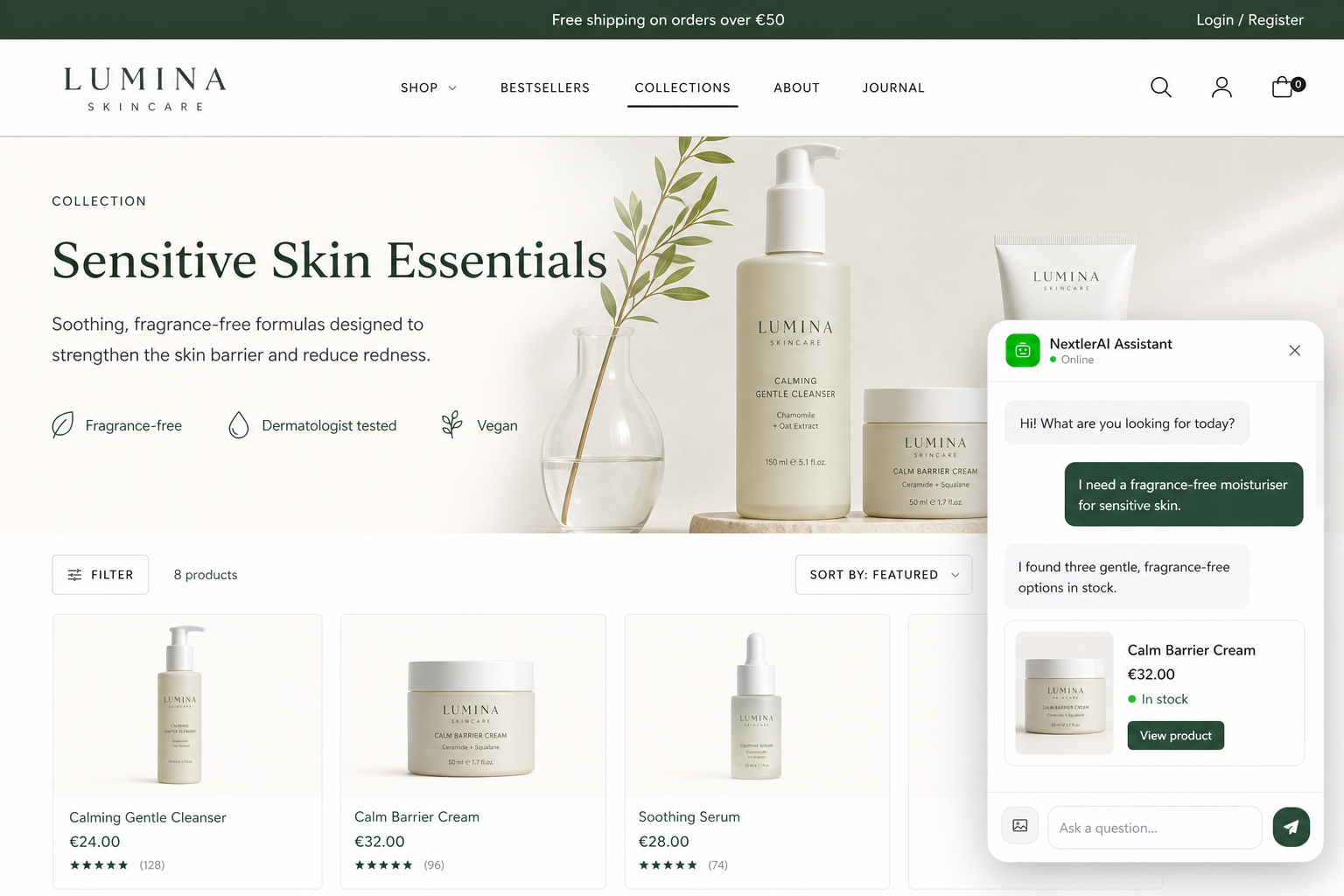
Floating sales assistant
Product discovery, questions, comparisons, cart actions and support from any page.
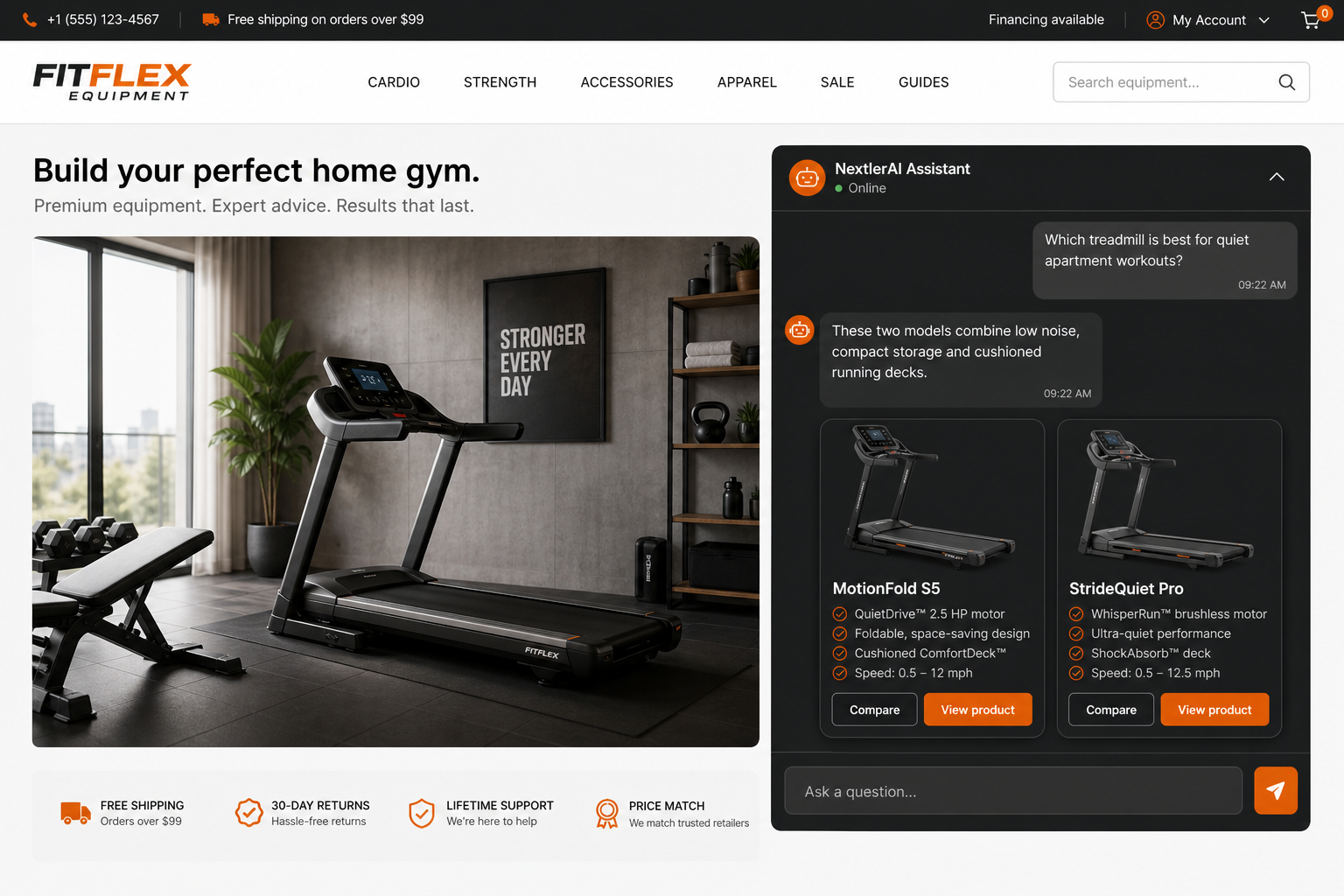
On-page assistant
Place a complete guided conversation inside landing, product or service pages.
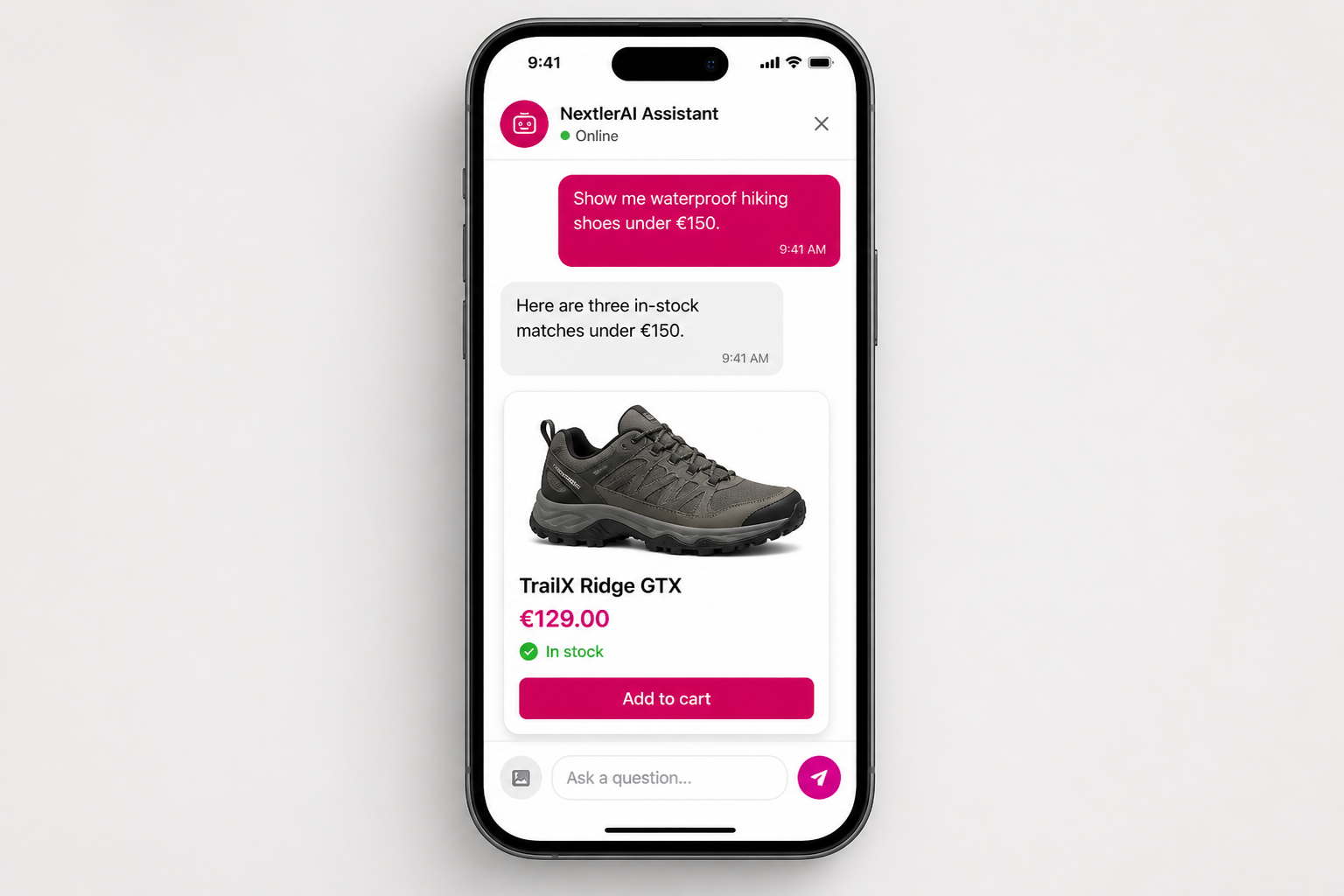
Mobile shopping assistant
Keep product discovery and cart actions clear on the smallest customer screens.
Every customer-facing surface uses the same grounded catalogue, knowledge and conversation state. Elementor is optional.
INTELLIGENCE FOR THE MERCHANT
See what customers want—even when you do not sell it yet.
Track top queries, zero-result demand, product clicks, assistant engagement and chat-to-sale signals. Background indexing updates only changed products, while diagnostics and usage tracking keep the system observable.
CONVERSATIONSLive demand
UNMET DEMANDZero-result queries
See the products customers are already asking for.
CATALOGUEBackground indexed
Changed products update automatically.
CONTROL IN WORDPRESS
Configure the experience.
Keep control of the evidence.
The light-mode administration keeps behaviour, appearance, trusted sources and AI connections understandable without exposing provider keys to the storefront.
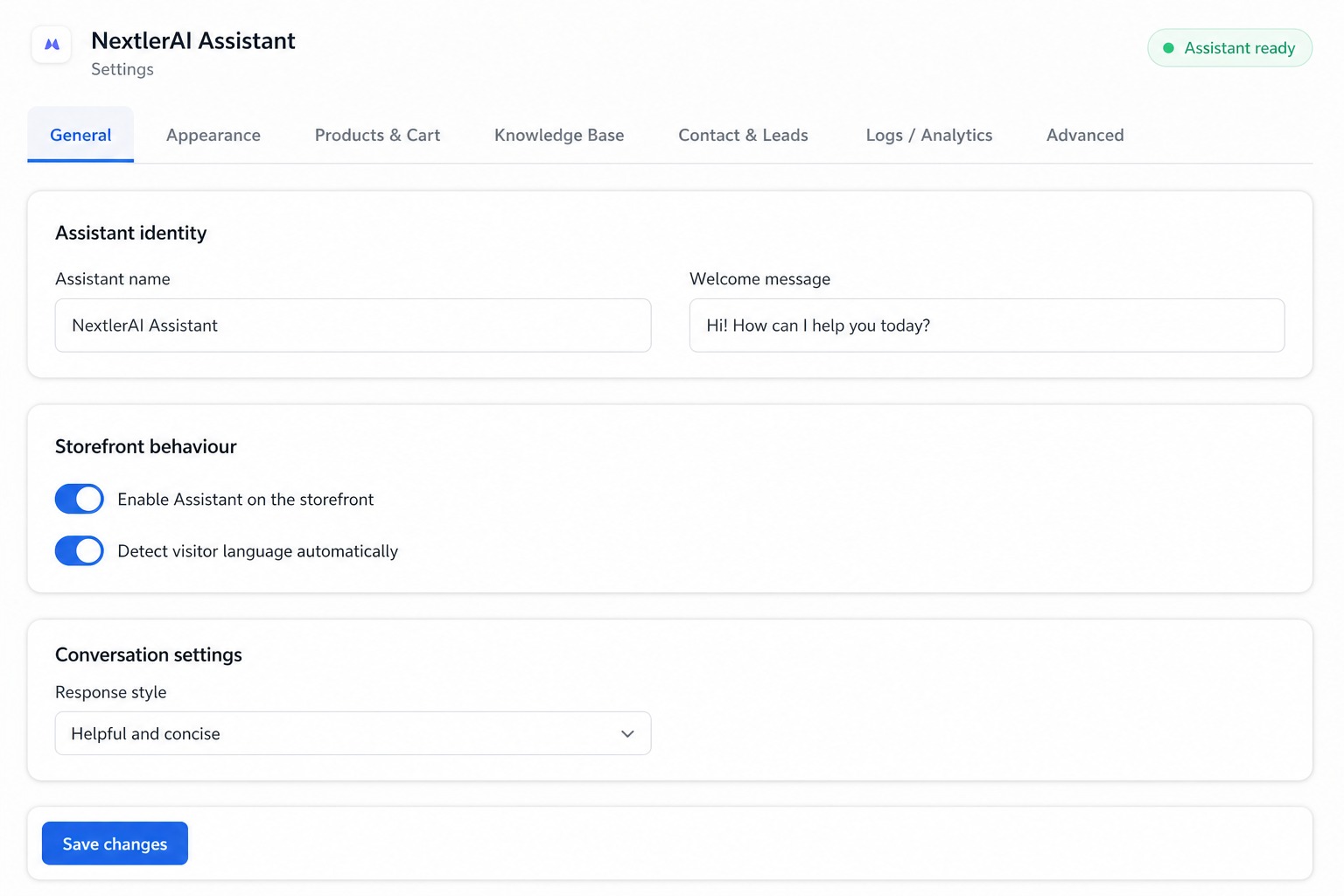
01 / GENERAL
Set identity and behaviour
Control the assistant name, welcome message, storefront availability and automatic language detection.
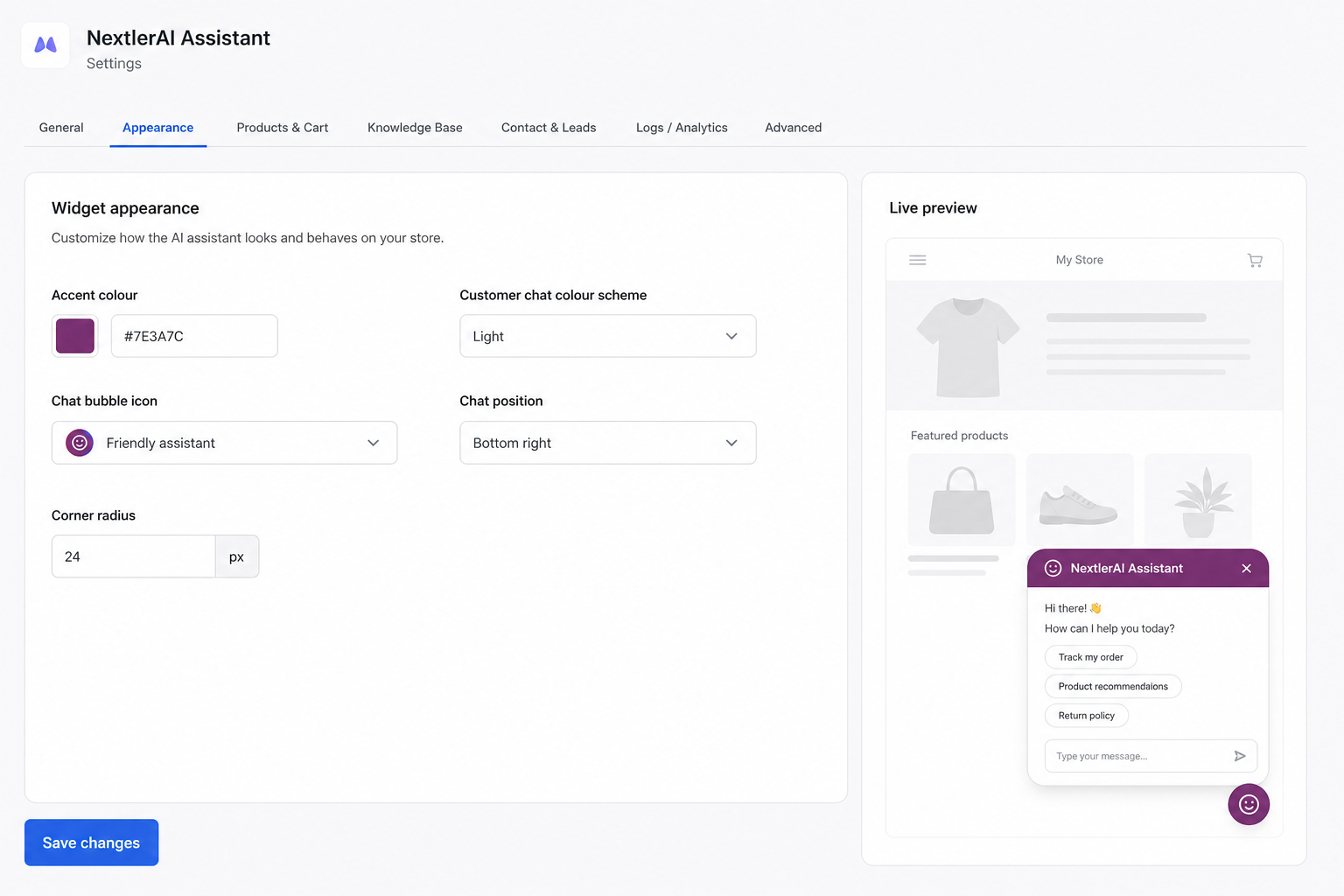
02 / APPEARANCE
Make the chat match the store
Choose the accent, customer-facing colour scheme, icon, placement and corner treatment with a live preview.
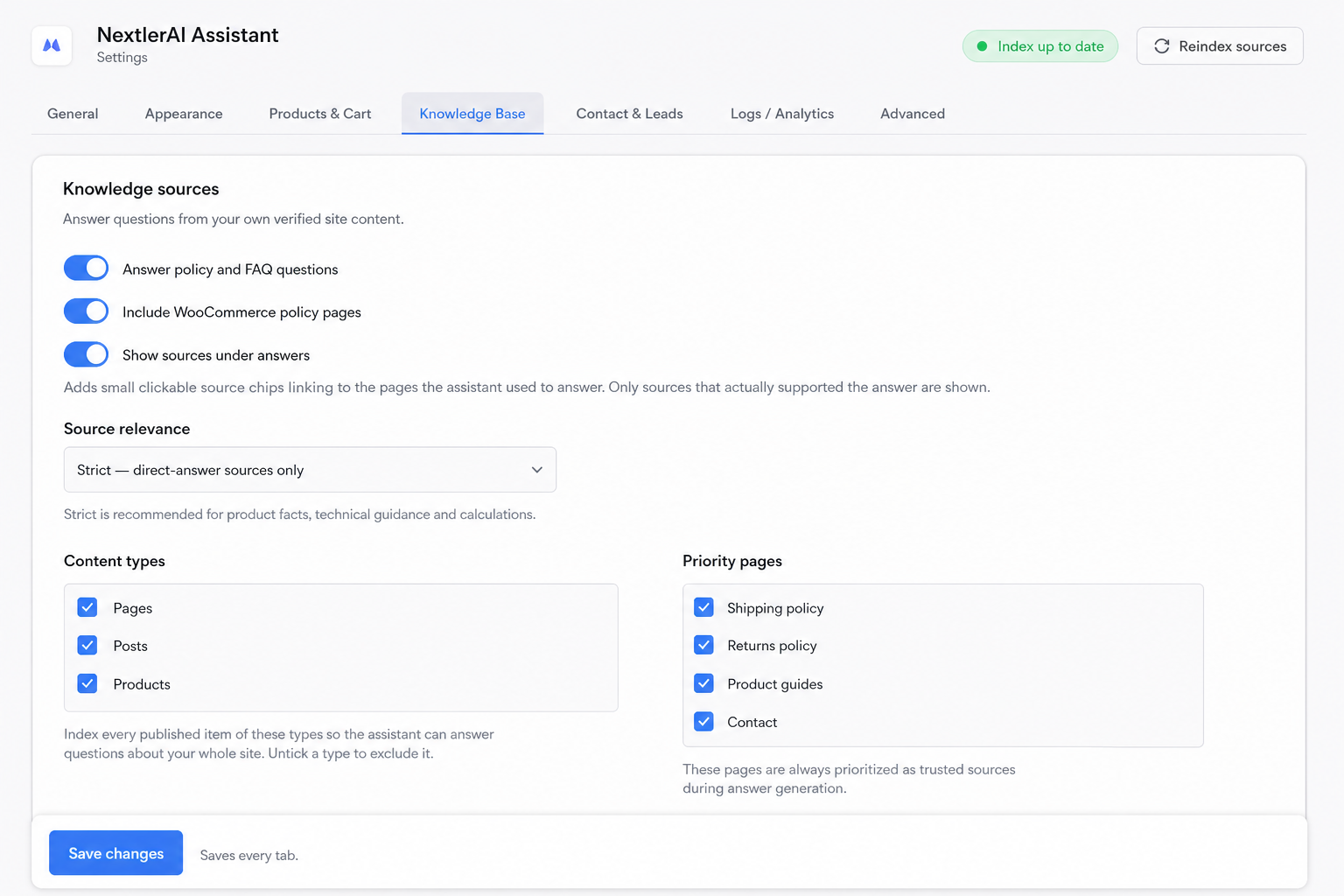
03 / KNOWLEDGE
Select the sources you trust
Index only the products, pages, policies and guides that Assistant is allowed to use in answers.
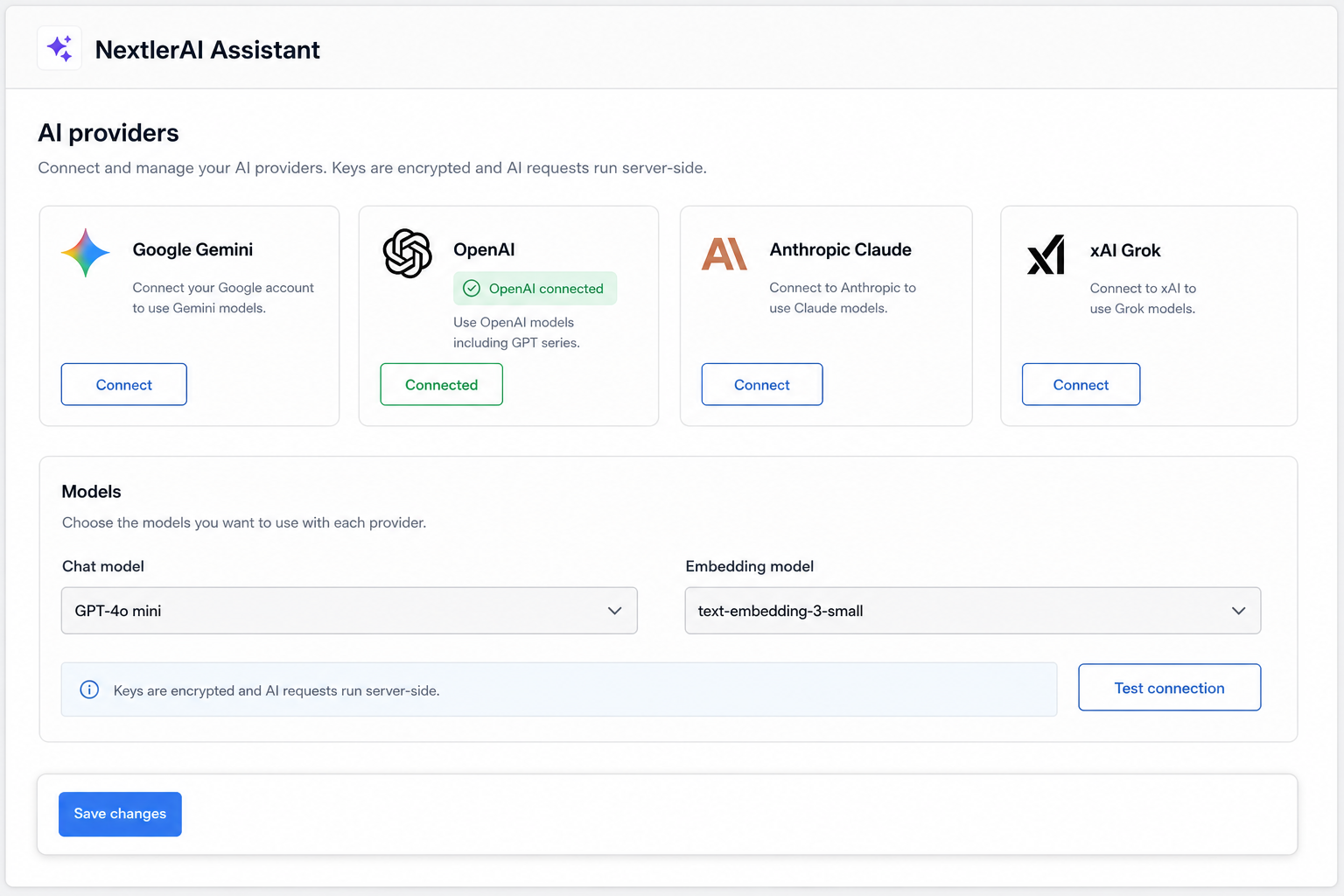
04 / AI PROVIDERS
Bring the provider you choose
Connect supported AI services, select chat and embedding models, and keep credentials on the server.
CONTROL BY ARCHITECTURE
Your keys stay server-side.
Your index stays on your site.
Bring your own key
Connect your own Gemini, OpenAI, Claude or Grok account. NextlerAI does not resell inference.
Server-side requests
Provider calls are made in PHP. API credentials are not exposed to the browser.
Local vector storage
Product embeddings and indexed knowledge are stored in custom tables in your WordPress database.
Explicit external processing
Only the configured AI provider receives the text or image required for the requested AI feature.
TECHNICAL DETAILS
Everything your implementation team needs to know.
- Platform
- WordPress 6.0 or newer
- Runtime
- PHP 7.4 or newer
- Commerce
- WooCommerce optional; required for catalogue, cart and checkout features
- Page builder
- Elementor optional
- AI providers
- Google Gemini, OpenAI, Anthropic Claude, xAI Grok
- Embedding providers
- Google Gemini or OpenAI
- Indexing
- Action Scheduler background batches; changed products re-index automatically
- Search storage
- MySQL/custom WordPress tables with an abstracted search backend
- Multilingual layers
- WordPress, Polylang, WPML and TranslatePress detection
- Frontend isolation
- Shadow DOM for the floating and Elementor surfaces
- License
- Domain-bound activation with signed server responses and grace handling
- Data removal
- Configurable: remove plugin data on uninstall or retain it for reinstallation
LATEST PRODUCT UPDATES
Assistant keeps
moving forward.
Public release notes show what changed. Customers with active update access download the matching ZIP securely from My Products.
NextlerAI AssistantNextlerAI Assistant 1.30.4v1.30.4+
This update makes product-support and documentation answers more reliable by routing licence, activation, provider, indexing, account and troubleshooting questions to verified guides and procedures. It also prevents unrelated blog posts from appearing as documentation while preserving existing product, cart, embed, licensing and stored-data compatibility.
WHAT CHANGED
• Added verified guide retrieval for licence keys, activation, API keys, AI providers, model routing, embeds, indexing, Knowledge Base, visual search, comparisons, stock alerts, diagnostics, My Account, downloads and invoices.
• Improved recognition of symptom-led support requests such as “where is”, “I can’t find”, “not working” and “error” across supported languages.
• Added direct recognition of dedicated guide content, even when the visitor does not explicitly ask for a guide, manual or tutorial.
• Improved routing of product, account, licence and administration questions to real guides and procedures.
• Changed blog and article discovery to explicit opt-in: articles are shown only when the visitor asks to find, read, open, show or recommend one.
• Prevented model-requested article searches during ordinary support, product, licence and documentation conversations.
• Strengthened relevance requirements before a page, service or article can appear as a visible source or action.
• Prevented semantically related blog posts from being presented as product documentation.
• Required documentation answers to link to a verified guide, procedure or dedicated guide URL.
• Published 7 new customer guides and expanded the live guide library to 37 articles.
• Updated 8 existing Assistant guides and added 4 new in-depth Assistant guides.
• Updated 3 account and licensing guides and added 3 new purchase, plan, licence-key and troubleshooting guides.
• Reviewed and updated 13 Publisher guides for the 3.7.6 scheduling, reservation, native WordPress Scheduled-post and watchdog workflow.
• Product search, verified comparisons, cart actions, embeds, licensing, provider settings and stored data remain compatible.
• No settings reset, database migration or reindex is required for this update.
WordPress 6.0PHP 7.4
Choose Assistant plan ↗Customers download this release from My Products.
NextlerAI AssistantNextlerAI Assistant 1.29.6v1.29.6+
Grounded AI commerce assistance, semantic product discovery, recommendations and store actions.
WHAT CHANGED
Initial NextlerAI customer release.
WordPress 6.0PHP 7.4WooCommerce 9.9
Choose Assistant plan ↗Customers download this release from My Products.
FROM DOWNLOAD TO LIVE
Install in minutes.
Configure with control.
Your account keeps the plugin ZIP and the matching licence together, so activation never becomes guesswork.
Download
Open My Products and download the latest Assistant ZIP.
Install
In WordPress, choose Plugins → Add New → Upload Plugin.
Activate
Copy the Assistant licence shown beside this product and activate the site.
Connect
Select an AI provider, add your own API key and index the content you trust.
QUESTIONS, ANSWERED
Before you bring the agent into your store.
Does it require a separate AI subscription?+
You bring an API key from a supported provider. Provider usage and billing remain between you and that provider.
Can it invent products or prices?+
Product recommendations, prices, stock and variations are grounded in live WooCommerce data. A response validator blocks unsupported commerce facts.
Does it work without WooCommerce?+
Yes. It can answer from WordPress content and your knowledge base. WooCommerce enables product discovery, recommendations, cart and checkout.
What happens when an online payment needs secure card fields?+
The assistant creates the WooCommerce order and hands the customer to the official secure order-payment page for gateways that require their own payment UI.
Do I need Elementor?+
No. The floating assistant works with any theme. Elementor is only needed for the optional Chat, Search and Recommendations widgets.
Where is indexed data stored?+
Embeddings and knowledge-index data remain in your WordPress database. Text or images are sent to the AI provider only when required for an enabled AI operation.
NEXTLERAI ASSISTANT
Turn more product questions into confident purchases.
Give every visitor immediate, accurate help without replacing the WordPress and WooCommerce stack you already own.

